AUDIO AND VISUAL SYSTEM(for Radio and Display Type) Voice Guidance does not Function
| DTC Code | DTC Name |
|---|---|
| Voice Guidance does not Function |
PROCEDURE
CHECK VOICE GUIDANCE SETTING
-
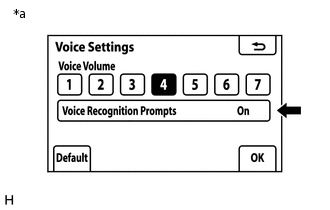
*a
Example
Display the "Voice Settings" screen.
Check that "Off" is not selected.
Result
Proceed to
"Off" is not selected
"Off" is selected
"Off" is selected TURN VOICE RECOGNITION PROMPTS "On"
-
CHECK AUDIO FUNCTION
Check that sound can be heard from a front speaker.
Result
Proceed to
Sound can be heard
Sound cannot be heard