PARKING ASSIST MONITOR SYSTEM
-
FUNCTION OF MAIN COMPONENTS
Component Function Radio and Display Receiver Assembly*1
-
Displays the image transmitted by the rear television camera assembly on the screen.
-
The user can change the guide lines from the setting screen.
Navigation Receiver Assembly*2 Rear Television Camera Assembly Outputs display data to show the guide lines superimposed on a view of the area behind the vehicle on the radio and display receiver assembly*1 or the navigation receiver assembly*2. Park/Neutral Position Switch Assembly*3 Transmits the shift position signal to the radio and display receiver assembly*1 or the navigation receiver assembly*2. Steering Sensor Detects the steering angle and transmits signals to the rear television camera assembly. Main Body ECU (Multiplex Network Body ECU) Outputs the back door courtesy switch signal to the rear television camera assembly. Clearance Warning ECU Assembly*4 Sends a clearance sonar information signal to the radio and displayreceiver assembly*1 or the navigation receiver assembly*2. Central Gateway ECU Transmits the signal between the CAN communication bus. Back-up Light Switch Assembly*5 Transmits the on/off signals of the back-up light switch assembly to the radio and display receiver assembly*1 or the navigation receiver assembly*2.
-
*1: Models with display audio system
-
*2: Models with navigation system
-
*3: Models with automatic transaxle or CVT
-
*4: Models with 8-sensor type Toyota parking assist-sensor system
-
*5: Models with manual transaxle
-
-
OPERATING CONDITION
-
Operating Condition
-
The ignition switch is ON.
-
The shift lever is moved to R.
-
The back door is closed.
-
-
-
FUNCTION
-
Area Displayed on Screen
-
Rear Television Camera Assembly
-
On the display, objects on the right of the vehicle appear on the right side of the display panel, and objects on the left of the vehicle appear on the left side of the display panel.
-
The rear television camera assembly uses a wide-angle lens. The perceived distance from images that appear on the screen differs from the actual distance.
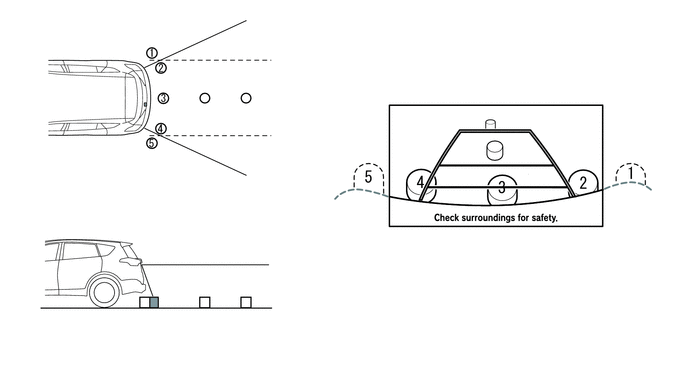
Tech Tips
The area displayed on the screen may vary in accordance with vehicle status or road conditions. The area covered by the rear television camera assembly is limited. The rear television camera assembly does not show objects close to either corner of the bumper or under the bumper.
-
-
-
Warning Message
-
A warning message appears at the bottom, side or center of the screen under the following conditions. The warning message appears in the same language that has been selected by the language selector of the radio and display receiver assembly*1 or the navigation receiver assembly*2.
-
*1: Models with display audio system or navigation system
-
*2: Models with navigation system
Message Appearing at Bottom or Side of Screen Warning Message Condition Check surroundings for safety The parking assist monitor system is in operation. -
-
-
Parking Assist Monitor Display
-
Perpendicular Parking Mode
-
Perpendicular parking mode can be selected from parking assist guide line display mode, distance guide line display mode and estimated course line display mode.
-
When perpendicular parking mode is operating, fixed guide lines appear superimposed on a view of the area behind the vehicle. These guide lines can be used to assist the driver while backing up the vehicle.
-
The user can select the back camera guide line setting screen through the navigation system menu screen to change the guide line display mode.
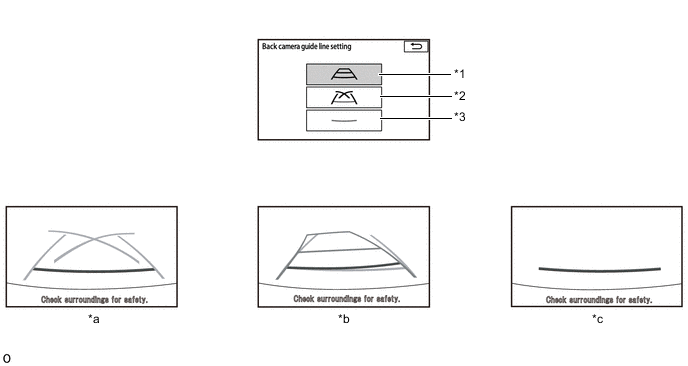
*1 Estimated Course Line Display Mode Switch *2 Parking Assist Guide Line Display Mode Switch *3 Distance Guide Line Display Mode Switch - - *a Parking Assist Guide Line Display Mode *b Estimated Course Line Display Mode *c Distance Guide Line Display Mode - - -
A description of the parking assist guide line display mode is provided in the following diagram:
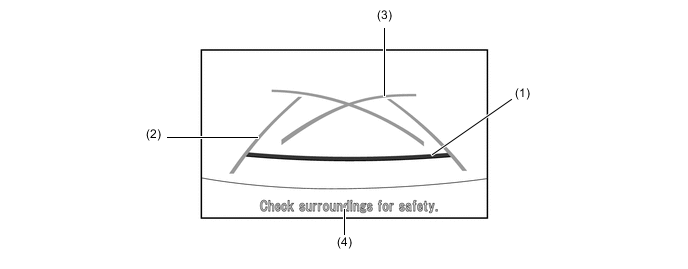
Item Description (1) Distance Guide Line (Red) Indicates a position on the ground approximately 0.5 m (1.6 ft.) behind the rear bumper. (2) Vehicle Width Extension Guide Line (Blue) Indicates the estimated vehicle width. (3) Parking Assist Guide Line (Blue) Indicates the path the vehicle will follow if the driver turns the steering wheel fully. (4) Warning Message Display Area Area where warning messages are displayed. -
A description of the distance guide line display mode is provided in the following diagram:
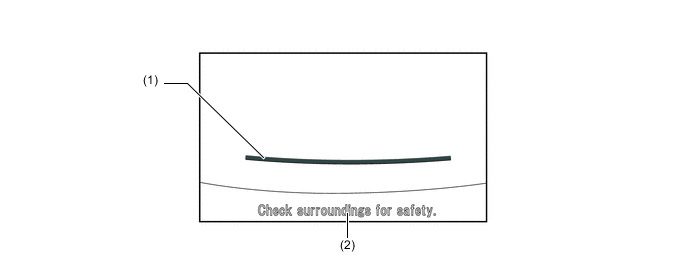
Item Description (1) Distance Guide Line (Red) Indicates a position on the ground approximately 0.5 m (1.6 ft.) behind the rear bumper. (2) Warning Message Display Area Area where warning messages are displayed. -
A description of the estimated course line display mode is provided in the following diagram.
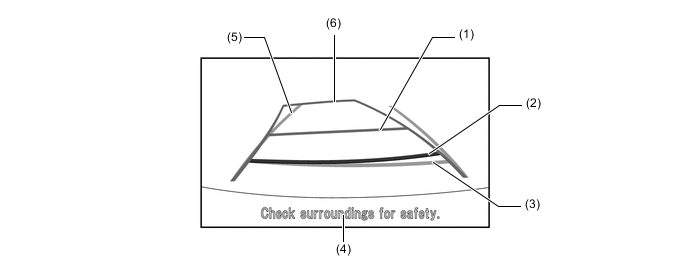
Item Description (1) Distance Guide Line (Yellow) Moves together with estimated course lines in sync with the steering wheel. The center of the line indicates a position on the ground approximately 1.0 m (3.3 ft.) behind the rear bumper. (2) Distance Guide Line (Red) Moves together with estimated course lines in sync with the steering wheel. The center of the line indicates a position on the ground approximately 0.5 m (1.6 ft.) behind the rear bumper. (3) Distance Guide Line (Blue) Indicates a position on the ground approximately 0.5 m (1.6 ft.) behind the rear bumper. (4) Warning Message Display Area Area where warning messages are displayed. (5) Vehicle Width Extension Guide Line (Blue) Indicates the estimated vehicle width. (6) Estimated Course Line (Yellow) Moves in sync with the steering wheel to indicate the estimated reverse course of the vehicle. -
For details of the back camera guide line setting screen, see the following illustration:
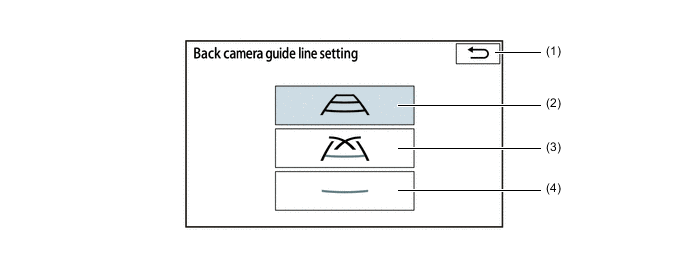
Item Description (1) Back Switch Returns back to the menu screen. (2) Estimated Course Line Display Mode Switch Switches the display mode to estimated course line display mode. (3) Parking Assist Guide Line Display Mode Switch Switches the display mode to parking assist guide line display mode. (4) Distance Guide Line Display Mode Switch Switches the display mode to distance guide line display mode.
-
-
-
-
SYSTEM CONTROL
-
Parking Assist Guide Line Display Mode (Perpendicular Parking) of Parking Assist Monitor System
-
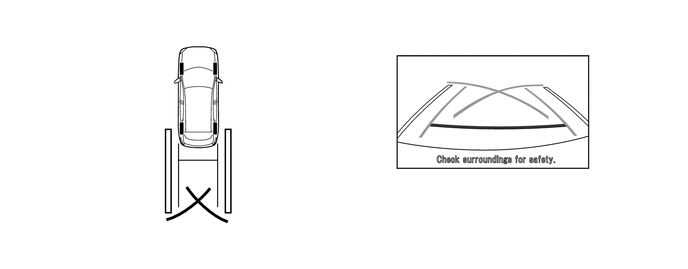
To use parking assist guide line display mode in perpendicular parking when parking the vehicle in a parking space, perform the following procedure:
-
Select parking assist guide line display mode.
-
Move the shift lever to R.
-
An image appears on the display panel as illustrated below:
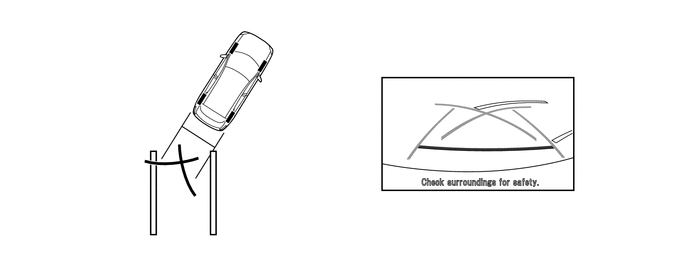
-
Back the vehicle up and stop at the position in which the parking assist guide line comes in contact with the left side of the intended parking position.
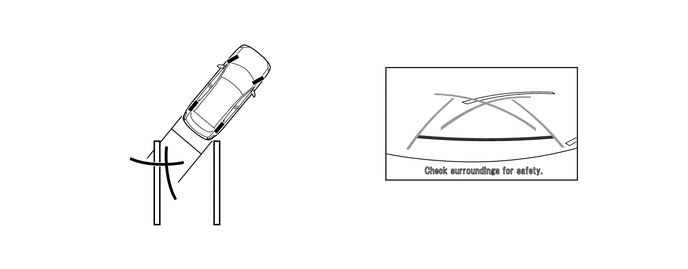
-
Turn the steering wheel fully to the right and back the vehicle up.
-
Continue backing the vehicle up until the vehicle is parallel to the plotted lines.
-
Once the vehicle is parallel, aim the steering wheel straight ahead and back the vehicle up to the target stop position.
-
-
-
Estimated Course Line Display Mode (Perpendicular Parking) of Parking Assist Monitor System
-
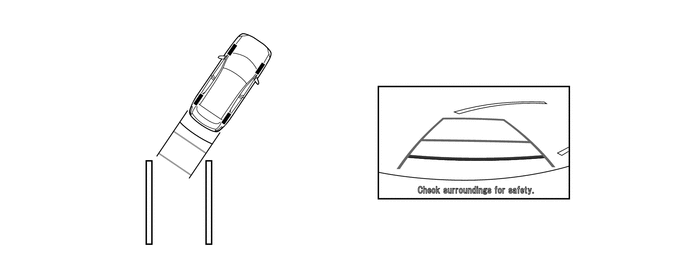
To use estimated course line display mode in perpendicular parking when parking the vehicle in a parking space, perform the following procedure:
-
Select estimated course line display mode.
-
Move the shift lever to R.
-
An image appears on the display panel as illustrated below:
-
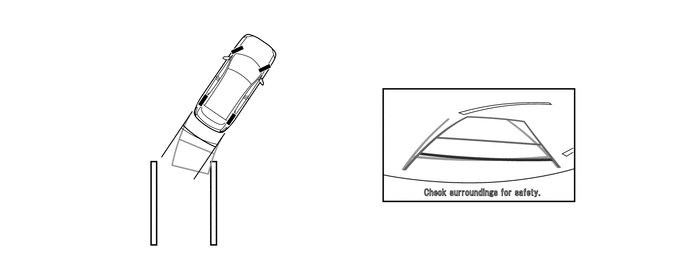
Turn the steering wheel so that the estimated course lines are within the parking space, and back up carefully.
-
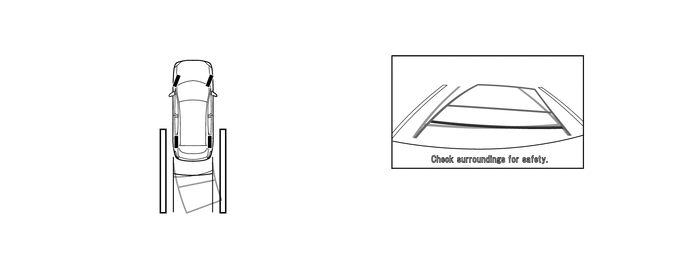
When the rear of the vehicle is within the parking space, turn the steering wheel in order to equalize the distance between the vehicle width extension lines and the parking space sidelines.
-
When the vehicle width extension guide lines and the parking space sidelines are parallel, straighten the steering wheel and then carefully back up until the entire vehicle is within the parking space.
-
-
-
-
DIAGNOSIS
-
The parking assist monitor system is equipped with a diagnosis function which can display the diagnosis menus. The method for entering the diagnosis menu screen is the same as the method used for the multi-display. For details, refer to the Repair Manual.
-