SPEED LIMITER SYSTEM ROAD TEST
INSPECT SET FUNCTION (for 1KR-FE)
-
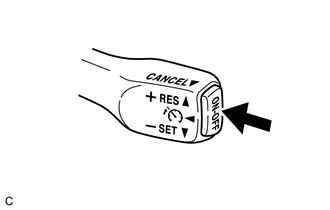
Turn the speed limiter system on using the adjustable speed limiter switch (cruise control main switch) (ON/OFF button).
-
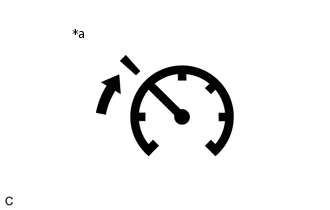
*a
Speed Limiter Indicator (Green or Amber)
Check that the speed limiter indicator illuminates (green) in the combination meter assembly.
Drive the vehicle at 30 km/h or more, or 20 mph or more.
-
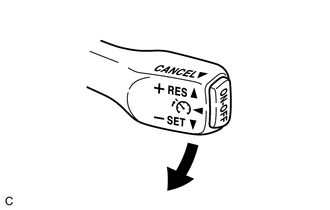
Press the adjustable speed limiter switch (cruise control main switch) to - SET.
Check that the vehicle speed is limited to the set speed.
-
INSPECT OVERRIDE FUNCTION (for 1KR-FE)
Turn the speed limiter system on using the adjustable speed limiter switch (cruise control main switch) (ON/OFF button).
Drive the vehicle at 30 km/h or more, or 20 mph or more.
Press the adjustable speed limiter switch (cruise control main switch) to - SET.
Fully depress the accelerator pedal and check that the vehicle accelerates beyond the set speed.
INSPECT ACCELERATION FUNCTION (for 1KR-FE)
Turn the speed limiter system on using the adjustable speed limiter switch (cruise control main switch) (ON/OFF button).
Drive the vehicle at 30 km/h or more, or 20 mph or more.
Press the adjustable speed limiter switch (cruise control main switch) to - SET.
-
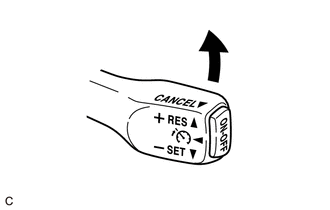
Check that the vehicle limit speed increases by an interval of 5 km/h or 5 mph while the adjustable speed limiter switch (cruise control main switch) is pressed to + RES, and that the vehicle maintains the newly set speed when the switch is released.
Tap the adjustable speed limiter switch (cruise control main switch) to + RES. Check that the vehicle limit speed increases by about 1 km/h or 1 mph each time the switch is tapped (tap-up control).
INSPECT COAST FUNCTION (for 1KR-FE)
Turn the speed limiter system on using the adjustable speed limiter switch (cruise control main switch) (ON/OFF button).
Drive the vehicle at 30 km/h or more, or 20 mph or more.
-
Press the adjustable speed limiter switch (cruise control main switch) to - SET.
Check that vehicle limit speed decreases by an interval of 5 km/h or 5 mph while the adjustable speed limiter switch (cruise control main switch) is pressed to - SET, and that the vehicle maintains the newly set speed when the switch is released.
Tap the adjustable speed limiter switch (cruise control main switch) to - SET. Check that the vehicle limit speed decreases by about 1 km/h or 1 mph each time the switch is tapped (tap-down control).
INSPECT CANCEL FUNCTION (for 1KR-FE)
Turn the speed limiter system on using the adjustable speed limiter switch (cruise control main switch) (ON/OFF button).
Drive the vehicle at 30 km/h or more, or 20 mph or more.
Press the adjustable speed limiter switch (cruise control main switch) to - SET.
When performing one of the following, check that the speed limiter system control of vehicle speed is canceled and that the normal driving mode is reset.
-
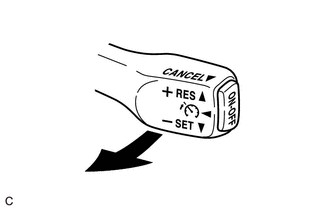
Pulling the adjustable speed limiter switch (cruise control main switch) to CANCEL.
-
Turning the speed limiter system off using the adjustable speed limiter switch (cruise control main switch) (ON/OFF button).
-
INSPECT RESUME FUNCTION (for 1KR-FE)
Turn the speed limiter system on using the adjustable speed limiter switch (cruise control main switch) (ON/OFF button).
Drive the vehicle at 30 km/h or more, or 20 mph or more.
Press the adjustable speed limiter switch (cruise control main switch) to - SET.
Pull the adjustable speed limiter switch (cruise control main switch) to CANCEL.
-
After pressing the adjustable speed limiter switch (cruise control main switch) to + RES while driving the vehicle at 30 km/h or more, or 20 mph or more, check that the vehicle limit speed at the time of cancellation is resumed.
INSPECT SET FUNCTION (for 1PP)
-
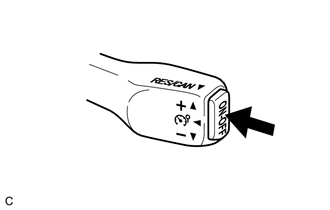
Turn the speed limiter system on using the adjustable speed limiter switch (cruise control main switch) (ON/OFF button).
-
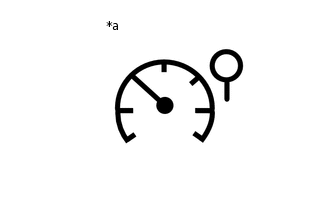
*a
Speed Limiter Indicator (Amber)
Check that the speed limiter indicator illuminates (yellow) in the combination meter assembly.
Drive the vehicle at 30 km/h or more, or 20 mph or more.
-
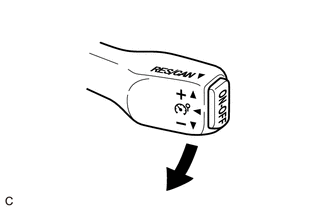
Press the adjustable speed limiter switch (cruise control main switch) to -.
Check that the vehicle speed is limited to the set speed.
-
INSPECT OVERRIDE FUNCTION (for 1PP)
Turn the speed limiter system on using the adjustable speed limiter switch (cruise control main switch) (ON/OFF button).
Drive the vehicle at 30 km/h or more, or 20 mph or more.
Press the adjustable speed limiter switch (cruise control main switch) to -.
Fully depress the accelerator pedal and check that the vehicle accelerates beyond the set speed.
INSPECT ACCELERATION FUNCTION (for 1PP)
Turn the speed limiter system on using the adjustable speed limiter switch (cruise control main switch) (ON/OFF button).
Drive the vehicle at 30 km/h or more, or 20 mph or more.
Press the adjustable speed limiter switch (cruise control main switch) to -.
-
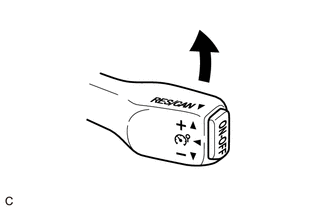
Check that the vehicle limit speed increases by an interval of 5 km/h or 5 mph while the adjustable speed limiter switch (cruise control main switch) is pressed to +, and that the vehicle maintains the newly set speed when the switch is released.
Tap the adjustable speed limiter switch (cruise control main switch) to +. Check that the vehicle limit speed increases by about 1 km/h or 1 mph each time the switch is tapped (tap-up control).
INSPECT COAST FUNCTION (for 1PP)
Turn the speed limiter system on using the adjustable speed limiter switch (cruise control main switch) (ON/OFF button).
Drive the vehicle at 30 km/h or more, or 20 mph or more.
-
Press the adjustable speed limiter switch (cruise control main switch) to -.
Check that vehicle limit speed decreases by an interval of 5 km/h or 5 mph while the adjustable speed limiter switch (cruise control main switch) is pressed to -, and that the vehicle maintains the newly set speed when the switch is released.
Tap the adjustable speed limiter switch (cruise control main switch) to -. Check that the vehicle limit speed decreases by about 1 km/h or 1 mph each time the switch is tapped (tap-down control).
INSPECT CANCEL FUNCTION (for 1PP)
Turn the speed limiter system on using the adjustable speed limiter switch (cruise control main switch) (ON/OFF button).
Drive the vehicle at 30 km/h or more, or 20 mph or more.
Press the adjustable speed limiter switch (cruise control main switch) to -.
When performing one of the following, check that the speed limiter system control of vehicle speed is canceled and that the normal driving mode is reset.
-
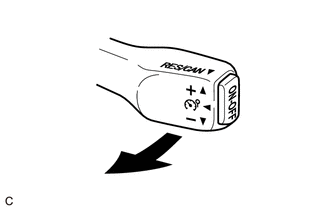
Pulling the adjustable speed limiter switch (cruise control main switch) to RES/CAN.
-
Turning the speed limiter system off using the adjustable speed limiter switch (cruise control main switch) (ON/OFF button).
-
INSPECT RESUME FUNCTION (for 1PP)
Turn the speed limiter system on using the adjustable speed limiter switch (cruise control main switch) (ON/OFF button).
Drive the vehicle at 30 km/h or more, or 20 mph or more.
Press the adjustable speed limiter switch (cruise control main switch) to -.
-
Pull the adjustable speed limiter switch (cruise control main switch) to RES/CAN.
After pulling the adjustable speed limiter switch (cruise control main switch) to RES/CAN while driving the vehicle at 30 km/h or more, or 20 mph or more, check that the vehicle limit speed at the time of cancellation is resumed.