TELEMATICS TRANSCEIVER INSTALLATION
PROCEDURE
INSTALL NO. 2 TELEPHONE BRACKET
Install the bracket with the 2 bolts.
INSTALL NO. 1 TELEPHONE BRACKET
Install the bracket with the 3 bolts.
Connect the 2 connectors.
INSTALL MAYDAY BATTERY WITH BRACKET
Attach the 2 claws to install the mayday battery.
Install the bracket with the bolt.
13 N*m
127 kgf*cm
9 ft.*lbf
INSTALL TELEMATICS TRANSCEIVER
Insert the telematics transceiver with bracket into the vehicle.
-
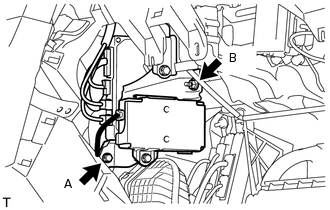
Install the telematics transceiver with bracket with the bolt and nut.
for bolt A
13 N*m
127 kgf*cm
9 ft.*lbf
for nut B
8.0 N*m
82 kgf*cm
71 in.*lbf
Connect the connectors.
INSTALL INSTRUMENT PANEL BOX ASSEMBLY
INSTALL INSTRUMENT PANEL BOX DOOR COVER
INSTALL LOWER NO. 2 INSTRUMENT PANEL AIRBAG ASSEMBLY
INSTALL LOWER INSTRUMENT COVER LH
INSTALL INSTRUMENT PANEL FINISH PANEL END RH
INSTALL FRONT NO. 2 CONSOLE BOX INSERT
INSTALL NO. 2 INSTRUMENT PANEL UNDER COVER SUB-ASSEMBLY
INSTALL NO. 2 INSTRUMENT PANEL REGISTER ASSEMBLY
INSTALL CENTER INSTRUMENT CLUSTER FINISH PANEL GARNISH
INSTALL COWL SIDE TRIM BOARD RH
INSTALL DOOR SCUFF PLATE ASSEMBLY RH
INSTALL INSTRUMENT SIDE PANEL RH
CONNECT CABLE TO NEGATIVE BATTERY TERMINAL
Note:When disconnecting the cable, some systems need to be initialized after the cable is reconnected (Click hereClick hereClick here).
CHECK SRS WARNING LIGHT
Check the SRS warning light (Click here).
PERFORM REGISTRATION
Perform registration (Click hereClick here).
Note:When replacing the mayday battery or telematics transceiver together with the mayday battery, perform registration.