AUDIO AND VISUAL SYSTEM(for 10.3 Inch Display), Diagnostic DTC:B1535, C1622
| DTC Code | DTC Name |
|---|---|
| B1535 | NTSC Disconnected (from Park Assist/Monitoring ECU) |
| C1622 | Back Camera Disconnected |
DESCRIPTION
This DTC is stored if the radio receiver assembly judges that the signals or signal lines between the rear television camera assembly and the multi-display assembly are not normal as a result of its self check.
| DTC No. | Detection Item | DTC Detection Condition | Trouble Area |
|---|---|---|---|
| B1535 | NTSC Disconnected (from Park Assist/Monitoring ECU) | Open or short in the rear television camera assembly signal circuit |
|
| C1622 | Back Camera Disconnected | Open or short in the rear television camera assembly signal circuit |
|
WIRING DIAGRAM
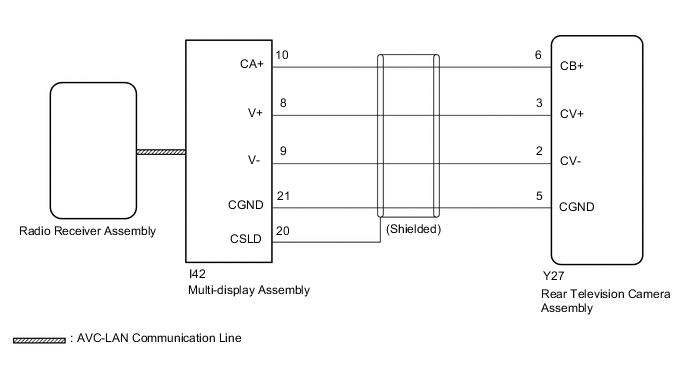
CAUTION / NOTICE / HINT
Note
-
If the cable was disconnected from and reconnected to the negative (-) battery terminal, the estimated course lines may not be displayed on the image of the area behind the vehicle. In this case, perform "Correct the Steering Angle Neutral Point".
-
Depending on the parts that are replaced or operations that are performed during vehicle inspection or maintenance, calibration of other systems as well as the parking assist monitor system may be needed.
-
When replacing the radio receiver assembly, always replace it with a new one.
If a radio receiver assembly which was installed to another vehicle is used, the following may occur:
-
A communication malfunction DTC may be stored.
-
The radio receiver assembly may not operate normally.
Tech Tips
Depending on the parts that are replaced during vehicle inspection or maintenance, performing initialization, registration or calibration may be needed. Refer to Precaution for Audio and Visual System.
PROCEDURE
-
CHECK HARNESS AND CONNECTOR (REAR TELEVISION CAMERA ASSEMBLY - MULTI-DISPLAY ASSEMBLY)
-
Disconnect the Y27 rear television camera assembly connector.
-
Disconnect the I42 multi-display assembly connector.
-
Measure the resistance according to the value(s) in the table below.
Standard Resistance Tester Connection Condition Specified Condition Y27-6 (CB+) - I42-10 (CA+) Always Below 1 Ω Y27-3 (CV+) - I42-8 (V+) Always Below 1 Ω Y27-2 (CV-) - I42-9 (V-) Always Below 1 Ω Y27-5 (CGND) - I42-21 (CGND) Always Below 1 Ω Y27-6 (CB+) or I42-10 (CA+) - Body ground Always 10 kΩ or higher Y27-3 (CV+) or I42-8 (V+) - Body ground Always 10 kΩ or higher Y27-2 (CV-) or I42-9 (V-) - Body ground Always 10 kΩ or higher Y27-5 (CGND) or I42-21 (CGND) - Body ground Always 10 kΩ or higher Result Proceed to OK NG
NG 
REPAIR OR REPLACE HARNESS OR CONNECTOR
OK 
-
-
CHECK MULTI-DISPLAY ASSEMBLY (CA+, CGND)
-
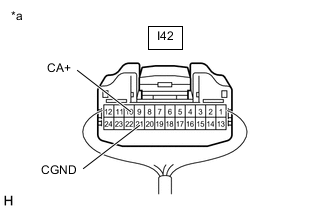
*a Component with harness connected
(Multi-display Assembly)
Remove the multi-display assembly with the connector still connected.
-
Measure the voltage according to the value(s) in the table below.
Standard Voltage Tester Connection Switch Condition Specified Condition I42-10 (CA+) - I42-21 (CGND) Engine switch on (ACC) 5.5 to 7.05 V -
Measure the resistance according to the value(s) in the table below.
Standard Resistance Tester Connection Condition Specified Condition I42-21 (CGND) - Body ground Always Below 1 Ω Result Proceed to OK NG
NG
REPLACE MULTI-DISPLAY ASSEMBLY Click here
OK
-
-
CHECK REAR TELEVISION CAMERA ASSEMBLY
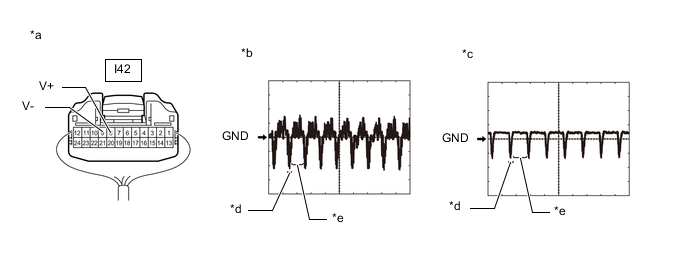
*a Component with harness connected
(Multi-display Assembly)
*b Waveform 1 *c Waveform 2 *d Synchronization Signal *e Video Waveform - -
-
Remove the multi-display assembly with the connector still connected.
-
Check the waveform of the rear television camera assembly using an oscilloscope.
Item Content Measurement terminal I42-8 (V+) - I42-9 (V-) Measurement setting 200 mV/DIV., 50 μsec./DIV. Condition Waveform 1: Engine running, shift position in R, camera lens is not covered, displaying an image.
Waveform 2: Engine running, shift position in R, camera lens is covered, blacking out the screen.
Tech Tips
-
The video waveform changes according to the image sent by the rear television camera assembly.
-
The video waveform is constantly output when the engine switch is on (ACC).
OK Waveform is as shown in the illustration. Result Proceed to OK NG -
NG
REPLACE REAR TELEVISION CAMERA ASSEMBLY Click here
OK
-
-
CHECK MULTI-DISPLAY ASSEMBLY
-
Replace the multi-display assembly with a new or known good one.
-
Clear the DTCs.
Body Electrical > Navigation System > Clear DTCs -
Check for DTCs and check that no DTCs are output.
Body Electrical > Navigation System > Trouble CodesResult Result Proceed to DTC C1622 is not output A DTC C1622 is output B
A
END
B
REPLACE RADIO RECEIVER ASSEMBLY Click here
-