PRE-CRASH SAFETY SYSTEM
-
OPERATION
-
Warning Indication
-
The combination meter assembly uses the multi-information display, master warning light, PCS warning light and buzzer to provide the driver with pre-crash safety system malfunction and indications.
-
If the driving support ECU assembly determines that the possibility of a collision is high, it sends a signal to the combination meter assembly and skid control buzzer. Upon receiving this signal, the combination meter assembly indicates a warning using the multi-information display and buzzer sounds. Details are indicated below.
When there is a high possibility of a collision Multi-information Display Skid Control Buzzer Assembly BRAKE ! Sounds Continuously -
If the pre-crash safety system is disabled, a message will be displayed on the multi-information display.
When the pre-crash safety system is disabled Multi-information Display Master Warning Light PCS Warning Light PRE-CRASH SAFETY OFF - Illuminates -
When the system is not available, the following warning occurs to warn the driver.
When a system malfunction is detected Multi-information Display Detail Master Warning Light PCS Warning Light Buzzer DTC PRE-CRASH SAFETY MALFUNCTION
VISIT YOUR DEALER
This message appears when the driving support ECU assembly detects a system malfunction. Illuminates Illuminates Sounds once Repair is required DTCs are stored PRE-CRASH SAFETY UNAVAILABLE
-
Millimeter wave radar sensor assembly is misaligned
-
Temperature of millimeter wave radar sensor assembly is abnormality
-
Power supply of millimeter wave radar sensor assembly is abnormality
- Illuminates - - PRE-CRASH SAFETY UNAVAILABLE
CLEAN SENSOR
Dirty front grille emblem or millimeter wave radar sensor assembly. - Illuminates - - FRONT CAMERA VISION BLOCKED CLEAN AND DEMIST WINDSHIELD Dirty or fog windshield glass over the forward recognition camera. - Illuminates - - FRONT CAMERA UNAVAILABLE
-
Temperature of forward recognition camera is abnormal.
-
Power supply of forward recognition camera is abnormal.
- Illuminates - - -
-
-
Changing settings of the pre-crash safety system
-
Enabling/disabling the pre-crash safety system
-
The pre-crash safety system can be enabled/disabled on setting display screen of the multi-information display.
Tech Tips
The system is automatically enabled each time the power switch is turned to ON mode.
-
If the system is disabled, the PCS warning light will turn on and a message will be displayed on the multi-information display.
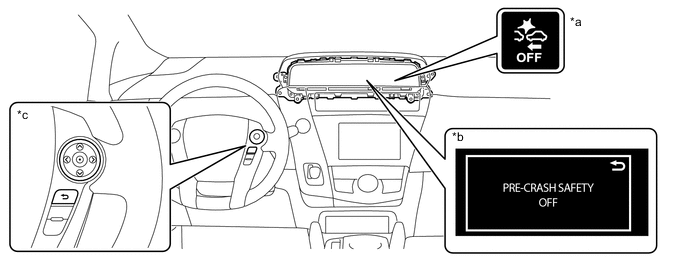
*a PCS warning Light *b Multi-information Display *c Steering Pad Switch Assembly - -
-
-
Changing the pre-crash warning timing
-
The pre-crash warning timing can be changed on setting display screen of the multi-information display.
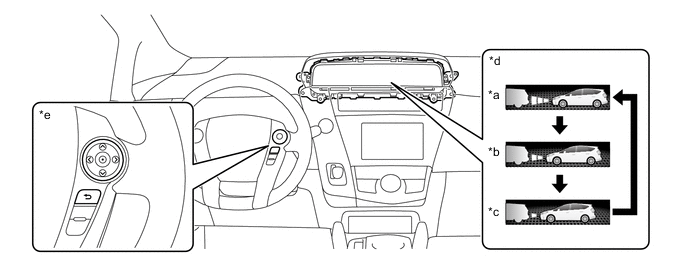
*a Far *b Middle *c Near *d Multi-information Display *e Steering Pad Switch Assembly - - Tech Tips
-
The pre-crash safety system is set to Middle by default.
-
When Near is selected, the warning will begin to operate later than with the default timing.
-
When Far is selected, the warning will begin to operate earlier than with the default timing.
-
The Operation timing setting is retained when the power switch is turned off.
-
-
-
-