SFI SYSTEM(for Rear Air Fuel Ratio Sensor), Diagnostic DTC:P25B473
| DTC Code | DTC Name |
|---|---|
| P25B473 | Turbocharger/Supercharger Wastegate "A" Actuator Stuck Closed |
DESCRIPTION
Refer to DTC P024313.
| DTC No. | Detection Item | DTC Detection Condition | Trouble Area | MIL | Memory | Note |
|---|---|---|---|---|---|---|
| P25B473 | Turbocharger/Supercharger Wastegate "A" Actuator Stuck Closed | The boost pressure does not drop despite control to open the waste gate valve (2 trip detection logic). |
|
Comes on | DTC stored | SAE Code: P25B4 |
MONITOR DESCRIPTION
Monitors the turbocharging pressure when the waste gate valve receives an open command. A waste gate valve stuck close malfunction occurs when the turbocharging variation, which results from 2 operation conditions with differing air volumes, becomes equal to, or greater than, the judgment variation. The ECM illuminates the MIL and stores a DTC.
MONITOR STRATEGY
| Required Sensors/Components | No. 2 turbo pressure sensor Mass air flow meter sub-assembly |
| Frequency of Operation | Once per driving cycle |
CONFIRMATION DRIVING PATTERN
-
Connect the GTS to the DLC3.
-
Turn the engine switch on (IG).
-
Turn the GTS on.
-
Clear the DTCs (even if no DTCs are stored, perform the clear DTC procedure).
-
Turn the engine switch off and wait for at least 30 seconds.
-
Turn the engine switch on (IG).
-
Turn the GTS on.
-
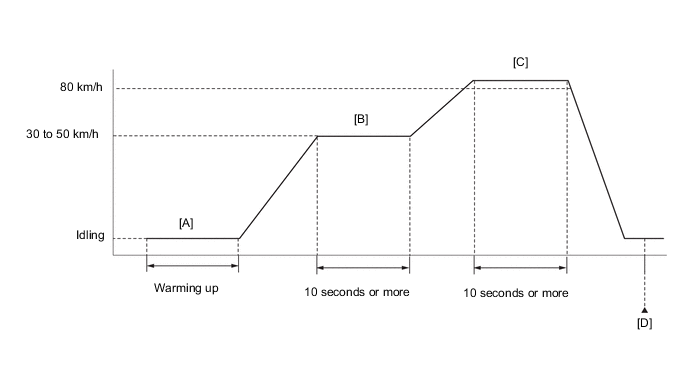
Start the engine and warm it up until the engine coolant temperature reaches 75°C (167°F) or higher [A].
-
Drive the vehicle at 30 to 50 km/h (19 to 31 mph) for 10 seconds or more [B].
CAUTION:
When performing the confirmation driving pattern, obey all speed limits and traffic laws.
-
Drive the vehicle at 80 km/h (50 mph) or more for 10 seconds or more [C].
CAUTION:
When performing the confirmation driving pattern, obey all speed limits and traffic laws.
-
Enter the following menus: Powertrain / Engine / Trouble Codes [D].
-
Read the pending DTCs.
Tech Tips
-
If a pending DTC is output, the system is malfunctioning.
-
If a pending DTC is not output, perform the following procedure.
-
-
Enter the following menus: Powertrain / Engine / Utility / All Readiness.
-
Input the DTC: P25B473.
-
Check the DTC judgment result.
GTS Display Description NORMAL
-
DTC judgment completed
-
System normal
ABNORMAL
-
DTC judgment completed
-
System abnormal
INCOMPLETE
-
DTC judgment not completed
-
Perform driving pattern after confirming DTC enabling conditions
Tech Tips
-
If the judgment result shows NORMAL, the system is normal.
-
If the judgment result shows ABNORMAL, the system has a malfunction.
-
If the judgment result shows INCOMPLETE, perform steps [B] through [D] again.
-
WIRING DIAGRAM
Refer to DTC P010012 for the mass air flow meter sub-assembly circuit.
Refer to DTC P023511 for No. 2 turbo pressure sensor circuit.
CAUTION / NOTICE / HINT
Tech Tips
Read Freeze Frame Data using the GTS. The ECM records vehicle and driving condition information as Freeze Frame Data the moment a DTC is stored. When troubleshooting, Freeze Frame Data can help determine if the vehicle was moving or stationary, if the engine was warmed up or not, if the air fuel ratio was lean or rich, and other data from the time the malfunction occurred.
PROCEDURE
-
CHECK ANY OTHER DTCS OUTPUT (IN ADDITION TO DTC P25B473)
-
Connect the GTS to the DLC3.
-
Turn the engine switch on (IG).
-
Turn the GTS on.
-
Enter the following menus: Powertrain / Engine / Trouble Codes.
-
Read the DTCs.
Powertrain > Engine > Trouble CodesResult Result Proceed to DTC P25B473 is output A DTC P25B473 and other DTCs are output B Tech Tips
If any DTCs other than P25B473 are output, troubleshoot those DTCs first.
B 
GO TO DTC CHART Click here
A 
-
-
CHECK VACUUM REGULATING VALVE ASSEMBLY
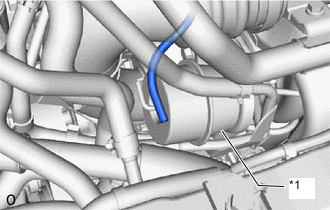
*1 Waste Gate Valve Actuator with Bracket Assembly
-
Disconnect the vacuum hose of the waste gate valve actuator with bracket assembly.
-
Start the engine.
-
Check whether the vacuum hose of the vacuum regulating valve assembly applies no suction your finger.
OK Vacuum hose applies no suction to finger. Result Proceed to OK NG
NG 
REPLACE VACUUM REGULATING VALVE ASSEMBLY Click here
OK
-
-
INSPECT WASTE GATE VALVE (TURBINE WITH VALVE HOUSING SUB-ASSEMBLY)
-
Inspect the waste gate valve.
Result Proceed to OK NG
NG
REPLACE TURBINE WITH VALVE HOUSING SUB-ASSEMBLY Click here
OK
-
-
INSPECT WASTE GATE VALVE ACTUATOR WITH BRACKET ASSEMBLY
-
Inspect the waste gate valve actuator with bracket assembly.
Result Proceed to OK NG
NG
REPLACE WASTE GATE VALVE ACTUATOR WITH BRACKET ASSEMBLY Click here
OK
-
-
INSPECT MASS AIR FLOW METER SUB-ASSEMBLY
-
Inspect the mass air flow meter sub-assembly, referring to the On-vehicle Inspection for Mass Air Flow Meter.
-
Inspect the mass air flow meter sub-assembly, referring to the Inspection for Mass Air Flow Meter.
-
Inspect the function of the mass air flow meter sub-assembly.
-
Connect the GTS to the DLC3.
-
Turn the engine switch on (IG).
-
Turn the GTS on.
-
Enter the following menus: Powertrain / Engine / Data List / Engine Speed, Mass Air Flow Sensor and Coolant Temperature.
Powertrain > Engine > Data ListTester Display Engine Speed Mass Air Flow Sensor Coolant Temperature -
Start the engine and warm it up until the engine coolant temperature is 75°C (167°F) or higher with all the accessories switched off.
-
Read Mass Air Flow Sensor while maintaining an engine speed of 3000 rpm.
Standard GTS Display Condition Specified Condition Mass Air Flow Sensor
-
Shift lever position: P
-
A/C switch: Off
-
Engine warmed up
-
Engine Speed: 3000 rpm
Between 6.0 and 18.0 gm/sec -
Result Proceed to OK NG -
NG
CHECK TERMINAL VOLTAGE (POWER SOURCE OF MASS AIR FLOW METER SUB-ASSEMBLY) Click here
OK
-
-
INSPECT NO. 2 TURBO PRESSURE SENSOR
-
Inspect the No. 2 turbo pressure sensor.
Result Proceed to OK NG
NG
CHECK TERMINAL VOLTAGE (POWER SOURCE OF NO. 2 TURBO PRESSURE SENSOR) Click here
OK
-
-
CLEAR DTC
-
Connect the GTS to the DLC3.
-
Turn the engine switch on (IG).
-
Turn the GTS on.
-
Clear the DTCs.
Powertrain > Engine > Clear DTCs -
Turn the engine switch off and wait for at least 30 seconds.
Result Proceed to NEXT
NEXT
-
-
CHECK WHETHER DTC OUTPUT RECURS (DTC P25B473)
-
Drive the vehicle in accordance with the driving pattern described in Confirmation Driving Pattern.
-
Enter the following menus: Powertrain / Engine / Utility / All Readiness.
Powertrain > Engine > UtilityTester Display All Readiness -
Input the DTC: P25B473.
-
Check the DTC judgment result.
Result Result Proceed to NORMAL
(DTCs are not output)
A ABNORMAL
(DTC P25B473 is output)
B
A
END
B
-
-
REPLACE ECM
-
Replace the ECM.
Result Proceed to NEXT
NEXT
GO TO STEP 23 Click here
-
-
CHECK TERMINAL VOLTAGE (POWER SOURCE OF NO. 2 TURBO PRESSURE SENSOR)
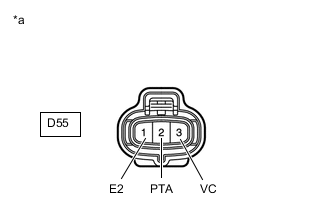
*a Front view of wire harness connector
(to No. 2 Turbo Pressure Sensor)
-
Disconnect the No. 2 turbo pressure sensor connector.
-
Turn the engine switch on (IG).
-
Measure the voltage according to the value(s) in the table below.
Standard Voltage Tester Connection Condition Specified Condition D55-3 (VC) - D55-1 (E2) Engine switch on (IG) 4.5 to 5.5 V D55-2 (PTA) - D55-1 (E2) Engine switch on (IG) 3.0 to 5.5 V Result Proceed to OK NG
NG
CHECK HARNESS AND CONNECTOR (NO. 2 TURBO PRESSURE SENSOR - ECM) Click here
OK
-
-
REPLACE NO. 2 TURBO PRESSURE SENSOR
-
Replace the No. 2 turbo pressure sensor.
Result Proceed to NEXT
NEXT
GO TO STEP 23 Click here
-
-
CHECK HARNESS AND CONNECTOR (NO. 2 TURBO PRESSURE SENSOR - ECM)
-
Disconnect the No. 2 turbo pressure sensor connector.
-
Disconnect the ECM connector.
-
Measure the resistance according to the value(s) in the table below.
Standard Resistance Tester Connection Condition Specified Condition D55-3 (VC) - D1-140 (VPTA) Always Below 1 Ω D55-2 (PTA) - D1-108 (PTA) Always Below 1 Ω D55-1 (E2) - D1-139 (EPTA) Always Below 1 Ω D55-3 (VC) or D1-140 (VPTA) - Body ground and other terminals Always 10 kΩ or higher D55-2 (PTA) or D1-108 (PTA) - Body ground and other terminals Always 10 kΩ or higher Result Proceed to OK NG
NG
REPAIR OR REPLACE HARNESS OR CONNECTOR Click here
OK
-
-
REPLACE ECM
-
Replace the ECM.
Result Proceed to NEXT
NEXT
GO TO STEP 23 Click here
-
-
REPAIR OR REPLACE HARNESS OR CONNECTOR
-
Repair or replace the wire harness or connector.
Result Proceed to NEXT
NEXT
GO TO STEP 23 Click here
-
-
CHECK TERMINAL VOLTAGE (POWER SOURCE OF MASS AIR FLOW METER SUB-ASSEMBLY)
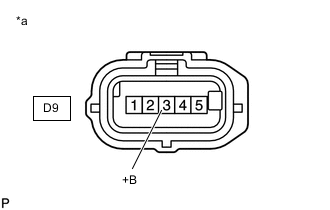
*a Front view of wire harness connector
(to Mass Air Flow Meter Sub-assembly)
-
Disconnect the mass air flow meter sub-assembly connector.
-
Turn the engine switch on (IG).
-
Measure the voltage according to the value(s) in the table below.
Standard Voltage Tester Connection Switch Condition Specified Condition D9-3 (+B) - Body ground Engine switch on (IG) 11 to 14 V Result Proceed to OK NG
NG
CHECK HARNESS AND CONNECTOR (SEMICONDUCTOR POWER INTEGRATION ECU - MASS AIR FLOW METER SUB-ASSEMBLY) Click here
OK
-
-
CHECK HARNESS AND CONNECTOR (MASS AIR FLOW METER SUB-ASSEMBLY - ECM)
-
Disconnect the mass air flow meter sub-assembly connector.
-
Disconnect the ECM connector.
-
Measure the resistance according to the value(s) in the table below.
Standard Resistance Tester Connection Condition Specified Condition D9-5 (VG) - D1-92 (VG) Always Below 1 Ω D9-4 (E2G) - D1-91 (E2G) Always Below 1 Ω D9-5 (VG) or D1-92 (VG) - Body ground and other terminals Always 10 kΩ or higher Result Proceed to OK NG
NG
REPAIR OR REPLACE HARNESS OR CONNECTOR Click here
OK
-
-
REPLACE MASS AIR FLOW METER SUB-ASSEMBLY
-
Replace the mass air flow meter sub-assembly.
Tech Tips
Perform "Inspection After Repair" after replacing the mass air flow meter sub-assembly.
Result Proceed to NEXT
NEXT
GO TO STEP 23 Click here
-
-
REPAIR OR REPLACE HARNESS OR CONNECTOR
-
Repair or replace the wire harness or connector.
Result Proceed to NEXT
NEXT
GO TO STEP 23 Click here
-
-
CHECK HARNESS AND CONNECTOR (SEMICONDUCTOR POWER INTEGRATION ECU - MASS AIR FLOW METER SUB-ASSEMBLY)
-
Disconnect the semiconductor power integration ECU connector.
-
Disconnect the mass air flow meter sub-assembly connector.
-
Measure the resistance according to the value(s) in the table below.
Standard Resistance Tester Connection Condition Specified Condition 1G-1 - D9-3 (+B) Always Below 1 Ω 1G-1 or D9-3 (+B) - Body ground and other terminals Always 10 kΩ or higher Result Proceed to OK NG
OK
REPLACE SEMICONDUCTOR POWER INTEGRATION ECU Click here
NG
REPAIR OR REPLACE HARNESS OR CONNECTOR
-
-
REPLACE WASTE GATE VALVE ACTUATOR WITH BRACKET ASSEMBLY
-
Replace the waste gate valve actuator with bracket assembly.
Result Proceed to NEXT
NEXT
GO TO STEP 23 Click here
-
-
REPLACE TURBINE WITH VALVE HOUSING SUB-ASSEMBLY
-
Replace the turbine with valve housing sub-assembly.
Result Proceed to NEXT
NEXT
GO TO STEP 23 Click here
-
-
REPLACE VACUUM REGULATING VALVE ASSEMBLY
-
Replace the vacuum regulating valve assembly.
Result Proceed to NEXT
NEXT
-
-
CLEAR DTC
-
Connect the GTS to the DLC3.
-
Turn the engine switch on (IG).
-
Turn the GTS on.
-
Clear the DTCs.
Powertrain > Engine > Clear DTCs -
Turn the engine switch off and wait for at least 30 seconds.
Result Proceed to NEXT
NEXT
-
-
CHECK WHETHER DTC OUTPUT RECURS (DTC P25B473)
-
Drive the vehicle in accordance with the driving pattern described in Confirmation Driving Pattern.
-
Enter the following menus: Powertrain / Engine / Utility / All Readiness.
Powertrain > Engine > UtilityTester Display All Readiness -
Input the DTC: P25B473.
-
Check the DTC judgment result.
GTS Display Description NORMAL
-
DTC judgment completed
-
System normal
ABNORMAL
-
DTC judgment completed
-
System abnormal
INCOMPLETE
-
DTC judgment not completed
-
Perform driving pattern after confirming DTC enabling conditions
Result Proceed to NEXT -
NEXT
END
-