VACUUM SENSOR ON-VEHICLE INSPECTION
PROCEDURE
-
INSPECT NO. 2 TURBO PRESSURE SENSOR
-
for Bank 1:
-
Remove the No. 2 turbo pressure sensor.
-
Connect the No. 2 turbo pressure sensor connector.
-
Connect the GTS to the DLC3.
-
Turn the engine switch on (IG).
-
Turn the GTS on.
-
Enter the following menus: Powertrain / Engine / Data List / Purge Pressure Sensor Bank 1.
Powertrain > Engine > Data ListTester Display Purge Pressure Sensor Bank1 -
Read the air pressure value from the Data List.
Tech Tips
-
Standard atmospheric pressure is approximately 101 kPa (abs) (15 psi (abs)).
-
For every 100 m (328 ft.) increase in altitude, atmospheric pressure drops by approximately 1 kPa (0.15 psi). This varies by weather.
-
-
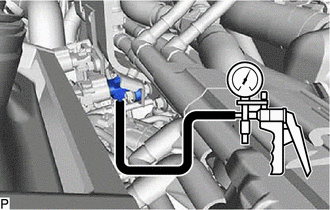
Using a vacuum pump, set the No. 2 turbo pressure sensor.
-
Using a vacuum pump, read the value when pressure is applied and when pressure is decreased.
OK The pressure values when applying pressure or decreasing pressure using the vacuum pump and the Data List values are nearly the same. Note
-
Do not apply a pressure of 50 kPa (0.5 kgf/cm2, 7.3 psi) or more to the No. 2 turbo pressure sensor.
-
Do not apply a vacuum of 50 kPa (375 mmHg, 14.8 in.Hg) or more to the No. 2 turbo pressure sensor.
Tech Tips
The pressure value displayed in the Data List is the pressure value indicated on the vacuum pump with the air pressure value added.
Example: Vacuum Pump Pressure Value Air Pressure Value Equation Data List Value When vacuum is applied at 30 kPa (225 mmHg, 8.86 in.Hg) 100 kPa (1.0 kgf/cm2, 15 psi)
-30 + 100 = 70 70 kPa (0.7 kgf/cm2, 10.2 psi)
When pressure is applied at 30 kPa (0.3 kgf/cm2, 4.4 psi)
30 + 100 = 130 130 kPa (1.3 kgf/cm2, 19 psi)
-
-
Install the No. 2 turbo pressure sensor.
-
-
for Bank 2:
-
Remove the No. 2 turbo pressure sensor.
-
Connect the No. 2 turbo pressure sensor connector.
-
Connect the GTS to the DLC3.
-
Turn the engine switch on (IG).
-
Turn the GTS on.
-
Enter the following menus: Powertrain / Engine / Data List / Purge Pressure Sensor Bank 2.
Powertrain > Engine > Data ListTester Display Purge Pressure Sensor Bank2 -
Read the air pressure value from the Data List.
Tech Tips
-
Standard atmospheric pressure is approximately 101 kPa (abs) (15 psi (abs)).
-
For every 100 m (328 ft.) increase in altitude, atmospheric pressure drops by approximately 1 kPa (0.15 psi). This varies by weather.
-
-
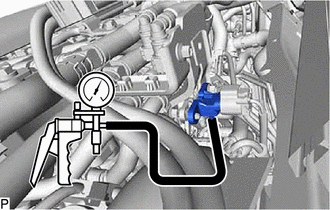
Using a vacuum pump, set the No. 2 turbo pressure sensor.
-
Using a vacuum pump, read the value when pressure is applied and when pressure is decreased.
OK The pressure values when applying pressure or decreasing pressure using the vacuum pump and the Data List values are nearly the same. Note
-
Do not apply a pressure of 50 kPa (0.5 kgf/cm2, 7.3 psi) or more to the No. 2 turbo pressure sensor.
-
Do not apply a vacuum of 50 kPa (375 mmHg, 14.8 in.Hg) or more to the No. 2 turbo pressure sensor.
Tech Tips
The pressure value displayed in the Data List is the pressure value indicated on the vacuum pump with the air pressure value added.
Example: Vacuum Pump Pressure Value Air Pressure Value Equation Data List Value When vacuum is applied at 30 kPa (225 mmHg, 8.86 in.Hg) 100 kPa (1.0 kgf/cm2, 15 psi)
-30 + 100 = 70 70 kPa (0.7 kgf/cm2, 10.2 psi)
When pressure is applied at 30 kPa (0.3 kgf/cm2, 4.4 psi)
30 + 100 = 130 130 kPa (1.3 kgf/cm2, 19 psi)
-
-
Install the No. 2 turbo pressure sensor.
-
-