NAVIGATION SYSTEM(for DVD) GPS Mark is not Displayed
| DTC Code | DTC Name |
|---|---|
| GPS Mark is not Displayed |
PROCEDURE
CHECK CABIN
Check the cabin for any object that might interrupt radio reception on the instrument panel. If such an object exists, remove it and check if the GPS mark reappears.
Tip:The GPS uses extremely weak radio waves originating from satellites. If the signal is interrupted by obstructions or other radio waves, the GPS may not be able to properly receive the signal.
OK
Mark appears.
Result
Result
OK
NG
OK NORMAL OPERATION
CHECK SURROUNDINGS
Check if the vehicle is in a location where GPS signal reception is poor. If the vehicle is in such a place, relocate the vehicle and check if the GPS mark reappears.
Tip:The GPS uses 24 satellites in 6 orbits. At any point in time, 4 satellites should be able to pinpoint the vehicle. However, GPS signals may not reach the vehicle due to influence from the surroundings, vehicle direction, and time. For examples, see the illustration below.
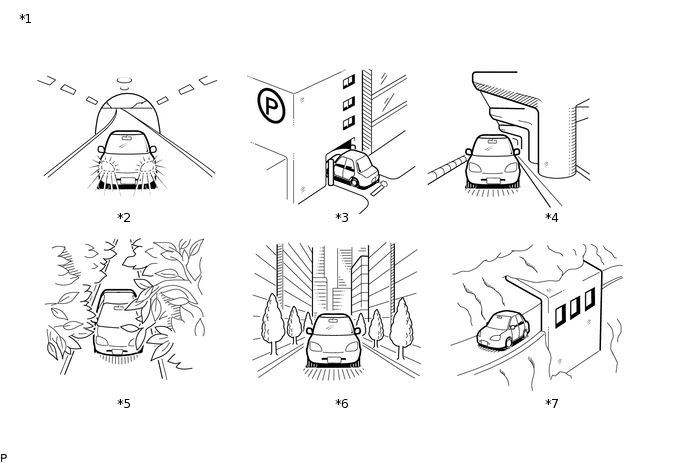
*1
Example
*2
In a Tunnel
*3
In a Building
*4
Under an Overpass
*5
On a Forest or Tree-lined Path
*6
Between Tall Buildings
*7
Under a Cliff or Overhang
-
-
OK
GPS mark is displayed.
Result
Result
OK
NG
OK SYSTEM RETURNS TO NORMAL
CHECK GPS INFORMATION (NAVIGATION CHECK MODE)
-
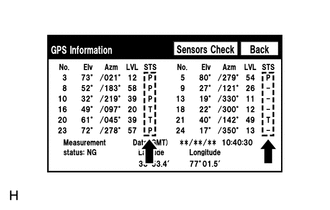
Enter the "Navigation Check" mode and select "GPS Information".
Check how many of the codes (T or P) appear in the "STS" column.
OK
At least 3 codes appear.
Result
Result
OK
NG
-