LUGGAGE COMPARTMENT DOOR OUTSIDE GARNISH REMOVAL
PROCEDURE
-
REMOVE LUGGAGE COMPARTMENT DOOR COVER
-
REMOVE REAR LIGHT ASSEMBLY LH
-
REMOVE REAR LIGHT ASSEMBLY RH
Tech Tips
Use the same procedure as for the LH side.
-
REMOVE NO. 3 LUGGAGE COMPARTMENT DOOR OUTSIDE GARNISH
-
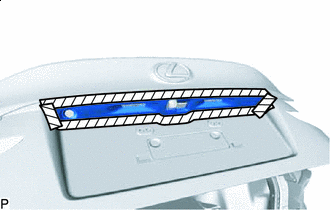

Protective Tape Apply protective tape around the No. 3 luggage compartment door outside garnish as shown in the illustration.
-
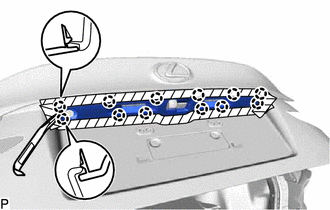
Using a moulding remover, disengage the 12 claws and remove the No. 3 luggage compartment door outside garnish.
-
-
REMOVE LUGGAGE ELECTRICAL KEY SWITCH (w/o Rear Monitor)
-
REMOVE LUGGAGE ELECTRICAL KEY SWITCH WITH REAR TELEVISION CAMERA ASSEMBLY (w/ Rear Monitor)
-
REMOVE LUGGAGE COMPARTMENT DOOR OUTSIDE GARNISH SUB-ASSEMBLY
-
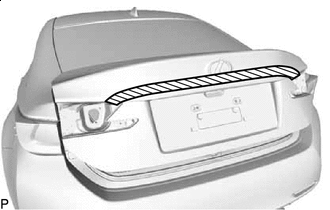
Protective Tape Apply protective tape around the luggage compartment door outside garnish sub-assembly as shown in the illustration.
-
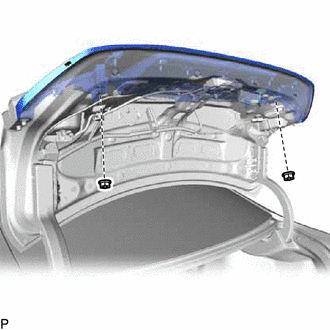
Remove the 2 nuts.
-
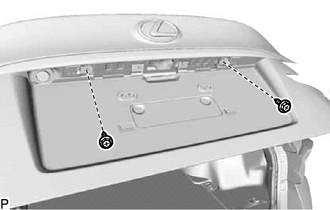
Remove the 2 screws.
-
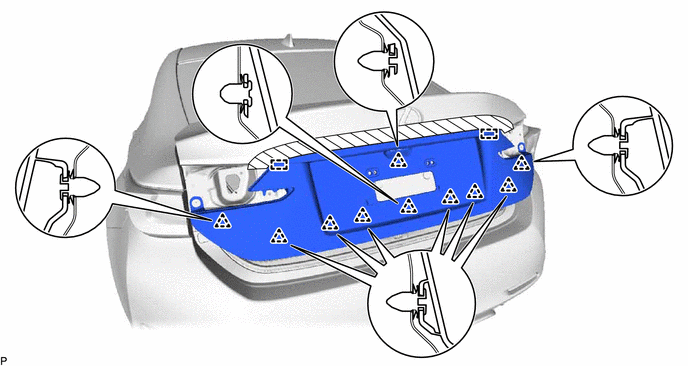
Disengage the 10 clips and 2 guides to remove the luggage compartment door outside garnish sub-assembly.
-
Remove the 10 clips from the luggage compartment door outside garnish sub-assembly.
-
-
REMOVE LUGGAGE COMPARTMENT DOOR OUTSIDE GARNISH PROTECTOR
-
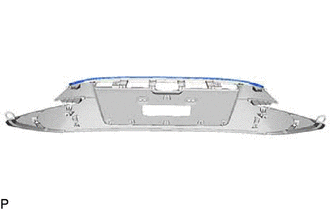
Remove the luggage compartment door outside garnish protector from the luggage compartment door outside garnish.
-