REAR SPOILER REASSEMBLY
PROCEDURE
-
INSTALL CENTER STOP LIGHT ASSEMBLY
-
INSTALL NO. 2 REAR SPOILER SEAL
Tech Tips
When installing the No. 2 rear spoiler seal, heat the rear spoiler using a heat light.
Heating Temperature Item Temperature Rear Spoiler 20 to 30°C (68 to 86°F) Note
Do not heat the rear spoiler excessively.
-
Clean the rear spoiler surface.
-
Using a heat light, heat the rear spoiler surface.
-
Remove the double-sided tape from the rear spoiler.
-
Wipe off any tape adhesive residue with cleaner.
-
-
Using a heat light, heat the rear spoiler.
-
Remove the release paper from the 2 new No. 2 rear spoiler seals.
Tech Tips
After removing the release paper, keep the exposed adhesive free from foreign matter.
-
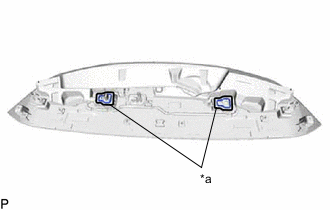
*a Line Install the 2 No. 2 rear spoiler seals as shown in the illustration.
Tech Tips
Apply the No. 2 rear spoiler seal along the line marked on the rear spoiler.
-
-
INSTALL REAR SPOILER SEAL
Tech Tips
When installing the rear spoiler seal, heat the rear spoiler using a heat light.
Heating Temperature Item Temperature Rear Spoiler 20 to 30°C (68 to 86°F) Note
Do not heat the rear spoiler excessively.
-
Clean the rear spoiler surface.
-
Using a heat light, heat the rear spoiler surface.
-
Remove the double-sided tape from the rear spoiler.
-
Wipe off any tape adhesive residue with cleaner.
-
-
Using a heat light, heat the rear spoiler.
-
Remove the release paper from a new rear spoiler seal.
Tech Tips
After removing the release paper, keep the exposed adhesive free from foreign matter.
-
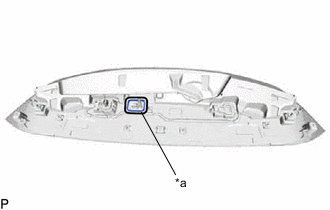
*a Line Install the rear spoiler seal as shown in the illustration.
Tech Tips
Apply the rear spoiler seal along the line marked on the rear spoiler.
-
-
INSTALL NO. 2 REAR SPOILER PROTECTOR
Tech Tips
When installing the No. 2 rear spoiler protector, heat the rear spoiler using a heat light.
Heating Temperature Item Temperature Rear Spoiler 20 to 30°C (68 to 86°F) Note
Do not heat the rear spoiler excessively.
-
Clean the rear spoiler surface.
-
Using a heat light, heat the rear spoiler surface.
-
Remove the double-sided tape from the rear spoiler.
-
Wipe off any tape adhesive residue with cleaner.
-
-
Using a heat light, heat the rear spoiler.
-
Remove the release paper from the 3 new No. 2 rear spoiler protectors.
Tech Tips
After removing the release paper, keep the exposed adhesive free from foreign matter.
-
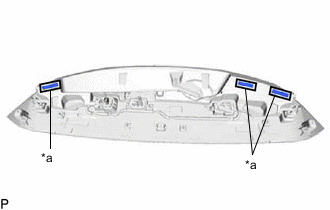
*a Line Install the 3 No. 2 rear spoiler protectors as shown in the illustration.
Tech Tips
Apply the No. 2 rear spoiler protector along the line marked on the rear spoiler.
-
-
INSTALL NO. 1 REAR SPOILER PROTECTOR
Tech Tips
When installing the No. 1 rear spoiler protector, heat the rear spoiler using a heat light.
Heating Temperature Item Temperature Rear Spoiler 20 to 30°C (68 to 86°F) Note
Do not heat the rear spoiler excessively.
-
Clean the rear spoiler surface.
-
Using a heat light, heat the rear spoiler surface.
-
Remove the double-sided tape from the rear spoiler.
-
Wipe off any tape adhesive residue with cleaner.
-
-
Using a heat light, heat the rear spoiler.
-
Remove the release paper from the 5 new No. 1 rear spoiler protectors.
Tech Tips
After removing the release paper, keep the exposed adhesive free from foreign matter.
-
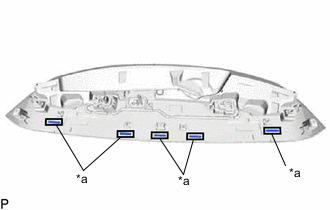
*a Line Install the 5 No. 1 rear spoiler protectors as shown in the illustration.
Tech Tips
Apply the No. 1 rear spoiler protector along the line marked on the rear spoiler.
-