INTELLIGENT PARKING ASSIST SYSTEM
-
OUTLINE
-
The intelligent parking assist system shows a view of the area behind the vehicle on the navigation display. In addition, it controls the steering to assist the driver with perpendicular parking and parallel parking.
-
The system calculates the target parking position based on signals from the No. 1 ultrasonic sensors mounted on both sides of the front bumper, and reduces the driver's burden of adjusting the target parking position on the display.
-
The easy set function is provided. If the system recognizes the lines of the parking space (white lines) in parking assist mode, conventional operation for setting the target parking position is unnecessary, improving usability.
-
The intelligent parking assist system can be disabled or enabled using the assist mode select switch displayed on the multi-display of the navigation receiver assembly.
-
This system is equipped with a self-diagnosis function, which is operated on a dedicated window that appears on the display, just as in the navigation system.
-
-
MAIN FEATURES
-
The intelligent parking assist system can display either parking assist (perpendicular parking) or parallel parking assist modes.
-
Parking assist (perpendicular parking) is used when parking the vehicle in a space that is located perpendicular to the vehicle.
-
Parallel parking assist is used when parallel parking.
-
Using the assist mode select switch disables or enables the intelligent parking assist system. When the intelligent parking assist system is disabled, a view of the area behind the vehicle, on which the guide lines are super imposed, is displayed on the multi-display of the navigation receiver assembly.

Text in Illustration *1 Assist Mode Select Switch - -
-
-
PRECAUTION
-
General Precautions
-
Do not rely entirely on the intelligent parking assist system. When backing up, drive the vehicle as carefully as you would drive one that is not equipped with the intelligent parking assist system.
-
Back up slowly by depressing the brake pedal to adjust the speed.
-
If the vehicle appears about to come into contact with an adjacent vehicle or pedestrian, depress the brake pedal to bring the vehicle to a stop. Then, cancel the intelligent parking assist system by pressing the stop switch on the screen.
-
When the system is operating in parking assist mode, the steering wheel will turn automatically. Maintain a proper driving posture without allowing a necktie, pendant, or your arms to get caught, or long finger nails to come in contact with the steering wheel. Do not allow children to come close to the steering wheel.
-
Never attempt to back up the vehicle only by observing the screen. If you do so, you could unexpectedly crash the vehicle or cause an accident because the image on the screen could differ from the actual situation. While backing up, also make sure to use the inside and outside rear view mirrors in order to directly verify the safety of the rear and surrounding areas.
-
Do not operate the system on a slippery surface such as a frozen or snowy road, or when using tire chains. Doing so could unexpectedly cause the vehicle to crash or become involved in an accident.
-
If the back door is open, only the image from the rear television camera assembly and a warning message are displayed on the screen. Operate the system only with the back door completely closed.
-
-
Rear Television Camera Precautions
-
Do not expose the rear television camera assembly to a strong impact or force, as it will alter the orientation of the rear television camera assembly and cause improper operation.
-
The area covered by the rear television camera assembly is limited. The rear television camera assembly does not show objects close to either corner of the bumper or show items under the bumper. The clearance distance that appears on the screen is different from the actual distance because the rear television camera assembly uses a wide-angle lens.
-
If the camera lens becomes dirty, it cannot transmit a clear image. If water droplets, snow, or mud adhere to the lens, rinse with water and wipe with a soft cloth. If the lens is extremely dirty, wash it with a mild cleanser and rinse.
-
Do not allow organic solvent, car wax, window cleaner or glass coat to adhere to the rear television camera assembly. If this happens, wipe it off as soon as possible.
-
If you scrape the camera lens, or scrub it with a hard brush or an abrasive agent, you may scratch the lens, leading to poor picture quality.
-
In the following cases, it may become difficult to see the images on the screen, but this is not a malfunction:
-
In the dark (for example, at night).
-
When the temperature near the lens is very high or low.
-
When water droplets are adhering to the rear television camera assembly, or when humidity is high (for example, when it rains).
-
When the rear television camera assembly has scratches or dirt on it.
-
When foreign matter (for example, mud) is adhering to the camera lens.
-
When the sun or the beam of headlights is shining directly into the camera lens.
-
-
When the rear television camera assembly is used under fluorescent lights, sodium lights, or mercury lights etc., the lights and the illuminated area may appear to flicker.
-
When washing the vehicle with a high-pressure washer, do not spray water on the rear television camera assembly or surrounding area. High-pressure water can damage the camera.
-
If a bright light (for example, sunlight reflected off the vehicle body) is picked up by the rear television camera assembly, the smear effect*, particular to the CCD camera, may occur.
Tech Tips
*: Smear effect: A phenomenon that occurs when a bright light is received by the rear television camera assembly. When the image is transmitted to the screen, the light source will appear to have a vertical streak above and below it.

Text in Illustration *1 Bright Light *2 Vertical Streak -
As the rear television camera assembly has a water proof construction, do not detach, disassemble or modify it. This may cause incorrect operation.
-
If the temperature changes rapidly, such as when hot water is poured on the vehicle in cold weather, the system may not operate.
-
-
Road Condition Precautions
-
Depending on the number of occupants, the load conditions, the slope of the road, and bumps in the road, a disparity may occur between the display indication and the actual distance on the road surface. Operate the vehicle carefully.
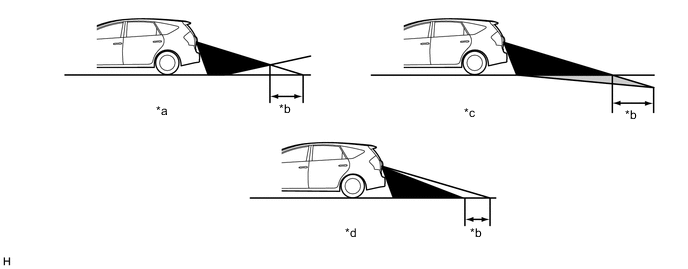
Text in Illustration *a Steep Uphill Incline behind Vehicle *b Disparity *c Steep Downhill Incline behind Vehicle *d Vehicle Posture Changed by Passengers and Load -
If a steep uphill incline is behind the vehicle, an obstacle appears to be further away than it actually is, as shown in the illustration below.
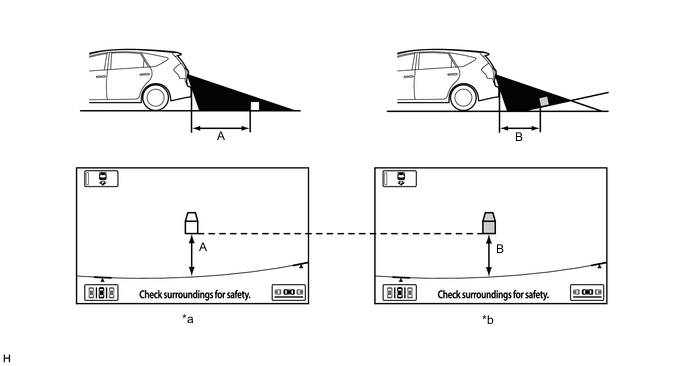
Text in Illustration *a Screen Image in Case A *b Screen Image in Case B
-
-
Precautions for 3-Dimensional Obstacles
-
Drive carefully when any 3-dimensional objects such as walls or vehicles are behind the vehicle as the distance and estimated guide lines are provided based on the road surface.
-
When passing close to a 3-dimensional object, the vehicle may come into contact with the object even if the estimated vehicle path seems not to be in contact with it on the screen.
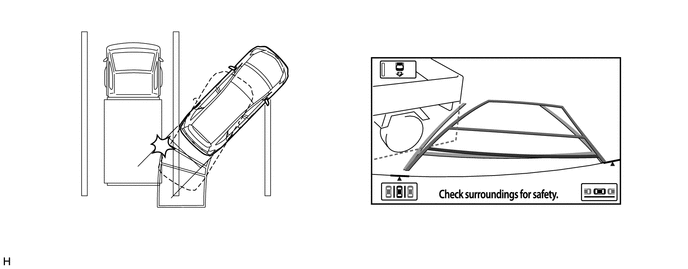
-
The distance indication as shown on the screen varies between 3-dimensional objects such as a vehicle and a flat plane such as the road surface. As shown in the following illustrations, points A and B are actually vertically in the same position and point C is a bit away from them, however, the points are displayed in order of distance from the vehicle, B, C and A. Therefore, the vehicle will come into contact with the 3-dimensional object if it is backed to point B on the screen.
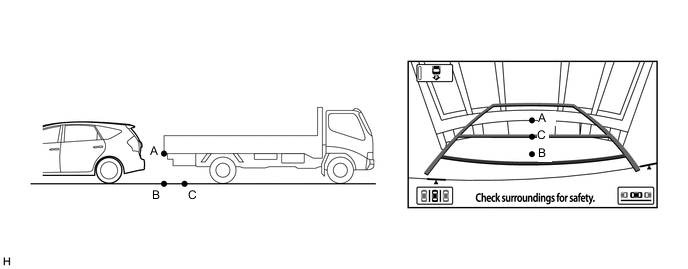
-
On slippery roads such as snowy roads, the estimated vehicle path and actual vehicle path may not match.
-
When only one parking line is provided, the vehicle may seem to be parallel to the line on the screen even if it is not actually parallel.
-
-
-
No. 1 Ultrasonic Sensor Precautions
-
Under the following conditions, a No. 1 ultrasonic sensor may not function properly:
-
A sensor is covered with foreign matter, such as mud or snow (the detection function returns to normal when the sensor is cleaned).
-
A sensor is frozen (the detection function returns to normal when the temperature of the sensor rises).
-
A hand or similar obstacle is blocking the sensor.
Tech Tips
-
In very cold weather, the malfunction display may appear and the sensors may not be able to detect obstacles.
-
If the malfunction display appears, visually check the sensors first. If the sensors are free of foreign matter but the malfunction display remains, a sensor may have a malfunction.
-
-
-
A detection range may be affected by the following conditions:
-
A No. 1 ultrasonic sensor is covered with foreign matter, such as mud or snow.
-
The vehicle is in an excessively hot or excessively cold area.
-
-
Under the following conditions, a detection error may occur:
-
Driving on a bumpy road, an unpaved road, or in tall grass.
-
Ultrasonic waves are received from the horn or parking sonar system of another vehicle, a motorcycle engine, or the air brakes of a large vehicle.
-
It is raining heavily or a sensor is splashed with water.
-
The vehicle is tilted at a steep angle.
-
The vehicle is equipped with a fender pole or a wireless antenna mechanism.
-
A sensor is covered with foreign matter, such as mud or snow.
-
The vehicle is moving forward or backward towards high curbs or objects that are perpendicular to the ground.
-
A sensor is sprayed with high-pressure water or steam.
-
A towing hitch is mounted on the vehicle.
-
-
The sensors cannot detect the following objects:
-
Thin objects, such as wires and ropes.
-
Materials that absorb ultrasonic waves, such as cotton, snow, etc.
-
Objects with sharp edges.
-
Short objects.
-
Objects that are tall and protrude toward the vehicle above the detection range of the sensors.
-
-
Other notices:
-
The sensors cannot detect objects directly under the bumper. (A sensor may detect low objects and thin poles, and then lose track of them.)
-
Beware that the detection range of this system is limited. In certain conditions, some objects may not be detected. As a result, always make sure to visually confirm the safety of your surroundings when driving or parking.
-
The sensors may not be able to detect obstacles that are too close to the sensor.
-
The sensors may not be able to detect obstacles if the sensors have been dropped or subjected to a strong impact.
-
-
-
Other Precautions
-
Do not use tires of a different size from those that came new with the vehicle, otherwise the system may not operate properly or may display improper estimated guide lines. Therefore, confirm tire fitment before replacing the tires.
-
Directly verify the rear and the surroundings of the vehicle with your eyes for safety before backing up the vehicle. Never attempt to back up the vehicle only by observing the screen.
-
-