SFI SYSTEM(for Rear Air Fuel Ratio Sensor) Lack of Power
DESCRIPTION
| Problem Symptom | Suspected Area | Trouble Area | |
|---|---|---|---|
Strong engine vibration due to above symptoms |
|
Ignition system |
|
| Fuel system |
|
||
| Intake and exhaust systems |
|
||
| Other control systems |
|
||
| Engine |
|
||
| High load from another system |
|
||
Tech Tips
-
If any other DTCs are output, perform troubleshooting for those DTCs first.
-
Make sure to reproduce the conditions present when the malfunction occurred.
-
Using the GTS, read the Data List to confirm the engine operating conditions. This information can be useful when troubleshooting.
-
If the problem symptoms do not recur, attempt to reproduce the symptoms and conditions when the malfunction occurred based on the result of the customer problem analysis. Place the priority on confirming the symptoms.
-
SYMPTOM AND CAUSE OF SYSTEM MALFUNCTION
Tech Tips
The following are descriptions of the characteristics of each system malfunction. After understanding the link between the causes and symptoms, perform the inspection of each component. Even if the problem symptom does not recur, signs of the malfunction may be found in the Data List.
-
Ignition system
Spark plug Main cause of malfunction Performance degradation (wear, existence of foreign matter, etc.) Symptom Engine speed fluctuation due to abnormal combustion Data List Misfire Count Cylinder #1 to #4 Tech Tips
If the spark plug of the malfunctioning cylinder is abnormally wet with fuel, a leaking fuel injector assembly is suspected.
Ignition coil assembly Main cause of malfunction Internal malfunction Problem symptom Engine speed fluctuation due to abnormal combustion Data List Misfire Count Cylinder #1 to #4 -
Fuel system
Fuel injector assembly Main cause of malfunction Blockage Problem symptom
-
Engine speed fluctuation due to abnormal combustion
-
Idle speed too low or high
Data List
-
Target Air-Fuel Ratio
-
A/F (O2) Lambda Sensor B1S1
-
Short FT B1S1
-
Long FT B1S1
-
Total FT Bank 1
-
Fuel System Status Bank 1
-
A/F Learn Value Idle (Port) Bank 1
-
A/F Learn Value Low (Port) Bank 1
-
A/F Learn Value Mid No.1 (Port) Bank 1
-
A/F Learn Value Mid No.2 (Port) Bank 1
-
A/F Learn Value High (Port) Bank 1
-
A/F Learn Value Idle Bank 1
-
A/F Learn Value Low Bank 1
-
A/F Learn Value Mid No.1 Bank 1
-
A/F Learn Value Mid No.2 Bank 1
-
A/F Learn Value High Bank 1
-
A/F Learn Value Low (Dual) Bank 1
-
A/F Learn Value Mid (Dual) No.1 Bank 1
-
A/F Learn Value Mid (Dual) No.2 Bank 1
-
A/F Learn Value High (Dual) Bank 1
Tech Tips
If the engine malfunction disappears when the fuel injection volume is increased or decreased using the Control the Injection Volume, the respective cylinder may be malfunctioning.
Fuel system Tech Tips
If the air fuel ratio becomes lean only when the engine is running under a high load and at a high engine speed, clogging of the fuel pump or fuel filter is suspected.
Fuel quality Main cause of malfunction
-
Fuel degradation due to age or water contamination
-
Low fuel quality
-
Addition of fuel additive
Problem symptom
-
Engine speed fluctuation due to abnormal combustion
-
Idle speed too low or high
-
Engine is difficult to start
-
-
Intake and exhaust systems
Mass air flow meter sub-assembly Main cause of malfunction Performance degradation (existence of foreign matter, etc.) Problem symptom Lack of power Data List Mass Air Flow Sensor Tech Tips
If the value of the Data List item "Mass Air Flow Sensor" is abnormal, a malfunction of the mass air flow meter sub-assembly is suspected.
Throttle system Main cause of malfunction Inappropriate trim volume adjustment due to accumulation of deposits Problem symptom
-
Engine speed fluctuation due to abnormal combustion
-
Idle speed too low or high
Data List
-
Engine Stall Control F/B Flow
-
ISC F/B Learn Torque
-
ISC Total AUXS Torque
-
ISC F/B Torque
-
Sum of ISC F/B Torque (Recent)
-
ISC AUXS Torque (Alternator)
-
ISC AUXS Torque (Air Conditioner)
-
Throttle Air Flow F/B Value
Air fuel ratio sensor (sensor 1), Air fuel ratio sensor (sensor 2) Main cause of malfunction Deviation in sensor characteristics Problem symptom Abnormal combustion due to deviation of actual air fuel ratio from calculated ratio Data List
-
A/F (O2) Sensor Voltage B1S1
-
A/F (O2) Sensor Current B1S2
-
Fuel System Status Bank 1
Turbocharger Main cause of malfunction Waste gate valve stuck closed Problem symptom Lack of power due to fail safe Data List Boost Pressure Sensor -
-
Engine
Engine assembly Main cause of malfunction
-
Compression loss
-
Accumulation of deposits
(Combustion chamber, intake valve or intake manifold)
Problem symptom
-
Engine speed fluctuation due to abnormal combustion
-
Idle speed too low or high
-
Hesitation during acceleration or stalling
Tech Tips
-
If deposits have accumulated in the combustion chamber or on an intake valve, the engine may stall when deposits are caught on an intake valve.
-
When performing the Active Test "Check the Cylinder Compression", if the speed of one cylinder is higher than the others, the cylinder may have a compression loss.
-
If deposits accumulate on the intake valves, the supply of fuel may be delayed due to adherence of the fuel to the deposits, causing a rough idle.
-
-
-
Data List Items Related to Lack of Power
Tech Tips
Depending on the vehicle model, the applicable Data List items may vary. Data List items other than the ones used in the diagnostic procedure are for reference only.
-
Mass Air Flow Sensor
-
Engine Stall Control F/B Flow
-
ISC F/B Learn Torque
-
ISC Total AUXS Torque
-
ISC F/B Torque
-
Sum of ISC F/B Torque (Recent)
-
ISC AUXS Torque (Alternator)
-
ISC AUXS Torque (Air Conditioner)
-
Throttle Air Flow F/B Value
-
Target Fuel Pressure (High)
-
Target Fuel Pressure (Low)
-
Fuel Pressure (High)
-
Fuel Pressure (Low)
-
High Pressure Fuel Pump Duty Ratio (D4)
-
High Pressure Fuel Pump Discharge Rate
-
Target Air-Fuel Ratio
-
A/F (O2) Lambda Sensor B1S1
-
A/F (O2) Sensor Voltage B1S1
-
A/F (O2) Sensor Current B1S2
-
Short FT B1S1
-
Long FT B1S1
-
Total FT Bank 1
-
Fuel System Status Bank 1
-
A/F Learn Value Idle (Port) Bank 1
-
A/F Learn Value Low (Port) Bank 1
-
A/F Learn Value Mid No.1 (Port) Bank 1
-
A/F Learn Value Mid No.2 (Port) Bank 1
-
A/F Learn Value High (Port) Bank 1
-
A/F Learn Value Idle Bank 1
-
A/F Learn Value Low Bank 1
-
A/F Learn Value Mid No.1 Bank 1
-
A/F Learn Value Mid No.2 Bank 1
-
A/F Learn Value High Bank 1
-
A/F Learn Value Low (Dual) Bank 1
-
A/F Learn Value Mid (Dual) No.1 Bank 1
-
A/F Learn Value Mid (Dual) No.2 Bank 1
-
A/F Learn Value High (Dual) Bank 1
-
Boost Pressure Sensor
-
PROCEDURE
-
INTERVIEW THE CUSTOMER
-
Interview the customer for details about the conditions when experiencing the lack of power.
Tech Tips
If a lack of power occurs when the engine is running under a high load and at a high engine speed, the fuel filter may be clogged.
Result Result Proceed to Other than below A Lack of power during high-load driving B
B 
CHECK DTC OUTPUT Click here
A 
-
-
CHECK DTC OUTPUT
-
Connect the GTS to the DLC3.
-
Turn the engine switch on (IG).
-
Turn the GTS on.
-
Perform a road test.
-
Enter the following menus: Powertrain / Engine / Trouble Codes.
-
Read the DTCs.
Powertrain > Engine > Trouble CodesResult Result Proceed to DTCs are not output A DTC is output B
B 
GO TO DTC CHART Click here
A
-
-
SYMPTOM CONFIRMATION
-
Check if the problem symptoms reported in the customer problem analysis recur.
Tech Tips
If the problem symptoms do not recur, attempt to reproduce the conditions when the malfunction occurred based on the result of the customer problem analysis.
Result Result Proceed to The problem symptom recurs A The problem symptom does not recur (occurred in the past) B
B
CHECK FOR INTERMITTENT PROBLEMS Click here
A
-
-
READ VALUE USING GTS (ISC F/B LEARN TORQUE)
-
Connect the GTS to the DLC3.
-
Turn the engine switch on (IG).
-
Turn the GTS on.
-
Enter the following menus: Powertrain / Engine / Data List / ISC F/B Learn Torque.
Powertrain > Engine > Data ListTester Display ISC F/B Learn Torque -
Read the value displayed on the GTS.
Result Result Proceed to Less than 15 Nm A Other than above B
B
REMOVE FOREIGN OBJECT (CLEAN THROTTLE BODY WITH MOTOR ASSEMBLY) Click here
A
-
-
READ VALUE USING GTS (KNOCK CORRECT LEARN VALUE)
-
Connect the GTS to the DLC3.
-
Start the engine and warm it up until the engine coolant temperature reaches 75°C (167°F) or higher.
-
Turn the GTS on.
-
Idle the engine.
-
Enter the following menus: Powertrain / Engine / Data List / Coolant Temperature and Knock Correct Learn Value.
Powertrain > Engine > Data ListTester Display Coolant Temperature Knock Correct Learn Value -
Read the value.
Result Knock Correct Learn Value Proceed to 5 deg(CA) or higher A Less than 5 deg(CA) B Tech Tips
-
If the value shown in the Data List is below 5 deg(CA), interview the customer to check if the malfunction is caused by the quality of the fuel being used.
-
If the result of the customer problem analysis is that improper fuel was not used or the type of fuel used is unknown, suggest that the customer refuel the vehicle with a different brand of fuel and then check if the malfunction symptoms disappear.
-
B
CONFIRM FUEL
A
-
-
READ VALUE USING GTS (SHORT FT B1S1 AND LONG FT B1S1)
-
Connect the GTS to the DLC3.
-
Turn the engine switch on (IG).
-
Turn the GTS on.
-
Enter the following menus: Powertrain / Engine / Data List / Short FT B1S1 and Long FT B1S1.
Powertrain > Engine > Data ListTester Display Short FT B1S1 Long FT B1S1 -
Read the value displayed on the GTS.
Result Data List Result Proceed to Short FT B1S1 + Long FT B1S1 -15% or higher, or less than 15% A Other than above B Tech Tips
-
"Total FT Bank 1" is used to detect an abnormal air fuel ratio. As the value of "Total FT Bank 1" is corrected by the ECM before it is displayed in the Data List, the displayed value may not be equal to the sum of the measured "Short FT B1S1" and "Long FT B1S1".
-
An abnormally lean or rich tendency can be checked by reading the following Data List items: A/F Learn Value Idle (Port) Bank 1, A/F Learn Value Low (Port) Bank 1, A/F Learn Value Mid No.1 (Port) Bank 1, A/F Learn Value Mid No.2 (Port) Bank 1, A/F Learn Value High (Port) Bank 1, A/F Learn Value Idle Bank 1, A/F Learn Value Low Bank 1, A/F Learn Value Mid No.1 Bank 1, A/F Learn Value Mid No.2 Bank 1, A/F Learn Value High Bank 1, A/F Learn Value Low (Dual) Bank 1, A/F Learn Value Mid (Dual) No.1 Bank 1, A/F Learn Value Mid (Dual) No.2 Bank 1 and A/F Learn Value High (Dual) Bank 1.
-
The following may cause a lean air fuel ratio (an operating range in which the air fuel ratio learned value correction is +15% or more):
-
Decrease in fuel injector assembly injection volume
-
Decrease in mass air flow meter sub-assembly output (due to existence of foreign matter)
-
Air leaks in intake system after mass air flow meter sub-assembly
-
Decrease in fuel pressure (at fuel filter, fuel pump, fuel main valve assembly or fuel suction plate sub-assembly)
-
On vehicles which the learning value for each operating range can be checked, if the value of "A/F Learn Value High (Port) Bank 1", "A/F Learn Value High Bank 1" or "A/F Learn Value High (Dual) Bank 1" only is corrected to the positive side, a malfunction in the fuel system (clogging of the fuel pump or fuel filter) is suspected.
-
On vehicles which the learning value for each operating range can be checked, if the value of "A/F Learn Value Idle (Port) Bank 1", "A/F Learn Value Low (Port) Bank 1", "A/F Learn Value Idle Bank 1", "A/F Learn Value Low Bank 1" or "A/F Learn Value Low (Dual) Bank 1" only is corrected to the positive side, an air leak after the mass air flow meter sub-assembly is suspected.
-
The following may cause a rich air fuel ratio (an operating range in which the air fuel ratio learned value correction is -15% or less):
-
Increase in the fuel injector assembly injection volume
-
Purge VSV system
-
B
GO TO STEP 23 Click here
A
-
-
READ VALUE USING GTS (BOOST PRESSURE SENSOR)
-
Connect the GTS to the DLC3.
-
Turn the engine switch on (IG).
-
Turn the GTS on.
-
Start the engine and warm it up until the engine coolant temperature reaches 75°C (167°F) or higher.
-
Enter the following menus: Powertrain / Engine / Data List / Coolant Temperature and Boost Pressure Sensor.
Powertrain > Engine > Data ListTester Display Coolant Temperature Boost Pressure Sensor -
Accelerate to 80 km/h (50 mph) with the accelerator pedal fully depressed.
CAUTION:
When performing the confirmation driving pattern, obey all speed limits and traffic laws.
Tech Tips
-
Perform the test drive at 500 m (1640 ft.) or lower elevation. Accurate evaluation may not be possible at high elevation.
-
-
Read the Data List while driving with the shift lever in 2nd and an engine speed of 4000 rpm (40 to 65 km/h [25 to 40 mph]).
Result GTS Display Result Proceed to Boost Pressure Sensor 120 kPa [17.4 psi] or higher A Below 120 kPa [17.4 psi] B
B
GO TO LACK OF POWER (TURBOCHARGER SYSTEM) Click here
A
-
-
PERFORM ACTIVE TEST USING GTS (D-4S (FUEL CUT))
-
Connect the GTS to the DLC3.
-
Turn the engine switch on (IG).
-
Turn the GTS on.
-
Start the engine.
Tech Tips
Reproduce the vehicle conditions when the malfunction occurred. (such as after the engine is warmed up or after a cold start).
-
Enter the following menus: Powertrain / Engine / Active Test / D-4S (Fuel Cut) / Data List / Engine Speed.
Powertrain > Engine > Active TestActive Test Display D-4S (Fuel Cut) Data List Display Engine Speed -
According to the display on the GTS, perform the Active Test and check for a malfunctioning cylinder.
Tech Tips
-
Perform fuel-cut of port injection and direct injection for each cylinder and check the change in the engine speed.
-
If the engine speed of a cylinder does not change while performing the Active Test, it can be determined that the cylinder is malfunctioning.
-
If the engine speed of all cylinders change while performing the Active Test, it can be determined that multiple cylinders are malfunctioning.
-
A cylinder for which the Data List item "Misfire Count Cylinder #1 to #4" increases may be malfunctioning.
Result Result Proceed to One cylinder is malfunctioning A Multiple or all cylinders are malfunctioning, or the malfunctioning cylinder cannot be determined. B -
B
READ VALUE USING GTS (MASS AIR FLOW SENSOR) Click here
A
-
-
PERFORM ACTIVE TEST USING GTS (CHECK THE CYLINDER COMPRESSION)
Tech Tips
If the vehicle does not support the Active Test "Check the Cylinder Compression", measure the compression pressure. If the compression pressure is normal, go to step 10 (PERFORM ACTIVE TEST USING GTS (D-4S (INJECTION VOLUME))).
-
Warm up the engine.
-
Turn the engine switch off.
-
Connect the GTS to the DLC3.
-
Turn the engine switch on (IG).
-
Turn the GTS on.
-
Enter the following menus: Powertrain / Engine / Active Test / Check the Cylinder Compression / Data List / Engine Speed Cylinder #1 to #4 and Average Engine Speed of All Cylinder.
Powertrain > Engine > Active TestActive Test Display Check the Cylinder Compression Data List Display Engine Speed Cylinder #1 Engine Speed Cylinder #2 Engine Speed Cylinder #3 Engine Speed Cylinder #4 Average Engine Speed of All Cylinder Tech Tips
To display the entire Data List, press the pull down menu button next to Primary. Then select Compression.
-
Push the snapshot button to turn the snapshot function on.
Tech Tips
Using the snapshot function, data can be recorded during the Active Test.
-
While the engine is not running, press the Active button to change Check the Cylinder Compression to "Start".
Tech Tips
After performing the above procedure, Check the Cylinder Compression will start. Fuel injection for all cylinders is prohibited and each cylinder engine speed measurement enters standby mode.
-
Crank the engine for about 10 seconds.
-
Monitor the engine speed (Engine Speed Cylinder #1 to #4 and Average Engine Speed of All Cylinder) displayed on the GTS.
Tech Tips
-
At first, the GTS will display extremely high cylinder engine speed values. After approximately 10 seconds of engine cranking, the engine speed measurement of each cylinder will change to the actual engine speed.
-
If the cylinder engine speed values (Engine Speed Cylinder #1 to #4) displayed in the Data List do not change from an extremely high value, return to the Active Test menu screen, change "Check the Cylinder Compression" to "Start" and crank the engine again within 1 second.
Note
-
Do not crank the engine continuously for 20 seconds or more.
-
If it is necessary to crank the engine again after Check the Cylinder Compression has been changed to "Start" and the engine has been cranked once, press Exit to return to the Active Test menu screen. Then change Check the Cylinder Compression to "Start" and crank the engine.
-
Use a fully-charged battery.
-
-
Stop cranking the engine, and then change "Check the Cylinder Compression" to "Stop" after the engine stops.
Note
-
If the Active Test is changed to "Stop" while the engine is being cranked, the engine will start.
-
When performing the Active Test, DTC P160400 (Startability Malfunction) may be stored.
-
After performing the Active Test, make sure to check and clear DTCs.
-
-
Push the snapshot button to turn the snapshot function off.
-
Select "Stored Data" on the GTS screen, select the recorded data and display the data as a graph.
Tech Tips
If the data is not displayed as a graph, the change of the values cannot be observed.
-
Read the value.
Tech Tips
-
If the value of Data List item "Engine Speed Cylinder" of a cylinder is higher than other cylinders, the cylinder may be malfunctioning.
-
If the value of Data List item "Engine Speed Cylinder" is high for only one cylinder, compression loss is suspected.
Result Result Proceed to There is no variation in "Engine Speed Cylinder"
(All cylinders display approximately the same value for "Engine Speed Cylinder")
A There is variation in "Engine Speed Cylinder"
(Only one cylinder displays a value for "Engine Speed Cylinder" that differs considerably)
B -
B
CHECK CYLINDER COMPRESSION PRESSURE Click here
A
-
-
PERFORM ACTIVE TEST USING GTS (D-4S (INJECTION VOLUME))
-
Connect the GTS to the DLC3.
-
Turn the engine switch on (IG).
-
Turn the GTS on.
-
Start the engine and warm it up until the engine coolant temperature 75°C (167°F) or higher with all the accessories switched off.
-
Idle the engine.
-
Enter the following menus: Powertrain / Engine / Active Test / D-4S (Injection Volume) / Data List / Coolant Temperature.
Powertrain > Engine > Active TestActive Test Display D-4S (Injection Volume) Data List Display Coolant Temperature -
According to the display on the GTS, perform the Active Test and check the vehicle conditions when increasing and decreasing the fuel injection volume of port injection and direct injection.
Tech Tips
-
Increase and decrease the fuel injection volume of the port injection and direct injection simultaneously and check the vehicle condition.
-
Change the fuel injection volume between the minimum and maximum range of correction (e.g. -12.5% to 24.8%).
Result Result Proceed to Malfunction is still present even if the fuel injection volume is changed A Malfunction disappears when the fuel injection volume is changed B -
B
REPLACE FUEL INJECTOR ASSEMBLY Click here
A
-
-
CHECK IGNITION SYSTEM
-
Check the ignition system.
Tech Tips
-
Interchange the ignition coil assembly and spark plug of the malfunctioning cylinder with those of a known good cylinder and check if the malfunctioning cylinder returns to normal.
-
If the spark plug of the malfunctioning cylinder is abnormally wet with fuel even after the ignition coil assembly and spark plug are replaced, a leaking fuel injector assembly is suspected.
Result Result Proceed to The malfunctioning cylinder does not return to normal A The malfunctioning cylinder returned to normal B -
B
GO TO STEP 35 Click here
A
-
-
INSPECT OTHER RELATED COMPONENTS
-
Check the power source circuit, wire harness and connectors.
Result Proceed to NEXT
NEXT
GO TO STEP 35 Click here
-
-
REMOVE FOREIGN OBJECT (CLEAN THROTTLE BODY WITH MOTOR ASSEMBLY)
-
Clean off any deposits from the inside of the throttle body with motor assembly.
-
Push open the throttle valve and wipe off any carbon from the valve and bore using a piece of cloth soaked in non-residue solvent.
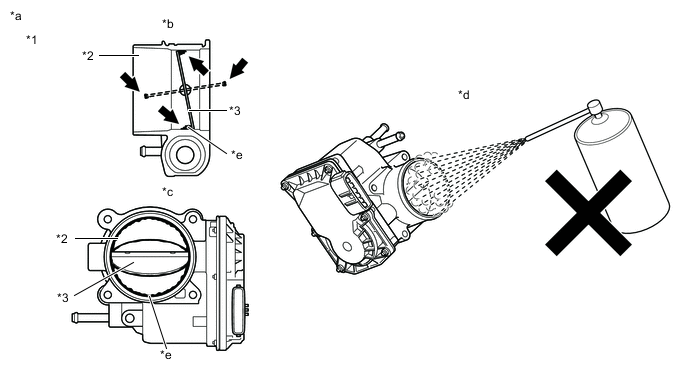
*1 Throttle Body with Motor Assembly *2 Bore *3 Valve - - *a Reference *b Throttle Body with Motor Assembly Cross-section Diagram *c When valve fully opened *d Do not directly apply cleaner *e Deposits - - Note
-
Make sure that the cloth or your fingers do not get caught in the valve.
-
Make sure that foreign matter does not enter the throttle valve.
-
Do not directly apply non-residue solvent to the throttle body with motor assembly or wash the throttle body with motor assembly. Cleaning solvent may leak into the motor from the shaft and cause problems such as rust or valve movement problems.
-
If there is coating material on the edge of the valve, be careful not to remove it.
Tech Tips
The illustrations are for reference only. Actual parts may differ.
Result Proceed to NEXT -
NEXT
-
-
PERFORM CONFIRMATION DRIVING PATTERN
-
Perform "Inspection After Repair" after cleaning the throttle body with motor assembly.
-
Connect the GTS to the DLC3.
-
Turn the engine switch on (IG).
-
Turn the GTS on.
-
Start the engine and warm it up until the engine coolant temperature reaches 75°C (167°F) or higher.
-
Allow the engine to idle for 3 minutes or more and confirm that the engine speed is within the specified range.
Tech Tips
If the engine is operated without performing learning value reset and idle learning after cleaning the deposits from the throttle body with motor assembly, the idle speed may increase.
Result Proceed to NEXT
NEXT
GO TO STEP 36 Click here
-
-
CHECK CYLINDER COMPRESSION PRESSURE
-
Measure the cylinder compression pressure. If the compression pressure of a cylinder is low, inspect the engine assembly and repair or replace parts as necessary.
Result Proceed to NEXT
NEXT
GO TO STEP 35 Click here
-
-
REPLACE FUEL INJECTOR ASSEMBLY
-
Replace the abnormal fuel injector assembly.
Tech Tips
-
If the air fuel ratio learned value is corrected to the positive side for all operating ranges due to low fuel injector assembly injection volume, replace the fuel injector assemblies of all cylinders.
-
Perform "Inspection After Repair" after replacing the fuel injector assembly.
Result Proceed to NEXT -
NEXT
GO TO STEP 36 Click here
-
-
CHECK DTC OUTPUT
-
Connect the GTS to the DLC3.
-
Turn the engine switch on (IG).
-
Turn the GTS on.
-
Perform the DTC P024313 confirmation driving pattern.
-
Enter the following menus: Powertrain / Engine / Trouble Codes.
-
Read the DTCs.
Powertrain > Engine > Trouble CodesResult Result Proceed to DTCs are not output A DTC is output B
B
GO TO DTC CHART Click here
A
-
-
INSPECT WASTE GATE VALVE (TURBINE HOUSING WITH VALVE SUB-ASSEMBLY)
-
Inspect the waste gate valve.
Result Proceed to OK NG
NG
REPLACE TURBINE HOUSING WITH VALVE SUB-ASSEMBLY Click here
OK
-
-
INSPECT WASTE GATE VALVE ACTUATOR WITH BRACKET ASSEMBLY
-
Inspect the waste gate valve actuator with bracket assembly.
Result Proceed to OK NG
NG
REPLACE WASTE GATE VALVE ACTUATOR WITH BRACKET ASSEMBLY Click here
OK
-
-
INSPECT VACUUM REGULATING VALVE ASSEMBLY
-
Inspect the vacuum regulating valve assembly.
Result Proceed to OK NG
NG
REPLACE VACUUM REGULATING VALVE ASSEMBLY Click here
OK
-
-
CHECK HARNESS AND CONNECTOR (VACUUM REGULATING VALVE ASSEMBLY - ECM)
-
Disconnect the vacuum regulating valve assembly connector.
-
Disconnect the ECM connector.
-
Measure the resistance according to the value(s) in the table below.
Standard Resistance Tester Connection Condition Specified Condition D65-1 (+B) - D1-37 (WGV+) Always Below 1 Ω D65-2 (VN) - D1-36 (WGV-) Always Below 1 Ω D65-1 (+B) or D1-37 (WGV+) - Body ground and other terminals Always 10 kΩ or higher D65-2 (VN) or D1-36 (WGV-) - Body ground and other terminals Always 10 kΩ or higher Result Proceed to OK NG
OK
GO TO STEP 3 Click here
NG
REPAIR OR REPLACE HARNESS OR CONNECTOR
-
-
GO TO LACK OF POWER (TURBOCHARGER SYSTEM)
-
Perform a lack of power (turbocharger system) troubleshooting inspection.
Result Proceed to NEXT
NEXT
GO TO STEP 36 Click here
-
-
READ VALUE USING GTS (MASS AIR FLOW SENSOR)
-
Connect the GTS to the DLC3.
-
Turn the engine switch on (IG).
-
Turn the GTS on.
-
Enter the following menus: Powertrain / Engine / Data List / Engine Speed, Mass Air Flow Sensor and Coolant Temperature.
Powertrain > Engine > Data ListTester Display Engine Speed Mass Air Flow Sensor Coolant Temperature -
Start the engine and warm it up until the engine coolant temperature 75°C (167°F) or higher with all the accessories switched off.
-
According to the display on the GTS, read the Data List when the engine switch is turned on (IG) and while maintaining an engine speed of 3000 rpm.
Result Result Proceed to Other than below A Engine switch on (IG) (engine stopped): 0.57 gm/sec or higher
Engine speed 3000 rpm (without load): Less than 5.7 gm/sec
B
B
CHECK INTAKE SYSTEM Click here
A
-
-
PERFORM ACTIVE TEST USING GTS (D-4S (INJECTION VOLUME))
-
Connect the GTS to the DLC3.
-
Turn the engine switch on (IG).
-
Turn the GTS on.
-
Start the engine and warm it up until the engine coolant temperature 75°C (167°F) or higher with all the accessories switched off.
-
Warm up the air fuel ratio sensors at an engine speed of 2500 rpm for 90 seconds.
-
Idle the engine.
-
Enter the following menus: Powertrain / Engine / Active Test / D-4S (Injection Volume) / Data List / Coolant Temperature, A/F (O2) Sensor Voltage B1S1 and A/F (O2) Sensor Current B1S2.
Powertrain > Engine > Active TestActive Test Display D-4S (Injection Volume) Data List Display Coolant Temperature A/F (O2) Sensor Voltage B1S1 A/F (O2) Sensor Current B1S2 -
According to the display on the GTS, perform the Active Test and check the vehicle conditions when increasing and decreasing the fuel injection volume of port injection and direct injection.
Tech Tips
-
The air fuel ratio sensor (sensor 1) has an output delay of a few seconds and the air fuel ratio sensor (sensor 2) has a maximum output delay of approximately 20 seconds.
-
Read the output values immediately after warming up the air fuel ratio sensors to avoid an inaccurate reading due to a sensor cooling.
-
Increase and decrease the fuel injection volume of the port injection and direct injection simultaneously and check the vehicle condition.
-
Change the fuel injection volume between the minimum and maximum range of correction (e.g. -12.5% to 24.8%).
Standard GTS Display
(Sensor)
Injection Volume Voltage A/F (O2) Sensor Voltage B1S1
(Air fuel ratio sensor (sensor 1))
24.8% Below 3.1 V -12.5% Higher than 3.4 V A/F (O2) Sensor Current B1S2
(Air fuel ratio sensor (sensor 2))
24.8% Below -0.86 mA -12.5% More than 0.33 mA Result Result Proceed to Output values are abnormal A Malfunction disappears when fuel injection volume is increased B Malfunction is still present when fuel injection volume is increased, even if output values are normal C -
B
REPLACE FUEL INJECTOR ASSEMBLY Click here
C
PERFORM ACTIVE TEST USING GTS (ACTIVATE THE CIRCUIT RELAY) Click here
A
-
-
REPLACE AIR FUEL RATIO SENSOR (SENSOR 1) AND AIR FUEL RATIO SENSOR (SENSOR 2)
-
Replace the air fuel ratio sensor (sensor 1).
Tech Tips
Perform "Inspection After Repair" after replacing the air fuel ratio sensor (sensor 1).
-
Replace the air fuel ratio sensor (sensor 2).
Tech Tips
Perform "Inspection After Repair" after replacing the air fuel ratio sensor (sensor 2).
Result Proceed to NEXT
NEXT
GO TO STEP 36 Click here
-
-
REPLACE FUEL INJECTOR ASSEMBLY
-
Replace the fuel injector assemblies of all cylinders.
Result Proceed to NEXT
NEXT
GO TO STEP 36 Click here
-
-
CHECK INTAKE SYSTEM
-
Check for air leaks or blockage in the intake system components. If a connection problem or foreign matter is found, repair the connection or remove the foreign matter.
Tech Tips
-
If there is foreign matter in the intake system components, remove it before proceeding to the next step.
-
If there is no foreign matter in the intake system components, check for foreign matter in the mass air flow meter sub-assembly. If there is foreign matter in the mass air flow meter sub-assembly, remove it.
Result Proceed to NEXT -
NEXT
GO TO STEP 35 Click here
-
-
PERFORM ACTIVE TEST USING GTS (ACTIVATE THE CIRCUIT RELAY)
-
Connect the GTS to the DLC3.
-
Turn the engine switch on (IG).
-
Turn the GTS on.
-
Enter the following menus: Powertrain / Engine / Active Test / Activate the Circuit Relay.
Powertrain > Engine > Active TestTester Display Activate the Circuit Relay -
When performing the Active Test, check for an operating sound from the fuel pump (for low pressure side).
OK Activate the Circuit Relay Specified Condition ON Operating sound heard OFF Operating sound not heard Result Proceed to OK NG
NG
INSPECT FUEL PUMP CONTROL SYSTEM Click here
OK
-
-
INSPECT FUEL PUMP (FOR LOW PRESSURE SIDE)
-
Attach a fuel pressure gauge and check the fuel pressure when cranking the engine and after stopping the engine.
Standard Vehicle State Specified Condition Cranking engine 196 to 833 kPa (2.0 to 8.5 kgf/cm2, 28 to 121 psi)
5 minutes after stopping engine 98 kPa (1.0 kgf/cm2, 14 psi) or higher
Tech Tips
-
If there is foreign matter such as iron particles on the fuel pump (for low pressure side), remove it.
-
Make sure that there are no leaks from the fuel lines, signs of fuel leakage or fuel odors.
-
If the air fuel ratio becomes lean only when the engine is running under a high load and at a high engine speed, clogging of the fuel filter is suspected.
Result Proceed to OK NG -
NG
INSPECT RELATED PARTS Click here
OK
-
-
READ VALUE USING GTS (FUEL PRESSURE (HIGH))
-
Connect the GTS to the DLC3.
-
Start the engine and warm it up until the engine coolant temperature is 75°C (167°F) or higher with all the accessories switched off.
-
Turn the GTS on.
-
Enter the following menus: Powertrain / Engine / Data List / Engine Speed, Coolant Temperature, Fuel Pressure (High) and Injection Mode.
Powertrain > Engine > Data ListTester Display Engine Speed Coolant Temperature Fuel Pressure (High) Injection Mode -
Read Fuel Pressure (High) with the engine speed at 3000 rpm.
Standard GTS Display Condition Specified Condition Fuel Pressure (High)
-
Shift position: P
-
A/C: Off
-
Engine warmed up
-
Engine Speed: 3000 rpm
-
Injection Mode: Direct
4000 to 8000 kPag Result Proceed to OK NG -
NG
GO TO STEP 35 Click here
OK
-
-
READ VALUE USING GTS (FUEL CUT HISTORY)
-
Connect the GTS to the DLC3.
-
Turn the engine switch on (IG).
-
Turn the GTS on.
-
Enter the following menus: Powertrain / Engine / Data List / Fuel Cut History 1 to 4.
Powertrain > Engine > Data ListTester Display Fuel Cut History 1 Fuel Cut History 2 Fuel Cut History 3 Fuel Cut History 4 -
According to the display on the GTS, read the Data List.
Result Result Proceed to Other than below A The "distance calculated by subtracting the driving distance at the time of the malfunction from the current driving distance" and "distance calculated by subtracting the driving distance of Fuel Cut History 1 to 4 in the Data List from the driving distance of Distance for Control in the Data List" match* B Tech Tips
*: The Data List fuel cut operation history records the driving distance when the strong knocking repeated prevention control (engine protection) function is performed. Performing initialization of the GTS "Heavy Knock History" causes the Data List item "Fuel Cut History 1 to 4" driving distance to be reset to 0 km.
If "distance calculated by subtracting the driving distance at the time of the malfunction from the current driving distance" and "distance calculated by subtracting the driving distance of Fuel Cut History 1 to 4 from the driving distance of Distance for Control in the Data List" match, explain to the customer that this is the normal control for the repeated prevention control (engine protection).
B
END
A
-
-
INSPECT OTHER RELATED COMPONENTS
-
Inspect other related components.
Tech Tips
If the malfunctioning part could not be determined by performing the preceding inspections, one of the following malfunctions is suspected.
-
Deposits in the intake manifold or on an intake valve
-
Delay in fuel supply due to adherence of the fuel to the deposits
Result Proceed to NEXT -
NEXT
GO TO STEP 35 Click here
-
-
INSPECT RELATED PARTS
-
Inspect the following fuel pump (for low pressure side) related parts:
-
Fuel suction plate sub-assembly
-
Fuel main valve assembly
-
Fuel lines and connecting parts
-
Fuel filter
Result Proceed to NEXT -
NEXT
GO TO STEP 35 Click here
-
-
INSPECT FUEL PUMP CONTROL SYSTEM
-
Inspect the fuel pump control system.
Result Proceed to NEXT
NEXT
-
-
REPAIR OR REPLACE MALFUNCTIONING PARTS
-
Repair or replace the malfunctioning part.
-
Perform "Inspection After Repair" after repairing or replacing the malfunctioning part.
Result Proceed to NEXT
NEXT
-
-
CONDUCT CONFIRMATION TEST
-
Check that the engine has returned to normal.
Result Proceed to NEXT
NEXT
END
-