NAVIGATION SYSTEM Microphone Circuit between Microphone and Navigation Receiver Assembly
DESCRIPTION
This circuit sends a microphone signal from the telephone microphone assembly to the navigation receiver assembly.
It also supplies power from the navigation receiver assembly to the telephone microphone assembly.
WIRING DIAGRAM
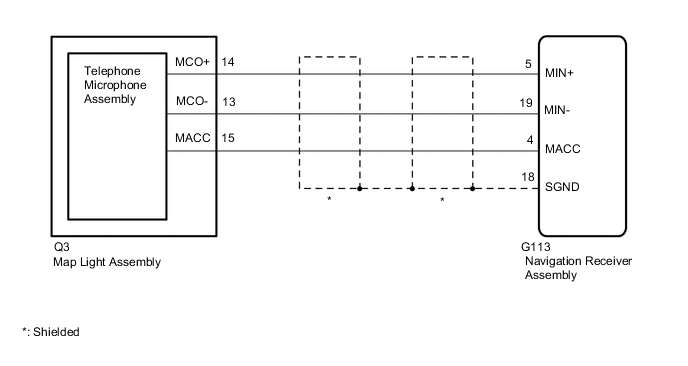
CAUTION / NOTICE / HINT
Note
Check that the wire harness is properly installed and does not have any sharp bends, pinching or loose connections.
PROCEDURE
-
CHECK NAVIGATION RECEIVER ASSEMBLY
-
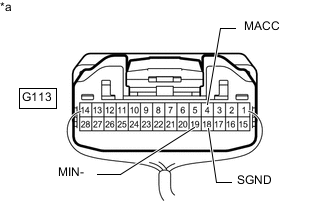
*a Component with harness connected
(Navigation Receiver Assembly)
Measure the resistance according to the value(s) in the table below.
Standard Resistance Tester Connection Condition Specified Condition G113-18 (SGND) - Body ground Always Below 1 Ω G113-19 (MIN-) - Body ground Always Below 1 Ω -
Measure the voltage according to the value(s) in the table below.
Standard Voltage Tester Connection Switch Condition Specified Condition G113-4 (MACC) - Body ground Ignition switch ACC 4 to 6 V Result Proceed to OK NG
NG 
REPLACE NAVIGATION RECEIVER ASSEMBLY Click here
OK 
-
-
CHECK HARNESS AND CONNECTOR (NAVIGATION RECEIVER ASSEMBLY - MAP LIGHT ASSEMBLY)
-
Disconnect the G113 navigation receiver assembly connector.
-
Disconnect the Q3 map light assembly connector.
-
Measure the resistance according to the value(s) in the table below.
Standard Resistance Tester Connection Condition Specified Condition G113-5 (MIN+) - Q3-14 (MCO+) Always Below 1 Ω G113-19 (MIN-) - Q3-13 (MCO-) Always Below 1 Ω G113-4 (MACC) - Q3-15 (MACC) Always Below 1 Ω G113-5 (MIN+) - Body ground Always 10 kΩ or higher G113-19 (MIN-) - Body ground Always 10 kΩ or higher G113-4 (MACC) - Body ground Always 10 kΩ or higher G113-18 (SGND) - Body ground Always 10 kΩ or higher Result Proceed to OK NG
NG
REPAIR OR REPLACE HARNESS OR CONNECTOR
OK
-
-
CHECK TELEPHONE MICROPHONE ASSEMBLY
-
Replace the telephone microphone assembly with a known good one.
-
Check if the same problem occurs again.
OK Malfunction disappears. Result Proceed to OK NG
OK
END (TELEPHONE MICROPHONE ASSEMBLY IS DEFECTIVE)
NG
REPLACE MAP LIGHT ASSEMBLY Click here
-