CHARGING SYSTEM ON-VEHICLE INSPECTION
PROCEDURE
-
CHECK AUXILIARY BATTERY
-
Check that the auxiliary battery cables are connected to the correct terminals.
If they are not, connect them properly.
-
Check the auxiliary battery for damage and deformation. If severe damage, deformation or leakage is found, replace the auxiliary battery.
-
-
CHECK AUXILIARY BATTERY VOLTAGE
-
Turn the power switch off and turn on the high beam headlights for 30 seconds. This will remove the surface charge from the auxiliary battery.
-
Measure the auxiliary battery voltage according to the value(s) in the table below.
Result Tester Connection Condition Specified Condition Result Positive (+) auxiliary battery terminal - Negative (-) auxiliary battery terminal 20°C (68°F), Power switch off 12.6 to 12.8 V Auxiliary battery is OK 12.2 to 12.4 V Recharge auxiliary battery 11.8 to 12.0 V Replace auxiliary battery
-
-
RECHARGE AUXILIARY BATTERY
-
Recharge the auxiliary battery.
Tech Tips
-
Recharge the auxiliary battery according to the charger's instructions.
-
Apply the appropriate charging current according to the type of auxiliary battery shown in the table below.
Auxiliary Battery Type Charging Current S46B24L Below 5 A -
-
Turn the power switch off and turn on the high beam headlights for 30 seconds. This will remove the surface charge from the auxiliary battery.
-
Measure the auxiliary battery voltage according to the value(s) in the table below.
Result Tester Connection Condition Specified Condition Result Positive (+) auxiliary battery terminal - Negative (-) auxiliary battery terminal 20°C (68°F), Power switch off 12.6 to 12.8 V Auxiliary battery is OK 12.2 to 12.4 V Recharge auxiliary battery 11.8 to 12.0 V Replace auxiliary battery
-
-
CHECK AUXILIARY BATTERY TERMINAL, FUSIBLE LINK AND FUSE
-
Check that the auxiliary battery terminals are not loose or corroded.
- Torque:
- Positive (+) Auxiliary Battery Terminal
- 5.4 N*m { 55 kgf*cm, 48 in.*lbf }
- Negative (-) Auxiliary Battery Terminal
- 5.4 N*m { 55 kgf*cm, 48 in.*lbf }
If a terminal is loose or corroded, tighten or clean the terminal.
-
Measure the resistance of each fusible link and fuse for the auxiliary battery charging system.
Standard Resistance Below 1 Ω If the result is not as specified, replace the fusible link or fuse as necessary.
-
-
CHECK AMD TERMINAL
-
Remove the service plug grip.
-
Check that the AMD terminal is connected securely, and there is no contact problem.
If there are any arc marks, replace the affected parts.
-
Check that the nut for the AMD terminal is tightened to the specified torque.
-
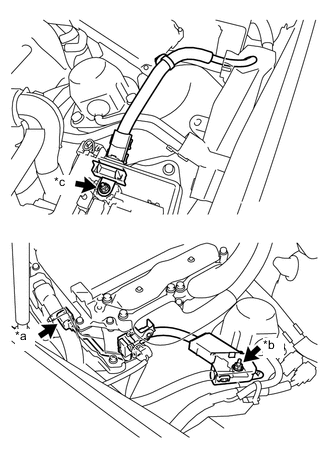
*a Inverter with Converter Assembly Side *b Inverter Bus-bar Plate Sub-assembly Side *c No. 1 Engine Room Relay Block and No. 1 Junction Block Assembly Side for LHD:
- Torque:
- Inverter with converter assembly side
- 18 N*m { 184 kgf*cm, 13 ft.*lbf }
- Inverter bus-bar plate sub-assembly side
- 10.5 N*m { 107 kgf*cm, 8 ft.*lbf }
- No. 1 engine room relay block and No. 1 junction block assembly side
- 10.5 N*m { 107 kgf*cm, 8 ft.*lbf }
If there are no arc marks and the AMD terminal connection is faulty, connect the AMD terminal securely.
-
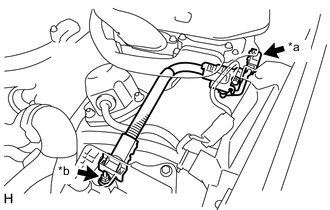
*a Inverter with Converter Assembly Side *b No. 1 Engine Room Relay Block and No. 1 Junction Block Assembly Side for RHD:
- Torque:
- Inverter with converter assembly side
- 18.0 N*m { 184 kgf*cm, 13 ft.*lbf }
- No. 1 engine room relay block and No. 1 junction block assembly side
- 10.5 N*m { 107 kgf*cm, 8 ft.*lbf }
If there are no arc marks and the AMD terminal connection is faulty, connect the AMD terminal securely.
-
-
Install the service plug grip.
-
-
CHECK DC/DC CONVERTER FUNCTION
-
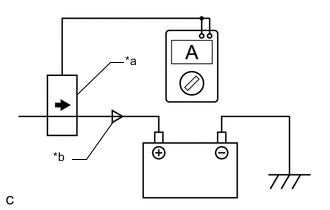
*a Probe Direction *b Current Flowing into Auxiliary Battery Connect the AC/DC 400 A probe to the positive (+) auxiliary battery cable.
-
Turn the power switch on (READY) and leave the vehicle as is until the electric current flowing to the auxiliary battery becomes 10 A or less.
-
Turn on the high beam headlights, and turn the blower motor switch to the HI position and the rear window defogger on.
-
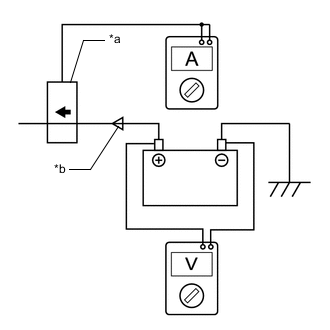
*a Probe Direction *b Current Flowing from Auxiliary Battery Measure the current and voltage according to the value(s) in the table below.
Result Item Tester Connection Condition Specified Condition Current flowing from auxiliary battery Positive (+) auxiliary battery cable Power switch on (READY)
(The high beam headlights are on, the blower motor switch is in the HI position, and the rear window defogger is turned on.)
0 A or less
(No current from auxiliary battery)
Auxiliary battery voltage Positive (+) auxiliary battery terminal - Negative (-) auxiliary battery terminal 13 to 15 V If the result is not as specified, replace the inverter with converter assembly.
-