REAR MULTI OPERATION PANEL SYSTEM OPERATION CHECK
-
INSPECT REAR MULTI OPERATION PANEL
-
Check that the relevant system can be operated by using a finger and touching the touch panel on the rear power seat switch (rear multi operation panel).
Tech Tips
The rear power seat switch (rear multi operation panel) may not respond normally depending on the condition at the time of operation
-
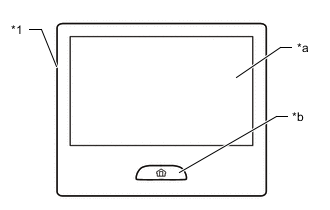
*1 Rear power seat switch (Rear Multi Operation Panel) *a Touch screen *b Home switch Press the home switch and check that the following operations can be performed.
Home switch condition Operation Single press The home screen displays. (The screen is illuminated when the screen display turns off and then displays the home screen) Long press Stop the power seat and turn off the screen. Press 3 times consecutively* Stop the power seat and turn off the screen. Tech Tips
*:Press the home switch continuously within 0.6 seconds.
-