AUTOMATIC TRANSAXLE SYSTEM REGISTRATION
CAUTION / NOTICE / HINT
When the automatic transaxle is replaced, the transaxle compensation code must be input into the ECM (proceed to Procedure 1). After the automatic transaxle is installed, the Quick Response (QR) code label will be positioned where the code cannot be read. Therefore, before installing the automatic transaxle, record the transaxle compensation codes or input them in the GTS.
When the ECM is replaced, the existing transaxle compensation codes must be input into the new ECM (proceed to Procedure 2).
PROCEDURE
INPUT TRANSAXLE COMPENSATION CODE INTO ECM (Procedure 1)
Note:Transaxle compensation codes are unique, 60-digit alphanumeric values printed on a QR label on the transaxle. If an incorrect transaxle compensation code is input into the ECM, shift shock may occur.
-
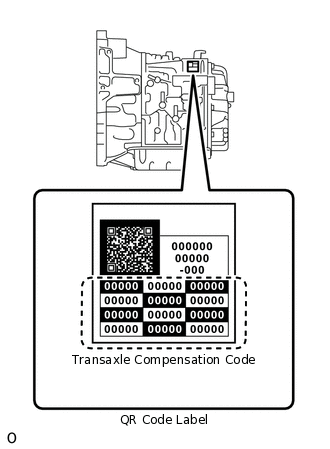
Record the transaxle compensation code specified on the QR label.
Tip:The transaxle compensation code is imprinted on the QR label.
Move the shift lever to N or P.
Connect the GTS to the DLC3.
Turn the ignition switch to ON.
Turn the GTS on.
Note:Do not start the engine.
Enter the following menus: Powertrain / Engine and ECT / Utility / A/T Code Registration.
Powertrain > Engine and ECT > Utility
Tester Display
A/T Code Registration
Select "Set Compensation Code".
Register the compensation code.
Manually input the transaxle compensation code. The code is a 60-digit alphanumeric value printed on the QR label.
Check that the compensation code displayed on the screen is correct by comparing it with the 60-digit alphanumeric value on the QR label.
Note:If an incorrect transaxle compensation code is input into the ECM, shift shock will occur.
Press "Next" to set the compensation code to the ECM.
Tip:If the registration process fails, the compensation code may be incorrect. Check the compensation code again.
If the attempted compensation code is correct, a problem with the wire harness or a bad connection with the DLC3 may cause a registration failure. Check the wire harness and the DLC3 connection. If no problem is found, the ECM may be malfunctioning. Check the ECM and repeat this operation.
Press "Exit".
-
TRANSFER TRANSAXLE COMPENSATION CODE (Procedure 2)
Note:Transaxle compensation codes are 60-digit alphanumeric values imprinted on a QR label on the transaxle. If an incorrect transaxle compensation code is input into the ECM, shift shock may occur.
Tip:The following operation is available for use with ECMs that can transmit the registered transaxle compensation code to GTS.
Move the shift lever to N or P.
Connect the GTS to the DLC3.
Turn the ignition switch to ON.
Turn the GTS on.
Note:Do not start the engine.
Tip:The transaxle compensation code is imprinted on the QR label.
Read the transaxle compensation code.
Enter the following menus: Powertrain / Engine and ECT / Utility / A/T Code Registration.
Powertrain > Engine and ECT > Utility
Tester Display
A/T Code Registration
Select "Read Compensation Code".
Press "Save".
Press "Save" or "Overwrite".
Tip:When there is existing code data, press "Overwrite".
Note:Do not use the code specified on the transaxle QR label even if the transaxle compensation code cannot be read using the GTS. The code printed on an in-service transaxle may not match its current characteristics. Replace the ECM with a new one and perform a road test to allow the ECM to learn.
Press "Exit".
Turn the ignition switch off.
Replace the ECM.
Set the transaxle compensation code.
Turn the ignition switch to ON.
Turn the GTS on.
Enter the following menus: Powertrain / Engine and ECT / Utility / A/T Code Registration.
Powertrain > Engine and ECT > Utility
Tester Display
A/T Code Registration
Select "Set Compensation Code".
Press "Open".
Press "Open" again to proceed.
Press "Next" to set the compensation code to the ECM.
Press "Exit".