OCCUPANT CLASSIFICATION SYSTEM, Diagnostic DTC:B1793
| DTC Code | DTC Name |
|---|---|
| B1793 | Occupant Classification Sensor Power Supply Circuit Malfunction |
DESCRIPTION
The occupant classification sensor power supply circuit consists of the occupant detection ECU and rear occupant classification sensor LH and RH.
DTC B1793 is stored when a malfunction is detected in the rear occupant classification sensor power supply circuit.
DTC No. |
Detection Item |
DTC Detection Condition |
Trouble Area |
|---|---|---|---|
B1793 |
Occupant Classification Sensor Power Supply Circuit Malfunction |
|
|
When DTC B1650/32 is stored as a result of troubleshooting the airbag system, perform troubleshooting for DTC B1793 of the occupant classification system.
Use the GTS to check for DTCs of the occupant detection ECU, otherwise the DTCs cannot be read.
WIRING DIAGRAM
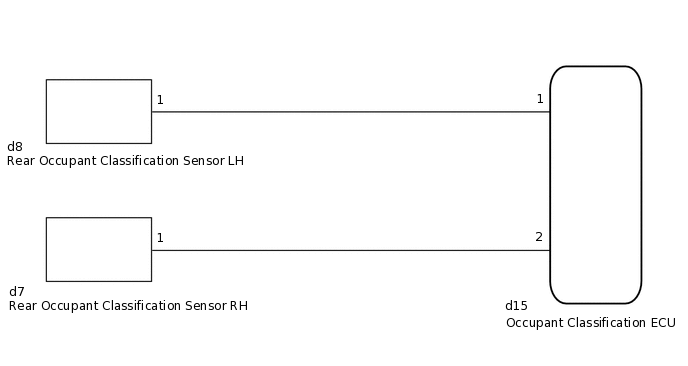
CAUTION / NOTICE / HINT
When disconnecting the cable, some systems need to be initialized after the cable is reconnected
If troubleshooting (wire harness inspection) is difficult to perform, remove the front seat RH installation bolts to see the undersurface of the seat cushion.
In the above case, hold the seat so that it does not fall down. Holding the seat for a long period of time may cause problems, such as seat rail deformation. Hold the seat up only for as long as necessary.
PROCEDURE
CHECK DTC
Turn the ignition switch to ON, and wait for at least 60 seconds.
Clear the DTCs.
Body Electrical > Occupant Detection > Clear DTCs
Tip:First clear the DTCs stored in the occupant detection ECU, and then clear the DTCs stored in the airbag sensor assembly.
Use the GTS to clear the DTCs of the occupant detection ECU, otherwise the DTCs cannot be cleared.
Turn the ignition switch off.
Turn the ignition switch to ON, and wait for at least 60 seconds.
Check for DTCs.
Body Electrical > Occupant Detection > Trouble Codes
Result
Proceed to
DTC B1793 is not output
DTC B1793 is output
Tip:DTCs other than DTC B1793 may be output at this time, but they are not related to this check.
CHECK CONNECTION OF CONNECTOR
Turn the ignition switch off.
Disconnect the cable from the negative (-) battery terminal, and wait for at least 90 seconds.
Check that the connectors are properly connected to the occupant detection ECU and rear occupant classification sensor LH and RH.
Result
Proceed to
Connectors are properly connected
Connectors are not properly connected
Connectors are not properly connected CONNECT CONNECTOR
CHECK CONNECTOR
-
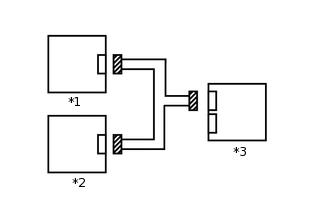
*1
Rear Occupant Classification Sensor LH
*2
Rear Occupant Classification Sensor RH
*3
Occupant Detection ECU
Disconnect the connectors from the occupant detection ECU and rear occupant classification sensor LH and RH.
Check that the connectors (on the occupant detection ECU side and rear occupant classification sensor LH and RH side) are not damaged.
Result
Proceed to
Connectors are not deformed or damaged
Connectors are deformed or damaged
Connectors are deformed or damaged REPLACE FRONT SEAT WIRE RH
-
CHECK FRONT SEAT WIRE RH
Connect the cable to the negative (-) battery terminal, and wait for at least 2 seconds.
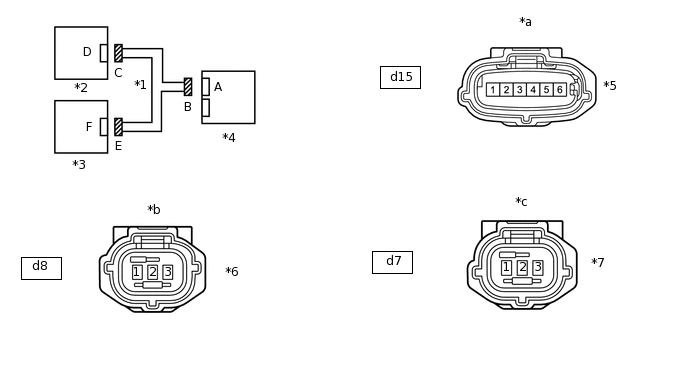
*1
Front Seat Wire RH
*2
Rear Occupant Classification Sensor LH
*3
Rear Occupant Classification Sensor RH
*4
Occupant Detection ECU
*5
Connector B
*6
Connector C
*7
Connector E
-
-
*a
Front view of wire harness connector
(to Occupant Detection ECU)
*b
Front view of wire harness connector
(to Rear Occupant Classification Sensor LH)
*c
Front view of wire harness connector
(to Rear Occupant Classification Sensor RH)
-
-
Turn the ignition switch to ON.
Measure the voltage according to the value(s) in the table below.
Standard Voltage
Tester Connection
Switch Condition
Specified Condition
d15-1 - Body ground
Ignition switch ON
Below 1 V
d15-2 - Body ground
Turn the ignition switch off.
Disconnect the cable from the negative (-) battery terminal, and wait for at least 90 seconds.
Measure the resistance according to the value(s) in the table below.
Standard Resistance
Tester Connection
Condition
Specified Condition
d15-1 - d8-1
Always
Below 1 Ω
d15-2 - d7-1
d15-1 - d15-2
Always
1 MΩ or higher
d15-1 - Body ground
d15-2 - Body ground
Result
Proceed to
OK
NG
NG REPLACE FRONT SEAT WIRE RH
CHECK DTC
Connect the connectors to occupant detection ECU and rear occupant classification sensor LH and RH.
Connect the cable to the negative (-) battery terminal, and wait for at least 2 seconds.
Turn the ignition switch to ON, and wait for at least 60 seconds.
Clear the DTCs.
Body Electrical > Occupant Detection > Clear DTCs
Tip:First clear the DTCs stored in the occupant detection ECU, and then clear the DTCs stored in the airbag sensor assembly.
Use the GTS to clear the DTCs of the occupant detection ECU, otherwise the DTCs cannot be cleared.
Turn the ignition switch off.
Turn the ignition switch to ON, and wait for at least 60 seconds.
Check for DTCs.
Body Electrical > Occupant Detection > Trouble Codes
Result
Proceed to
DTC B1793 is not output
DTC B1793 is output
Tip:DTCs other than DTC B1793 may be output at this time, but they are not related to this check.
REPLACE OCCUPANT DETECTION ECU
Turn the ignition switch off.
Disconnect the cable from the negative (-) battery terminal, and wait for at least 90 seconds.
Replace the occupant detection ECU.
Tip:Perform the inspection using parts from a normal vehicle when possible.
Result
Proceed to
NEXT
PERFORM ZERO POINT CALIBRATION
Connect the cable to the negative (-) battery terminal, and wait for at least 2 seconds.
Turn the ignition switch to ON.
Perform the zero point calibration.
Result
Proceed to
"Zero Point Calibration is complete." is displayed
"Zero Point Calibration is complete." is not displayed
"Zero Point Calibration is complete." is not displayed REPLACE SEPARATE TYPE FRONT SEAT CUSHION SPRING ASSEMBLY (REAR OCCUPANT CLASSIFICATION SENSOR)Click here
PERFORM SENSITIVITY CHECK
Perform the sensitivity check.
Standard
27 to 33 kg (59.5 to 72.8 lb)
Result
Proceed to
OK
NG
NG REPLACE SEPARATE TYPE FRONT SEAT CUSHION SPRING ASSEMBLY (REAR OCCUPANT CLASSIFICATION SENSOR)Click here
CHECK DTC
Clear the DTCs.
Body Electrical > Occupant Detection > Clear DTCs
Tip:First clear the DTCs stored in the occupant detection ECU, and then clear the DTCs stored in the airbag sensor assembly.
Use the GTS to clear the DTCs of the occupant detection ECU, otherwise the DTCs cannot be cleared.
Turn the ignition switch off.
Turn the ignition switch to ON, and wait for at least 60 seconds.
Check for DTCs.
Body Electrical > Occupant Detection > Trouble Codes
Result
Proceed to
DTC B1793 is not output
DTC B1793 is output
Tip:DTCs other than DTC B1793 may be output at this time, but they are not related to this check.
DTC B1793 is not output END (OCCUPANT DETECTION ECU WAS DEFECTIVE)
DTC B1793 is output REPLACE SEPARATE TYPE FRONT SEAT CUSHION SPRING ASSEMBLY (REAR OCCUPANT CLASSIFICATION SENSOR)Click here
REPLACE SEPARATE TYPE FRONT SEAT CUSHION SPRING ASSEMBLY (REAR OCCUPANT CLASSIFICATION SENSOR)
Turn the ignition switch off.
Disconnect the cable from the negative (-) battery terminal, and wait for at least 90 seconds.
Replace the separate type front seat cushion spring assembly.
for Power Seat
for Manual Seat
Tip:Perform the inspection using parts from a normal vehicle when possible.
Result
Proceed to
NEXT
PERFORM ZERO POINT CALIBRATION
Connect the cable to the negative (-) battery terminal, and wait for at least 2 seconds.
Turn the ignition switch to ON.
Perform the zero point calibration.
Result
Proceed to
NEXT
PERFORM SENSITIVITY CHECK
Perform the sensitivity check.
Standard
27 to 33 kg (59.5 to 72.8 lb)
Result
Proceed to
NEXT
NEXT END (SEPARATE TYPE FRONT SEAT CUSHION SPRING ASSEMBLY [REAR OCCUPANT CLASSIFICATION SENSOR] WAS DEFECTIVE)