NAVIGATION SYSTEM / MULTI INFORMATION SYSTEM
-
OUTLINE
-
Light Emitting Diodes (LEDs) are used to provide mercury-free backlighting for the navigation receiver assembly. This reduces the burden on the environment and ensures brightness.
-
The map database of the navigation system is stored in the micro SD card in the navigation receiver assembly. To update the map database, purchase a new micro SD card with the latest map database and replace the old micro SD card.
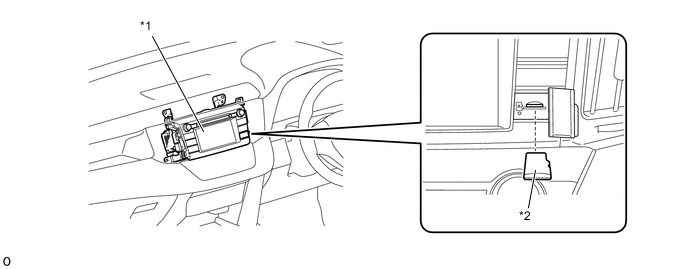
*1 Navigation Receiver Assembly *2 Micro SD Card -
A fuel consumption screen is provided in consideration of the environment.
-
-
SPECIFICATION
Multi-display 6.1-inch Wide Video Graphics Array (WVGA) TFT Display Navigation Computer FUJITSU TEN Gyro Sensor Piezoelectric Ceramic Element Map Data Media Micro SD Card Micro SD Card AISIN AW Language Supported Voice Guidance English Voice Recognition -
MAIN FEATURES
-
Voice Recognition System
-
When the voice recognition system starts operating, the commands that the system is able to recognize are displayed on the navigation receiver assembly.
-
-
The main functions of the navigation receiver assembly are listed below:
Function Outline Navigation System Through the use of the Global Positioning System (GPS) and map data stored on a micro SD card, the navigation system analyzes the position of the vehicle and indicates the current position on the map displayed on the screen. In addition, the system can be used to register memory points and navigate to a destination. Audio/Video System Serves as the display and controls for the following operations:
-
Radio operation
-
CD player operation
-
Bluetooth-compatible portable audio player operation
-
USB memory operation
-
iPod/iPhone operation
-
Portable audio player operation (AUX type)
Hands-free System When a Bluetooth-compatible cellular telephone is registered to the navigation system, the user can make and receive calls or talk hands-free on the cellular telephone by operating the switches on the screen/steering pad. Speech Command System Operates the navigation, audio and hands-free based on voice commands. Monitor System (Models with Monitor System) Displays a view of the area behind the vehicle that is captured by the television camera mounted on the back door when the shift lever is moved to R. Others Fuel Consumption Screen Fuel consumption information such as average fuel consumption per minute, current fuel consumption per minute and past fuel consumption record is displayed. Maintenance Information The maintenance information function can be used to inform the user of the inspection or replacement timing of the following items based on the calendar function and distance driven:
-
Engine oil: Replace engine oil
-
Oil filter: Replace engine oil filter
-
Rotation: Rotate tires
-
Tires: Replace tires
-
Battery: Replace battery
-
Brake pad: Replace brake pads
-
Wipers: Replace wiper blades
-
Coolant: Replace engine coolant
-
Brake oil: Replace brake fluid
-
Trans. fluid: Replace ATF
-
Service: Scheduled maintenance
-
Air filter: Replace air filter
-
Personal: New information items can be created separately from the provided items
Screen Adjustment The brightness and contrast of the screen can be adjusted to suit the brightness of the surroundings. Map Database Update The map database can be updated by purchasing a new micro SD card with the latest map database and replacing the old micro SD card. General Setting
-
System Time: The user can change the time zone and turn the daylight saving time on/off.
-
Units of Measurement: The user can change the unit of measure for distance/fuel consumption.
-
Beep: The user can sound beeps.
-
Color Theme: The user can change the screen button color.
-
Auto Change to Home Screen: The user can turn set automatic screen changes from the audio control screen to the home screen on/off. When set to on, the screen will automatically return to the home screen from the audio control screen after 20 seconds.
-
Animation: The user can turn the animations on/off.
-
Customize Startup Image: The user can customize the startup images.
-
Customize Screen Off Image: The user can customize the screen off image.
-
Delete Personal Data: The user can delete personal data.
-
Software Update: The user can update software versions.
-
Software Information: The user can display the software information. Notices related to third party software used in this product are displayed.
-
Default: The user can reset all setup items.
Voice Setting
-
Voice Volume: The user can adjust the voice guidance.
-
Automatic Navigation Guidance: The user can set the voice guidance during route guidance on/off.
-
Voice Recognition Prompts: The user can set the voice recognition prompts.
-
Train Voice Recognition: The user can train voice recognition. The speech command system adapts to the user's accent.
-
Voice Prompt Interrupt: The user can set the voice prompt interrupt on/off.
-
Default: The user can reset all setup items.
Diagnosis This menu contains the following items:
-
Failure Diagnosis
-
System Check
-
SD Check
-
Diagnosis Recorder
-
Function Check/Setting
-
Panel and Steering Switch
-
Touch Switch
-
Microphone Check
-
System Sensors Check
-
Vehicle Signal
-
HF Voice Quality Setting
-
DAB Reception Check (Models with Digital Audio Broadcast (DAB) Tuner)
-
Service Information
-
Program Update
-
Version Information
-
Product Information
-
-