AUDIO AND VISUAL SYSTEM(for 8 Inch Display) Speaker Circuit
DESCRIPTION
If there is a short in a speaker circuit, the stereo component amplifier assembly detects it and stops output to the speakers.
Thus sound cannot be heard from the speakers even if there is no malfunction in the stereo component amplifier assembly, telematics transceiver* or speakers.
-
*: w/ Manual (SOS) Switch
WIRING DIAGRAM
-
for 9 Speakers
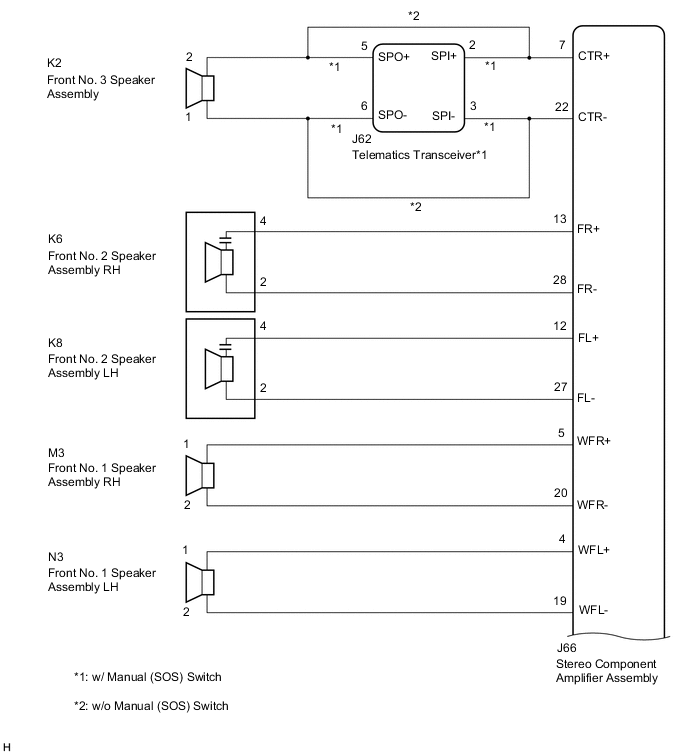
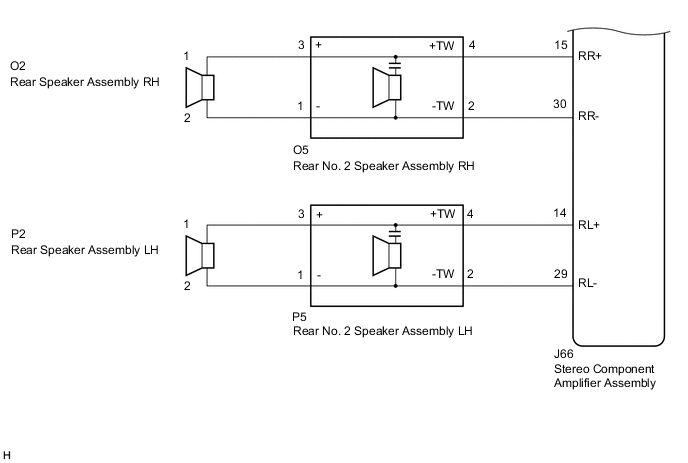
-
for 12 Speakers
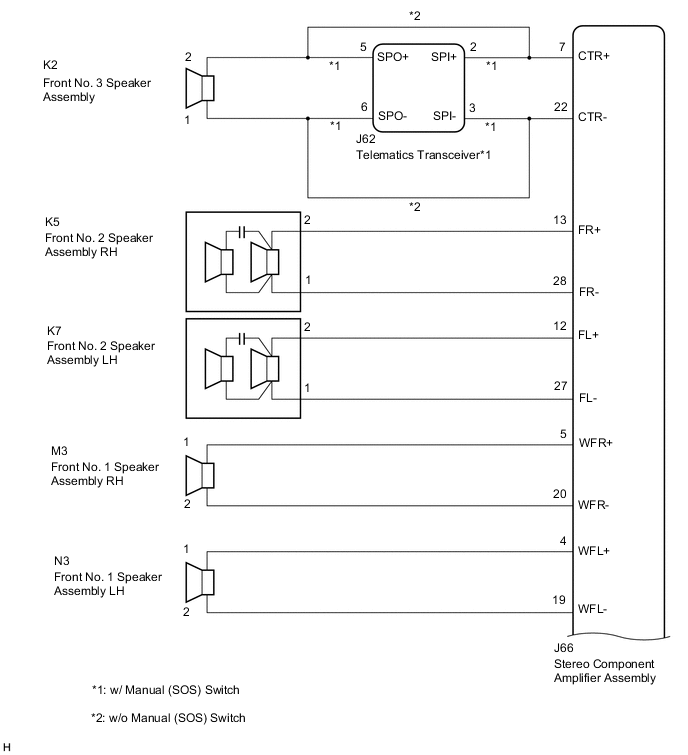
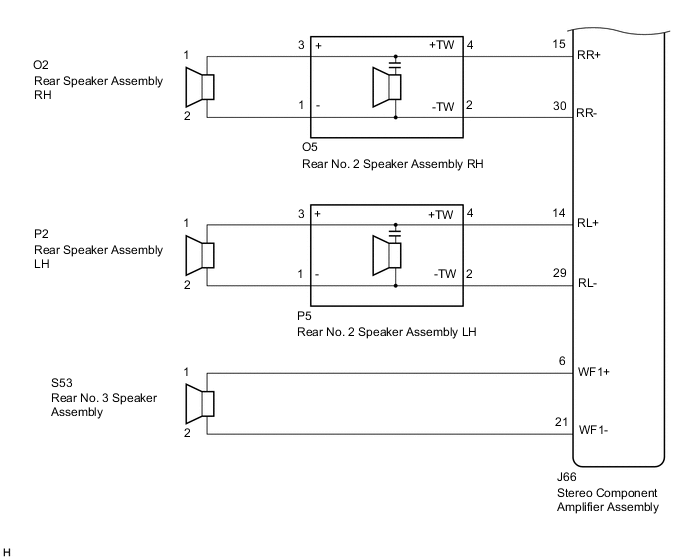
CAUTION / NOTICE / HINT
Note
Depending on the parts that are replaced during vehicle inspection or maintenance, performing initialization, registration or calibration may be needed. Refer to Precaution for Audio and Visual System.
PROCEDURE
-
CONFIRM MODEL
-
Choose the model to be inspected.
Result Result Proceed to for 9 Speakers A for 12 Speakers B
B 
CHECK SPEAKER (OPERATION CHECK) Click here
A 
-
-
CHECK SPEAKER (OPERATION CHECK)
-
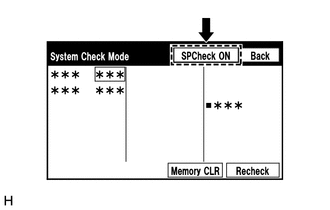
Enter the "System Check Mode" screen. Refer to Check SP Check On in Operation Check.
-
Perform the operation check above and determine the speaker that is not operating.
Result Not Operating Speaker Proceed to Front No. 3 speaker assembly
(w/ Manual (SOS) Switch)
A Front No. 3 speaker assembly
(w/o Manual (SOS) Switch)
B Front No. 2 speaker assembly C Front No. 1 speaker assembly D Rear speaker assembly or rear No. 2 speaker assembly E Tech Tips
If sound cannot be heard from any speaker, inspect all of them.
B
CHECK HARNESS AND CONNECTOR (STEREO COMPONENT AMPLIFIER ASSEMBLY - FRONT NO. 3 SPEAKER ASSEMBLY) Click here
C
CHECK HARNESS AND CONNECTOR (STEREO COMPONENT AMPLIFIER ASSEMBLY - FRONT NO. 2 SPEAKER ASSEMBLY) Click here
D
CHECK HARNESS AND CONNECTOR (STEREO COMPONENT AMPLIFIER ASSEMBLY - FRONT NO. 1 SPEAKER ASSEMBLY) Click here
E
CHECK HARNESS AND CONNECTOR (STEREO COMPONENT AMPLIFIER ASSEMBLY - REAR NO. 2 SPEAKER ASSEMBLY) Click here
A
-
-
CHECK HARNESS AND CONNECTOR (STEREO COMPONENT AMPLIFIER ASSEMBLY - TELEMATICS TRANSCEIVER - FRONT NO. 3 SPEAKER ASSEMBLY)
-
Disconnect the J66 stereo component amplifier assembly connector.
-
Disconnect the J62 telematics transceiver connector.
-
Disconnect the K2 front No. 3 speaker assembly connector.
-
Measure the resistance according to the value(s) in the table below.
Standard Resistance Tester Connection Condition Specified Condition J66-7 (CTR+) - J62-2 (SPI+) Always Below 1 Ω J66-22 (CTR-) - J62-3 (SPI-) Always Below 1 Ω K2-2 - J62-5 (SPO+) Always Below 1 Ω K2-1 - J62-6 (SPO-) Always Below 1 Ω J66-7 (CTR+) or J62-2 (SPI+) - Body ground Always 10 kΩ or higher J66-22 (CTR-) or J62-3 (SPI-) - Body ground Always 10 kΩ or higher K2-2 or J62-5 (SPO+) - Body ground Always 10 kΩ or higher K2-1 or J62-6 (SPO-) - Body ground Always 10 kΩ or higher Result Proceed to OK NG
NG 
REPAIR OR REPLACE HARNESS OR CONNECTOR
OK
-
-
INSPECT FRONT NO. 3 SPEAKER ASSEMBLY
-
Remove the front No. 3 speaker assembly.
-
Inspect the front No. 3 speaker assembly.
Result Proceed to OK NG
NG
REPLACE FRONT NO. 3 SPEAKER ASSEMBLY Click here
OK
-
-
INSPECT TELEMATICS TRANSCEIVER
-
Remove the telematics transceiver.
-
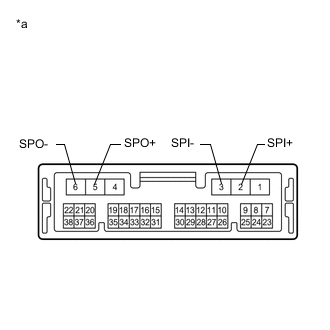
*a Component without harness connected
(Telematics Transceiver)
Measure the resistance according to the value(s) in the table below.
Standard Resistance Tester Connection Condition Specified Condition 2 (SPI+) - 5 (SPO+) Always Below 1 Ω 3 (SPI-) - 6 (SPO-) Always Below 1 Ω 2 (SPI+) - 3 (SPI-) Always 10 kΩ or higher 5 (SPO+) - 6 (SPO-) Always 10 kΩ or higher 2 (SPI+) - Body ground Always 10 kΩ or higher 3 (SPI-) - Body ground Always 10 kΩ or higher Result Proceed to OK NG
OK
PROCEED TO NEXT SUSPECTED AREA SHOWN IN PROBLEM SYMPTOMS TABLE Click here
NG
REPLACE TELEMATICS TRANSCEIVER Click here
-
-
CHECK HARNESS AND CONNECTOR (STEREO COMPONENT AMPLIFIER ASSEMBLY - FRONT NO. 3 SPEAKER ASSEMBLY)
-
Disconnect the J66 stereo component amplifier assembly connector.
-
Disconnect the K2 front No. 3 speaker assembly connector.
-
Measure the resistance according to the value(s) in the table below.
Standard Resistance Tester Connection Condition Specified Condition J66-7 (CTR+) - K2-2 Always Below 1 Ω J66-22 (CTR-) - K2-1 Always Below 1 Ω J66-7 (CTR+) or K2-2 - Body ground Always 10 kΩ or higher J66-22 (CTR-) or K2-1 - Body ground Always 10 kΩ or higher Result Proceed to OK NG
NG
REPAIR OR REPLACE HARNESS OR CONNECTOR
OK
-
-
INSPECT FRONT NO. 3 SPEAKER ASSEMBLY
-
Remove the front No. 3 speaker assembly.
-
Inspect the front No. 3 speaker assembly.
Result Proceed to OK NG
OK
PROCEED TO NEXT SUSPECTED AREA SHOWN IN PROBLEM SYMPTOMS TABLE Click here
NG
REPLACE FRONT NO. 3 SPEAKER ASSEMBLY Click here
-
-
CHECK HARNESS AND CONNECTOR (STEREO COMPONENT AMPLIFIER ASSEMBLY - FRONT NO. 2 SPEAKER ASSEMBLY)
-
Disconnect the J66 stereo component amplifier assembly connector.
-
Disconnect the K6 and K8 front No. 2 speaker assembly connectors.
-
Measure the resistance according to the value(s) in the table below.
Standard Resistance Tester Connection Condition Specified Condition J66-13 (FR+) - K6-4 Always Below 1 Ω J66-28 (FR-) - K6-2 Always Below 1 Ω J66-12 (FL+) - K8-4 Always Below 1 Ω J66-27 (FL-) - K8-2 Always Below 1 Ω J66-13 (FR+) or K6-4 - Body ground Always 10 kΩ or higher J66-28 (FR-) or K6-2 - Body ground Always 10 kΩ or higher J66-12 (FL+) or K8-4 - Body ground Always 10 kΩ or higher J66-27 (FL-) or K8-2 - Body ground Always 10 kΩ or higher Result Proceed to OK NG
NG
REPAIR OR REPLACE HARNESS OR CONNECTOR
OK
-
-
INSPECT FRONT NO. 2 SPEAKER ASSEMBLY
-
Remove the front No. 2 speaker assembly.
-
Inspect the front No. 2 speaker assembly.
-
Check that the malfunction disappears when a new or known good speaker is installed.
OK Malfunction disappears. Result Proceed to OK NG
OK
END
NG
PROCEED TO NEXT SUSPECTED AREA SHOWN IN PROBLEM SYMPTOMS TABLE Click here
-
-
CHECK HARNESS AND CONNECTOR (STEREO COMPONENT AMPLIFIER ASSEMBLY - FRONT NO. 1 SPEAKER ASSEMBLY)
-
Disconnect the J66 stereo component amplifier assembly connector.
-
Disconnect the M3 and N3 front No. 1 speaker assembly connectors.
-
Measure the resistance according to the value(s) in the table below.
Standard Resistance Tester Connection Condition Specified Condition J66-5 (WFR+) - M3-1 Always Below 1 Ω J66-20 (WFR-) - M3-2 Always Below 1 Ω J66-4 (WFL+) - N3-1 Always Below 1 Ω J66-19 (WFL-) - N3-2 Always Below 1 Ω J66-5 (WFR+) or M3-1 - Body ground Always 10 kΩ or higher J66-20 (WFR-) or M3-2 - Body ground Always 10 kΩ or higher J66-4 (WFL+) or N3-1 - Body ground Always 10 kΩ or higher J66-19 (WFL-) or N3-2 - Body ground Always 10 kΩ or higher Result Proceed to OK NG
NG
REPAIR OR REPLACE HARNESS OR CONNECTOR
OK
-
-
INSPECT FRONT NO. 1 SPEAKER ASSEMBLY
-
Remove the front No. 1 speaker assembly.
-
Inspect the front No. 1 speaker assembly.
Result Proceed to OK NG
OK
PROCEED TO NEXT SUSPECTED AREA SHOWN IN PROBLEM SYMPTOMS TABLE Click here
NG
REPLACE FRONT NO. 1 SPEAKER ASSEMBLY Click here
-
-
CHECK HARNESS AND CONNECTOR (STEREO COMPONENT AMPLIFIER ASSEMBLY - REAR NO. 2 SPEAKER ASSEMBLY)
-
Disconnect the J66 stereo component amplifier assembly connector.
-
Disconnect the O5 and P5 rear No. 2 speaker assembly connectors.
-
Measure the resistance according to the value(s) in the table below.
Standard Resistance Tester Connection Condition Specified Condition J66-15 (RR+) - O5-4 (+TW) Always Below 1 Ω J66-30 (RR-) - O5-2 (-TW) Always Below 1 Ω J66-14 (RL+) - P5-4 (+TW) Always Below 1 Ω J66-29 (RL-) - P5-2 (-TW) Always Below 1 Ω J66-15 (RR+) or O5-4 (+TW) - Body ground Always 10 kΩ or higher J66-30 (RR-) or O5-2 (-TW) - Body ground Always 10 kΩ or higher J66-14 (RL+) or P5-4 (+TW) - Body ground Always 10 kΩ or higher J66-29 (RL-) or P5-2 (-TW) - Body ground Always 10 kΩ or higher Result Proceed to OK NG
NG
REPAIR OR REPLACE HARNESS OR CONNECTOR
OK
-
-
CHECK HARNESS AND CONNECTOR (REAR SPEAKER ASSEMBLY - REAR NO. 2 SPEAKER ASSEMBLY)
-
Disconnect the O2 and P2 rear speaker assembly connectors.
-
Disconnect the O5 and P5 rear No. 2 speaker assembly connectors.
-
Measure the resistance according to the value(s) in the table below.
Standard Resistance Tester Connection Condition Specified Condition O2-1 - O5-3 (+) Always Below 1 Ω O2-2 - O5-1 (-) Always Below 1 Ω P2-1 - P5-3 (+) Always Below 1 Ω P2-2 - P5-1 (-) Always Below 1 Ω O2-1 or O5-3 (+) - Body ground Always 10 kΩ or higher O2-2 or O5-1 (-) - Body ground Always 10 kΩ or higher P2-1 or P5-3 (+) - Body ground Always 10 kΩ or higher P2-2 or P5-1 (-) - Body ground Always 10 kΩ or higher Result Proceed to OK NG
NG
REPAIR OR REPLACE HARNESS OR CONNECTOR
OK
-
-
INSPECT REAR SPEAKER ASSEMBLY
-
Remove the rear speaker assembly.
-
Inspect the rear speaker assembly.
Result Proceed to OK NG
NG
REPLACE REAR SPEAKER ASSEMBLY Click here
OK
-
-
INSPECT REAR NO. 2 SPEAKER ASSEMBLY
-
Remove the rear No. 2 speaker assembly.
-
Inspect the rear No. 2 speaker assembly.
-
Check that the malfunction disappears when a new or known good speaker is installed.
OK Malfunction disappears. Result Proceed to OK NG
OK
END
NG
PROCEED TO NEXT SUSPECTED AREA SHOWN IN PROBLEM SYMPTOMS TABLE Click here
-
-
CHECK SPEAKER (OPERATION CHECK)
-
Enter the "System Check Mode" screen. Refer to Check SP Check On in Operation Check.
-
Perform the operation check above and determine the speaker that is not operating.
Result Not Operating Speaker Proceed to Front No. 3 speaker assembly
(w/ Manual (SOS) Switch)
A Front No. 3 speaker assembly
(w/o Manual (SOS) Switch)
B Front No. 2 speaker assembly C Front No. 1 speaker assembly D Rear speaker assembly or rear No. 2 speaker assembly E Rear No. 3 speaker assembly F Tech Tips
If sound cannot be heard from any speaker, inspect all of them.
B
CHECK HARNESS AND CONNECTOR (STEREO COMPONENT AMPLIFIER ASSEMBLY - FRONT NO. 3 SPEAKER ASSEMBLY) Click here
C
CHECK HARNESS AND CONNECTOR (STEREO COMPONENT AMPLIFIER ASSEMBLY - FRONT NO. 2 SPEAKER ASSEMBLY) Click here
D
CHECK HARNESS AND CONNECTOR (STEREO COMPONENT AMPLIFIER ASSEMBLY - FRONT NO. 1 SPEAKER ASSEMBLY) Click here
E
CHECK HARNESS AND CONNECTOR (STEREO COMPONENT AMPLIFIER ASSEMBLY - REAR NO. 2 SPEAKER ASSEMBLY) Click here
F
CHECK HARNESS AND CONNECTOR (STEREO COMPONENT AMPLIFIER ASSEMBLY - REAR NO. 3 SPEAKER ASSEMBLY) Click here
A
-
-
CHECK HARNESS AND CONNECTOR (STEREO COMPONENT AMPLIFIER ASSEMBLY - TELEMATICS TRANSCEIVER - FRONT NO. 3 SPEAKER ASSEMBLY)
-
Disconnect the J66 stereo component amplifier assembly connector.
-
Disconnect the J62 telematics transceiver connector.
-
Disconnect the K2 front No. 3 speaker assembly connector.
-
Measure the resistance according to the value(s) in the table below.
Standard Resistance Tester Connection Condition Specified Condition J66-7 (CTR+) - J62-2 (SPI+) Always Below 1 Ω J66-22 (CTR-) - J62-3 (SPI-) Always Below 1 Ω K2-2 - J62-5 (SPO+) Always Below 1 Ω K2-1 - J62-6 (SPO-) Always Below 1 Ω J66-7 (CTR+) or J62-2 (SPI+) - Body ground Always 10 kΩ or higher J66-22 (CTR-) or J62-3 (SPI-) - Body ground Always 10 kΩ or higher K2-2 or J62-5 (SPO+) - Body ground Always 10 kΩ or higher K2-1 or J62-6 (SPO-) - Body ground Always 10 kΩ or higher Result Proceed to OK NG
NG
REPAIR OR REPLACE HARNESS OR CONNECTOR
OK
-
-
INSPECT FRONT NO. 3 SPEAKER ASSEMBLY
-
Remove the front No. 3 speaker assembly.
-
Inspect the front No. 3 speaker assembly.
Result Proceed to OK NG
NG
REPLACE FRONT NO. 3 SPEAKER ASSEMBLY Click here
OK
-
-
INSPECT TELEMATICS TRANSCEIVER
-
Remove the telematics transceiver.
-
*a Component without harness connected
(Telematics Transceiver)
Measure the resistance according to the value(s) in the table below.
Standard Resistance Tester Connection Condition Specified Condition 2 (SPI+) - 5 (SPO+) Always Below 1 Ω 3 (SPI-) - 6 (SPO-) Always Below 1 Ω 2 (SPI+) - 3 (SPI-) Always 10 kΩ or higher 5 (SPO+) - 6 (SPO-) Always 10 kΩ or higher 2 (SPI+) - Body ground Always 10 kΩ or higher 3 (SPI-) - Body ground Always 10 kΩ or higher Result Proceed to OK NG
OK
PROCEED TO NEXT SUSPECTED AREA SHOWN IN PROBLEM SYMPTOMS TABLE Click here
NG
REPLACE TELEMATICS TRANSCEIVER Click here
-
-
CHECK HARNESS AND CONNECTOR (STEREO COMPONENT AMPLIFIER ASSEMBLY - FRONT NO. 3 SPEAKER ASSEMBLY)
-
Disconnect the J66 stereo component amplifier assembly connector.
-
Disconnect the K2 front No. 3 speaker assembly connector.
-
Measure the resistance according to the value(s) in the table below.
Standard Resistance Tester Connection Condition Specified Condition J66-7 (CTR+) - K2-2 Always Below 1 Ω J66-22 (CTR-) - K2-1 Always Below 1 Ω J66-7 (CTR+) or K2-2 - Body ground Always 10 kΩ or higher J66-22 (CTR-) or K2-1 - Body ground Always 10 kΩ or higher Result Proceed to OK NG
NG
REPAIR OR REPLACE HARNESS OR CONNECTOR
OK
-
-
INSPECT FRONT NO. 3 SPEAKER ASSEMBLY
-
Remove the front No. 3 speaker assembly.
-
Inspect the front No. 3 speaker assembly.
Result Proceed to OK NG
OK
PROCEED TO NEXT SUSPECTED AREA SHOWN IN PROBLEM SYMPTOMS TABLE Click here
NG
REPLACE FRONT NO. 3 SPEAKER ASSEMBLY Click here
-
-
CHECK HARNESS AND CONNECTOR (STEREO COMPONENT AMPLIFIER ASSEMBLY - FRONT NO. 2 SPEAKER ASSEMBLY)
-
Disconnect the J66 stereo component amplifier assembly connector.
-
Disconnect the K5 and K7 front No. 2 speaker assembly connectors.
-
Measure the resistance according to the value(s) in the table below.
Standard Resistance Tester Connection Condition Specified Condition J66-13 (FR+) - K5-2 Always Below 1 Ω J66-28 (FR-) - K5-1 Always Below 1 Ω J66-12 (FL+) - K7-2 Always Below 1 Ω J66-27 (FL-) - K7-1 Always Below 1 Ω J66-13 (FR+) or K5-2 - Body ground Always 10 kΩ or higher J66-28 (FR-) or K5-1 - Body ground Always 10 kΩ or higher J66-12 (FL+) or K7-2 - Body ground Always 10 kΩ or higher J66-27 (FL-) or K7-1 - Body ground Always 10 kΩ or higher Result Proceed to OK NG
NG
REPAIR OR REPLACE HARNESS OR CONNECTOR
OK
-
-
INSPECT FRONT NO. 2 SPEAKER ASSEMBLY
-
Remove the front No. 2 speaker assembly.
-
Inspect the front No. 2 speaker assembly.
-
Check that the malfunction disappears when a new or known good speaker is installed.
OK Malfunction disappears. Result Proceed to OK NG
OK
END
NG
PROCEED TO NEXT SUSPECTED AREA SHOWN IN PROBLEM SYMPTOMS TABLE Click here
-
-
CHECK HARNESS AND CONNECTOR (STEREO COMPONENT AMPLIFIER ASSEMBLY - FRONT NO. 1 SPEAKER ASSEMBLY)
-
Disconnect the J66 stereo component amplifier assembly connector.
-
Disconnect the M3 and N3 front No. 1 speaker assembly connectors.
-
Measure the resistance according to the value(s) in the table below.
Standard Resistance Tester Connection Condition Specified Condition J66-5 (WFR+) - M3-1 Always Below 1 Ω J66-20 (WFR-) - M3-2 Always Below 1 Ω J66-4 (WFL+) - N3-1 Always Below 1 Ω J66-19 (WFL-) - N3-2 Always Below 1 Ω J66-5 (WFR+) or M3-1 - Body ground Always 10 kΩ or higher J66-20 (WFR-) or M3-2 - Body ground Always 10 kΩ or higher J66-4 (WFL+) or N3-1 - Body ground Always 10 kΩ or higher J66-19 (WFL-) or N3-2 - Body ground Always 10 kΩ or higher Result Proceed to OK NG
NG
REPAIR OR REPLACE HARNESS OR CONNECTOR
OK
-
-
INSPECT FRONT NO. 1 SPEAKER ASSEMBLY
-
Remove the front No. 1 speaker assembly.
-
Inspect the front No. 1 speaker assembly.
Result Proceed to OK NG
OK
PROCEED TO NEXT SUSPECTED AREA SHOWN IN PROBLEM SYMPTOMS TABLE Click here
NG
REPLACE FRONT NO. 1 SPEAKER ASSEMBLY Click here
-
-
CHECK HARNESS AND CONNECTOR (STEREO COMPONENT AMPLIFIER ASSEMBLY - REAR NO. 2 SPEAKER ASSEMBLY)
-
Disconnect the J66 stereo component amplifier assembly connector.
-
Disconnect the O5 and P5 rear No. 2 speaker assembly connectors.
-
Measure the resistance according to the value(s) in the table below.
Standard Resistance Tester Connection Condition Specified Condition J66-15 (RR+) - O5-4 (+TW) Always Below 1 Ω J66-30 (RR-) - O5-2 (-TW) Always Below 1 Ω J66-14 (RL+) - P5-4 (+TW) Always Below 1 Ω J66-29 (RL-) - P5-2 (-TW) Always Below 1 Ω J66-15 (RR+) or O5-4 (+TW) - Body ground Always 10 kΩ or higher J66-30 (RR-) or O5-2 (-TW) - Body ground Always 10 kΩ or higher J66-14 (RL+) or P5-4 (+TW) - Body ground Always 10 kΩ or higher J66-29 (RL-) or P5-2 (-TW) - Body ground Always 10 kΩ or higher Result Proceed to OK NG
NG
REPAIR OR REPLACE HARNESS OR CONNECTOR
OK
-
-
CHECK HARNESS AND CONNECTOR (REAR SPEAKER ASSEMBLY - REAR NO. 2 SPEAKER ASSEMBLY)
-
Disconnect the O2 and P2 rear speaker assembly connectors.
-
Disconnect the O5 and P5 rear No. 2 speaker assembly connectors.
-
Measure the resistance according to the value(s) in the table below.
Standard Resistance Tester Connection Condition Specified Condition O2-1 - O5-3 (+) Always Below 1 Ω O2-2 - O5-1 (-) Always Below 1 Ω P2-1 - P5-3 (+) Always Below 1 Ω P2-2 - P5-1 (-) Always Below 1 Ω O2-1 or O5-3 (+) - Body ground Always 10 kΩ or higher O2-2 or O5-1 (-) - Body ground Always 10 kΩ or higher P2-1 or P5-3 (+) - Body ground Always 10 kΩ or higher P2-2 or P5-1 (-) - Body ground Always 10 kΩ or higher Result Proceed to OK NG
NG
REPAIR OR REPLACE HARNESS OR CONNECTOR
OK
-
-
INSPECT REAR SPEAKER ASSEMBLY
-
Remove the rear speaker assembly.
-
Inspect the rear speaker assembly.
Result Proceed to OK NG
NG
REPLACE REAR SPEAKER ASSEMBLY Click here
OK
-
-
INSPECT REAR NO. 2 SPEAKER ASSEMBLY
-
Remove the rear No. 2 speaker assembly.
-
Inspect the rear No. 2 speaker assembly.
-
Check that the malfunction disappears when a new or known good speaker is installed.
OK Malfunction disappears. Result Proceed to OK NG
OK
END
NG
PROCEED TO NEXT SUSPECTED AREA SHOWN IN PROBLEM SYMPTOMS TABLE Click here
-
-
CHECK HARNESS AND CONNECTOR (STEREO COMPONENT AMPLIFIER ASSEMBLY - REAR NO. 3 SPEAKER ASSEMBLY)
-
Disconnect the J66 stereo component amplifier assembly connector.
-
Disconnect the S53 rear No. 3 speaker assembly connector.
-
Measure the resistance according to the value(s) in the table below.
Standard Resistance Tester Connection Condition Specified Condition J66-6 (WF1+) - S53-1 Always Below 1 Ω J66-21 (WF1-) - S53-2 Always Below 1 Ω J66-6 (WF1+) or S53-1 - Body ground Always 10 kΩ or higher J66-21 (WF1-) or S53-2 - Body ground Always 10 kΩ or higher Result Proceed to OK NG
NG
REPAIR OR REPLACE HARNESS OR CONNECTOR
OK
-
-
INSPECT REAR NO. 3 SPEAKER ASSEMBLY
-
Remove the rear No. 3 speaker assembly.
w/o Rear No. 2 Seat: Click here
w/ Rear No. 2 Seat: Click here
-
Inspect the rear No. 3 speaker assembly.
w/o Rear No. 2 Seat: Click here
w/ Rear No. 2 Seat: Click here
Result Proceed to OK NG
OK
PROCEED TO NEXT SUSPECTED AREA SHOWN IN PROBLEM SYMPTOMS TABLE Click here
NG
REPLACE REAR NO. 3 SPEAKER ASSEMBLY w/o Rear No. 2 Seat: Click here
REPLACE REAR NO. 3 SPEAKER ASSEMBLY w/ Rear No. 2 Seat: Click here -