ECD SYSTEM(for Swirl Control Valve), Diagnostic DTC:P1320
| DTC Code | DTC Name |
|---|---|
| P1320 | Crankshaft Signal Diagnose - DGI Error |
DESCRIPTION
Refer to DTC P0335 (Click here).
DTC No. |
DTC Detection Condition |
Trouble Area |
|---|---|---|
P1320 |
One of following conditions is met (3 trip detection logic):
|
|
DTC No. |
Data List |
|---|---|
P1320 |
Engine Speed |
WIRING DIAGRAM
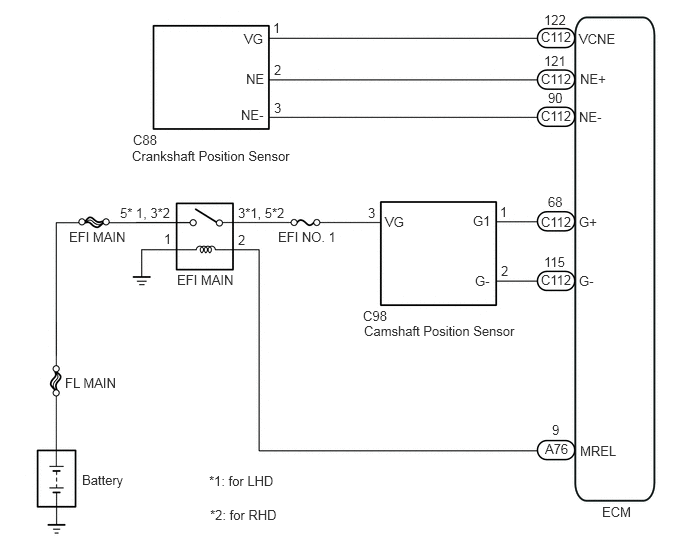
CAUTION / NOTICE / HINT
When replacing the ECM and/or engine assembly, the ECM needs Registration and Initialization (Click here).
When the ECM must be replaced, before replacing the ECM, perform the "Learning Values Save" function using the GTS. Then after installing the new ECM, perform all of the initialization/registrations for the "Learning Values Write" function by following the instructions shown on the GTS display.
Check the value on the GTS.
-
Connect the GTS to the DLC3.
Start the engine and turn the GTS on.
Enter the following menus: Powertrain / Engine and ECT / Data List / Engine Speed.
The engine speed can be confirmed in the Data List using the GTS. If there are no NE signals from the crankshaft position sensor despite the engine running, the engine speed will be indicated as zero. If the voltage output of the crankshaft position sensor is insufficient, the engine speed will be indicated as lower than the actual engine speed.
Read freeze frame data using the GTS. Freeze frame data records the engine condition when malfunctions are detected. When troubleshooting, freeze frame data can help determine if the vehicle was moving or stationary, if the engine was warmed up or not, and other data from the time the malfunction occurred.
PROCEDURE
READ VALUE USING GTS (ENGINE SPEED)
Connect the GTS to the DLC3.
Turn the ignition switch to ON and turn the GTS on.
Enter the following menus: Powertrain / Engine and ECT / Data List / Engine Speed.
Read the value.
OK
Less than 1000 rpm when the vehicle state is idling
CONFIRM WHETHER MALFUNCTION HAS BEEN SUCCESSFULLY REPAIREDClick here
CHECK HARNESS AND CONNECTOR (CRANKSHAFT POSITION SENSOR - ECM)
Disconnect the crankshaft position sensor connector.
Disconnect the ECM connector.
Measure the resistance according to the value(s) in the table below.
Standard Resistance
Tester Connection
Condition
Specified Condition
C88-2 (NE) - C112-121 (NE+)
Always
Below 1 Ω
C88-3 (NE-) - C112-90 (NE-)
Always
Below 1 Ω
C88-1 (VG) - C112-122 (VCNE)
Always
Below 1 Ω
C88-2 (NE) or C112-121 (NE+) - Body ground
Always
10 kΩ or higher
C88-3 (NE-) or C112-90 (NE-) - Body ground
Always
10 kΩ or higher
C88-1 (VG) or C112-122 (VCNE) - Body ground
Always
10 kΩ or higher
REPAIR OR REPLACE HARNESS OR CONNECTORClick here
CHECK HARNESS AND CONNECTOR (POWER SOURCE)
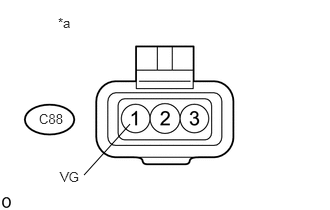
Disconnect the crankshaft position sensor connector.
Measure the voltage according to the value(s) in the table below.
Standard Voltage
Tester Connection
Switch Condition
Specified Condition
C88-1 (VG) - Body ground
Ignition switch ON
4.5 to 5.5 V
Table 2. Text in Illustration *a
Front view of wire harness connector
(to crankshaft position sensor)
REPLACE ECMClick here
REPLACE CRANKSHAFT POSITION SENSOR
Replace crankshaft position sensor (Click here).
CHECK WHETHER DTC OUTPUT RECURSClick here
REPAIR OR REPLACE HARNESS OR CONNECTOR
Repair or replace the harness or connector.
CONFIRM WHETHER MALFUNCTION HAS BEEN SUCCESSFULLY REPAIREDClick here
CHECK WHETHER DTC OUTPUT RECURS
Connect the GTS to the DLC3.
Turn the ignition switch to ON and turn the GTS on.
Clear the DTCs (Click here).
Turn the ignition switch off and wait for 60 seconds or more [A].
Perform road test [B].
Repeat [A] and [B] for the number of trips detected.
Enter the following menus: Powertrain / Engine and ECT / Trouble Codes.
Confirm that the DTC is not output again.
END
REPLACE ECM
Replace the ECM (Click here).
CONFIRM WHETHER MALFUNCTION HAS BEEN SUCCESSFULLY REPAIRED
Connect the GTS to the DLC3.
Turn the ignition switch to ON and turn the GTS on.
Clear the DTCs (Click here).
Turn the ignition switch off and wait for 60 seconds or more [A].
Perform road test [B].
Repeat [A] and [B] for the number of trips detected.
Enter the following menus: Powertrain / Engine and ECT / Trouble Codes.
Confirm that the DTC is not output again.
END