SFI SYSTEM VEHICLE CONTROL HISTORY
DESCRIPTION (SFI SYSTEM)
Vehicle Control History is a function that captures and stores ECU data when triggered by specific vehicle behavior.
The number of possible stored Freeze Frame Data sets, whether multi Freeze Frame Data is available, the number of freeze frame points, Freeze Frame Data items, the ECU internal range, etc., is different depending on the stored group.
The stored data items for Vehicle Control History Freeze Frame Data are different depending on the stored group. When the value of a data item does not change across all points, only the value of the detection point will be displayed. The contents of the Freeze Frame Data is almost the same as that of the Data List.
PRECAUTIONS (SFI SYSTEM)
As Vehicle Control History may be overwritten whenever the trigger conditions are met, make sure to save Vehicle Control History before performing any inspections.
As Vehicle Control History may be stored when performing an Active Test, learning, etc., make sure to clear the Vehicle Control History before returning the vehicle to the customer.
CHECK VEHICLE CONTROL HISTORY (SFI SYSTEM)
Connect the GTS to the DLC3.
Turn the ignition switch to ON.
Turn the GTS on.
Enter the following menus: Powertrain / Engine / Utility / Vehicle Control History (RoB).
Powertrain > Engine > Utility
Tester Display
Vehicle Control History (RoB)
Tip:It is also possible to display Vehicle Control History during the Health Check, if "Store All Data" is selected.
Table 1. Vehicle Control History Item Code
Item
Trigger Description
Stored Group
Reference Inspection Procedure
Link
X0856
GPF Rejuvenate Interruption
When normal PM (Particulate Matter) regeneration stops
0A
Check the Vehicle Control History Freeze Frame Data items "GPF Rejuvenate Impossibility History"
X0857
GPF Rejuvenate Run Insufficiency
The air fuel ratio conditions are met at 60 km/h (37 mph) or more, but the temperature required for PM regeneration has not been reached
0A
Check that the vehicle was driven in the specified manner, and then increase the vehicle speed and perform particulate filter rejuvenation again.
Refer to Particulate Filter Rejuvenate Procedure
X0858
Particulate Filter Differential Pressure High Bank1
When the GPF (Gasoline Particulate Filter) upstream exhaust pressure measured by the differential pressure sensor (GPF differential pressure calibration value) exceeds the threshold value due to the accumulation of PM or ash (metal oxide)
0A
Refer to the P244B00 inspection procedure
X0859
Particulate Filter Differential Pressure Too High Bank1
When the GPF upstream exhaust pressure measured by the differential pressure sensor (GPF differential pressure calibration value) exceeds the threshold value due to further PM and ash being accumulated in the GPF after the GPF differential pressure sensor determines the pressure is high (X0858)
0A
Refer to the P244B00 inspection procedure
X085C
Over Temperature Prevention when Particulate Filter Over Accumulation
When the PM deposition ratio is at or above the specified value and GPF temperature is at or above the specified value
0A
Refer to the P246300 inspection procedure
Table 2. Stored Data Stored Group
Number of Records
Number of Freeze Frame Points
Multi Freeze Frame Data Sampling Period
Note
0A
4 codes
Tip:If the detection conditions for a code that is not currently stored are met, the code will be stored.
If the detection conditions for a code that is currently stored are met again in the same trip, the code will not be overwritten.
If the detection conditions for a code that is currently stored are met again in a different trip, the code will be overwritten.
1 point (multi Freeze Frame Data not available)
-
The data can be cleared by using the GTS or by disconnecting the cable from the negative (-) battery terminal.
Tip:Only 1 measurement point can be displayed for stored group 0A Freeze Frame Data.
CLEAR VEHICLE CONTROL HISTORY (SFI SYSTEM)
Connect the GTS to the DLC3.
Turn the ignition switch to ON.
Turn the GTS on.
Enter the following menus: Powertrain / Engine / Utility / Vehicle Control History (RoB) (Clear).
Powertrain > Engine > Utility
Tester Display
Vehicle Control History (RoB)
Note:By performing this procedure, all stored Vehicle Control History items will be cleared.
VEHICLE CONTROL HISTORY FREEZE FRAME DATA (SFI SYSTEM)
Connect the GTS to the DLC3.
Turn the ignition switch to ON.
Turn the GTS on.
Enter the following menus: Powertrain / Engine / Utility / Vehicle Control History (RoB).
Powertrain > Engine > Utility
Tester Display
Vehicle Control History (RoB)
Select a Vehicle Control History item to access the applicable Freeze Frame Data.
Check the Freeze Frame Data recorded with the Vehicle Control History.
Figure 1. Vehicle Control History Freeze Frame Data 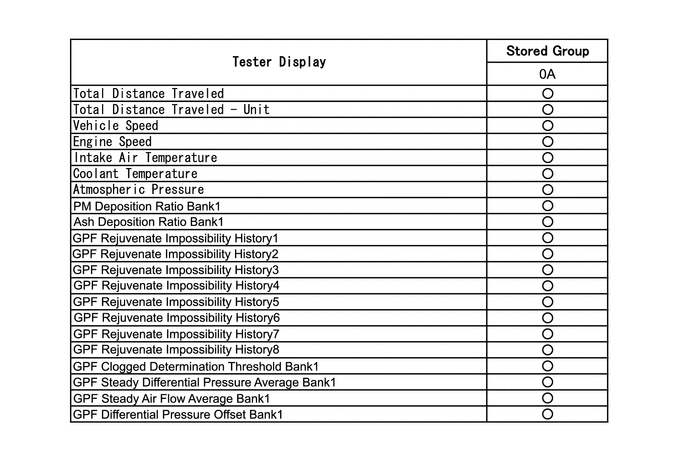
CHECK VEHICLE CONTROL HISTORY (CHARGING SYSTEM)
Connect the GTS to the DLC3.
Turn the ignition switch to ON.
Turn the GTS on.
Enter the following menus: Powertrain / Engine / Utility / Vehicle Control History (RoB).
Powertrain > Engine > Utility
Tester Display
Vehicle Control History (RoB)
Code
Tester Display
Measurement Item
Diagnostic Note
X0600
Auxiliary Battery Voltage Low at Start
History of low battery voltage at engine control system start
-
X0601
Auxiliary Battery Voltage Low at IG OFF
History of low battery voltage when ignition switch off
-
X0602
Auxiliary Battery Discharge at IG OFF
History of battery becoming discharged when ignition switch off
-
X0603
Auxiliary Battery Discharge at Running
History of battery becoming discharged while vehicle being driven
-
VEHICLE CONTROL HISTORY FREEZE FRAME DATA (CHARGING SYSTEM)
Connect the GTS to the DLC3.
Turn the ignition switch to ON.
Turn the GTS on.
Enter the following menus: Powertrain / Engine / Utility / Vehicle Control History (RoB).
Powertrain > Engine > Utility
Tester Display
Vehicle Control History (RoB)
Select a Vehicle Control History item to access the applicable Freeze Frame Data.
Check the Freeze Frame Data recorded with the Vehicle Control History.
Table 3. w/ Battery State Sensor Assembly GTS Display
Description
Total Distance Traveled
Driving distance
Total Distance Traveled - Unit
Unit of driving distance
Initial Engine Battery Minimum Voltage
Minimum voltage at engine start
Alternator Voltage - Non Active Test
Requested voltage when the regulator forced operation is not executed
Alternator Output Duty Ratio
LIN terminal output (power generation rate)
Auxiliary Battery Voltage
Battery voltage
(+B1, +B2 terminal)
Auxiliary Battery Integrated Current
Battery capacity taking into account battery deterioration.
Smoothed Value of Auxiliary Battery Temperature
Calculated battery fluid temperature by battery state sensor assembly
Auxiliary Battery Charge Rate
Battery charge percentage calculated by battery state sensor assembly
Auxiliary Battery Charging Rate Accuracy
Accuracy of battery charge percentage calculated by battery state sensor assembly
Auxiliary Battery Charging Capacity
Charge of battery calculated by battery state sensor assembly
Estimated Open Ended Auxiliary Battery Voltage when IG OFF
Estimated battery release voltage calculated when ignition switch is off by the battery state sensor assembly
Auxiliary Battery Average Current during IG OFF
Average current while parked (average value of current consumed from when the ignition switch is off until lit is to ON)
IG OFF Time just before IG ON
Parking duration (duration from when the ignition switch is off until it is to ON)
Auxiliary Battery Average Current when Auxiliary Battery Voltage Low (during IG OFF)
Average current when system judges that voltage is low while parked (average current value when the ignition switch is off until the system judges the voltage is low while parked)
IG OFF Time when Auxiliary Battery Voltage Low (during IG OFF)
Parking duration when system judges that voltage is low while parked (duration from when the ignition switch is off until the system judges the voltage is low while parked)
Table 4. w/o Battery State Sensor Assembly GTS Display
Description
Total Distance Traveled
Driving distance
Total Distance Traveled - Unit
Unit of driving distance
CLEAR VEHICLE CONTROL HISTORY
Connect the GTS to the DLC3.
Turn the ignition switch to ON.
Turn the GTS on.
Enter the following menus: Powertrain / Engine / Utility / Vehicle Control History (RoB) (Clear).
Note:By performing this procedure, all stored Vehicle Control History items will be cleared.
Powertrain > Engine > Utility
Tester Display
Vehicle Control History (RoB)