SFI SYSTEM(w/o Canister Pump Module), Diagnostic DTC:P001700
| DTC Code | DTC Name |
|---|---|
| P001700 | Crankshaft Position - Camshaft Position Correlation Bank 1 Sensor B |
DESCRIPTION
Refer to DTC P001313.
| DTC No. | Detection Item | DTC Detection Condition | Trouble Area | MIL | Memory | Note |
|---|---|---|---|---|---|---|
| P001700 | Crankshaft Position - Camshaft Position Correlation Bank 1 Sensor B | Deviation in the crankshaft position sensor signal and camshaft position sensor (for exhaust camshaft) signal (2 trip detection logic). |
|
Does not come on | DTC stored | SAE Code: P0017 |
MONITOR DESCRIPTION
To monitor the correlation of the exhaust camshaft position and crankshaft position, the ECM checks the VVT learned value while the engine is idling. The VVT learned value is calibrated based on the camshaft position and crankshaft position. The exhaust valve timing is set to the most advanced angle while the engine is idling. If the VVT learned value is out of the specified range in consecutive driving cycles, the ECMstores this DTC.
MONITOR STRATEGY
| Required Sensors/Components (Main) | Camshaft timing exhaust gear assembly |
| Required Sensors/Components (Related) | Camshaft position sensor Crankshaft position sensor |
| Frequency of Operation | Continuous |
TYPICAL ENABLING CONDITIONS
| Engine speed | 500 to 1400 rpm |
CONFIRMATION DRIVING PATTERN
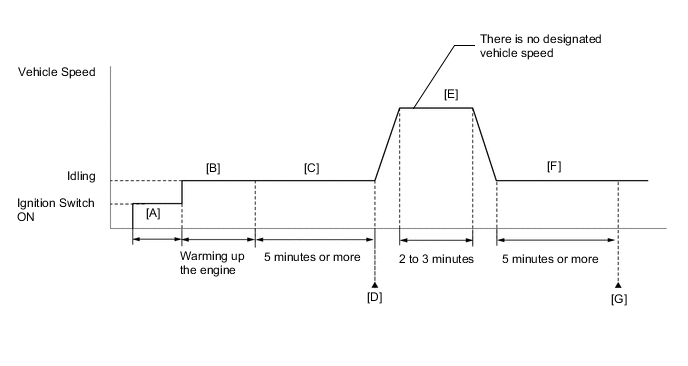
-
Connect the GTS to the DLC3.
-
Turn the ignition switch to ON.
-
Turn the GTS on.
-
Clear the DTCs (even if no DTCs are stored, perform the clear DTC procedure).
-
Turn the ignition switch off and wait for at least 30 seconds.
-
Turn the ignition switch to ON [A].
-
Turn the GTS on.
-
Start the engine and warm it up until the engine coolant temperature reaches 75°C (167°F) or higher [B].
-
Idle the engine for 5 minutes or more [C].
-
Enter the following menus: Powertrain / Engine / Trouble Codes [D].
-
Read the pending DTCs.
Tech Tips
-
If a pending DTC is output, the system is malfunctioning.
-
If a pending DTC is not output, perform the following procedure.
-
-
Enter the following menus: Powertrain / Engine / Utility / All Readiness.
-
Input the DTC: P001700.
-
Check the DTC judgment result.
GTS Display Description NORMAL
-
DTC judgment completed
-
System normal
ABNORMAL
-
DTC judgment completed
-
System abnormal
INCOMPLETE
-
DTC judgment not completed
-
Perform driving pattern after confirming DTC enabling conditions
Tech Tips
-
If the judgment result is NORMAL, the system is normal.
-
If the judgment result is ABNORMAL, the system has a malfunction.
-
If the judgment result is INCOMPLETE, perform steps [E] through [G].
-
-
Drive the vehicle for 2 to 3 minutes [E].
CAUTION:
When performing the confirmation driving pattern, obey all speed limits and traffic laws.
-
Idle the engine for 5 minutes or more [F].
-
Enter the following menus: Powertrain / Engine / Trouble Codes [G].
-
Read the pending DTCs.
Tech Tips
-
If a pending DTC is output, the system is malfunctioning.
-
If a pending DTC is not output, perform the following procedure.
-
-
Check the DTC judgment result.
Tech Tips
-
If the judgment result is NORMAL, the system is normal.
-
If the judgment result is ABNORMAL, the system has a malfunction.
-
CAUTION / NOTICE / HINT
Tech Tips
-
The monitor for this DTC detects when the timing chain is shifted by one tooth or more.
-
Read Freeze Frame Data using the GTS. The ECM records vehicle and driving condition information as Freeze Frame Data the moment a DTC is stored. When troubleshooting, Freeze Frame Data can help determine if the vehicle was moving or stationary, if the engine was warmed up or not, if the air fuel ratio was lean or rich, and other data from the time the malfunction occurred.
PROCEDURE
-
CHECK ANY OTHER DTCS OUTPUT (IN ADDITION TO DTC P001700)
-
Connect the GTS to the DLC3.
-
Turn the ignition switch to ON.
-
Turn the GTS on.
-
Enter the following menus: Powertrain / Engine / Trouble Codes.
-
Read the DTCs.
Powertrain > Engine > Trouble CodesResult Result Proceed to DTC P001700 is output A DTC P001700 and other DTCs are output B Tech Tips
If any DTCs other than P001700 are output, troubleshoot those DTCs first.
B 
GO TO DTC CHART Click here
A 
-
-
PERFORM ACTIVE TEST USING GTS (CONTROL THE EXHAUST VVT OCV DUTY RATIO BANK 1)
Tech Tips
If the VVT system can be operated through the Active Test, it can be assumed that the VVT system is operating normally.
-
Connect the GTS to the DLC3.
-
Start the engine.
-
Turn the GTS on.
-
Enter the following menus: Powertrain / Engine / Active Test / Control the Exhaust VVT OCV Duty Ratio Bank 1 / Data List / Exhaust VVT Change Angle Bank 1.
Powertrain > Engine > Active TestActive Test Display Control the Exhaust VVT OCV Duty Ratio Bank 1 Data List Display Exhaust VVT Change Angle Bank 1 -
Perform the Active Test. Check that the displacement angle varies.
OK Displacement angle varies. Result Proceed to OK NG
NG 
INSPECT CAM TIMING OIL CONTROL SOLENOID ASSEMBLY Click here
OK
-
-
CHECK ENGINE MECHANICAL SYSTEM
-
Check for mechanical malfunctions that affect the valve timing, such as a jumped tooth or stretching of the timing chain.
Tech Tips
Perform "Inspection After Repair" after repairing or replacing the engine mechanical system.
Result Proceed to OK NG
OK
GO TO STEP 7 Click here
NG
REPAIR OR REPLACE MALFUNCTIONING PARTS, COMPONENT AND AREA
-
-
INSPECT CAM TIMING OIL CONTROL SOLENOID ASSEMBLY
-
Inspect the cam timing oil control solenoid assembly.
Result Proceed to OK NG
NG
REPLACE CAM TIMING OIL CONTROL SOLENOID ASSEMBLY Click here
OK
-
-
INSPECT CAMSHAFT TIMING OIL CONTROL VALVE ASSEMBLY (EXHAUST CAMSHAFT TIMING GEAR BOLT ASSEMBLY)
-
Inspect the camshaft timing oil control valve assembly (exhaust camshaft timing gear bolt assembly).
Result Proceed to OK NG
NG
REPLACE CAMSHAFT TIMING OIL CONTROL VALVE ASSEMBLY (EXHAUST CAMSHAFT TIMING GEAR BOLT ASSEMBLY) Click here
OK
-
-
INSPECT CAMSHAFT TIMING EXHAUST GEAR ASSEMBLY
-
Inspect the camshaft timing exhaust gear assembly.
Tech Tips
Perform "Inspection After Repair" after replacing the camshaft timing exhaust gear assembly.
Result Proceed to OK NG
NG
REPLACE CAMSHAFT TIMING EXHAUST GEAR ASSEMBLY Click here
OK
-
-
CLEAR DTC
-
Connect the GTS to the DLC3.
-
Turn the ignition switch to ON.
-
Turn the GTS on.
-
Clear the DTCs.
Powertrain > Engine > Clear DTCs -
Turn the ignition switch off and wait for at least 30 seconds.
Result Proceed to NEXT
NEXT
-
-
CHECK WHETHER DTC OUTPUT RECURS (DTC P001700)
-
Drive the vehicle in accordance with the driving pattern described in Confirmation Driving Pattern.
-
Enter the following menus: Powertrain / Engine / Trouble Codes / Pending.
-
Read the pending DTCs.
Powertrain > Engine > Trouble CodesResult Result Proceed to DTCs are not output A DTC P001700 is output B
A
CHECK FOR INTERMITTENT PROBLEMS Click here
B
REPLACE ECM Click here
-