PANORAMIC VIEW MONITOR SYSTEM
-
FUNCTION OF MAIN COMPONENTS
Component Function Front Television Camera Assembly Outputs a video signal of the area in front of the vehicle to the parking assist ECU. Rear Television Camera Assembly Outputs a video signal of the area to the rear of the vehicle to the parking assist ECU. Side Television Camera Assembly LH Outputs a video signal of the area to the left side of the vehicle to the parking assist ECU. Side Television Camera Assembly RH Outputs a video signal of the area to the right side of the vehicle to the parking assist ECU. Parking Assist ECU
-
Combines video signals from the front, rear, left and right television camera assemblies to create a seamless overhead image.
-
Calculates each guide line based on information signals from each ECU and sensor, combines the lines with the panoramic view and images from each television camera assembly, and outputs a video signal to the multi-display assembly.
-
Turns each television camera assembly on and off according to the input shift position signal and panoramic view monitor main switch signal.
-
Combines detection information with the currently displayed panoramic view monitor system screen according to signals from the clearance warning ECU assembly or blind spot monitor sensor LH and outputs a video signal to the multi-display assembly.
Multi-display Assembly Displays image information received from the parking assist ECU. Integration Control and Panel Assembly
-
Panoramic View Monitor Main Switch
Switches the panoramic view monitor system screen display. Steering Sensor Detects the angle of the steering wheel and sends the resulting signals to the parking assist ECU. Lexus Display Audio Controller (Remote Operation Board)*1 Sends operation signals to the radio receiver assembly. Remote Touch*2 Radio Receiver Assembly Sends operation signals to the multi-display assembly. Park/Neutral Position Switch Assembly Sends the shift position signal to the ECM. ECM Sends received shift position signals to the parking assist ECU. Brake Actuator Assembly
-
Skid Control ECU
Sends received vehicle speed signals to the parking assist ECU. Main Body ECU (Multiplex Network Body ECU) Sends the front door and back door opening and closing signals, etc., to the parking assist ECU. Clearance Warning ECU Assembly Sends clearance sonar information signal to the parking assist ECU. Blind Spot Monitor Sensor LH Sends RCTA information signal to the parking assist ECU. *1: Models with Lexus Display Audio System
*2: Models with Navigation System
-
-
SYSTEM CONTROL
-
Each screen of the panoramic view monitor system displays guide lines, estimated course lines, etc., together according to the selected screen display mode to inform the driver of the tire positions and trajectories which cannot be directly seen from the driver seat.
-
When the LEXUS parking assist-sensor system detects an obstacle or the blind spot monitor system detects a vehicle approaching from the right or left at the rear of the vehicle, clearance sonar information or RCTA information is displayed superimposed on the screen according to each screen display mode.
-
-
OPERATING CONDITION
-
Manual display mode and automatic display mode are provided for the display method of the panoramic view monitor system.
-
Manual Display Mode
-
Manual display mode is a method of displaying the panoramic view monitor system screen according to the needs of the driver via operation of the panoramic view monitor main switch.
-
The screen displayed when the panoramic view monitor main switch is pressed differs according to the shift position.
-
When the vehicle speed exceeds 20 km/h (12 mph), the panoramic view monitor system screen ends and switches to display the navigation screen or information screen.
-
-
Automatic Display Mode
-
When starting off and stopping the vehicle in automatic display mode, it is possible to display the "panoramic view and wide front view" or "side simultaneous view" automatically instead of by pressing the panoramic view monitor main switch. Refer to the following chart for the screen display conditions.
-
The automatic display mode can be set with the auto mode button displayed on the screen.
Automatic Display Mode Screen Display Conditions Display Screen Display Conditions Assumed Situation Display when starting off Vehicle speed is 10 km/h (6 mph) or less and shift lever is not in P or R 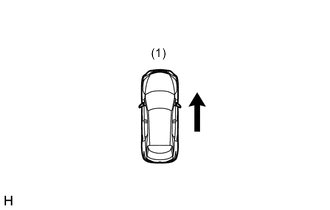
(1) Check surroundings Display when stopping vehicle Shift lever is not in P or R and vehicle speed becomes 10 km/h (6 mph) or less 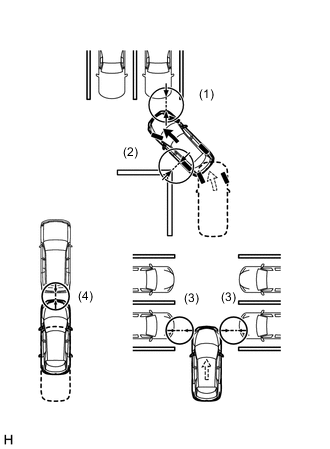
(1) Forward blind spot
(2) Inside blind spot
(3) Vehicle width
(4) Vehicle-to-vehicle distance
-
-
-
When the LEXUS parking assist-sensor system detects an obstacle while driving at a vehicle speed of 10 km/h or less, the monitor screen automatically changes from the current screen (navigation screen, DVD screen, etc.) to the clearance information screen with the "panoramic view and wide front view" screen.
-
When all of the following conditions are met, the panoramic view and wide front view will be displayed.
-
The shift lever is in D or N.
-
The LEXUS parking assist-sensor system has detected an obstacle.
-
-
When either of the following conditions is met, the panoramic view and wide front view will be canceled and return to its original screen.
-
The vehicle speed is 0 km/h (0 mph).
-
The LEXUS parking assist-sensor system does not detect an obstacle.
-
-
-
-
FUNCTION
-
Panoramic View Monitor System Display Range
-
Panoramic View
-
The display range of the panoramic view image is as follows. However, the range differs according to the vehicle and road surface conditions.
Note
The panoramic view image display range is limited and objects in the blind spot close to the vehicle or objects taller than the road surface may not be displayed. Also, the clearness at the four corners may be reduced. Take care when driving.
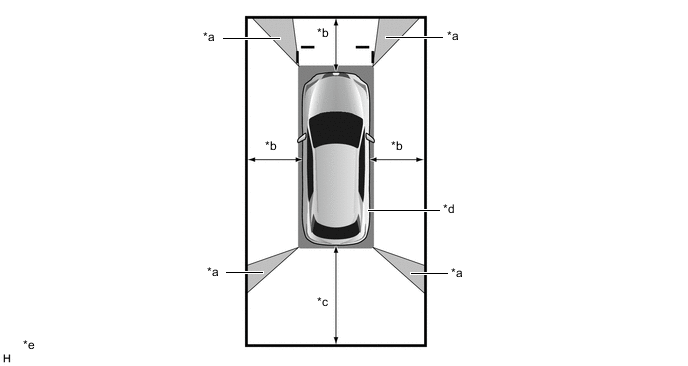
*a Image Combination Processing Area *b Approximately 2.0 m (6.6 ft.) *c Approximately 3.0 m (9.8 ft.) *d Blind Spot *e The illustration shown is an example only. - -
-
-
Wide Front View
-
The wide front view image displays the area behind the vehicle as shown in the illustration. However, the range differs according to the vehicle and road surface conditions.
Tech Tips
Since the lens of the front television camera assembly may affect the perceived distance to objects in certain areas of the image, masking is used.
Note
The image display range is limited. Also, since objects near either end of the bumper and objects positioned directly under and near the bumper may not be displayed, take care when driving.
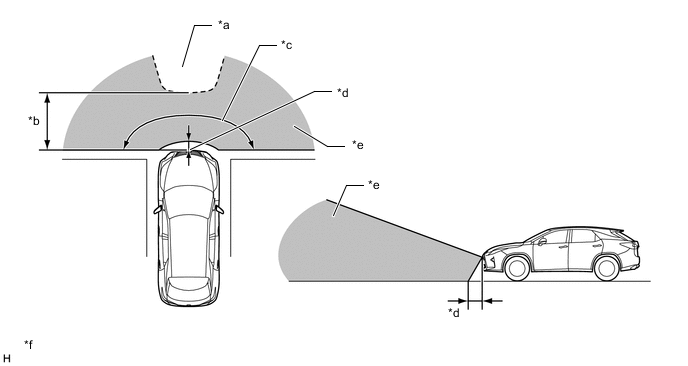
*a Mask Area *b Approximately 5.0 m (16.4 ft.) *c Approximately 180° *d Approximately 0.4 m (1.3 ft.) *e Front Television Camera Assembly Imaging Range *f The illustrations shown are examples only.
-
-
Rear View / Wide Rear View
-
The rear view image displays the area behind the vehicle as shown in the illustration. However, the range differs according to the vehicle and road surface conditions.
Note
The image display range is limited. Also, since objects near either end of the bumper and objects positioned directly under and near the bumper may not be displayed, take care when driving.
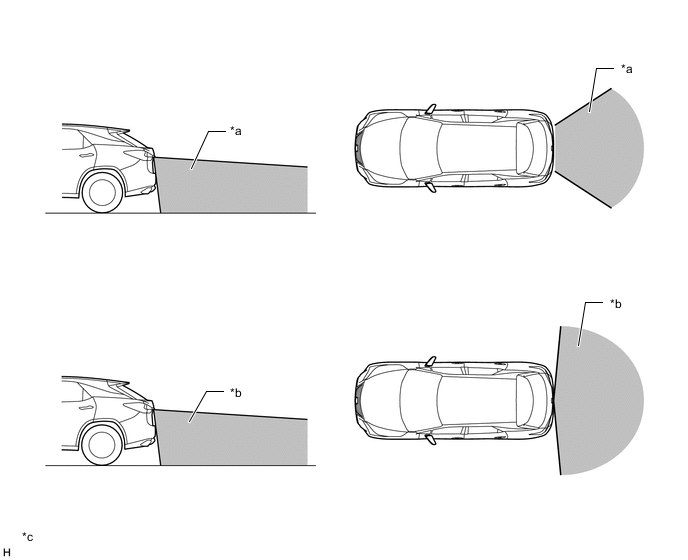
*a Rear Television Camera Assembly Imaging Range (Rear View) *b Rear Television Camera Assembly Imaging Range (Wide Rear View) *c The illustrations shown are examples only. - -
-
-
Side Simultaneous View
-
The side simultaneous view displays the areas to the side of the vehicle as shown in the illustration. However, the range differs according to the vehicle and road surface conditions.
Note
The image display range is limited, take care when driving.
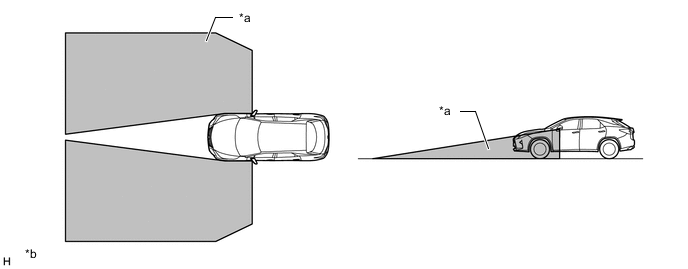
*a Side Television Camera Assembly Imaging Range *b The illustrations shown are examples only.
-
-
Side View
-
The side view displays the area to the side of the vehicle as shown in the illustration. However, the range differs according to the vehicle and road surface conditions.
Note
The image display range is limited, take care when driving.
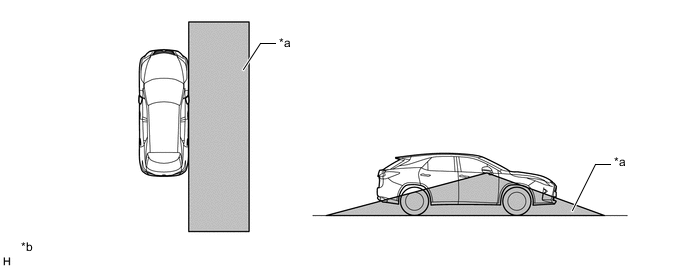
*a Side Television Camera Assembly Imaging Range *b The illustrations shown are examples only.
-
-
-
Panoramic View Monitor System Screen and Operation
-
Each screen of the panoramic view monitor system displays guide lines, estimated course lines, etc., to inform the driver of the tire positions and trajectories which cannot be directly seen from the driver seat, according to the selected screen display mode.
-
When the LEXUS parking assist-sensor system detects an obstacle or the blind spot monitor system detects a vehicle approaching from the right or left at the rear of the vehicle, clearance sonar information or RCTA information is superimposed on the screen according to the selected screen display mode.
-
-
Panoramic View and Wide Front View
-
Panoramic View and Wide Front View Display Contents
-
The panoramic view created by combining images from each television camera assembly and the image from the front television camera assembly are displayed simultaneously. The images assist the driver to confirm the safety of the surroundings and areas to the left and right of the vehicle at locations with poor visibility, such as intersections and T-junctions.
Tech Tips
When the outer rear view mirror assemblies are retracted, the side view and wide front view is displayed.
Figure 1. Panoramic View and Wide Front View Display Contents
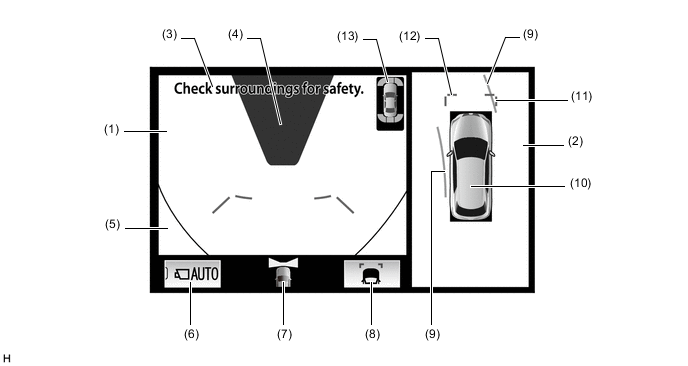
The illustration shown is an example only. The illustration may differ from the actual vehicle screen.
Item Description (1) Wide Front View An image captured by the front television camera assembly of the area in front of the vehicle. (2) Panoramic View An overhead image of the vehicle created by combining images from the front, rear, left and right side television camera assemblies. (3) Warning Message Warns the driver according to the message on the display. (4) Masking Since the lens of the front television camera assembly may affect the perceived distance to objects in certain areas of the image, masking is used. (5) Vehicle Reflection Parts of the vehicle (grille and bumper) are displayed. (6) Auto Mode Button*1, *2 Is used to turn the automatic display mode on and off. When the automatic display mode is on, the switch indicator illuminates. (7) Camera Direction Display Vehicle Icon Indicates that the wide front view is displayed on the left side of the screen. (8) Display Mode Switch Button Changes the display mode. (9) Forward Estimated Course Line*1, *3 (Yellow)
-
Displays the estimated course calculated from the steering angle.
-
Displays the estimated course in front of the front of the vehicle on the outside of the turn, and the estimated course ahead of the rear of the vehicle on the inside of the turn.
(10) Panoramic View Vehicle Icon*4 Displays the vehicle position in the panoramic view. (11) Front Vehicle Width Extension Line (Blue) These lines are vehicle width extension lines. The lines displayed are wider than the actual vehicle width. (12) Front Distance Guide Line (Blue) These lines are distance guide lines showing the distance forward from the edge of the front bumper. (Approximately 1.0 m (3.3 ft.)) (13) Clearance Sonar Icon*5 If an obstacle is detected when the LEXUS parking assist-sensor system is activated, the approximate distance between the vehicle and the obstacle is displayed. *1: Not displayed when the panoramic view and wide front view is displayed with the shift lever in R.
*2: Not displayed when the side view and wide front view is displayed while the shift lever is in P or R and the outer rear view mirror assembly is retracted.
*3: Displayed when the guide line display is set to "Estimated Course Line Display Mode" and the steering angle is not positioned straight ahead.
*4: The color of the panoramic view vehicle icon can be changed. Refer to the Repair Manual for the details.
*5: Models with 8 inch multi-display
-
-
-
Estimated Course Line Display Mode
-
The forward estimated course lines represent the estimated course of the vehicle. By turning the steering wheel so that no objects are within the estimated course lines, the driver can easily maneuver the vehicle around objects.
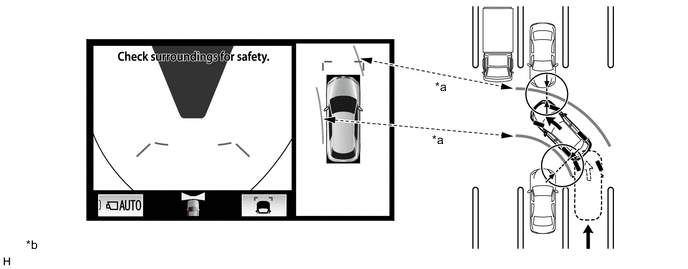
*a Forward Estimated Course Line *b The illustration shown is an example only. The illustration may differ from the actual vehicle screen.
-
-
Distance Guide Line Display Mode
-
The front distance guide lines inform the driver of the vehicles relative location when driving into a parking space. By aligning the front distance guide lines with the end of the parking space and the parking space lines, the driver can easily position the vehicle within the parking space.
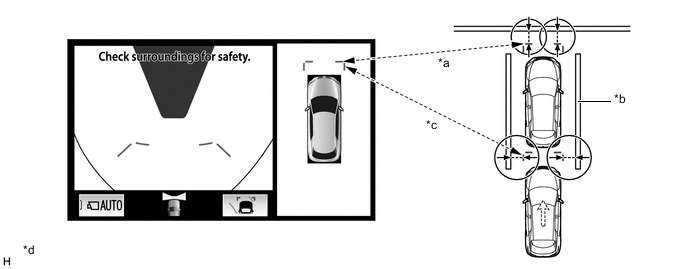
*a Front Distance Guide Line *b Parking Space Line *c Front Vehicle Width Extension Line *d The illustration shown is an example only. The illustration may differ from the actual vehicle screen.
-
-
-
Side View and Wide Front View (When Outer Rear View Mirror Assemblies are Retracted)
-
Side View and Wide Front View Display Contents
-
When the outer rear view mirror assemblies are retracted, the panoramic view does not display. Instead, an enlarged image from the side television camera RH and the wide front view are displayed to assist the driver to confirm the safety of the surroundings and park close to objects.
Figure 2. Side View and Wide Front View Display Contents
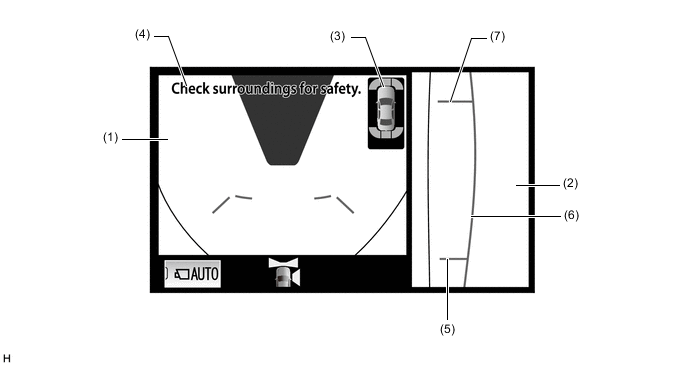
The illustration shown is an example only. The illustration may differ from the actual vehicle screen.
Item Description (1) Wide Front View An image captured by the front television camera assembly of the area in front of the vehicle. (2) Side View (Right Side*1/Left Side*2) An image of the area to the right of the vehicle captured by the side television camera assembly RH*1/LH*2. (3) Clearance Sonar Icon*3 If an obstacle is detected when the LEXUS parking assist-sensor system is activated, the approximate distance between the vehicle and the obstacle is displayed. (4) Warning Message Warns the driver. (5) Rear Tire Contact Line (Blue) A guide line showing the rear right tire contact position. (6) Vehicle Width Parallel Line (Blue) A vehicle width guide line including the outer rear view mirror assembly. (7) Front Tire Contact Line (Blue) A guide line showing the front right tire contact position. *1: LHD Models
*2: RHD Models
*3: Models with 8 inch multi-display
-
-
-
Panoramic View and Rear View
-
Panoramic View and Rear View Display Contents
-
The panoramic view created by combining images from the front, rear, left and right side television camera assemblies and the image from the rear television camera assembly are displayed simultaneously. The images assist the driver to confirm the safety of the surroundings when operating the vehicle in reverse.
Figure 3. Panoramic View and Rear View Display Contents
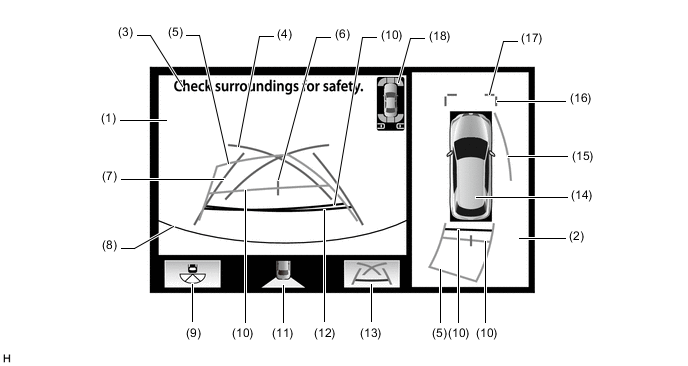
The illustration shown is an example only. The illustration may differ from the actual vehicle screen.
Item Description (1) Rear View An image captured by the rear television camera assembly of the area to the rear of the vehicle. (2) Panoramic View An overhead image of the vehicle created by combining images from the front, rear, left and right side television camera assemblies. (3) Warning Message Warns the driver. (4) Parking Assist Guide Line*1 (Blue) Indicates the path the vehicle will follow when the driver turns the steering wheel fully. (5) Rear Estimated Course Line*2 (Yellow) Moves in sync with the steering wheel to indicate the estimated reverse course of the vehicle. (6) Vehicle Center Guide Line (Blue) Indicates the estimated position on the ground of the center of the vehicle. (7) Rear Vehicle Width Extension Line*3 (Blue) Indicates the estimated vehicle width. (8) Edge of Rear Bumper The edge of the rear bumper is displayed on the screen. (9) Camera Angle Mode Switch Button Switches to the wide rear view. (10) Rear Distance Guide Line (Yellow/Red)*4 These lines are distance guide lines showing the distance from the edge of the rear bumper. (Approximately 1.0 m (3.3 ft.): yellow, approximately 0.5 m (1.6 ft.): red) (11) Camera Direction Display Vehicle Icon Indicates that the rear view is displayed on the left side of the screen. (12) Rear Distance Guide Line (Blue*5) These lines are distance guide lines showing the distance from the edge of the rear bumper. (Approximately 0.5 m (1.6 ft.)) (13) Display Mode Switch Button Changes the display mode. (14) Panoramic View Vehicle Icon*6 Displays the vehicle position in the panoramic view. (15) Side Estimated Course Line*4 (Yellow)
-
Displays the estimated course calculated from the steering angle.
-
Displays the estimated course on the outside of the steering direction.
(16) Front Vehicle Width Extension Line (Blue) These lines are vehicle width extension lines. The lines displayed are wider than the actual vehicle width. (17) Front Distance Guide Line (Blue) These lines are distance guide lines showing the distance forward from the edge of the front bumper. (Approximately 1.0 m (3.3 ft.)) (18) Clearance Sonar Icon*7 If an obstacle is detected when the LEXUS parking assist-sensor system is activated, the approximate distance between the vehicle and the obstacle is displayed. RCTA Icon*7 If a vehicle is detected when the blind spot monitor system is activated, the direction of the approaching vehicle is displayed. *1: The side estimated course line or rear estimated course line and the parking assist guide line cannot be displayed simultaneously.
*2: Displayed when the guide line display is set to "Estimated Course Line Display Mode".
*3: Not displayed when the steering angle is approximately straight ahead.
*4: Displayed when the guide line display is set to "Estimated Course Line Display Mode" and the steering angle is not positioned straight ahead.
*5: Turns red in "Parking Assist Guide Line Display Mode" and "Distance Guide Line Display Mode".
*6: The color of the panoramic view vehicle icon can be changed. Refer to the Repair Manual for the details.
*7: Models with 8 inch multi-display
-
-
-
Estimated Course Line Display Mode (Perpendicular Parking (Entering Parking Space))
-
The estimated course lines inform the driver of the estimated course of the vehicle based on the current steering angle. When reversing, by turning the steering wheel so that the estimated course lines are correctly positioned with respect to the parking space lines, the driver can easily position the vehicle within the parking space. Also, the estimated course lines assist the driver to avoid obstacles.
-
The rear vehicle width extension lines can be used to determine whether the vehicle is parked straight in the parking space by confirming whether the parking space lines and rear vehicle width extension lines are crossed or parallel.
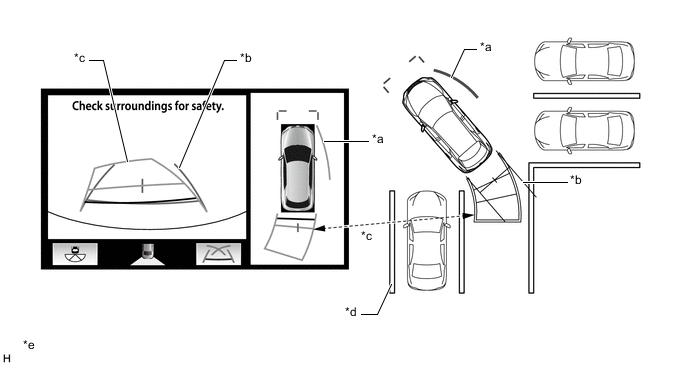
*a Side Estimated Course Line *b Rear Vehicle Width Extension Line *c Rear Estimated Course Line *d Parking Space Line *e The illustration shown is an example only. The illustration may differ from the actual vehicle screen. - -
-
-
Estimated Course Line Display Mode (Parallel Parking)
-
The estimated course lines inform the driver of the estimated course of the vehicle based on the current steering angle. By turning the steering wheel so that the estimated course lines are correctly positioned with respect to the side of the road or parking space line, the driver can easily position the vehicle within the parking space. Also, the estimated course lines assist the driver to avoid obstacles.
-
The rear vehicle width extension lines can be used to determine whether the vehicle is parked straight in the desired parking position by confirming the status of the shoulder and parking space lines, etc., and rear vehicle width extension lines.
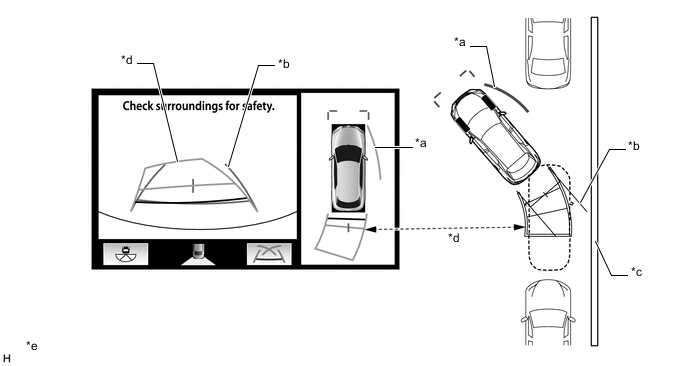
*a Side Estimated Course Line *b Rear Vehicle Width Extension Line *c Shoulder and Parking Space Lines, etc. *d Rear Estimated Course Line *e The illustration shown is an example only. The illustration may differ from the actual vehicle screen. - -
-
-
Parking Assist Guide Line Display Mode (Perpendicular Parking (Entering Parking Space))
-
The parking assist guide lines inform the driver of the course of the vehicle when the steering wheel is turned to full lock while driving in reverse. By driving the vehicle in reverse until the parking assist guide lines align with the parking space line, the vehicle can be guided to the position at which the driver should start turning the steering wheel.
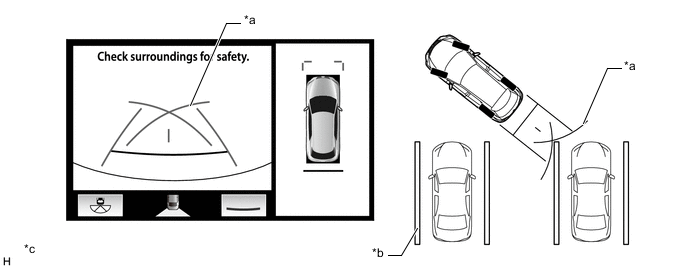
*a Parking Assist Guide Line *b Parking Space Line *c The illustration shown is an example only. The illustration may differ from the actual vehicle screen. - -
-
-
Parking Assist Guide Line Display Mode (Parallel Parking)
-
The parking assist guide lines inform the driver of the course of the vehicle when the steering wheel is turned to full lock while driving in reverse. By driving the vehicle in reverse until the parking assist guide lines align with the side of the road or parking space line, the vehicle can be guided to the position at which the driver should start turning the steering wheel.
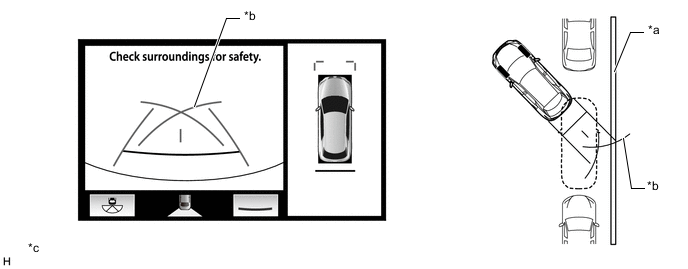
*a Shoulder and Parking Space Lines, etc. *b Parking Assist Guide Line *c The illustration shown is an example only. The illustration may differ from the actual vehicle screen. - -
-
-
-
Side View and Rear View (when Outer Rear View Mirror Assemblies are Retracted)
-
Side View and Rear View Display Contents
-
When the outer rear view mirror assemblies are retracted, the side television camera assembly RH and rear television camera assembly images simultaneously display and assist the driver to confirm the safety of the surroundings and park close to the curb or parking space boundary line.
Figure 4. Side View and Rear View Display Contents
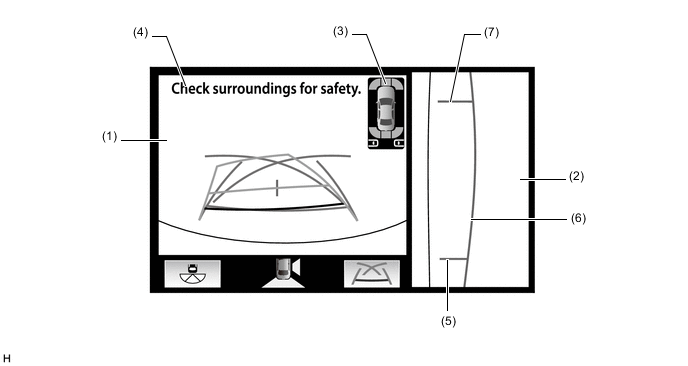
The illustration shown is an example only. The illustration may differ from the actual vehicle screen.
Item Description (1) Rear View An image captured by the rear television camera assembly of the area to the rear of the vehicle. (2) Side View (Right Side*1/Left Side*2) An image of the area to the right of the vehicle captured by the side television camera assembly RH*1/LH*2. (3) Clearance Sonar Icon*3 If an obstacle is detected when the LEXUS parking assist-sensor system is activated, the approximate distance between the vehicle and the obstacle is displayed. RCTA Icon*3 If a vehicle is detected when the blind spot monitor system is activated, the direction of the approaching vehicle is displayed. (4) Warning Message Warns the driver according to the message on the display. (5) Rear Tire Contact Line (Blue) A guide line showing the rear right tire contact position. (6) Vehicle Width Parallel Line (Blue) A vehicle width guide line including the outer rear view mirror assembly. (7) Front Tire Contact Line (Blue) A guide line showing the front right tire contact position. *1: LHD Models
*2: RHD Models
*3: Models with 8 inch multi-display
-
-
-
Rear View
-
Rear View Display Contents
-
An image from the rear television camera assembly is displayed to assist the driver to confirm the safety of the left and right sides of the vehicle while driving in reverse.
Figure 5. Rear View Display Contents
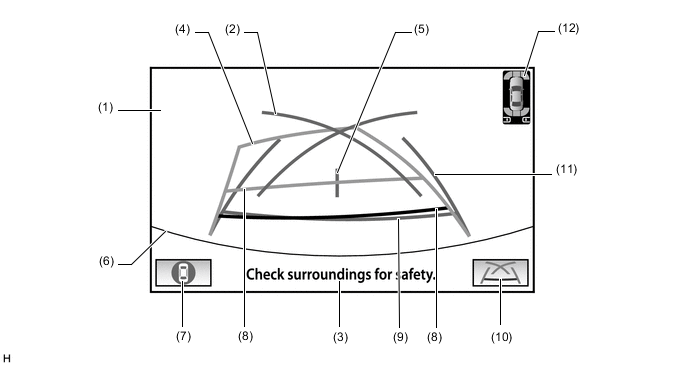
The illustration shown is an example only. The illustration may differ from the actual vehicle screen.
Item Description (1) Rear View An image captured by the rear television camera assembly of the area to the rear of the vehicle. (2) Parking Assist Guide Line*1 (Blue) Indicates the path the vehicle will follow when the driver turns the steering wheel fully. (3) Warning Message Warns the driver according to the message on the display. (4) Rear Estimated Course Line*2 (Yellow) Moves in sync with the steering wheel to indicate the estimated reverse course of the vehicle. (5) Vehicle Center Guide Line (Blue) Indicates the estimated position on the ground of the center of the vehicle. (6) Edge of Rear Bumper The edge of the rear bumper is displayed on the screen. (7) Camera Angle Mode Button Switches to the panoramic view and rear view, or side view and rear view, according to the state of the outer rear view mirror assembly.(extended/retracted). (8) Rear Distance Guide Line (Yellow/Red)*3 These lines are distance guide lines showing the distance from the edge of the rear bumper. (Approximately 1.0 m (3.3 ft.): yellow, approximately 0.5 m (1.6 ft.): red) (9) Rear Distance Guide Line (Blue*4) These lines are distance guide lines showing the distance from the edge of the rear bumper. (Approximately 0.5 m (1.6 ft.)) (10) Display Mode Switch Button Changes the display mode. (11) Rear Vehicle Width Extension Line*5 (Blue) Indicates the estimated vehicle width. (12) Clearance Sonar Icon*6 If an obstacle is detected when the LEXUS parking assist-sensor system is activated, the approximate distance between the vehicle and the obstacle is displayed. RCTA Icon*6 If a vehicle is detected when the blind spot monitor system is activated, the direction of the approaching vehicle is displayed. *1: The rear estimated course line and the parking assist guide line cannot be displayed simultaneously.
*2: Displayed when the guide line display is set to "Estimated Course Line Display Mode".
*3: Displayed when the guide line display is set to "Estimated Course Line Display Mode" and the steering angle is not positioned straight ahead.
*4: Turns red in "Parking Assist Guide Line Display Mode" and "Distance Guide Line Display Mode".
*5: Not displayed when the steering angle is approximately straight ahead.
*6: Models with 8 inch multi-display
-
-
-
Wide Rear View
-
Wide Rear View Display Contents
-
An enlarged image from the rear television camera assembly is displayed to assist the driver to confirm the safety of the left and right sides of the vehicle while driving in reverse.
Figure 6. Wide Rear View Display Contents
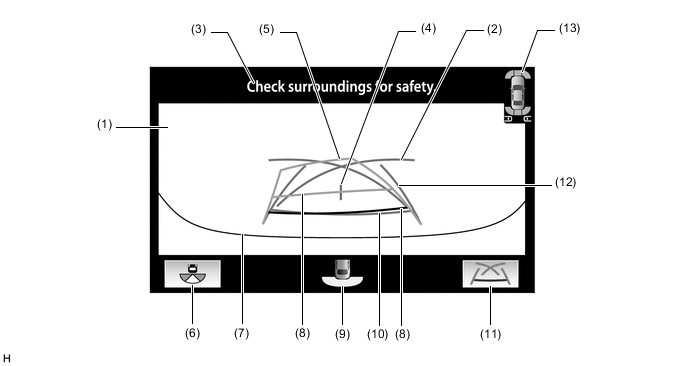
The illustration shown is an example only. The illustration may differ from the actual vehicle screen.
Item Description (1) Wide Rear View An image captured by the rear television camera assembly of the area to the rear of the vehicle. (2) Parking Assist Guide Line*1 (Blue) Indicates the path the vehicle will follow when the driver turns the steering wheel fully. (3) Warning Message Warns the driver according to the message on the display. (4) Vehicle Center Guide Line (Blue) Indicates the estimated position on the ground of the center of the vehicle. (5) Rear Estimated Course Line*2 (Yellow) Moves in sync with the steering wheel to indicate the estimated reverse course of the vehicle. (6) Camera Angle Mode Button Switches to the rear view. (7) Edge of Rear Bumper The edge of the rear bumper is displayed on the screen. (8) Rear Distance Guide Line (Yellow/Red)*3 These lines are distance guide lines showing the distance from the edge of the rear bumper. (Approximately 1.0 m (3.3 ft.): yellow, approximately 0.5 m (1.6 ft.): red) (9) Camera Direction Display Vehicle Icon Indicates that the "wide rear view" is displayed. (10) Rear Distance Guide Line (Blue*4) These lines are distance guide lines showing the distance from the edge of the rear bumper. (Approximately 0.5 m (1.6 ft.)) (11) Display Mode Switch Button Changes the display mode. (12) Rear Vehicle Width Extension Line*5 (Blue) Indicates the estimated vehicle width. (13) Clearance Sonar Icon*6 If an obstacle is detected when the LEXUS parking assist-sensor system is activated, the approximate distance between the vehicle and the obstacle is displayed. RCTA Icon*6 If a vehicle is detected when the blind spot monitor system is activated, the direction of the approaching vehicle is displayed. *1: The rear estimated course line and the parking assist guide line cannot be displayed simultaneously.
*2: Displayed when the guide line display is set to "Estimated Course Line Display Mode".
*3: Displayed when the guide line display is set to "Estimated Course Line Display Mode" and the steering angle is not positioned straight ahead.
*4: Turns red in "Parking Assist Guide Line Display Mode" and "Distance Guide Line Display Mode".
*5: Not displayed when the steering angle is approximately straight ahead.
*6: Models with 8 inch multi-display
-
-
Estimated Course Line Display Mode (Perpendicular Parking (Entering Parking Space))
-
The estimated course lines inform the driver of the estimated course of the vehicle based on the current steering angle. When reversing, by turning the steering wheel so that the estimated course lines are correctly positioned with respect to the parking space lines, the driver can easily position the vehicle within the parking space. Also, the estimated course lines assist the driver to avoid obstacles.
-
The rear vehicle width extension lines can be used to determine whether the vehicle is parked straight in the parking space by confirming the status of the parking space lines and rear vehicle width extension lines.
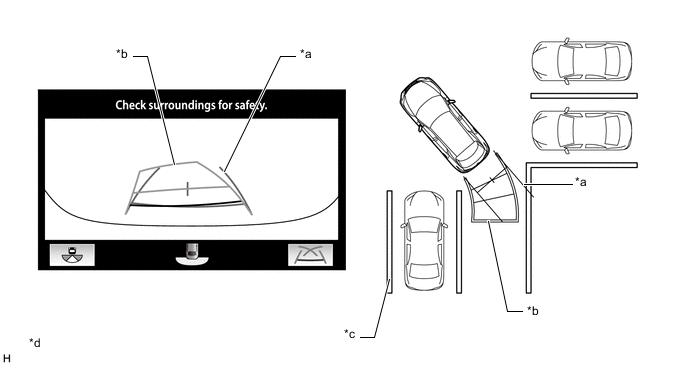
*a Rear Vehicle Width Extension Line *b Rear Estimated Course Line *c Parking Space Line *d The illustration shown is an example only. The illustration may differ from the actual vehicle screen.
-
-
Estimated Course Line Display Mode (Parallel Parking)
-
The estimated course lines inform the driver of the estimated course of the vehicle based on the current steering angle. When reversing, by turning the steering wheel so that the estimated course lines are correctly positioned with respect to the side of the road or parking space line, the driver can easily position the vehicle within the parking space. Also, the estimated course lines assist the driver to avoid obstacles.
-
The rear vehicle width extension lines can be used to determine whether the vehicle is parked straight in the desired parking position by confirming the status of the shoulder and parking space lines, etc., and rear vehicle width extension lines.
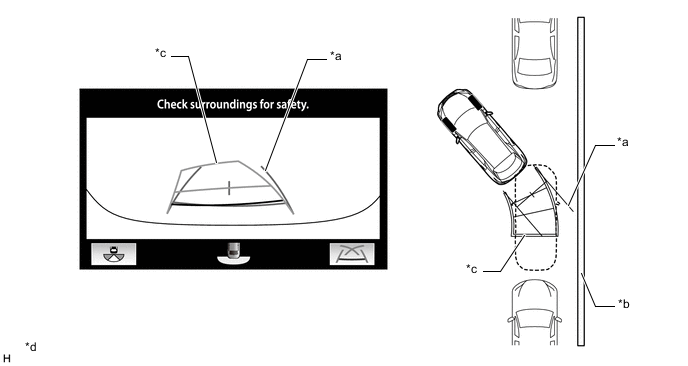
*a Rear Vehicle Width Extension Line *b Shoulder and Parking Space Line, etc. *c Rear Estimated Course Line *d The illustration shown is an example only. The illustration may differ from the actual vehicle screen.
-
-
Parking Assist Guide Line Display Mode (Perpendicular Parking (Entering Parking Space))
-
The parking assist guide lines inform the driver of the course of the vehicle when the steering wheel is turned to full lock while driving in reverse. By driving the vehicle in reverse until the parking assist guide lines align with the parking space line, the vehicle can be guided to the position at which the driver should start turning the steering wheel.
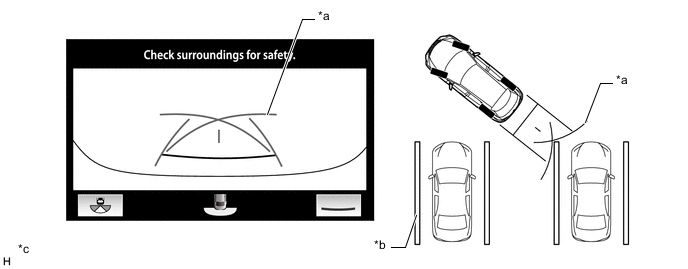
*a Parking Assist Guide Line *b Parking Space Line *c The illustration shown is an example only. The illustration may differ from the actual vehicle screen. - -
-
-
Parking Assist Guide Line Display Mode (Parallel Parking)
-
The parking assist guide lines are used as a guide to know where to stop the vehicle when driving the vehicle straight back in reverse, such as when parallel parking. By driving the vehicle in reverse until the parking assist guide lines align with the side of the road or parking space line, the vehicle can be guided to the position at which the driver should start turning the steering wheel.
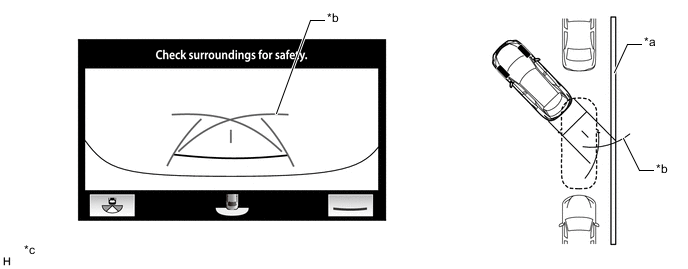
*a Shoulder and Parking Space Line, etc. *b Parking Assist Guide Line *c The illustration shown is an example only. The illustration may differ from the actual vehicle screen. - -
-
-
-
Side Simultaneous View
-
Side Simultaneous View Display Contents
-
This view displays images from the side television camera assembly installed on either side of the vehicle and assists the driver to confirm the safety of the area to the side of the vehicle and avoiding contact with obstacles on narrow roads, etc.
-
The side simultaneous view displays even when the outer rear view mirror assemblies are retracted.
Figure 7. Side Simultaneous View Display Contents
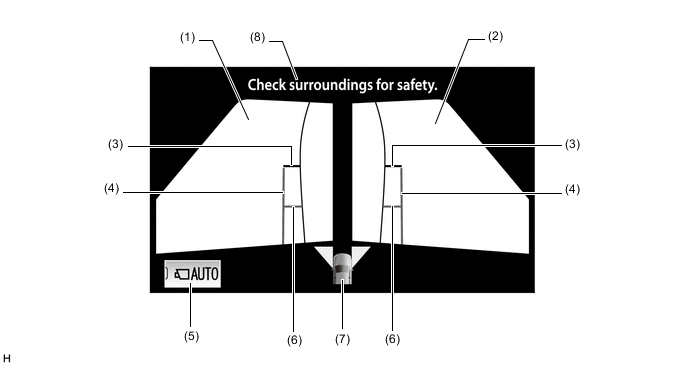
The illustration shown is an example only. The illustration may differ from the actual vehicle screen.
Item Description (1) Side View (Front Left Side) An image captured by the side television camera assembly LH of the area to the front left side of the vehicle. (2) Side View (Front Right Side) An image captured by the side television camera assembly RH of the area to the front right side of the vehicle. (3) Front Distance Guide Line (Red) These lines are distance guide lines showing the distance forward from the edge of the front bumper. (Approximately 0.5 m (1.6 ft.)) (4) Vehicle Width Parallel Line (Blue) A vehicle width guide line including the outer rear view mirror assembly. (5) Auto Mode Button Can be used to turn the automatic display mode on and off. When the automatic display mode is on, an indicator inside the button illuminates. (6) Front Tire Contact Line (Blue) A guide line showing the front tire contact position. (7) Camera Direction Display Vehicle Icon
-
Indicates that the "side simultaneous view" is displayed.
-
When the LEXUS parking assist-sensor system detects an obstacle, the distance and direction to the obstacle is superimposed on the screen.
(8) Warning Message Warns the driver according to the message on the display. -
-
-
Vehicle Width Parallel Line (Obstacle Evasion and Driving Close to Objects on Narrow Roads)
-
The vehicle width parallel lines inform the driver of the approximate width of the vehicle including the outer rear view mirror assemblies. By driving the vehicle so that the vehicle width parallel lines do not overlap actual obstacles, white lines, curbs, etc., the driver can avoid obstacles and drive the vehicle close to objects on narrow roads.
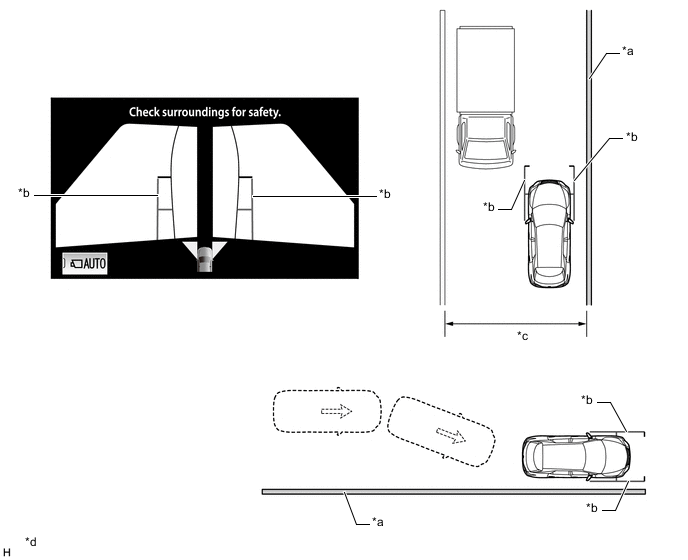
*a Wall, Fence, etc. *b Vehicle Width Parallel Line *c Narrow Road, etc. *d The illustration shown is an example only. The illustration may differ from the actual vehicle screen.
-
-
-
Moving View
-
Moving View (to Panoramic View) Display Contents
-
This view combines images from the front, rear, left and right side television camera assemblies to display an image of the vehicle from a viewpoint diagonally above the vehicle. The displayed image rotates 360 degrees around the vehicle displayed on the screen to assist the driver to confirm the safety of the surroundings. Furthermore, after the image of the vehicle from a viewpoint diagonally above the vehicle rotates a full 360 degrees, an overhead view of the vehicle is displayed.
-
Using the rotation pause button, the rotation of the moving view can be paused and unpaused at will.
-
When all of the following conditions are met, the moving view will be displayed.
-
Shift lever is in P.
-
LEXUS parking assist-sensor system is on.
-
Panoramic view monitor main switch is pressed.
-
When the outer rear view mirror assemblies are retracted, the moving view is not displayed and the side view and wide front view is displayed.
Figure 8. Moving View (to Panoramic View) Display Contents
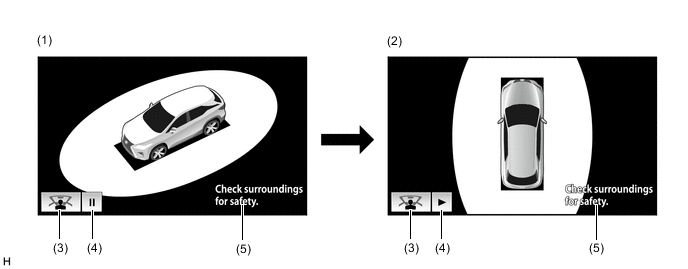
The illustration shown is an example only. The illustration may differ from the actual vehicle screen.
Item Description (1) Moving View An image of the vehicle and its surroundings as seen from a viewpoint diagonally above the vehicle while rotating the image 360 degrees around the vehicle. (2) Panoramic View An overhead image of the vehicle created by combining images from the front, rear, left and right side television camera assemblies. (3) See Through View Button Changes to the see through view. (4) Rotation Pause Button Pauses and unpauses the rotation of the moving view. (5) Warning Message Warns the driver. Tech Tips
The color of the moving view vehicle icon can be changed. Refer to the Repair Manual for the details.
-
-
-
See Through View
-
See Through View (to Panoramic View) Display Contents
-
By combining the images from cameras on the front, rear, and both sides of the vehicle, a simulated video display of the area around the vehicle is created. By reducing the size of blind spots from inside the vehicle, it assists the driver to confirm the safety of the area around the vehicle.
-
Using the rotation pause button, the rotation of the see through view can be paused and unpaused at will.
-
When all of the following conditions are met, the see through view will be displayed.
-
Shift lever is in P.
-
LEXUS parking assist-sensor system is on.
-
Panoramic view monitor main switch is pressed.
-
When the outer rear view mirror assemblies are retracted, the see through view is not displayed and the side view and wide front view is displayed.
Figure 9. See Through View (to Panoramic View) Display Contents
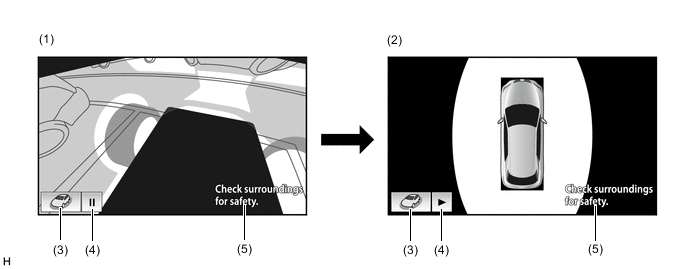
The illustration shown is an example only. The illustration may differ from the actual vehicle screen.
Item Description (1) See Through View Simulated view of the area around the vehicle as seen from inside the vehicle. (2) Panoramic View An overhead image of the vehicle created by combining images from the front, rear, left and right side television camera assemblies. (3) Moving View Button Changes to the moving view. (4) Rotation Pause Button Pauses and unpauses the rotation of the see through view. (5) Warning Message Warns the driver according to the message on the display.
-
-
-
Panoramic View Monitor System Display Operation
-
The panoramic view monitor system has 2 display modes. "Manual Display Mode" displays the screen according to the needs of the driver, and "Automatic Display Mode" automatically displays the screen when the display conditions are met.
-
The panoramic view monitor system display can be displayed and switched by operating the panoramic view monitor main switch.
-
The panoramic view monitor system is displayed when the panoramic view monitor main switch is pressed in manual display mode or the automatic display mode display conditions are met.
-
When the engine switch is on (IG) and the shift lever is in R, the "panoramic view and rear view" is displayed regardless of the operation status of the panoramic view monitor main switch.
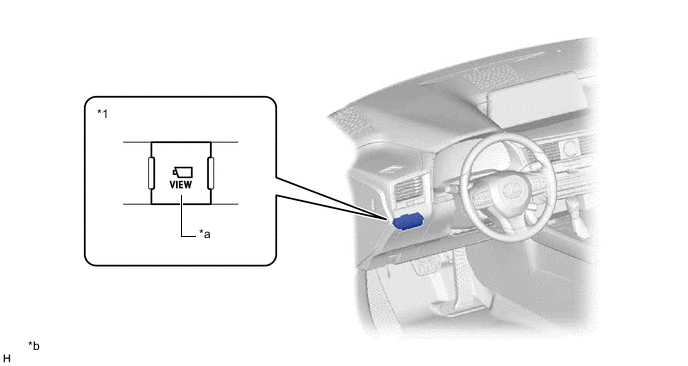
*1 Integration Control and Panel Assembly - - *a Panoramic View Monitor Main Switch *b The illustration shown in an example only.
-
-
Panoramic View Monitor System Screen Transition
-
The panoramic view monitor system assists the driver to confirm the conditions around the vehicle while driving at low speeds and when parking.
Figure 10. Screen Transition Chart (when Outer Rear View Mirror Assemblies are Extended)
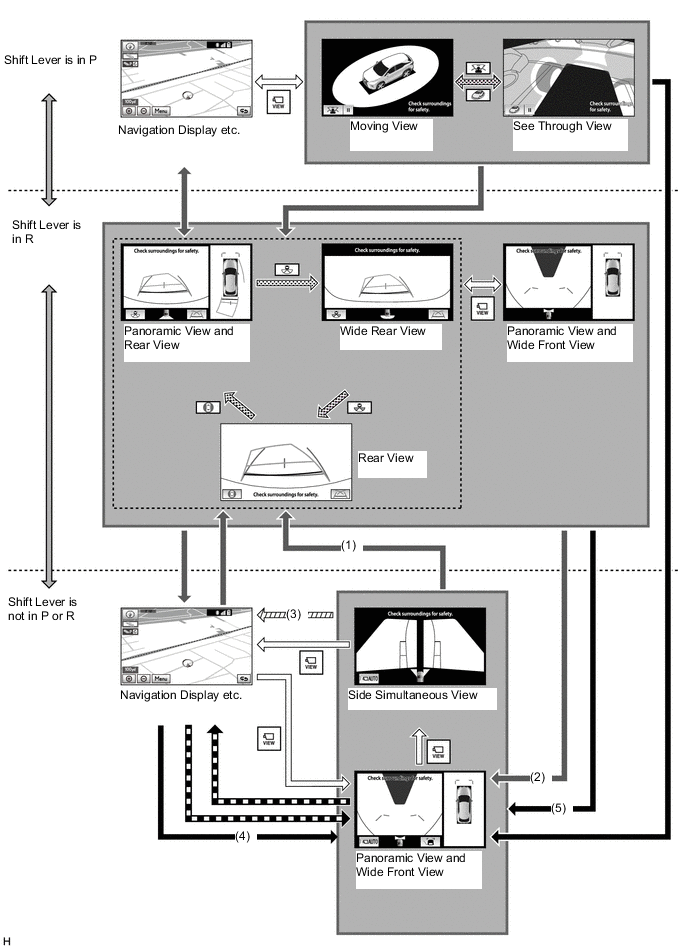
The illustration shown is an example only. The illustration may differ from the actual vehicle screen.

Shift Operation 
Screen Transition According to Shift Operation (Manual Display Mode) 
Screen Transition According to Change in Vehicle Speed 
Screen Transition According to Switch Operation (Manual Display Mode) 
Screen Transition in Automatic Display Mode 
Screen Transition According to Priority Screen Switching 
Screen Transition by LEXUS parking assist sensor-linked panoramic view function - - Screen Transition Conditions No. Conditions (1) When the shift lever is moved while the "panoramic view and wide front view" or "side simultaneous view" is displayed after the panoramic view monitor main switch is pressed. (2) When the shift lever is moved while the "panoramic view and rear view", "wide rear view" or "panoramic view and wide front view" is displayed following condition (1) (3) The vehicle speed has reached approximately 20 km/h (12 mph) or more. (4) When the vehicle speed becomes 10 km/h (6 mph) or less (previously displayed "panoramic view and wide front view" or "side simultaneous view" is displayed) (5) When the previously displayed "panoramic view and wide front view" or "side simultaneous view" is displayed Figure 11. Screen Transition Chart (when Outer Rear View Mirror Assemblies are Retracted)
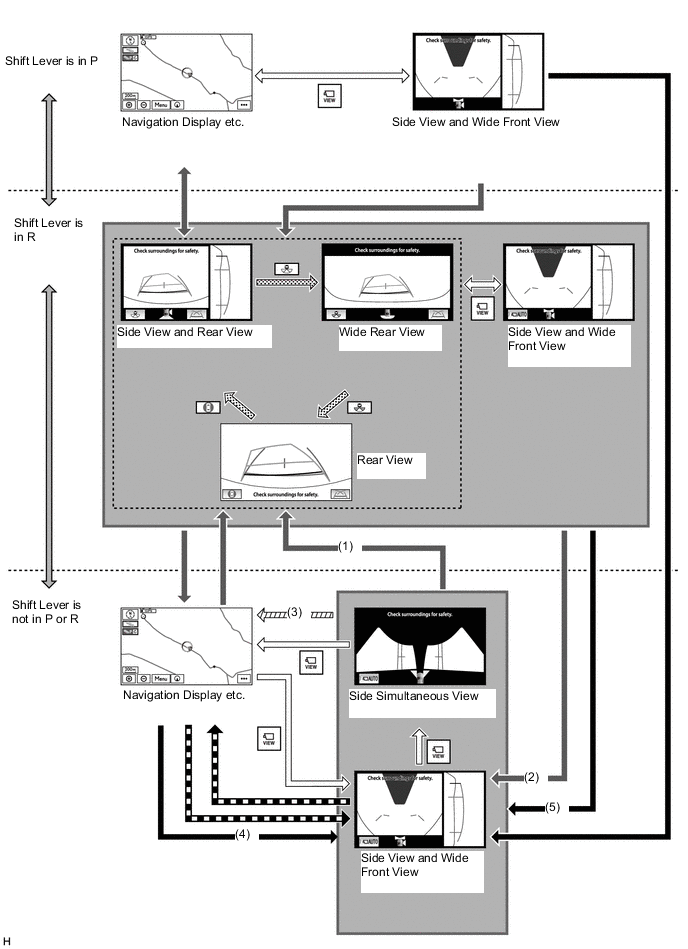
The illustration shown is an example only. The illustration may differ from the actual vehicle screen.
Shift Operation Screen Transition According to Shift Operation (Manual Display Mode) Screen Transition According to Change in Vehicle Speed Screen Transition According to Switch Operation (Manual Display Mode) Screen Transition in Automatic Display Mode Screen Transition According to Priority Screen Switching Screen Transition by LEXUS parking assist sensor-linked panoramic view function - - Screen Transition Conditions No. Conditions (1) When the shift lever is moved while the "side view and wide front view" or "side simultaneous view" is displayed after the panoramic view monitor main switch is pressed. (2) When the shift lever is moved while the "side view and rear view", "wide rear view" or "side view and wide front view" is displayed following condition (1). (3) The vehicle speed has reached approximately 20 km/h (12 mph) or more. (4) When the vehicle speed becomes 10 km/h (6 mph) or less (previously displayed "side view and wide front view" or "side simultaneous view" is displayed) (5) When the previously displayed "side view and wide front view" or "side simultaneous view" is displayed
-
-
Panoramic View Zoom Function
-
By touching the panoramic view screen, part of the panoramic view vehicle icon can be enlarged.
-
Using the zoom function, 4 areas near the vehicle corners can be enlarged.
Figure 12. Screen Transition Chart
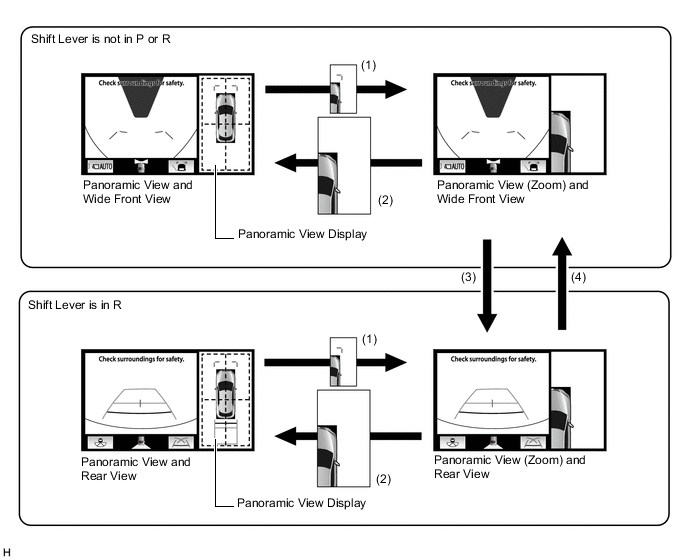
Screen Transition Conditions No. Conditions (1) Any of the 4 areas on the panoramic view screen is selected while the vehicle speed is approximately 12 km/h (7 mph) or less and the LEXUS parking assist-sensor system is turned on. (2) Any of the following conditions are met:
-
Remote touch switch is pressed on the panoramic view zoom screen
-
The vehicle speed changes from approximately 12 km/h (7 mph) or less to over approximately 12 km/h (7 mph).
-
The LEXUS parking assist-sensor system is turned off.
(3) Shift lever is moved to R. (4) Shift lever is moved to D or N. -
-
-
-
DIAGNOSIS
-
The parking assist ECU is equipped with a diagnosis function which can display a diagnosis menu for the panoramic view monitor system. For details, refer to the Repair Manual.
-