CLUTCH PEDAL SWITCH REMOVAL
PROCEDURE
REMOVE NO. 1 INSTRUMENT PANEL UNDER COVER SUB-ASSEMBLY (w/ Instrument Panel Under Cover)
DISCONNECT CONNECTORS (for LHD)
-
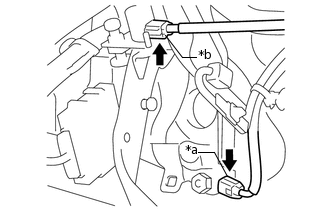
*a
Clutch Pedal Switch Assembly
*b
No. 2 Clutch Pedal Switch Assembly
Disconnect the clutch pedal switch assembly connector.
Disconnect the No. 2 clutch pedal switch assembly connector.
-
DISCONNECT CONNECTORS (for RHD)
-
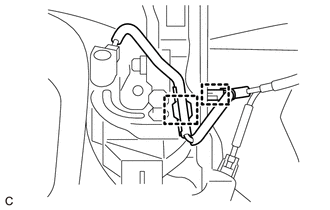
Disconnect the 2 clamps from the clutch pedal support sub-assembly.
-
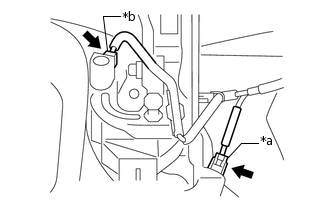
*a
Clutch Pedal Switch Assembly
*b
No. 2 Clutch Pedal Switch Assembly
Disconnect the clutch pedal switch assembly connector.
Disconnect the No. 2 clutch pedal switch assembly connector.
-
REMOVE CLUTCH PEDAL SWITCH ASSEMBLY
-
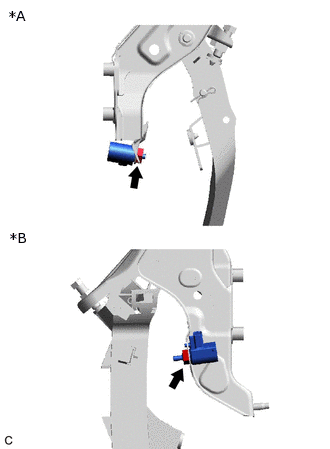
*A
for LHD
*B
for RHD
Remove the nut and clutch pedal switch assembly from the clutch pedal support sub-assembly.
Note:To prevent damage to the clutch pedal switch assembly, make sure not to rotate it during removal.
-
REMOVE NO. 2 CLUTCH PEDAL SWITCH ASSEMBLY
-
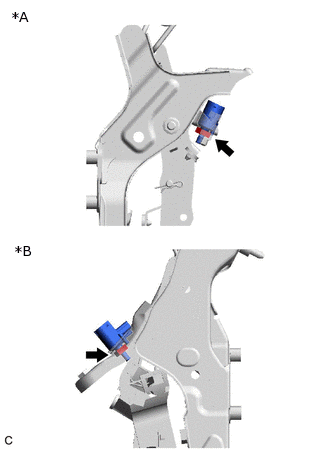
*A
for LHD
*B
for RHD
Remove the nut and No. 2 clutch pedal switch assembly from the clutch pedal support sub-assembly.
Note:To prevent damage to the No. 2 clutch pedal switch assembly, make sure not to rotate it during removal.
-