NAVIGATION SYSTEM / MULTI INFORMATION SYSTEM
-
OUTLINE
-
A multiple display function is provided. This function allows items such as a map screen and audio screen to be displayed on the navigation system screen simultaneously. The screen layout and displayed items are customizable, and by touching an item, it can be displayed full-screen.
-
The map database of the navigation system is stored in the microSD card in the navigation receiver assembly. To update the map database, purchase a new microSD card with the latest map database and replace the old microSD card.
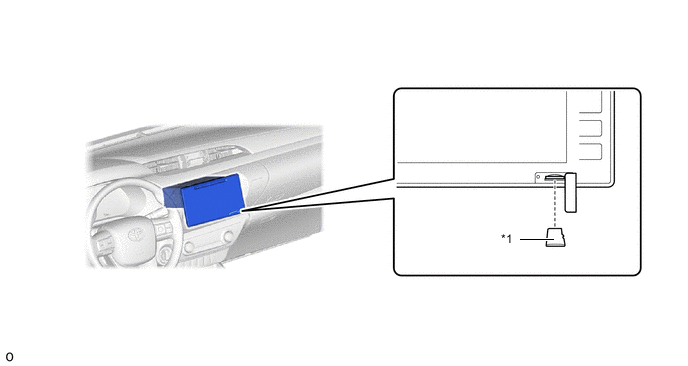
*1 microSD Card - - -
During route guidance, the user can confirm traffic information, such as congestions and accidents, displayed on the traffic bar on the map screen. The traffic bar shows information in the area from the current position to the destination or waypoint (100 km (65 miles) at the maximum).*
-
*: Models for South Africa
-
-
The navigation system sends navigation information to the combination meter assembly. The user can view a compass display or turn-by-turn directions to the destination on the multi-information display.
-
-
SPECIFICATION
Models for G.C.C. Countries Display 7.0-inch Wide LCD Navigation Computer Panasonic Map Data Media microSD Card (Disc Player Disc) microSD card Aisin AW Gyro Sensor Piezoelectric Ceramic Element Language Supported Voice Guidance English Voice Recognition - Models for Australia Display 7.0-inch Wide LCD Navigation Computer Fujitsu Ten Map Data Media microSD Card (Disc Player Disc) microSD card Fujitsu Ten Gyro Sensor Piezoelectric Ceramic Element Language Supported Voice Guidance English Voice Recognition English Models for South Africa Display 7.0-inch Wide LCD Navigation Computer Panasonic Map Data Media microSD Card (Disc Player Disc) microSD card Aisin AW Gyro Sensor Piezoelectric Ceramic Element Language Supported Voice Guidance English Voice Recognition English -
MAIN FEATURES
-
The main functions of the display and navigation module display are listed below.
Models for G.C.C. Countries and Australia Function Outline Navigation System Through the use of the Global Positioning System (GPS) and map data stored on a microSD card, the navigation system analyzes the position of the vehicle and indicates the current position on the map displayed on the screen. In addition, the user can use the system to register memory points and navigate to a destination. Audio/Video System Serves as the display and controls for the following operations:
-
Radio operation
-
CD/DVD*1 player operation
-
Bluetooth-compatible portable audio player operation
-
iPod/iPhone operation
-
USB memory operation
-
Portable audio player operation (AUX type)
Hands-free System When a Bluetooth-compatible cellular telephone is registered with the navigation receiver assembly, the driver can make and receive hands-free calls by operating the switches on the screen and steering pad. Monitor System When the shift lever is moved to R, a view of the area behind the vehicle captured by the television camera mounted on the tailgate is displayed on the screen. Others Fuel Consumption Screen Fuel consumption information such as average fuel consumption per minute, current fuel consumption per minute and past fuel consumption record is displayed. Maintenance Information*1 The maintenance information function can be used to inform the driver of the inspection or replacement timing based on the calendar function and distance driven. Language Select*1 The language of the menu screen, each message display and the voice guidance can be changed. Color Setting The button and progress bar color can be changed. Keyboard Layout*2 The keyboard layout can be changed. Screen Adjustment The user can adjust screen brightness and contrast to suit the brightness of the surroundings. Map Database Update The map database can be updated by purchasing a new microSD card with the latest map database and replacing the old microSD card. Diagnosis This menu contains the following items:
-
Failure Diagnosis
-
System Check
-
SD Check
-
Diagnosis Recorder
-
Function Check / Setting
-
Panel and Steering Switch
-
Microphone Check
-
Vehicle Signal
-
HF Voice Quality Setting
-
Touch Switch
-
System Sensors Check
-
DAB Reception Check*3
-
Service Information
-
Program Update
-
Version Information
-
Product Information
*1: Models for G.C.C. Countries
*2: Models for Australia
*3: Models with Digital Audio Broadcast (DAB) tuner
Models for South Africa Function Outline Navigation System Through the use of the Global Positioning System (GPS) and map data stored on a microSD card, the navigation system analyzes the position of the vehicle and indicates the current position on the map displayed on the screen. In addition, the user can use the system to register memory points and navigate to a destination. Audio/Video System Serves as the display and controls for the following operations:
-
Radio operation
-
CD/DVD player operation
-
Bluetooth-compatible portable audio player operation
-
iPod/iPhone operation
-
USB memory operation
-
Portable audio player operation (AUX type)
Hands-free System When a Bluetooth-compatible cellular telephone is registered with the navigation receiver assembly, the driver can make and receive hands-free calls by operating the switches on the screen and steering pad. Monitor System When the shift lever is moved to R, a view of the area behind the vehicle captured by the television camera mounted on the tailgate is displayed on the screen. Others Fuel Consumption Screen Fuel consumption information such as average fuel consumption per minute, current fuel consumption per minute and past fuel consumption record is displayed. Maintenance Information The maintenance information function can be used to inform the driver of the inspection or replacement timing based on the calendar function and distance driven. Language Select The language of the menu screen, each message display and the voice guidance can be changed. Color Setting The button and progress bar color can be changed. Screen Adjustment The user can adjust screen brightness and contrast to suit the brightness of the surroundings. Map Database Update The map database can be updated by purchasing a new microSD card with the latest map database and replacing the old microSD card. Diagnosis This menu contains the following items:
-
Failure Diagnosis
-
System Check
-
SD Check
-
Diagnosis Recorder
-
Function Check / Setting
-
Panel and Steering Switch
-
Microphone Check
-
Vehicle Signal
-
HF Voice Quality Setting
-
Touch Switch
-
System Sensors Check
-
DAB Reception Check
-
Service Information
-
Program Update
-
Version Information
-
Product Information
-
-
-
PRECAUTION
-
When ejecting the microSD card, observe the following precautions to avoid damaging it.
-
The microSD card (disc player disc) stores map data or various programs which are required to operate the navigation system. With the microSD card (disc player disc) removed, the navigation system will not operate properly. Do not remove the microSD card (disc player disc) unless necessary, such as for a map update.
-
Do not insert anything other than a microSD card (disc player disc) into the microSD card slot after removing the microSD card (disc player disc).
-
Do not insert a dusty or dirty microSD card (disc player disc) into the microSD card slot, as it may cause a malfunction.
-
After the microSD card (disc player disc) is inserted, make sure that it is secure in the microSD card slot.
-
-
When handling a microSD card (disc player disc), observe the following precautions. Failure to do so may cause a malfunction.
-
Do not touch the metal contacts of the microSD card (disc player disc) with your fingers or metal objects.

-
Do not bend, drop or strike a microSD card (disc player disc), as it is a precision electronic component and may become damaged
-
Avoid the following environments when storing a removed microSD card (disc player disc). Failure to do so may cause the microSD card (disc player disc) to malfunction and generate errors in the navigation system.
-
Areas where static electricity or electrical noise is present
-
Extremely hot or humid areas
-
Areas exposed to direct sunlight
-
Areas where condensation may form
-
Areas where corrosive gases may be generated
-
-
Do not peel the label on the microSD card or attach a new label or sticker.
-
-
Ignition Switch Expressions
-
The type of ignition switch used on this model differs depending on the specifications of the vehicle. The expressions listed in the table below are used in this section.
Expression Ignition Switch (Position) Engine Switch (Condition) Ignition Switch off LOCK Off (Lock) Ignition Switch ACC ACC On (ACC) Ignition Switch ON ON On (IG) Engine Start START On (Start)
-
-