PRE-COLLISION SYSTEM Laser Sensor Inspection
| DTC Code | DTC Name |
|---|---|
| Laser Sensor Inspection |
DESCRIPTION
The pre-collision city sensor determines the distance between this vehicle and a preceding vehicle using the laser sensor.
CAUTION / NOTICE / HINT
When replacing the pre-collision city sensor, replace it with a new one and be sure to initialize the settings. If a pre-collision city sensor which was installed to another vehicle is used, the information stored in the pre-collision city sensor will not match the information from the vehicle and, as a result, a DTC may be stored.
If the pre-collision city sensor has been replaced, or the windshield glass has been replaced or removed/installed, be sure to perform Pre-collision City Sensor Learning (Click here).
PROCEDURE
READ VALUE USING GTS
-
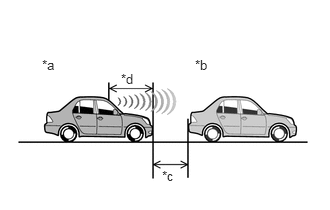
Position this vehicle and another vehicle as shown in the illustration, and then measure the distance between this vehicle and the preceding vehicle.
Table 1. Text in Illustration *a
This Vehicle
*b
Preceding Vehicle
*c
1.33 m (4.36 ft.)
*d
1.67 m (5.48 ft.)
Note:Perform the measurement indoors in an area where sunlight will not shine directly on the pre-collision city sensor.
Tip:The distance between the pre-collision city sensor (laser sensor) and the rear bumper of the preceding vehicle should be approximately 3 m (9.84 ft.).
The distance between the pre-collision city sensor (laser sensor) and the front bumper of this vehicle is 1.67 m (5.48 ft.).
The distance between the pre-collision city sensor (laser sensor) and the preceding vehicle is displayed in the Data List.
Do not use a modified car as a preceding vehicle.
Connect the GTS to the DLC3.
Turn the ignition switch to ON.
Turn the GTS on.
Enter the following menus: Chassis / PCS/LDA/RSA/LVN / Data List.
Read the Data List according to the display on the GTS.
Table 2. Chassis > PCS/LDA/RSA/LVN > Data List Tester Display
Measurement Item/Range
Normal Condition
Diagnostic Note
Lidar Detect Target Distance
Displays the distance to the preceding vehicle detected by the laser sensor (pre-collision city sensor). / 0 to 51.0 m
Distance between the vehicle and a preceding vehicle
When no preceding vehicle is detected, "0 m" (0 ft.) is displayed
Tip:If "0 m" (0 ft.) is displayed, the pre-collision city sensor (laser sensor) is malfunctioning.
OK
Distance displayed is within 3.0 m (9.84 ft.) +/- 0.5 m (1.64 ft.)
-