PRE-CRASH SAFETY SYSTEM TERMINALS OF ECU
CHECK DRIVING SUPPORT ECU ASSEMBLY
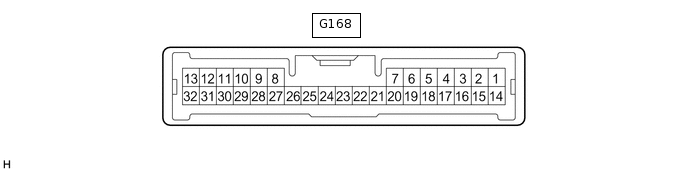
Disconnect the G168 driving support ECU assembly connector.
Note:If a load of more than 10 kg (22 lb) is placed on the connector, it may break. Do not place more load than is necessary on the connector.
Measure the voltage and resistance according to the value(s) in the table below.
Terminal No. (Symbol)
Wiring Color
Terminal Description
Condition
Specified Condition
G168-28 (GND) - Body ground
BR - Body ground
Ground
Always
Below 1 Ω
G168-7 (B) - Body ground
B - Body ground
Power source
Power switch on (IG)
11 to 14 V
Power switch off
Below 1 V
Tip:If the result is not as specified, there may be a malfunction on the wire harness side.
Reconnect the G168 driving support ECU assembly connector.
Check for pulses according to the value(s) in the table below.
Terminal No. (Symbol)
Wiring Color
Terminal Description
Condition
Specified Condition
G168-3 (BZ) - Body ground
LG - Body ground
Skid control buzzer output
Power switch on (IG)
Skid control buzzer operating
0 to 1.5 V
Power switch on (IG)
Skid control buzzer not operating
11 to 14 V
G168-11 (CA2L) - G168-28 (GND)
LG - BR
CAN communication signal
Power switch on (IG)
Pulse generation
(See waveform 1)
G168-9 (CA1N) - G168-28 (GND)
W - BR
CAN communication signal
Power switch on (IG)
Pulse generation
(See waveform 2)
G168-10 (CA2H) - G168-28 (GND)
P - BR
CAN communication signal
Power switch on (IG)
Pulse generation
(See waveform 3)
G168-8 (CA1P) - G168-28 (GND)
B - BR
CAN communication signal
Power switch on (IG)
Pulse generation
(See waveform 4)
-
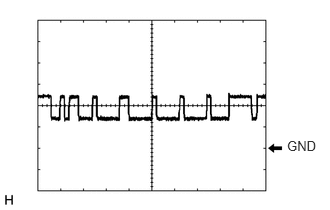
Waveform 1
CAN communication signal
Item
Content
Tester Connection
G168-11 (CA2L) - G168-28 (GND)
Tool Setting
1 V/DIV., 10 μsec./DIV.
Condition
Power switch on (IG)
Tip:The waveform varies depending on the CAN communication signal.
-
Waveform 2
CAN communication signal
Item
Content
Tester Connection
G168-9 (CA1N) - G168-28 (GND)
Tool Setting
1 V/DIV., 10 μsec./DIV.
Condition
Power switch on (IG)
Tip:The waveform varies depending on the CAN communication signal.
-
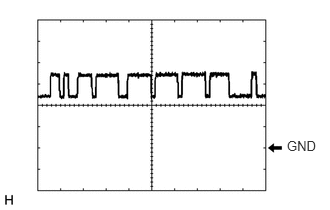
Waveform 3
CAN communication signal
Item
Content
Tester Connection
G168-10 (CA2H) - G168-28 (GND)
Tool Setting
1 V/DIV., 10 μsec./DIV.
Condition
Power switch on (IG)
Tip:The waveform varies depending on the CAN communication signal.
-
Waveform 4
CAN communication signal
Item
Content
Tester Connection
G168-8 (CA1P) - G168-28 (GND)
Tool Setting
1 V/DIV., 10 μsec./DIV.
Condition
Power switch on (IG)
Tip:The waveform varies depending on the CAN communication signal.
CHECK MILLIMETER WAVE RADAR SENSOR ASSEMBLY
CHECK FORWARD RECOGNITION CAMERA
CHECK BRAKE BOOSTER WITH MASTER CYLINDER ASSEMBLY (SKID CONTROL ECU)