TIRE PRESSURE WARNING SYSTEM INITIALIZATION
Initialization can be confirmed through the tire pressure warning light.
The order in which the data is received is random.
If the signals from all the wheels are received, initialization is completed.
Initialization is completed when the Data List "ID Tire Inflation Pressure" display shows the correct pressures.
Initialization is normally completed within a few minutes.
It may take up to a few minutes until the values are displayed. If the values are not displayed after a few minutes, perform troubleshooting according to the inspection procedure for DTCs C2121/21 to C2124/24 (C2125/25: w/ Full Size Spare Tire).
If initialization has not been completed successfully, DTC C2177/77 is stored after a vehicle speed of 37 km/h (23 mph) or more continues for 20 minutes or more.
During test mode (sensor check mode), the system will not change to initialization mode even if the tire pressure warning reset switch is pushed.
w/ ID Switching Function:
While the answer-back function for the ID switching function is operating, the system will not change to initialization mode even if the tire pressure warning reset switch is pressed.
-
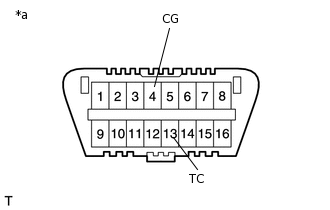
*a
Front view of DLC3
Initialization can be terminated by connecting terminals 13 (TC) and 4 (CG) of the DLC3.
BEFORE INITIALIZATION
Make sure that the tires are cold.
Set the air pressure of all tires to the specified value(s).
-
Tip:
for FMVSS138 Type:
The tire pressure warning system illuminates the tire pressure warning light to warn the driver when the following condition is met:
Due to the operation of the tire pressure warning reset switch, the tire pressure drops to approximately 75% or less of the tire pressure set during system initialization.
for ECE-R64 Type:
The tire pressure warning system illuminates the tire pressure warning light to warn the driver when any of the following conditions are met:
Due to the operation of the steering pad switch assembly, the tire pressure drops to approximately 80% or less of the tire pressure set during system initialization.
The tire pressure drastically decreases (approximately 20 kPa (0.2 kgf/cm2, 2.9 psi) or more within several minutes) to approximately 80% or less of the tire pressure* when the tires are warmed.
*: If initialization is performed and the vehicle is driven for a certain period of time, the tire pressure set during system initialization is adjusted and set to the tire pressure when the tires are warmed from the driving conditions.
Note:If the tire pressure is decreased approximately 20 kPa (0.2 kgf/cm2, 2.9 psi) or more in order to adjust the tire pressure, even if the adjusted tire pressure is 80% or more than the tire pressure set during system initialization, the tire pressure warning light may illuminate if the tire pressure drops below 80% of the tire pressure set when the tires are warmed. In this case, perform initialization again.
INITIALIZATION PROCEDURE
Turn the power switch on (IG).
Press and hold the tire pressure warning reset switch for 3 seconds or more so that the tire pressure warning light blinks 3 times.
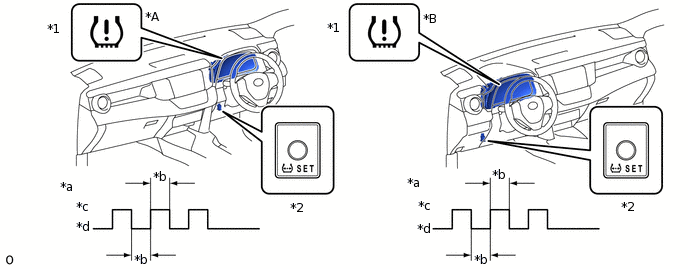
*A
for RHD
*B
for LHD
*1
Tire Pressure Warning Light
*2
Tire Pressure Warning Reset Switch
*a
Tire Pressure Warning Light Output Pattern
*b
1 sec.
*c
ON
*d
OFF
Turn the power switch off.
Connect the GTS to the DLC3.
Turn the power switch on (IG) and turn the GTS on.
Enter the following menus: Chassis / Tire Pressure Monitor / Data List.
Chassis > Tire Pressure Monitor > Data List
Tester Display
ID 1 Tire Inflation Pressure
ID 2 Tire Inflation Pressure
ID 3 Tire Inflation Pressure
ID 4 Tire Inflation Pressure
ID 5 Tire Inflation Pressure
Check that initialization has been completed.
Confirm that the tire pressure data of all tires is displayed on the GTS screen.