PARKING ASSIST MONITOR SYSTEM Images from All Cameras are Abnormal
| DTC Code | DTC Name |
|---|---|
| Images from All Cameras are Abnormal |
DESCRIPTION
The parking assist ECU displays images for the parking assist monitor, wide view front monitor* and side monitor* screens. Each image signal is sent from the parking assist ECU to the display and navigation module display through GVIF cable.
*: w/ Side Monitor System
WIRING DIAGRAM
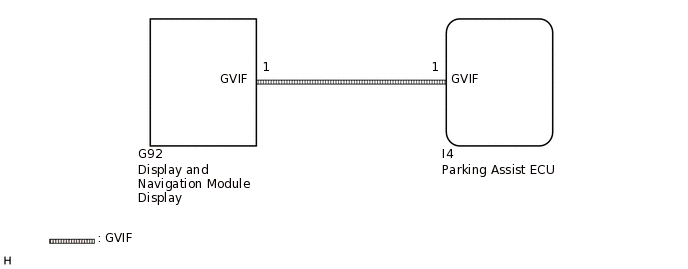
CAUTION / NOTICE / HINT
When "System initializing" is displayed on the display and navigation module display after the battery terminal disconnected, correct the steering angle neutral point (Click here).
Depending on the parts that are replaced or operations that are performed during vehicle inspection or maintenance, calibration of other systems as well as the parking assist monitor system may be needed (Click here).
Images are difficult to discern even in normal conditions if:
Noise may occur in the image depending on electrical devices used in the cabin.
Noise may occur in the image if accessories that generate radio waves have been installed.
The camera screen is frosted over (the image immediately after turning the engine switch on (IG) may be blurred or darker than normal).
The camera lens is dirty with snow, mud, etc.
A strong beam of light, such as a sunbeam or headlight, hits the camera.
It is too dark around the camera (at night etc.).
The ambient temperature around the camera is either too high or too low.
The vehicle is tilted at a steep angle.
The ambience of the camera is too bright. (When a strong light, such as a sunbeam reflected off the vehicle body, hits the camera, the image may be blurred. This is called the "SMEAR" phenomenon, peculiar to the CCD camera.)
PROCEDURE
CONFIRM SYMPTOMS
Check if the same symptom occurs on the parking assist monitor and side monitor screens.
Result
Result
Proceed to
Images from parking assist monitor system, wide view front monitor system and side monitor system are abnormal.
A
Side monitor system is not equipped.
Image from parking assist monitor system is abnormal.
B
Image from side monitor system is abnormal.
C
Image from wide view front monitor system is abnormal.
D
Tip:Conditions for displaying the parking assist monitor screen (Shift lever in R).
Refer to the conditions for displaying the side monitor screen (w/ Parking Assist Monitor System).
Refer to the conditions for displaying the wide view front monitor screen.
The parking assist ECU displays images for the parking assist monitor and side monitor screens.
Each image signal is sent from the parking assist ECU to the display and navigation module display through the digital communication cable.
If the same symptoms occur on the parking assist monitor, wide view front monitor and side monitor screens, image signals between the parking assist ECU and display and navigation module display may be abnormal.
D GO TO WIDE VIEW FRONT MONITOR SYSTEM (IMAGE FROM CAMERA FOR WIDE VIEW FRONT MONITOR IS ABNORMAL)
READ VALUE USING INTELLIGENT TESTER
Connect the intelligent tester to the DLC3.
Turn the engine switch on (IG).
Turn the intelligent tester on.
Enter the following menus: Chassis / Parking Assist Monitor System / Data List.
Check the Data List for proper functioning of the following items.
Chassis > IPA/Parking Assist Monitor > Data List
Tester Display
Measurement Item
Range
Normal Condition
Diagnostic Note
ASIC Output Status
Output condition of camera display
OK or NG
OK: Output condition of camera display is normal
NG: Output condition of camera display is abnormal
-
Result
Result
OK
NG
CHECK GVIF CABLE (PARKING ASSIST ECU - DISPLAY AND NAVIGATION MODULE DISPLAY)
Check the GVIF cable connector.
Check the GVIF cable connectors between the parking assist ECU and display and navigation module display for any connection problems.
Check if the same malfunction recurs when the parking assist monitor and side monitor screens are displayed.
Result
Result
Proceed to
Malfunction does not reoccur (returns to normal)
A
Malfunction reoccurs
B
A END (GVIF CABLE IS DEFECTIVE)
REPLACE GVIF CABLE
Replace the GVIF cable between the parking assist ECU and display and navigation module display with a new one.
Check if the same malfunction recurs when the parking assist monitor, wide view front monitor and side monitor screens are displayed.
Result
Result
Proceed to
Malfunction does not reoccur (returns to normal)
A
Malfunction reoccurs
B
A END (GVIF CABLE IS DEFECTIVE)
REPLACE DISPLAY AND NAVIGATION MODULE DISPLAY
Replace the display and navigation module display with a new or normally functioning one.
Check if the same malfunction recurs when the parking assist monitor, wide view front monitor and side monitor screens are displayed.
Result
Result
Proceed to
Malfunction does not reoccur (returns to normal)
A
Malfunction reoccurs
B
A END (DISPLAY AND NAVIGATION MODULE DISPLAY IS DEFECTIVE)