SFI SYSTEM, Diagnostic DTC:P1109, P2109
| DTC Code | DTC Name |
|---|---|
| P1109 | Throttle Deposit Malfunction |
| P2109 | Throttle / Pedal Position Sensor "A" Minimum Stop Performance |
DESCRIPTION
The idling speed is controlled by the Electronic Throttle Control System (ETCS). The ETCS is comprised of a throttle actuator, which operates the throttle valve, and a throttle position sensor, which detects the opening amount of the throttle valve. The ECM controls the throttle actuator to adjust the throttle valve opening amount so that the idling speed is maintained at the target idling speed.
| DTC No. | DTC Detection Condition | Trouble Area |
|---|---|---|
| P1109 | ISC learning value is 95% or more of the maximum learning ISC learning value, and 50% or more deposit is accumulated for 10 seconds continuously. (5 trip detection logic) |
|
| P2109 | One of the following conditions is met (1 trip detection logic):
|
|
Tech Tips
-
The ISC learned value is the calculated intake air amount corresponding to the throttle opening amount necessary to maintain the idling speed.
-
This malfunction is only detected once per trip. After it has been detected once, the system will not monitor for the malfunction for the rest of the trip.
-
The system uses the throttle with motor body assembly and mass air flow meter assembly to detect this malfunction.
MONITOR DESCRIPTION
If there are deposits in the throttle valve, a decrease in the ISC flow rate may cause engine stall or unstable idling. Therefore, the necessary ISC flow rate for idling is maintained using the ISC learned value and feedback. The ECM stores this DTC if the ISC learned value approaches its limit.
CONFIRMATION DRIVING PATTERN
-
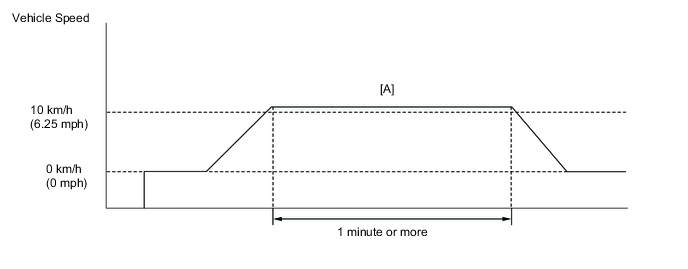
-
Connect the GTS to the DLC3.
-
Turn the ignition switch to ON and turn the GTS on.
-
Clear DTCs (even if no DTCs are stored, perform the clear DTC operation) Click here.
-
Turn the ignition switch off and wait for at least 30 seconds.
-
Turn the ignition switch to ON and turn the GTS on.
-
Start the engine and warm it up until the engine coolant temperature reaches 75°C (167°F) or higher.
-
Depress the accelerator pedal fully and release the accelerator pedal.
-
Drive the vehicle at 10 km/h (6.25 mph) or more for 1 minute or more [A].
CAUTION:
When performing the confirmation driving pattern, obey all speed limits and traffic laws.
-
Enter the following menus: Powertrain / Engine / Trouble Codes.
-
Read pending DTCs.
Tech Tips
-
If a pending DTC is output, the system is malfunctioning.
-
If a pending DTC is not output, perform the following procedure.
-
-
Enter the following menus: Powertrain / Engine / Utility / All Readiness.
-
Input the DTC: P1109 or P2109.
-
Check the DTC judgment result.
GTS Display Description NORMAL
-
DTC judgment completed
-
System normal
ABNORMAL
-
DTC judgment completed
-
System abnormal
INCOMPLETE
-
DTC judgment not completed
-
Perform driving pattern after confirming DTC enabling conditions
N/A
-
Unable to perform DTC judgment
-
Number of DTCs which do not fulfill DTC preconditions has reached ECU memory limit
Tech Tips
-
If the judgment result shows NORMAL, the system is normal.
-
If the judgment result shows ABNORMAL, the system has a malfunction.
-
-
If the test result is INCOMPLETE or N/A and no DTC is output, perform a universal trip and check for permanent DTCs Click here.
Tech Tips
-
If a permanent DTC is output, the system is malfunctioning.
-
If no permanent DTC is output, the system is normal.
-
CAUTION / NOTICE / HINT
Note
Never clean the throttle with motor body assembly.
Tech Tips
-
Read freeze frame data using the GTS. Freeze frame data records engine conditions when a malfunction occurs. This information can be useful when troubleshooting.
-
Since a pending DTC is not stored for this DTC, it takes time to confirm whether the malfunction has been successfully repaired by checking for this DTC. When confirming whether the malfunction has been successfully repaired, compare "ISC Learning Value" recorded in the freeze frame data with "ISC Learning Value" in the Data List after repairs have been made to save time.
PROCEDURE
-
CHECK ANY OTHER DTCS OUTPUT (IN ADDITION TO P2109)
-
Connect the GTS to the DLC3.
-
Turn the ignition switch to ON.
-
Turn the GTS on.
-
Enter the following menus: Powertrain / Engine / Trouble Codes.
-
Read DTCs.
Result Result Proceed to DTC P1109 or P2109 is output A DTC P1109 or P2109 and other DTCs are output B Tech Tips
If any DTCs other than P1109 or P2109 are output, troubleshoot those DTCs first.
B 
GO TO DTC CHART Click here
A 
-
-
REPLACE THROTTLE WITH MOTOR BODY ASSEMBLY
-
Replace the throttle with motor body assembly Click here.
NEXT
-
-
CHECK WHETHER DTC OUTPUT RECURS
-
Connect the GTS to the DLC3.
-
Turn the ignition switch to ON.
-
Turn the GTS on.
-
Clear the DTCs Click here.
-
Turn the ignition switch off and wait for at least 30 seconds.
-
Turn the ignition switch to ON.
-
Turn the GTS on.
-
Drive the vehicle in accordance with the driving pattern described in Confirmation Driving Pattern.
-
Enter the following menus: Powertrain / Engine / Trouble Codes.
-
Read DTCs.
Result Result Proceed to DTC is not output A DTC P1109 or P2109 is output B
A
END
B
REPLACE ECM Click here
-