HYBRID CONTROL SYSTEM, Diagnostic DTC:P0A7A-325, P0A7A-810
| DTC Code | DTC Name |
|---|---|
| P0A7A-325 | Generator Inverter Performance |
| P0A7A-810 | Generator Inverter Performance |
DTC SUMMARY
-
MALFUNCTION DESCRIPTION
These DTCs indicate that a large current flowed in the inverter for the generator. The cause of this malfunction may be one of the following:
-
Internal circuit malfunction in the inverter for the generator
-
Malfunction in the sensors for inverter control (current sensor, voltage sensor (VH, VL), etc.)
Internal inverter malfunction
-
DESCRIPTION
For a description of the inverter.
If an abnormal amount of current flows through the generator inverter, the MG ECU detects it and sends a signal to inform the hybrid vehicle control ECU assembly of the malfunction.
| DTC No. | Detection Item | DTC Detection Condition | Trouble Area | MIL | Warning Indicate |
|---|---|---|---|---|---|
| P0A7A-325 | Generator Inverter Performance | Generator inverter fail signal detected (overcurrent due to inverter assembly malfunction): Overcurrent occurs in the generator inverter.* (1 trip detection logic) |
|
Comes on | Master Warning Light: Comes on |
| P0A7A-810 | Generator Inverter Performance | Abnormal generator inverter current value detected (inverter malfunction) (1 trip detection logic) |
|
Comes on | Master Warning Light: Comes on |
*: The cause of the malfunction is most likely the inverter with converter assembly.
When a large current flows in the inverter and the current sensor and voltage sensors (VL, VH) are malfunctioning, this DTC is output.
CAUTION / NOTICE / HINT
CAUTION:
-
Before inspecting the high-voltage system or disconnecting the low voltage connector of the inverter with converter assembly, take safety precautions such as wearing insulated gloves and removing the service plug grip to prevent electrical shocks. After removing the service plug grip, put it in your pocket to prevent other technicians from accidentally reconnecting it while you are working on the high-voltage system.
-
After removing the service plug grip, wait for at least 10 minutes before touching any of the high-voltage connectors or terminals. After waiting for 10 minutes, check the voltage at the terminals in the inspection point in the inverter with converter assembly. The voltage should be 0 V before beginning work.
Tech Tips
Waiting for at least 10 minutes is required to discharge the high-voltage capacitor inside the inverter with converter assembly.
Note
After turning the power switch off, waiting time may be required before disconnecting the cable from the negative (-) auxiliary battery terminal. Therefore, make sure to read the disconnecting the cable from the negative (-) auxiliary battery terminal notices before proceeding with work.
Tech Tips
After the repair, clear the DTCs and perform the following procedure to check that DTCs are not output.
-
Turn the power switch on (READY) and wait for 5 seconds or more.
-
Drive the vehicle for approximately 10 minutes mainly using the engine.
PROCEDURE
-
CHECK DTC OUTPUT (HYBRID CONTROL)
-
Connect the GTS to the DLC3.
-
Turn the power switch on (IG).
-
Enter the following menus: Powertrain / Hybrid Control / Trouble Codes.
-
Check for DTCs.
Powertrain > Hybrid Control > Trouble CodesResult Proceed to P0A7A-203 is not output. P0A7A-203 is also output. Note
-
If P0A7A-203 is output, troubleshoot it first. After completing the troubleshooting for P0A7A-203, perform troubleshooting for this DTC.
-
Parts repaired or replaced during troubleshooting for P0A7A-203 do not need to be re-inspected in this diagnostic procedure.
-
-
Turn the power switch off.
P0A7A-203 is also output. 
GO TO DTC CHART (P0A7A-203) Click here
P0A7A-203 is not output. 
-
-
CHECK DTC OUTPUT (HYBRID CONTROL)
-
Connect the GTS to the DLC3.
-
Turn the power switch on (IG).
-
Enter the following menus: Powertrain / Hybrid Control / Trouble Codes.
-
Check for DTCs.
Powertrain > Hybrid Control > Trouble CodesTech Tips
-
If P0A7A-203 was not output in step 1 of this diagnostic procedure, check Table 1 below.
-
If P0A7A-203 was output in step 1 of this diagnostic procedure, diagnose that DTC first, then check Table 2 below.
Result Result Proceed to P0A7A-325 or 810 only is output, or DTCs except the ones in the tables below are also output. A Any of the following DTCs are also output. B Table 1 Malfunction Content Relevant DTC Microcomputer malfunction P0A1A-151, 166, 658, 791 Generator Control Module P0A1B-198, 786, 794 Drive Motor "A" Control Module P0A1D (all INF codes)*1 Hybrid Powertrain Control Module P1C2A-155 Generator A/D Converter Circuit P1C2B-192 Drive Motor "A" A/D Converter Circuit P1CA6-156 Generator Control Module Malfunction P1CA7-193 Drive Motor Control Module Malfunction P1CAC-200 Generator Position Sensor Angle Malfunction P1CAD-168 Drive Motor "A" Position Sensor Angle Malfunction P1CAF-792 Generator Position Sensor REF Signal Cycle Malfunction P1CB0-795 Drive Motor "A" Position Sensor REF Signal Cycle Malfunction P1CB2-793 Generator Position Sensor REF Signal Stop Malfunction P1CB3-796 Drive Motor "A" Position Sensor REF Signal Stop Malfunction P3133-659 Communication Error from Generator to Drive Motor "A" P3134-661 Communication Error from Drive Motor "A" to Generator Power source circuit malfunction P06B0-163 Sensor Power Supply "A" Circuit / Open P06D6-511 Sensor Reference Voltage "F" Circuit / Open P06E6-164 Sensor Power Supply "C" Circuit / Open P1C73-512 Sensor Standard Voltage "F" Circuit / Open Sensor and actuator circuit malfunction P0A3F-243 Drive Motor "A" Position Sensor Circuit P0A40-500 Drive Motor "A" Position Sensor Circuit Range / Performance P0A41-245 Drive Motor "A" Position Sensor Circuit Low P0A4B-253 Generator Position Sensor Circuit P0A4C-513 Generator Position Sensor Circuit Range / Performance P0A4D-255 Generator Position Sensor Circuit Low P0BEA-290 Drive Motor "A" Phase V Current Sensor Circuit Range / Performance P0BEE-298 Drive Motor "A" Phase W Current Sensor Circuit Range / Performance P0D2E-586 Drive Motor "A" Inverter Voltage Sensor Circuit Range / Performance P0D2F-266 Drive Motor "A" Inverter Voltage Sensor Circuit Low P0D30-267 Drive Motor "A" Inverter Voltage Sensor Circuit High P0E05-328 Generator Phase V Current Sensor Circuit Range / Performance P0E09-336 Generator Phase W Current Sensor Circuit Range / Performance P0E32-585 DC/DC Converter Voltage Sensor "A" Range / Performance P0E33-589 DC/DC Converter Voltage Sensor "A" Low P0E34-590 DC/DC Converter Voltage Sensor "A" High P1C3C-294 Drive Motor "A" Phase V Current Sensor Correlation P1C3D-302 Drive Motor "A" Phase W Current Sensor Correlation P1C3E-333 Generator Phase V Current Sensor Correlation P1C3F-341 Generator Phase W Current Sensor Correlation P1C4A-288 Drive Motor "A" Phase V Current Sensor Sub Circuit Range / Performance P1C4F-296 Drive Motor "A" Phase W Current Sensor Sub Circuit Range / Performance P1C54-326 Generator Phase V Current Sensor Sub Circuit Range / Performance P1C59-334 Generator Phase W Current Sensor Sub Circuit Range / Performance P1C6D-501 Drive Motor "A" Phase V Current Sensor Offset Range / Performance P1C6E-502 Drive Motor "A" Phase W Current Sensor Offset Range / Performance P1C71-515 Generator Phase V Current Sensor Offset Range / Performance P1C72-516 Generator Phase W Current Sensor Offset Range / Performance System malfunction P0C76-523 Hybrid Battery System Discharge Time Too Long P1C2D-587 Hybrid Battery Voltage / DC/DC Converter Voltage Correlation Table 2 Malfunction Content Relevant DTC Microcomputer malfunction P0A1A-151, 166, 658, 791 Generator Control Module P0A1B-198, 786, 794 Drive Motor "A" Control Module P0A1D (all INF codes)*1 Hybrid Powertrain Control Module P1C2A-155 Generator A/D Converter Circuit P1C2B-192 Drive Motor "A" A/D Converter Circuit P1CA6-156 Generator Control Module Malfunction P1CA7-193 Drive Motor Control Module Malfunction P1CAC-200 Generator Position Sensor Angle Malfunction P1CAD-168 Drive Motor "A" Position Sensor Angle Malfunction P1CAF-792 Generator Position Sensor REF Signal Cycle Malfunction P1CB0-795 Drive Motor "A" Position Sensor REF Signal Cycle Malfunction P1CB2-793 Generator Position Sensor REF Signal Stop Malfunction P1CB3-796 Drive Motor "A" Position Sensor REF Signal Stop Malfunction P3133-659 Communication Error from Generator to Drive Motor "A" P3134-661 Communication Error from Drive Motor "A" to Generator Power source circuit malfunction P06B0-163 Sensor Power Supply "A" Circuit / Open P06D6-511 Sensor Reference Voltage "F" Circuit / Open P06E6-164 Sensor Power Supply "C" Circuit / Open P1C73-512 Sensor Standard Voltage "F" Circuit / Open Sensor and actuator circuit malfunction P0A3F-243 Drive Motor "A" Position Sensor Circuit P0A40-500 Drive Motor "A" Position Sensor Circuit Range / Performance P0A41-245 Drive Motor "A" Position Sensor Circuit Low P0A4B-253 Generator Position Sensor Circuit P0A4C-513 Generator Position Sensor Circuit Range / Performance P0A4D-255 Generator Position Sensor Circuit Low P0BEA-290 Drive Motor "A" Phase V Current Sensor Circuit Range / Performance P0BEE-298 Drive Motor "A" Phase W Current Sensor Circuit Range / Performance P0D2E-586 Drive Motor "A" Inverter Voltage Sensor Circuit Range / Performance P0D2F-266 Drive Motor "A" Inverter Voltage Sensor Circuit Low P0D30-267 Drive Motor "A" Inverter Voltage Sensor Circuit High P0E32-585 DC/DC Converter Voltage Sensor "A" Range / Performance P0E33-589 DC/DC Converter Voltage Sensor "A" Low P0E34-590 DC/DC Converter Voltage Sensor "A" High P1C3C-294 Drive Motor "A" Phase V Current Sensor Correlation P1C3D-302 Drive Motor "A" Phase W Current Sensor Correlation P1C3E-333 Generator Phase V Current Sensor Correlation P1C3F-341 Generator Phase W Current Sensor Correlation P1C4A-288 Drive Motor "A" Phase V Current Sensor Sub Circuit Range / Performance P1C4F-296 Drive Motor "A" Phase W Current Sensor Sub Circuit Range / Performance P1C6D-501 Drive Motor "A" Phase V Current Sensor Offset Range / Performance P1C6E-502 Drive Motor "A" Phase W Current Sensor Offset Range / Performance System malfunction P0C76-523 Hybrid Battery System Discharge Time Too Long P1C2D-587 Hybrid Battery Voltage / DC/DC Converter Voltage Correlation Tech Tips
-
*1: If any INF codes are output for this DTC, refer to the corresponding diagnostic procedure.
-
P0A7A-325 or P0A7A-810 may be output as a result of the malfunction indicated by the DTCs above.
-
The chart above is listed in inspection order of priority.
-
Check DTCs that are output at the same time by following the listed order. (The main cause of the malfunction can be determined without performing unnecessary inspections.)
-
-
Turn the power switch off.
B
GO TO DTC CHART (HYBRID CONTROL SYSTEM) Click here
A
-
-
CHECK CONNECTOR CONNECTION CONDITION (INVERTER WITH CONVERTER ASSEMBLY CONNECTOR)
Result Result Proceed to OK A NG (The connector is not connected securely.) B NG (The terminals are not making secure contact or are deformed, or water or foreign matter exists in the connector.) C CAUTION:
Be sure to wear insulated gloves.
-
Check that the service plug grip is not installed.
Note
After removing the service plug grip, do not turn the power switch on (READY), unless instructed by the repair manual because this may cause a malfunction.
-
Check the connection condition of the low voltage connector of the inverter with converter assembly and the contact pressure of each terminal. Check the terminals for deformation, and check the connector for water ingress and foreign matter.
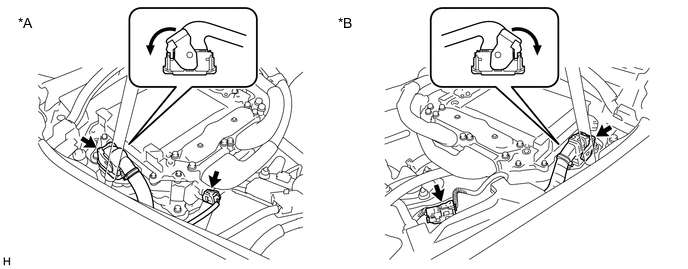
*A for LHD *B for RHD Note
Before disconnecting the connector, confirm that it is properly connected by checking that the locking claws are engaged and that the connector does not pull out.
OK - The connector is connected securely. - The terminals are not deformed and are connected securely. - No water or foreign matter in the connector. Result Result Proceed to OK A NG (The connector is not connected securely.) B NG (The terminals are not making secure contact or are deformed, or water or foreign matter exists in the connector.) C Tech Tips
When connecting the connector, insert it with the locking lever in the raised position. Rotate the lever downward and make sure that the connector is pulled into its socket. When the locking lever is in its fully closed position, a click will be heard as its locking claws engage. After the click is heard, pull up on the connector to confirm that it is properly connected.
A
REPLACE INVERTER WITH CONVERTER ASSEMBLY Click here
B
CONNECT SECURELY
C
REPAIR OR REPLACE HARNESS OR CONNECTOR
-