REAR SEAT ENTERTAINMENT ECU(w/ Rear No. 2 Seat) REMOVAL
PROCEDURE
-
REMOVE STEREO COMPONENT AMPLIFIER ASSEMBLY WITH BRACKET
-
REMOVE MULTI-DISPLAY CONTROLLER SUB-ASSEMBLY WITH BRACKET
-
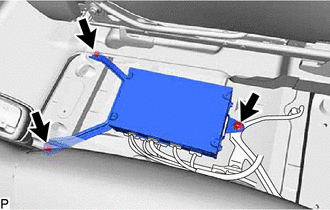
Remove the 2 bolts and nut.
-
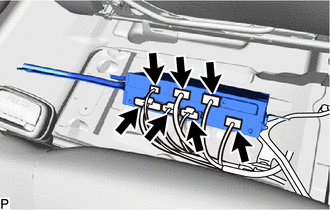
Disconnect each connector to remove the multi-display controller sub-assembly with bracket..
-
-
REMOVE NO. 2 MULTI-DISPLAY CONTROLLER BRACKET
-
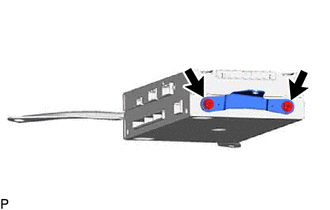
Remove the 2 screws and No. 2 multi-display controller bracket.
-
-
REMOVE NO. 3 MULTI-DISPLAY CONTROLLER BRACKET
-
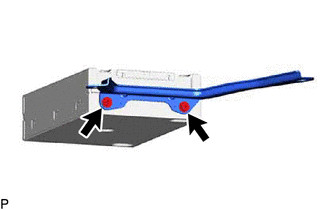
Remove the 2 screws and No. 3 multi-display controller bracket.
-
-
REMOVE MULTI-DISPLAY CONTROLLER SUB-ASSEMBLY