HYBRID BATTERY SYSTEM, Diagnostic DTC:P0AFC-123
| DTC Code | DTC Name |
|---|---|
| P0AFC-123 | Hybrid Battery Pack Sensor Module |
DESCRIPTION
-
If the battery smart unit detects an internal malfunction, it sends an error signal to the hybrid vehicle control ECU. When the hybrid vehicle control ECU receives the error signal from the battery smart unit, the ECU warns the driver and performs fail-safe control.
| DTC No. | INF Code | DTC Detection Condition | Trouble Area |
|---|---|---|---|
| P0AFC | 123 | The hybrid vehicle control ECU receives an error signal from the battery smart unit. |
|
WIRING DIAGRAM
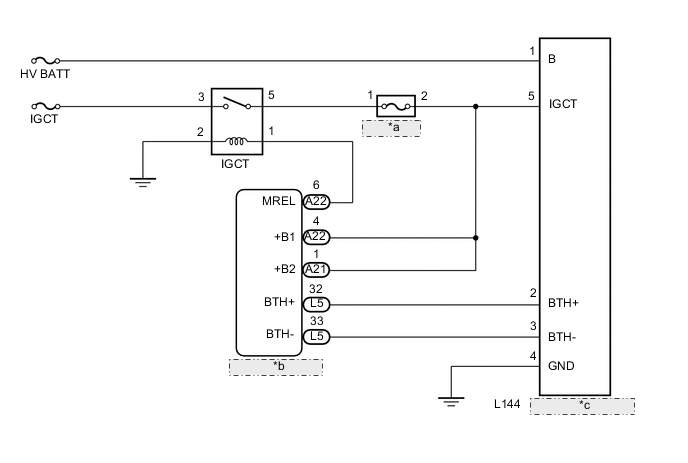
| *a | IGCT No. 2 |
| *b | Hybrid Vehicle Control ECU |
| *c | Battery Smart Unit |
CAUTION / NOTICE / HINT
CAUTION:
-
Before inspecting the high-voltage system or disconnecting the low voltage connector of the inverter with converter assembly, take safety precautions such as wearing insulated gloves and removing the service plug grip to prevent electrical shocks. After removing the service plug grip, put it in your pocket to prevent other technicians from accidentally reconnecting it while you are working on the high-voltage system.
-
After removing the service plug grip, wait for at least 10 minutes before touching any of the high-voltage connectors or terminals. After waiting for 10 minutes, check the voltage at the terminals in the inspection point in the inverter with converter assembly. The voltage should be 0 V before beginning work Click here.
Tech Tips
Waiting for at least 10 minutes is required to discharge the high-voltage capacitor inside the inverter with converter assembly.
Note
After turning the power switch off, waiting time may be required before disconnecting the cable from the negative (-) auxiliary battery terminal. Therefore, make sure to read the disconnecting the cable from the negative (-) auxiliary battery terminal notices before proceeding with work Click here.
Tech Tips
After repairing, restart the system (turn the power switch on (READY)) and recheck for DTCs Click here.
PROCEDURE
-
CHECK DTC OUTPUT (HYBRID CONTROL)
-
Connect the GTS to the DLC3.
-
Turn the power switch on (IG).
-
Enter the following menus: Powertrain / Hybrid Control / Trouble Codes.
-
Read output DTCs.
Result Result Proceed to P31AB-123 is not output A P31AB-123 is output B -
Turn the power switch off.
B 
GO TO DTC CHART (P31AB-123) Click here
A 
-
-
CHECK CONNECTOR CONNECTION CONDITION (BATTERY SMART UNIT CONNECTOR)
CAUTION:
Be sure to wear insulated gloves.
-
Check that the service plug grip is not installed.
Note
After removing the service plug grip, do not turn the power switch on (READY), unless instructed by the repair manual because this may cause a malfunction.
-
Remove the No. 1 hybrid battery shield sub-assembly Click here.
-
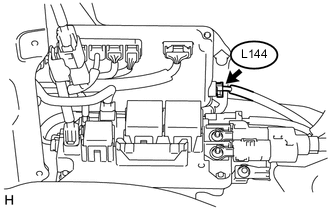
Check the connections of the L144 connector of the battery smart unit.
OK The connectors are connected securely and there are no contact problems. -
Install the No. 1 hybrid battery shield sub-assembly.
NG
CONNECT SECURELY
OK
-
-
CHECK HARNESS AND CONNECTOR (B AND IGCT VOLTAGE)
CAUTION:
Be sure to wear insulated gloves.
-
Check that the service plug grip is not installed.
Note
After removing the service plug grip, do not turn the power switch on (READY), unless instructed by the repair manual because this may cause a malfunction.
-
Remove the No. 1 hybrid battery shield sub-assembly Click here.
-
Connect the cable to the negative (-) auxiliary battery terminal.
-
Turn the power switch on (IG).
Note
Turning the power switch on (IG) with the service plug grip removed causes other DTCs to be stored. Clear the DTCs after performing this inspection.
-
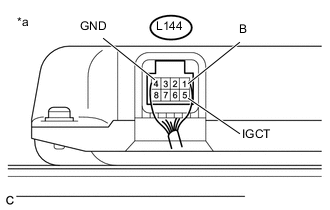
Text in Illustration *a Component with harness connected
(Battery Smart Unit)
Measure the voltage according to the value(s) in the table below.
Standard Voltage Tester Connection Condition Specified Condition L144-1 (B) - L144-4 (GND) Power switch off 8.6 V or more L144-5 (IGCT) - L144-4 (GND) Power switch on (IG) 8.6 V or more -
Turn the power switch off.
-
Disconnect the cable from the negative (-) auxiliary battery terminal.
-
Install the No. 1 hybrid battery shield sub-assembly.
OK
REPLACE BATTERY SMART UNIT Click here
NG
-
-
CHECK HARNESS AND CONNECTOR (GND - BODY GROUND)
CAUTION:
Be sure to wear insulated gloves.
-
Check that the service plug grip is not installed.
Note
After removing the service plug grip, do not turn the power switch on (READY), unless instructed by the repair manual because this may cause a malfunction.
-
Remove the No. 1 hybrid battery shield sub-assembly Click here.
-
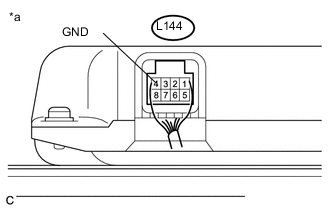
Text in Illustration *a Component with harness connected
(Battery Smart Unit)
Measure the resistance according to the value(s) in the table below.
Standard Resistance Tester Connection Condition Specified Condition L144-4 (GND) - Body ground Power switch off Below 1 Ω -
Install the No. 1 hybrid battery shield sub-assembly.
OK
REPAIR OR REPLACE HARNESS OR CONNECTOR (B OR IGCT CIRCUIT)
NG
REPAIR OR REPLACE HARNESS OR CONNECTOR (GND - BODY GROUND)
-