REAR SEAT ENTERTAINMENT SYSTEM SYSTEM DESCRIPTION
OUTLINE
As a unique feature of the Rear Seat Entertainment (RSE) system, the rear seat occupants can enjoy different audio-visual modes at the same time.
The rear seat occupants can control the audio-visual modes with the television switch and volume assembly, and listen to audio by using wired or wireless headphones.
The multi-display controller sub-assembly receives image and sound signals from the multi-display controller sub-assembly and distributes the signals to each television display assembly.
A television display assembly is installed on the back of each front seat.
The rear seat occupants can enjoy watching video by connecting an external device.
MOST communication is used between the multi-display controller sub-assembly, multi-media module receiver assembly and stereo component amplifier assembly. AVC-LAN communication is used between the multi-display controller sub-assembly, multi-display assembly and each television display assembly.
Occupants in the front seats, rear left seat and rear right seat can enjoy different content at the same time. However, this is possible for the rear left and rear right seats only when VIDEO is selected for either the left or right seat and another source is selected for the other seat.
FUNCTION OF MAIN COMPONENT
Component
Function
Television Display Assembly
Displays DVD and video images in accordance with video signals from the multi-display controller sub-assembly.
Receives signals from the television switch and volume assembly and outputs them to the multi-display controller sub-assembly.
Outputs audio signals to the wireless headphones in the form of infrared signals.
Displays the audio-visual control screen.
Displays the adjustment screen.
Displays the diagnosis screen. The diagnosis screen appears when diagnosis mode is started on the multi-display assembly.
Even if the engine switch is turned from on (ACC) to off to on (ACC), display condition continues (image adjustments maintained, sources continue playing on the left and right sides).
Multi-display Controller Sub-assembly
Processes video and audio signals from the video terminal and DVD image and audio signals from the multi-media module receiver assembly, and outputs them to the television display and headphone terminals.
Controls the distribution of the audio-visual content to the rear left and rear right seats.
Outputs audio signals for the video to the front seats.
Television Switch and Volume Assembly
Outputs various control signals of the RSE system to the television display assembly in the form of infrared signals.
Wireless Headphones
Receive audio signals from the television display assembly in the form of infrared signals.
Volume adjustment of the wireless headphones can be performed using the volume adjuster on the wireless headphones.
Headphone Terminal
Outputs audio signals to the wired headphones that are connected.
Adjusts the volume of the wired headphones in accordance with volume control.
This terminal is for connecting the external device output terminals (HDMI terminal).
Multi-media Module Receiver Assembly
Receives DVD image signals from the multi-media module receiver assembly and sends the signals to the multi-display controller sub-assembly.
COMMUNICATION SYSTEM
MOST Network Outline
AVC-LAN Outline
DIAGNOSIS FUNCTION
When the navigation system changes to the diagnosis screen, the television display assembly shows the "RSE Check" screen.
DISC PLAYER OUTLINE
A disc player uses a laser pickup to read digital signals recorded on CDs or DVDs. By converting the digital signals to analog, music and other content can be played.
CAUTION:Do not look directly at the laser pickup because the disc player uses an invisible laser beam. Be sure to operate the player only as instructed.
Note:Do not disassemble any part of the disc player.
Do not apply oil to the disc player.
Do not insert anything but a CD or DVD into the disc player.
Usable discs
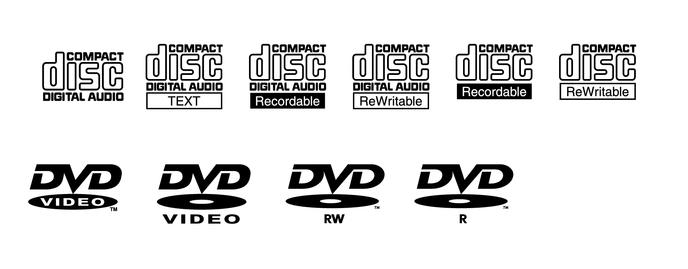
Precautions for use of discs
Note:Copy-protected CDs cannot be played.
CD-Rs, CD-RWs, DVD-Rs or DVD-RWs may not be played depending on the recording conditions or characteristics of the discs, or due to damage, dirt, or deterioration caused by leaving the discs in the cabin for a long time.
Unfinalized CD-Rs, CD-RWs, DVD-Rs and DVD-RWs cannot be played.
PAL or SECAM color television standard discs cannot be played. (Only NTSC discs can be played.)
Dualdiscs that mate DVD recorded material on one side with CD digital audio material on the other cannot be played.
Keep the discs away from dirt. Be careful not to damage the discs or leave fingerprints on them.
Hold discs by the outer edge and center hole with the label side up.
Leaving the disc exposed halfway out of the slot for a long time after pressing the disc eject button may cause deformation of the disc, making the disc unusable.
If discs have adhesive tape, stickers, labels, or any traces of such labels attached, the discs may not be ejected or player malfunctions may result.
Keep the discs away from direct sunlight. (Exposure to direct sunlight may cause deformation of the disc, making the disc unusable.)
Do not use odd-shaped discs because these may cause player malfunctions.
Do not use discs whose recording portion is transparent or translucent because they may not be inserted, ejected, or played normally.
Tip:When it is cold or it is raining, if the windows mist up, mist and condensation may form in the player. In such a case, the disc may skip or the disc may stop in the middle of play. Ventilate or dehumidify the cabin for a while before using the player.
The disc may skip if the player experiences strong vibrations when the vehicle is driven on rough road or similar uneven surfaces.
Check disc
-
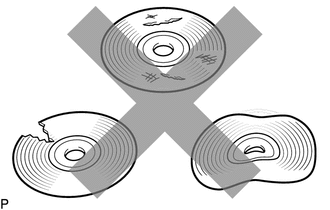
Check that the disc is not deformed or cracked.
-
Disc cleaning
Note:Do not use a lens cleaner because it may cause a malfunction in the pickup portion of the player.
-
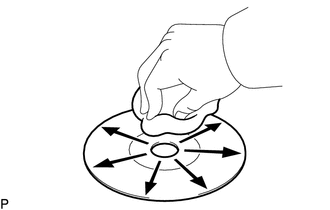
If dirt is on the disc surface, wipe it clean with a soft cloth from the inside to the outside in a radial direction.
Note:Pressing on the disc by hand or rubbing the disc with a hard cloth may scratch the disc surface.
Use of solvent such as a record spray, antistatic agent, alcohol, benzine, and thinner or a chemical cloth may cause damage to the disc, making the disc unusable.
-
"Bluetooth" OUTLINE (Click here)
USB FUNCTION OUTLINE (Click here)