AUDIO AND VISUAL SYSTEM Radio Broadcast cannot be Received or Poor Reception
PROCEDURE
-
CHECK RADIO AND DISPLAY RECEIVER ASSEMBLY
-
Check the radio automatic station search function.
-
Check the radio automatic station search function by activating it.
Result Result Proceed to Automatic station search function does not stop. A Automatic station search function stops on a station. B
-
B 
REPLACE RADIO AND DISPLAY RECEIVER ASSEMBLY Click here
A 
-
-
CHECK OPTIONAL COMPONENTS
-
Check if any optional components that may decrease reception capacity, such as sunshade film or a telephone antenna, are installed.
Result Result Proceed to Optional components are not installed. A Optional components are installed. B Note
Do not remove optional components without the permission of the customer.
B
REMOVE OPTIONAL COMPONENTS AND CHECK AGAIN (SEE NOTICE ABOVE)
A
-
-
CHECK RADIO AND DISPLAY RECEIVER ASSEMBLY
-
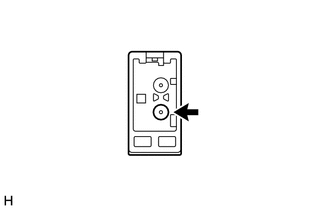
Preparation for check
-
Disconnect the antenna connector from the radio and display receiver assembly.
-
-
Check for noise
-
Turn the power switch on (ACC) with the radio and display receiver assembly connector connected.
-
Turn the radio on and tune into AM mode.
-
Place a screwdriver, thin wire or other metal object on the radio and display receiver assembly antenna jack and check that noise can be heard from the speakers.
OK Noise can be heard from the speakers.
-
NG
REPLACE RADIO AND DISPLAY RECEIVER ASSEMBLY Click here
OK
-
-
INSPECT RADIO AND DISPLAY RECEIVER ASSEMBLY
-
Disconnect the RA radio and display receiver assembly connector.
-
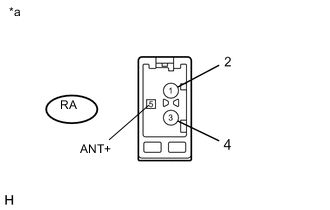
Text in Illustration *a Component without harness connected
(Radio and Display Receiver Assembly)
Measure the voltage according to the value(s) in the table below.
Standard Voltage Tester Connection Condition Specified Condition RA-5 (ANT+) - Body ground Power switch on (ACC)
Radio switch on and FM or AM selected
11 to 14 V
NG
REPLACE RADIO AND DISPLAY RECEIVER ASSEMBLY Click here
OK
-
-
REPLACE ANTENNA CORD SUB-ASSEMBLY
-
Replace the antenna cord sub-assembly with a new or known good one and check if radio broadcasts can be received normally Click here.
OK Radio broadcasts can be received normally.
OK
END
NG
-
-
REPLACE NO. 2 ANTENNA CORD SUB-ASSEMBLY
-
Replace the No. 2 antenna cord sub-assembly with a new or known good one and check if radio broadcasts can be received normally Click here.
OK Radio broadcasts can be received normally.
OK
END
NG
-
-
REPLACE NO. 1 AMPLIFIER ANTENNA ASSEMBLY
-
Replace the No. 1 amplifier antenna assembly with a new or known good one and check if radio broadcasts can be received normally Click here.
OK Radio broadcasts can be received normally.
OK
END
NG
-
-
REPLACE ROOF ANTENNA POLE SUB-ASSEMBLY
-
Replace the roof antenna pole sub-assembly with a new or known good one and check if radio broadcasts can be received normally Click here.
OK Radio broadcasts can be received normally.
OK
END
NG
REPLACE RADIO AND DISPLAY RECEIVER ASSEMBLY Click here
-