NAVIGATION SYSTEM (for Navigation Receiver Type) Voice Guidance does not Function
INSPECTION PROCEDURE
Note
After replacing the navigation ECU sub-assembly of vehicles subscribed to pay-type satellite radio broadcasts, registration of the XM radio ID is necessary.
PROCEDURE
-
CHECK NAVIGATION SETTING
-
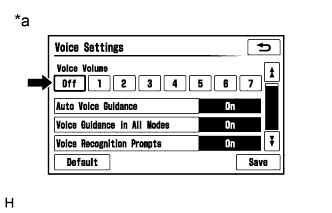
Display the "Voice Settings" screen.
-
Check that "Off" is not selected.
OK "Off" is not selected. Text in Illustration *a Example
NG 
SELECT VOICE VOLUME SETTING OTHER THAN "Off"
OK 
-
-
CHECK NAVIGATION SETTING
-
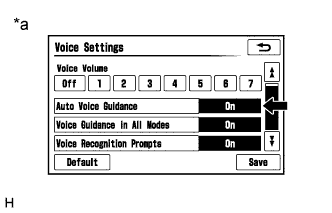
Display the "Voice Settings" screen.
-
Check that "Auto Voice Guidance" is not "Off".
OK "Auto Voice Guidance" is not "Off". Text in Illustration *a Example
NG
TURN AUTO VOICE GUIDANCE "On"
OK
-
-
CHECK NAVIGATION SETTING
-
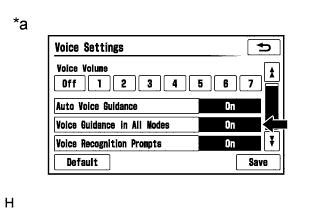
Display the "Voice Settings" screen.
-
Check that "Voice Guidance in All Modes" is not "Off".
OK "Voice Guidance in All Modes" is not "Off". Text in Illustration *a Example
NG
TURN VOICE GUIDANCE IN ALL MODES "On"
OK
-
-
CHECK AUDIO FUNCTION
-
Check that sound can be heard from a front speaker.
OK Sound can be heard.
NG
PROCEED TO NEXT SUSPECTED AREA SHOWN IN PROBLEM SYMPTOMS TABLE Click here
OK 
REPLACE NAVIGATION ECU SUB-ASSEMBLY Click here
-