NOISE FILTER INSTALLATION

-
INSTALL RADIO SETTING CONDENSER (for Window Defogger)
-
Engage the claw to install a new terminal cover to the wire harness.
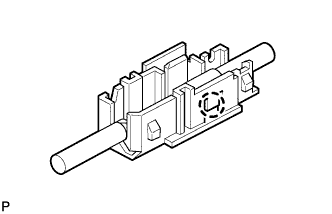
Note
-
Make sure to hold the wire harness so that the crimping side of the terminal is facing up when installing the wire harness to the terminal cover.
-
Make sure not to bend the exposed wire when installing the wire harness to the terminal cover.
-
Do not use excessive force when inserting the wire harness into the terminal cover.
-
If the terminal cover has been deformed at installation, replace the terminal and terminal cover with new ones.
-
-
Engage the 3 claws to install the new terminal cover with wire harness to a new condenser.
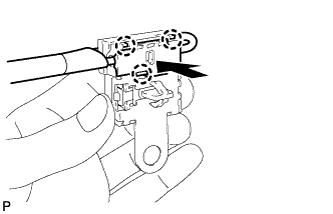
Note
-
Do not use excessive force when inserting the terminal cover into the condenser.
-
If the terminal cover has been deformed at installation, replace the terminal, terminal cover and condenser with new ones.
-
-
Engage the 2 clamps to temporarily install a new radio setting condenser with wire harness.
-
Install the new radio setting condenser with the bolt.
- Torque:
- 8.0 N*m { 82 kgf*cm, 71 in.*lbf }
-
-
INSTALL ROOF SIDE INNER GARNISH LH (for Window Defogger)
-
Engage the guide.
-
Engage the 5 clips to install the roof side inner garnish LH.
-
-
INSTALL REAR DOOR OPENING TRIM WEATHERSTRIP LH (for Window Defogger)
-
Align the alignment mark (Pink) on the weatherstrip with the protruding portion on the body indicated by the arrow in the illustration, and install the rear door opening trim weatherstrip LH.
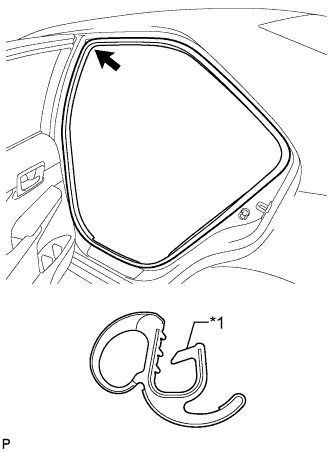
Text in Illustration *1 Alignment Mark (Pink) Note
After installation, check that the corners fit correctly.
-
-
INSTALL RADIO SETTING CONDENSER (for High Mounted Stop Light)
-
Engage the claw to install a new terminal cover to the wire harness.
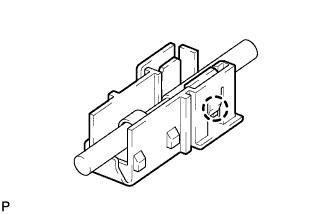
Note
-
Make sure to hold the wire harness so that the crimping side of the terminal is facing up when installing the wire harness to the terminal cover.
-
Make sure not to bend the exposed wire when installing the wire harness to the terminal cover.
-
Do not use excessive force when inserting the wire harness into the terminal cover.
-
If the terminal cover has been deformed at installation, replace the terminal and terminal cover with new ones.
-
-
Engage the 6 claws to install the 2 new terminal covers with wire harness to a new condenser.
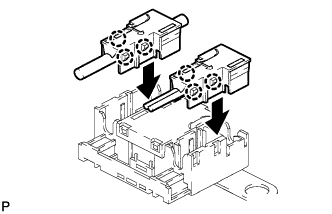
Note
-
Do not use excessive force when inserting the terminal cover into the condenser.
-
If the terminal cover has been deformed at installation, replace the terminal, terminal cover and condenser with new ones.
-
-
Engage the claw to insert the cover as shown in the illustration.
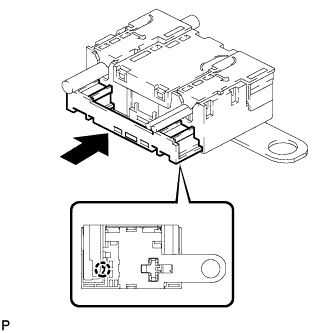
-
Engage the clamp to temporarily install a new radio setting condenser with wire harness.
-
Install the new radio setting condenser with the bolt.
- Torque:
- 8.0 N*m { 82 kgf*cm, 71 in.*lbf }
-
-
INSTALL REAR SIDE SEATBACK ASSEMBLY LH
-
Engage the hook to install the rear side seatback assembly LH.
-
Install the 2 bolts.
- Torque:
- 18 N*m { 184 kgf*cm, 13 ft.*lbf }
-
Connect the connector.
-
Connect the rear seat outer belt to the rear seat shoulder belt guide LH.
-
-
INSTALL REAR SEAT CUSHION LOCK HOOK
-
Engage the claw to install a new rear seat cushion lock hook.
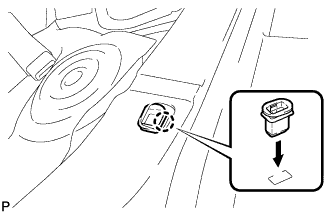
Note
Rear seat cushion lock hooks must not be reused.
Tech Tips
Use the same procedure for the RH side and the LH side.
-
-
INSTALL REAR SEAT CUSHION ASSEMBLY
-
Place the rear seat cushion assembly in the cabin.
Note
Be careful not to damage the vehicle body.
-
Engage the 2 hooks of the seat cushion to the vehicle body as shown in the illustration.
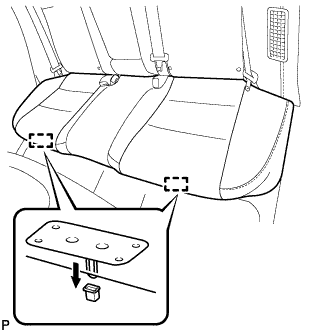
-
Confirm that the seat cushion is firmly installed.
Note
When installing the seat cushion, make sure that the seat belt buckles are not under the seat cushion.
-
-
CONNECT CABLE TO AUXILIARY BATTERY NEGATIVE TERMINAL
Note
When disconnecting the cable, some systems need to be initialized after the cable is reconnected Click here.
-
INSTALL LUGGAGE TRIM SERVICE HOLE COVER
-
Engage the claw to connect the luggage trim service hole cover.
-
-
INSPECT SRS WARNING LIGHT