HYBRID CONTROL SYSTEM, Diagnostic DTC:P0A60-288, P0A60-290, P0A60-294, P0A60-501, P0A63-296, P0A63-298, P0A63-302, P0A63-502

| DTC Code | DTC Name |
|---|---|
| P0A60-288 | Drive Motor "A" Phase V Current |
| P0A60-290 | Drive Motor "A" Phase V Current |
| P0A60-294 | Drive Motor "A" Phase V Current |
| P0A60-501 | Drive Motor "A" Phase V Current |
| P0A63-296 | Drive Motor "A" Phase W Current |
| P0A63-298 | Drive Motor "A" Phase W Current |
| P0A63-302 | Drive Motor "A" Phase W Current |
| P0A63-502 | Drive Motor "A" Phase W Current |
DESCRIPTION
The MG ECU located in the inverter with converter assembly monitors the motor inverter current sensors. P0A60 and P0A63 indicate malfunctions in current sensors, and they do not indicate malfunctions in the high-voltage system.
Tech Tips
The term "drive motor A" indicates MG2.
| DTC No. | INF Code | DTC Detection Condition | Trouble Area |
|---|---|---|---|
| P0A60 | 288 | Malfunction in motor inverter current sensor (phase V sub sensor) | Inverter with converter assembly |
| 290 | Malfunction in motor inverter current sensor (phase V main sensor) | ||
| 294 | Malfunction in motor inverter current sensor (performance problem or open phase V) | ||
| 501 | Malfunction in motor inverter current sensor (phase V main and sub sensors offset) | ||
| P0A63 | 296 | Malfunction in motor inverter current sensor (phase W sub sensor) | |
| 298 | Malfunction in motor inverter current sensor (phase W main sensor) | ||
| 302 | Malfunction in motor inverter current sensor (performance problem or open phase W) | ||
| 502 | Malfunction in motor inverter current sensor (phase W main and sub sensors offset) |
MONITOR DESCRIPTION
The power management control ECU monitors the motor inverter current sensor. If the power management control ECU detects a fault, it will illuminate the MIL and set a DTC.
MONITOR STRATEGY
| Related DTCs | P0A60 (INF 288/290/294/501): Drive Motor "A" Phase V Current P0A63 (INF 296/298/302/502): Drive Motor "A" Phase W Current |
| Required sensors / components | Motor inverter current sensor, motor resolver |
| Frequency of operation | Continuous |
| Duration | TMC's intellectual property |
| MIL operation | 1 driving cycle |
| Sequence of operation | None |
TYPICAL ENABLING CONDITIONS
| The monitor will run whenever the following DTCs are not present | TMC's intellectual property |
| Other conditions belong to TMC's intellectual property | - |
TYPICAL MALFUNCTION THRESHOLDS
| TMC's intellectual property | - |
COMPONENT OPERATING RANGE
| Power management control ECU | DTC P0A60 (INF 288/ 290/ 294/ 501) is not detected DTC P0A63 (INF 296/ 298/ 302/ 502) is not detected |
CONFIRMATION DRIVING PATTERN
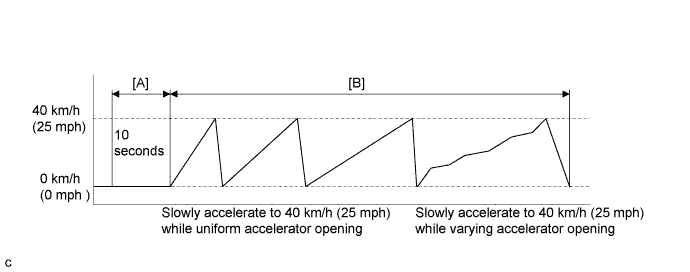
-
Connect the Techstream to the DLC3.
-
Turn the power switch on (IG) and turn the Techstream on.
-
Clear the DTCs (even if no DTCs are stored, perform the clear DTC procedure).
-
Turn the power switch off.
-
Turn the power switch on (READY) and turn the Techstream on.
-
With the vehicle stopped and shift lever in P, move the shift lever to N, wait for 10 seconds and then move the shift lever to D. [A]
Note
Do not leave the vehicle for an extended time with the shift lever in N.
-
Slowly accelerate from a stop (0 km/h (0 mph)) to 40 km/h (25 mph) several times while using different acceleration patterns. [B]
Tech Tips
The vehicle should be driven with an accelerator opening of approximately 50%.
-
Enter the following menus: Powertrain / Hybrid Control / Trouble Codes.
-
Check that permanent DTCs are cleared.
-
If the permanent DTCs are not cleared, perform the universal trip, and then check for permanent DTCs again.
Tech Tips
-
If a permanent DTC is output, the system is malfunctioning.
-
If no permanent DTC is output, the system is normal.
-
INSPECTION PROCEDURE
CAUTION:
-
Before inspecting the high-voltage system or disconnecting the low voltage connector of the inverter with converter assembly, take safety precautions such as wearing insulated gloves and removing the service plug grip to prevent electrical shocks. After removing the service plug grip, put it in your pocket to prevent other technicians from accidentally reconnecting it while you are working on the high-voltage system.
-
After removing the service plug grip, wait for at least 10 minutes before touching any of the high-voltage connectors or terminals. After waiting for 10 minutes, check the voltage at the terminals in the inspection point in the inverter with converter assembly. The voltage should be 0 V before beginning work Click here.
Tech Tips
Waiting for at least 10 minutes is required to discharge the high-voltage capacitor inside the inverter with converter assembly.
Note
After turning the power switch off, waiting time may be required before disconnecting the cable from the negative (-) auxiliary battery terminal. Therefore, make sure to read the disconnecting the cable from the negative (-) auxiliary battery terminal notices before proceeding with work Click here.
PROCEDURE
-
CHECK DTC OUTPUT (HYBRID CONTROL)
-
Connect the Techstream to the DLC3.
-
Turn the power switch on (IG).
-
Enter the following menus: Powertrain / Hybrid Control / Trouble Codes.
-
Check if DTCs are output.
Result Result Proceed to P0A60 or P0A63 only is output. A P0A78-202 is output. B -
Turn the power switch off.
B 
GO TO DTC CHART (P0A78-202) Click here
A 
-
-
CHECK CONNECTOR CONNECTION CONDITION (INVERTER WITH CONVERTER ASSEMBLY CONNECTOR)
CAUTION:
Be sure to wear insulated gloves.
-
Check that the service plug grip is not installed.
Note
After removing the service plug grip, do not turn the power switch on (READY), unless instructed by the repair manual because this may cause a malfunction.
-
Check the connector connections and contact pressure of the low voltage connectors of the inverter with converter assembly Click here.
Note
Before disconnecting the connector, confirm that it is properly connected by checking that the locking claws are engaged and that the connector does not pull out.
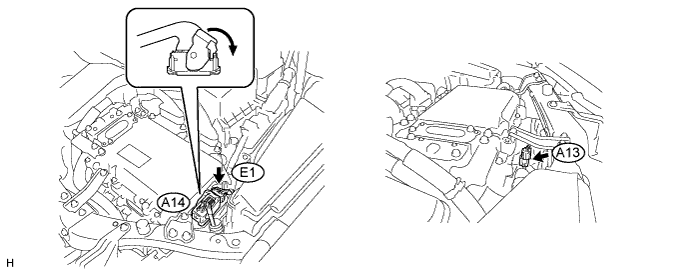
OK The connectors are connected securely and there are no contact pressure problems. Tech Tips
When connecting the connector, insert it with the locking lever in the raised position. Rotate the lever downward and make sure that the connector is pulled into its socket. When the locking lever is in its fully closed position, a click will be heard as its locking claws engage. After the click is heard, pull up on the connector to confirm that it is properly connected.
NG
CONNECT SECURELY
OK 
REPLACE INVERTER WITH CONVERTER ASSEMBLY Click here
-