SFI SYSTEM, Diagnostic DTC:P050B

| DTC Code | DTC Name |
|---|---|
| P050B | Cold Start Ignition Timing Performance |
MONITOR DESCRIPTION
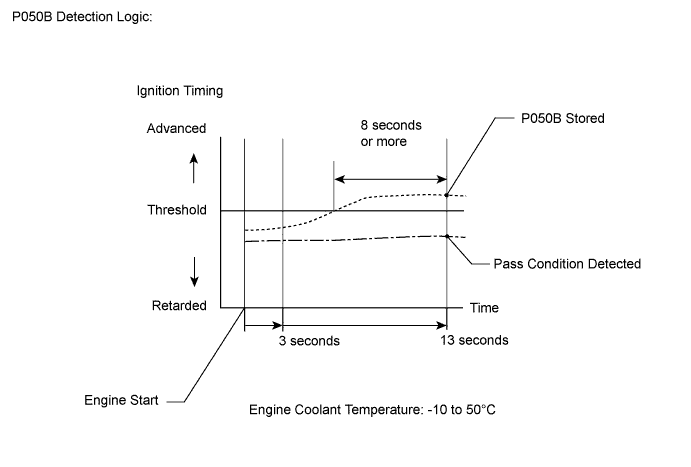
This monitor will run when the engine is started at an engine coolant temperature of -10 to 50°C (14 to 122°F). The DTC is stored after the engine idles for 13 seconds (2 trip detection logic).
The DTC is designed to monitor the ignition timing at cold start. When the engine is started at an engine coolant temperature of less than 50°C (122°F), the ECM checks the ignition timing during engine idling. If the ignition timing advances beyond the specified level within 10 seconds, the ECM interprets this as a malfunction. The MIL is illuminated and a DTC is stored when the malfunction is detected in consecutive driving cycles (2 trip detection logic).
Note
The idle speed control learned values are cleared by performing a learned value reset. Idle speed control learning needs to be performed before this DTC can be stored. To perform idle speed control learning, the engine must be warmed up by allowing it to idle for 5 minutes. For idle speed control learning to be successful, when the engine is started to warm it up, there must be at least 10 seconds of idling with the coolant temperature less than 50°C (122°F) before allowing it to continue running for the 5 minutes learning period.
| DTC No. | DTC Detection Condition | Trouble Area |
|---|---|---|
| P050B | Insufficient ignition timing retard at cold start (2 trip detection logic). |
|
MONITOR STRATEGY
| Related DTCs | P050B: Cold start ignition timing performance |
| Required Sensors/Components (Main) | Throttle with motor body assembly |
| Required Sensors/Components (Related) | Mass air flow meter sub-assembly Engine coolant temperature sensor |
| Frequency of Operation | Once per driving cycle |
| Duration | 10 seconds |
| MIL Operation | 2 driving cycles |
| Sequence of Operation | None |
TYPICAL ENABLING CONDITIONS
| Monitor runs whenever the following DTCs are not stored | P0010 (VVT oil control valve) P0011 (VVT system - advance) P0012 (VVT system - retard) P0016 (VVT system - misalignment) P0102, P0103 (Mass air flow meter) P0107, P0108 (Manifold absolute pressure) P0115, P0117, P0118 (Engine coolant temperature sensor) P0120, P0121, P0122, P0123, P0220, P0222, P0223, P2135 (Throttle position sensor) P0125 (Insufficient coolant temperature for closed loop fuel control) P014C, P014D, P015A, P015B, P2195, P2196, P2237, P2238, P2239, P2252, P2253 (Air fuel ratio sensor) P0171, P0172 (Fuel system) P0301, P0302, P0303, P0304 (Misfire) P0335 (Crankshaft position sensor) P0340, P0342, P0343 (Camshaft position sensor) P0351, P0352, P0353, P0354 (Igniter) P0401 (EGR system (closed)) P219A (Air fuel ratio imbalance) |
| Auxiliary battery voltage | 8 V or higher |
| Time after engine start | 3 seconds or more |
| Starter | Off |
| Engine coolant temperature at engine start | -10°C (14°F) or higher |
| Engine coolant temperature | -10°C (14°F) or higher, and less than 50°C (122°F) |
| Engine idling time | 0 seconds or more |
| Fuel-cut | Off |
| Vehicle speed | Less than 60 km/h (37.5 mph) |
| Atmospheric pressure | 76 kPa(abs) [570 mmHg(abs)] or higher |
TYPICAL MALFUNCTION THRESHOLDS
| Accumulated time when ignition timing retard is cut off | 8 seconds or more |
CONFIRMATION DRIVING PATTERN
-
Connect the Techstream to the DLC3.
-
Turn the power switch on (IG) and turn the Techstream on.
-
Clear the DTCs (even if no DTCs are stored, perform the clear DTC procedure).
-
Turn the power switch off and wait for at least 30 seconds.
-
Start the engine and warm it up for 5 minutes or more.
-
Stop the engine.
-
Leave the vehicle outside overnight.
-
Turn the power switch on (IG) and turn the Techstream on [A].
-
Enter the following menus: Powertrain / Engine and ECT / Data List / Primary / Coolant Temp.
-
Check that "Coolant Temp" in the Data List is within the range of -10 to 50°C (14 to 122°F).
-
Put the engine in inspection mode (maintenance mode) Click here.
-
Start the engine and warm it up until the coolant temperature is the same as the coolant temperature in the freeze frame data.
-
Idle the engine for 1 minute or more [B].
-
Enter the following menus: Powertrain / Engine and ECT / Trouble Codes [C].
-
Read the pending DTCs.
Tech Tips
-
If a pending DTC is output, the system is malfunctioning.
-
If a pending DTC is not output, perform the following procedure.
-
-
Enter the following menus: Powertrain / Engine and ECT / Utility / All Readiness.
-
Input the DTC: P050B.
-
Check the DTC judgment result.
Techstream Display Description NORMAL -
DTC judgment completed
-
System normal
ABNORMAL -
DTC judgment completed
-
System abnormal
INCOMPLETE -
DTC judgment not completed
-
Perform driving pattern after confirming DTC enabling conditions
N/A -
Unable to perform DTC judgment
-
Number of DTCs which do not fulfill DTC preconditions has reached ECU memory limit
Tech Tips
-
If the judgment result shows NORMAL, the system is normal.
-
If the judgment result shows ABNORMAL, the system has a malfunction.
-
If the judgment result shows INCOMPLETE or N/A, idle the engine for 3 minutes, let the engine cool down, and then perform steps [A] through [C] again.
-
-
If no pending DTC is output, perform a universal trip and check for permanent DTCs Click here.
Tech Tips
-
If a permanent DTC is output, the system is malfunctioning.
-
If no permanent DTC is output, the system is normal.
-
WIRING DIAGRAM
Refer to DTC P0102 Click here.
INSPECTION PROCEDURE
Note
Inspect the fuses for circuits related to this system before performing the following inspection procedure.
Tech Tips
-
DTC P050B may be output when the engine has the symptoms listed below. If necessary, check the trouble areas listed below.
Symptom Factor Trouble Area Low idle speed when engine is cold (immediately after engine start) Excessive engine friction Engine oil deterioration Rough idle when engine is cold
(immediately after engine start)
Abnormal combustion Fuel quality -
Read freeze frame data using the Techstream. The ECM records vehicle and driving condition information as freeze frame data the moment a DTC is stored. When troubleshooting, freeze frame data can help determine if the vehicle was moving or stationary, if the engine was warmed up or not, if the air fuel ratio was lean or rich, and other data from the time the malfunction occurred.
PROCEDURE
-
CHECK ANY OTHER DTCS OUTPUT (IN ADDITION TO DTC P050B)
-
Connect the Techstream to the DLC3.
-
Turn the power switch on (IG).
-
Turn the Techstream on.
-
Enter the following menus: Powertrain / Engine and ECT / Trouble Codes.
-
Read the DTCs.
Result Result Proceed to DTC P050B is output A DTC P050B and other DTCs are output B Tech Tips
If any DTCs other than P050B are output, troubleshoot those DTCs first.
B 
GO TO DTC CHART Click here
A 
-
-
READ VALUE USING TECHSTREAM (FUEL TRIM)
Tech Tips
Calculate the total fuel trim values to check the characteristic deviation of the mass air flow meter sub-assembly.
-
Connect the Techstream to the DLC3.
-
Turn the power switch on (IG).
-
Turn the Techstream on.
-
Put the engine in inspection mode (maintenance mode) Click here.
-
Start the engine.
-
Enter the following menus: Powertrain / Engine and ECT / Data List / Gas AF Control / Short FT #1 and Long FT #1.
-
Read the values displayed on the Techstream at engine idle.
-
Add together the Short FT #1 and Long FT #1 values to obtain the total fuel trim.
Standard Total of Short FT #1 and Long FT #1 values is between -20% and 20%.
NG 
CHECK PCV SYSTEM Click here
OK
-
-
INSPECT THROTTLE WITH MOTOR BODY ASSEMBLY (THROTTLE VALVE)
-
Check that there are no deposits around the throttle valve and throttle valve condition.
OK No deposits around the throttle valve and throttle valve moves smoothly.
NG
REPAIR OR REPLACE THROTTLE WITH MOTOR BODY ASSEMBLY Click here
OK
-
-
PERFORM ACTIVE TEST USING TECHSTREAM (CONTROL THE EGR STEP POSITION)
-
Connect the Techstream to the DLC3.
-
Turn the power switch on (IG).
-
Turn the Techstream on.
-
Put the engine in inspection mode (maintenance mode) Click here.
-
Start the engine and warm it up until the engine coolant temperature reaches 75°C (167°F) or higher.
Tech Tips
The A/C switch and all accessory switches should be off.
-
Enter the following menus: Powertrain / Engine and ECT / Active Test / Control the EGR Step Position / Primary / Throttle Idle Position and MAP.
-
Confirm that the Throttle Idle Position is ON and check the engine idling condition and MAP values in the Data List while performing the Active Test.
Tech Tips
-
Do not leave the EGR valve open for 10 seconds or more during the Active Test.
-
Be sure to return the EGR valve to step 0 when the Active Test is completed.
-
Do not open the EGR valve 30 steps or more during the Active Test.
OK MAP and idling condition change in response to EGR step position when Throttle Idle Position is ON in Data List. Standard - EGR Step Position (Active Test) 0 Steps 0 to 30 Steps Idling condition
(Throttle Idle Position: ON)
Steady idling Idling changes from steady to rough idling or engine stalls MAP
(Data List)
MAP value is 20 to 40 kPa(abs) [150 to 300 mmHg(abs)]
(EGR valve is fully closed)
MAP value is at least +10 kPa (75 mmHg) higher than when EGR valve is fully closed Tech Tips
During Active Test, if the idling condition does not change in response to EGR step position, then there is probably a malfunction in the EGR valve.
Result Result Proceed to NG A OK B -
B
CHECK WHETHER DTC OUTPUT RECURS (DTC P050B) Click here
A
-
-
INSPECT EGR VALVE ASSEMBLY
-
Remove the EGR valve assembly Click here.
-
Check if the EGR valve is stuck open.
OK EGR valve is tightly closed.
OK
CHECK WHETHER DTC OUTPUT RECURS (DTC P050B) Click here
NG
REPLACE EGR VALVE ASSEMBLY Click here
-
-
REPAIR OR REPLACE THROTTLE WITH MOTOR BODY ASSEMBLY
-
Repair or replace the throttle with motor body assembly Click here.
Tech Tips
Perform "Inspection After Repair" after repairing or replacing the throttle with motor body assembly Click here.
NEXT
CHECK WHETHER DTC OUTPUT RECURS (DTC P050B) Click here
-
-
CHECK PCV SYSTEM
-
Check the PCV hose connections Click here.
OK PCV valve and hose are connected correctly and are not damaged.
NG
REPAIR OR REPLACE PCV HOSE Click here
OK
-
-
CHECK INTAKE SYSTEM
-
Check the intake system for vacuum leaks Click here.
OK No leaks from the intake system.
NG
REPAIR OR REPLACE INTAKE SYSTEM Click here
OK
-
-
CHECK AIR CLEANER FILTER ELEMENT SUB-ASSEMBLY
-
Visually check that the air cleaner filter element is not excessively contaminated with dirt or oil.
OK The air cleaner filter element is not excessively contaminated with dirt or oil.
NG
REPLACE AIR CLEANER FILTER ELEMENT SUB-ASSEMBLY Click here
OK
-
-
PERFORM ACTIVE TEST USING TECHSTREAM (CONTROL THE EGR STEP POSITION)
-
Connect the Techstream to the DLC3.
-
Turn the power switch on (IG).
-
Turn the Techstream on.
-
Put the engine in inspection mode (maintenance mode) Click here.
-
Start the engine and warm it up until the engine coolant temperature reaches 75°C (167°F) or higher.
Tech Tips
The A/C switch and all accessory switches should be off.
-
Enter the following menus: Powertrain / Engine and ECT / Active Test / Control the EGR Step Position / Primary / Throttle Idle Position and MAP.
-
Confirm that the Throttle Idle Position is ON and check the engine idling condition and MAP values in the Data List while performing the Active Test.
Tech Tips
-
Do not leave the EGR valve open for 10 seconds or more during the Active Test.
-
Be sure to return the EGR valve to step 0 when the Active Test is completed.
-
Do not open the EGR valve 30 steps or more during the Active Test.
OK MAP and idling condition change in response to EGR step position when Throttle Idle Position is ON in Data List. Standard - EGR Step Position (Active Test) 0 Steps 0 to 30 Steps Idling condition
(Throttle Idle Position: ON)
Steady idling Idling changes from steady to rough idling or engine stalls MAP
(Data List)
MAP value is 20 to 40 kPa(abs) [150 to 300 mmHg(abs)]
(EGR valve is fully closed)
MAP value is at least +10 kPa (75 mmHg) higher than when EGR valve is fully closed Tech Tips
During Active Test, if the idling condition does not change in response to EGR step position, then there is probably a malfunction in the EGR valve.
Result Result Proceed to NG A OK B -
B
PERFORM ACTIVE TEST USING TECHSTREAM (CONTROL THE VVT LINEAR) Click here
A
-
-
INSPECT EGR VALVE ASSEMBLY
-
Remove the EGR valve assembly Click here.
-
Check if the EGR valve is stuck open.
OK EGR valve is tightly closed.
NG
REPLACE EGR VALVE ASSEMBLY Click here
OK
-
-
PERFORM ACTIVE TEST USING TECHSTREAM (CONTROL THE VVT LINEAR)
-
Operate the VVT system through the Active test, and check if the VVT system is operating normally.
-
Perform the Active Test, referring to DTC P0011 Inspection Procedure Click here.
-
NG
CHECK AND REPAIR VVT SYSTEM Click here
OK
-
-
READ VALUE USING TECHSTREAM (MAF)
-
Connect the Techstream to the DLC3.
-
Turn the power switch on (IG).
-
Turn the Techstream on.
-
Put the engine in inspection mode (maintenance mode) Click here.
-
Start the engine.
-
Enter the following menus: Powertrain / Engine and ECT / Data List / Primary / MAF, Coolant Temp and Engine Speed.
-
Allow the engine to idle until Coolant Temp reaches 75°C (167°F) or higher.
-
Read MAF with the engine speed at 2500 rpm.
Tech Tips
During charging control, the engine speed is set at idle. Therefore, the engine speed does not increase when depressing the accelerator pedal. In this case, read the Data List after charging control has completed.
Standard Techstream Display Condition Specified Condition MAF Shift lever position: N
A/C: Off
Engine Speed: 2500 rpm
Between 5.0 gm/sec and 9.0 gm/sec
OK
CHECK WHETHER DTC OUTPUT RECURS (DTC P050B) Click here
NG
CHECK HARNESS AND CONNECTOR (MASS AIR FLOW METER SUB-ASSEMBLY CONNECTOR CONNECTION) Click here
-
-
REPAIR OR REPLACE PCV HOSE
-
Repair or replace the PCV valve or hose.
NEXT
CHECK WHETHER DTC OUTPUT RECURS (DTC P050B) Click here
-
-
REPAIR OR REPLACE INTAKE SYSTEM
-
Repair or replace the intake system.
Tech Tips
Perform "Inspection After Repair" after repairing or replacing the intake system Click here.
NEXT
CHECK WHETHER DTC OUTPUT RECURS (DTC P050B) Click here
-
-
REPLACE AIR CLEANER FILTER ELEMENT SUB-ASSEMBLY
-
Replace the air cleaner filter element sub-assembly.
NEXT
CHECK WHETHER DTC OUTPUT RECURS (DTC P050B) Click here
-
-
REPLACE EGR VALVE ASSEMBLY
-
Replace the EGR valve assembly Click here.
Tech Tips
Perform "Inspection After Repair" after replacing the EGR valve assembly Click here.
NEXT
CHECK WHETHER DTC OUTPUT RECURS (DTC P050B) Click here
-
-
CHECK AND REPAIR VVT SYSTEM
-
Check and repair the VVT system.
Tech Tips
Refer to DTC P0011 Inspection Procedure Click here
NEXT
-
-
CHECK WHETHER DTC OUTPUT RECURS (DTC P050B)
Note
In this operation, the engine must be cold (approximately the same as the engine coolant temperature recorded in the freeze frame data).
-
Connect the Techstream to the DLC3.
-
Turn the power switch on (IG).
-
Turn the Techstream on.
-
Clear the DTCs Click here.
-
Turn the power switch off and wait for at least 30 seconds.
-
Turn the power switch on (IG).
-
Turn the Techstream on.
-
Enter the following menus: Powertrain / Engine and ECT / Data List / Primary / Coolant Temp.
-
Check that the engine coolant temperature is between -10 and 50°C (14 and 122°F).
-
Put the engine in inspection mode (maintenance mode) Click here.
-
Start the engine and warm it up until the engine coolant temperature is the same as the engine coolant temperature in the freeze frame data.
-
Drive the vehicle in accordance with the driving pattern described in Confirmation Driving Pattern.
-
Enter the following menus: Powertrain / Engine and ECT / Utility / All Readiness.
-
Input the DTC: P050B.
-
Check the DTC judgment result.
Result Result Proceed to NORMAL (DTC is not output) A ABNORMAL (DTC P050B is output) B
B
CHECK HARNESS AND CONNECTOR (MASS AIR FLOW METER SUB-ASSEMBLY CONNECTOR CONNECTION) Click here
A 
END
-
-
CHECK WHETHER DTC OUTPUT RECURS (DTC P050B)
Note
In this operation, the engine must be cold (approximately the same as the engine coolant temperature recorded in the freeze frame data).
-
Connect the Techstream to the DLC3.
-
Turn the power switch on (IG).
-
Turn the Techstream on.
-
Clear the DTCs Click here.
-
Turn the power switch off and wait for at least 30 seconds.
-
Turn the power switch on (IG).
-
Turn the Techstream on.
-
Enter the following menus: Powertrain / Engine and ECT / Data List / Primary / Coolant Temp.
-
Check that the engine coolant temperature is between -10 and 50°C (14 and 122°F).
-
Put the engine in inspection mode (maintenance mode) Click here.
-
Start the engine and warm it up until the engine coolant temperature is the same as the engine coolant temperature in the freeze frame data.
-
Drive the vehicle in accordance with the driving pattern described in Confirmation Driving Pattern.
-
Enter the following menus: Powertrain / Engine and ECT / Utility / All Readiness.
-
Input the DTC: P050B.
-
Check the DTC judgment result.
Result Result Proceed to NORMAL (DTC is not output) A ABNORMAL (DTC P050B is output) B
B
CHECK HARNESS AND CONNECTOR (MASS AIR FLOW METER SUB-ASSEMBLY CONNECTOR CONNECTION) Click here
A
CHECK FOR INTERMITTENT PROBLEMS Click here
-
-
CHECK HARNESS AND CONNECTOR (MASS AIR FLOW METER SUB-ASSEMBLY CONNECTOR CONNECTION)
-
Check the connection and terminal contact pressure of connectors and wire harnesses between the mass air flow meter sub-assembly and ECM Click here.
Tech Tips
Repair any problems.
NEXT
-
-
CHECK WHETHER DTC OUTPUT RECURS (DTC P050B)
Note
In this operation, the engine must be cold (approximately the same as the engine coolant temperature recorded in the freeze frame data).
-
Connect the Techstream to the DLC3.
-
Turn the power switch on (IG).
-
Turn the Techstream on.
-
Clear the DTCs Click here.
-
Turn the power switch off and wait for at least 30 seconds.
-
Turn the power switch on (IG).
-
Turn the Techstream on.
-
Enter the following menus: Powertrain / Engine and ECT / Data List / Primary / Coolant Temp.
-
Check that the engine coolant temperature is between -10 and 50°C (14 and 122°F).
-
Put the engine in inspection mode (maintenance mode) Click here.
-
Start the engine and warm it up until the engine coolant temperature is the same as the engine coolant temperature in the freeze frame data.
-
Drive the vehicle in accordance with the driving pattern described in Confirmation Driving Pattern.
-
Enter the following menus: Powertrain / Engine and ECT / Utility / All Readiness.
-
Input the DTC: P050B.
-
Check the DTC judgment result.
Result Result Proceed to ABNORMAL (DTC P050B is output) A NORMAL (DTC is not output) B
B
END
A
-
-
CHECK HARNESS AND CONNECTOR (MASS AIR FLOW METER SUB-ASSEMBLY - ECM)
-
Disconnect the mass air flow meter sub-assembly connector.
-
Disconnect the ECM connector.
-
Measure the resistance according to the value(s) in the table below.
Standard Resistance Tester Connection Condition Specified Condition E14-5 (VG) - E28-91 (VG) Always Below 1 Ω E14-4 (E2G) - E28-92 (E2G) Always Below 1 Ω E14-5 (VG) or E28-91 (VG) - Body ground Always 10 kΩ or higher
NG
REPAIR OR REPLACE HARNESS OR CONNECTOR
OK
-
-
REPLACE MASS AIR FLOW METER SUB-ASSEMBLY
-
Replace the mass air flow meter sub-assembly Click here.
Tech Tips
-
If the results of the inspections performed in step 13 indicated no problem, proceed to the next step without replacing the mass air flow meter sub-assembly.
-
Perform "Inspection After Repair" after replacing the mass air flow meter sub-assembly Click here.
-
NEXT
-
-
CONFIRM WHETHER MALFUNCTION HAS BEEN SUCCESSFULLY REPAIRED
Note
In this operation, the engine must be cold (approximately the same as the engine coolant temperature recorded in the freeze frame data).
-
Connect the Techstream to the DLC3.
-
Turn the power switch on (IG).
-
Turn the Techstream on.
-
Clear the DTCs Click here.
-
Turn the power switch off and wait for at least 30 seconds.
-
Turn the power switch on (IG).
-
Turn the Techstream on.
-
Enter the following menus: Powertrain / Engine and ECT / Data List / Primary / Coolant Temp.
-
Check that the engine coolant temperature is between -10 and 50°C (14 and 122°F).
-
Put the engine in inspection mode (maintenance mode) Click here.
-
Start the engine and warm it up until the engine coolant temperature is the same as the engine coolant temperature in the freeze frame data.
-
Drive the vehicle in accordance with the driving pattern described in Confirmation Driving Pattern.
-
Enter the following menus: Powertrain / Engine and ECT / Utility / All Readiness.
-
Input the DTC: P050B.
-
Check the DTC judgment result.
Result Result Proceed to NORMAL (DTC is not output) A ABNORMAL (DTC P050B is output) B
B
REPLACE ECM Click here
A
END
-