SFI SYSTEM, Diagnostic DTC:P0451, P0452, P0453

| DTC Code | DTC Name |
|---|---|
| P0451 | Evaporative Emission Control System Pressure Sensor Range / Performance |
| P0452 | Evaporative Emission Control System Pressure Sensor / Switch Low Input |
| P0453 | Evaporative Emission Control System Pressure Sensor / Switch High Input |
DTC SUMMARY
| DTC No. | Monitoring Item | Malfunction Detection Condition | Trouble Area | Detection Timing | Detection Logic |
|---|---|---|---|---|---|
| P0451 | Canister pressure sensor abnormal voltage fluctuation | Sensor output voltage fluctuates frequently in a certain time period. |
|
|
2 trip |
| P0452 | Canister pressure sensor low input | EVAP pressure sensor less than 42.11009 kPa(abs) [315.867 mmHg(abs)] for 0.5 seconds. |
|
1 trip | |
| P0453 | Canister pressure sensor high input | EVAP pressure sensor higher than 123.76147 kPa(abs) [928.331 mmHg(abs)] for 0.5 seconds. |
|
1 trip |
Tech Tips
The canister pressure sensor is built into the canister pump module.
DESCRIPTION
The description can be found in EVAP (Evaporative Emission) System Click here.
MONITOR DESCRIPTION
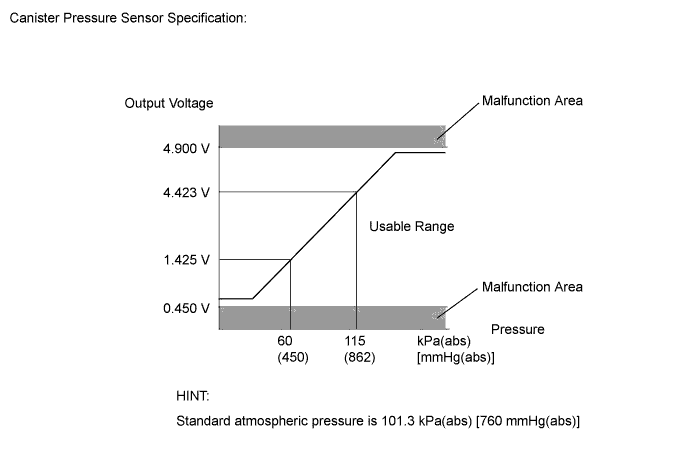
-
DTC P0451: Canister pressure sensor abnormal voltage fluctuation
If the canister pressure sensor voltage output fluctuates rapidly for 10 seconds, the ECM stops the EVAP system monitor. The ECM interprets this as the canister pressure sensor voltage fluctuating, and stops the EVAP system monitor. The ECM then illuminates the MIL and stores the DTC.
(Malfunction is detected by 2 trip detection logic).
-
DTC P0452: Canister pressure sensor voltage low
If the canister pressure sensor voltage output (pressure) is less than 0.45 V: 42.11009 kPa(abs) [315.867 mmHg(abs)], the ECM interprets this as an open or short circuit in the canister pressure sensor or its circuit, and stops the EVAP system monitor. The ECM then illuminates the MIL and stores the DTC (1 trip detection logic).
-
DTC P0453: Canister pressure sensor voltage high
If the canister pressure sensor voltage output (pressure) is higher than 4.9 V: 123.76147 kPa(abs) [928.331 mmHg(abs)], the ECM interprets this as an open or short circuit in the canister pressure sensor or its circuit, and stops the EVAP system monitor. The ECM then illuminates the MIL and stores the DTC (1 trip detection logic).
MONITOR STRATEGY
| Required Sensors/Components (Main) | Canister pump module |
| Required Sensors/Components (Related) | - |
| Frequency of Operation | Continuous |
| Duration | 0.5 seconds: P0452 and P0453 Less than 15 seconds: P0451 |
| MIL Operation | Immediate: P0452 and P0453 2 driving cycles: P0451 |
| Sequence of Operation | None |
TYPICAL ENABLING CONDITIONS
| Monitor runs whenever the following DTCs are not stored | None |
| Atmospheric pressure (absolute pressure) | 70 kPa(abs) [525 mmHg(abs)] or higher, and less than 110 kPa(abs) [825 mmHg(abs)] mmHg(abs)] |
| Auxiliary battery voltage | 10.5 V or higher |
| Intake air temperature | 4.4°C (40°F) or higher, and less than 50°C (122°F) |
| Canister pressure sensor malfunction (P0452, P0453) | Not detected |
| Either of the following conditions is met | A or B |
| A. Engine condition | Running |
| B. Time after key-off | 5, 7 or 9.5 hours |
| Monitor runs whenever the following DTCs are not stored | None |
| Both of the following conditions are met | - |
| Power switch | On (IG) |
| Auxiliary battery voltage | 8 V or higher |
TYPICAL MALFUNCTION THRESHOLDS
| Frequency that EVAP pressure change 0.3 kPa(gauge) [2.25 mmHg(gauge)] or higher | 10 times or more in 10 seconds |
| EVAP system pressure sensor | Less than 42.11009 kPa(abs) [315.867 mmHg(abs)] |
| EVAP system pressure sensor | Higher than 123.76147 kPa(abs) [928.331 mmHg(abs)] |
CONFIRMATION DRIVING PATTERN
Note
-
The Evaporative System Check (Automatic Mode) consists of 6 steps performed automatically by the Techstream. It takes a maximum of approximately 24 minutes.
-
Do not perform the Evaporative System Check when the fuel tank is higher than 90% full because the cut-off valve may be closed, making the fuel tank leak check unavailable.
-
When the temperature of the fuel is 35°C (95°F) or higher, a large amount of vapor forms and any check results become inaccurate. When performing the Evaporative System Check, keep the fuel temperature below 35°C (95°F).
-
Connect the Techstream to the DLC3.
-
Turn the power switch on (IG) and turn the Techstream on.
-
Enter the following menus: Powertrain / Engine and ECT / Data List / Primary / Intake Air.
-
Check that the intake air temperature is between 4.4 and 50°C (40 and 122°F).
-
Clear the DTCs (even if no DTCs are stored, perform the clear DTC procedure).
-
Turn the power switch off and wait for at least 30 seconds.
-
Turn the power switch on (IG) and turn the Techstream on.
-
Enter the following menus: Powertrain / Engine and ECT / Utility / Evaporative System Check / Automatic Mode.
-
After the Evaporative System Check is completed, check for All Readiness by entering the following menus: Powertrain / Engine and ECT / Utility / All Readiness.
-
Input the DTC: P0451, P0452 or P0453.
-
Check the DTC judgment result.
Techstream Display Description NORMAL -
DTC judgment completed
-
System normal
ABNORMAL -
DTC judgment completed
-
System abnormal
INCOMPLETE -
DTC judgment not completed
-
Perform driving pattern after confirming DTC enabling conditions
N/A -
Unable to perform DTC judgment
-
Number of DTCs which do not fulfill DTC preconditions has reached ECU memory limit
Tech Tips
-
If the judgment result shows NORMAL, the system is normal.
-
If the judgment result shows ABNORMAL, the system has a malfunction.
-
-
If the judgment result is INCOMPLETE or N/A and no pending DTC is output, perform a universal trip and check for permanent DTCs Click here.
Tech Tips
-
If a permanent DTC is output, the system is malfunctioning.
-
If no permanent DTC is output, the system is normal.
-
WIRING DIAGRAM
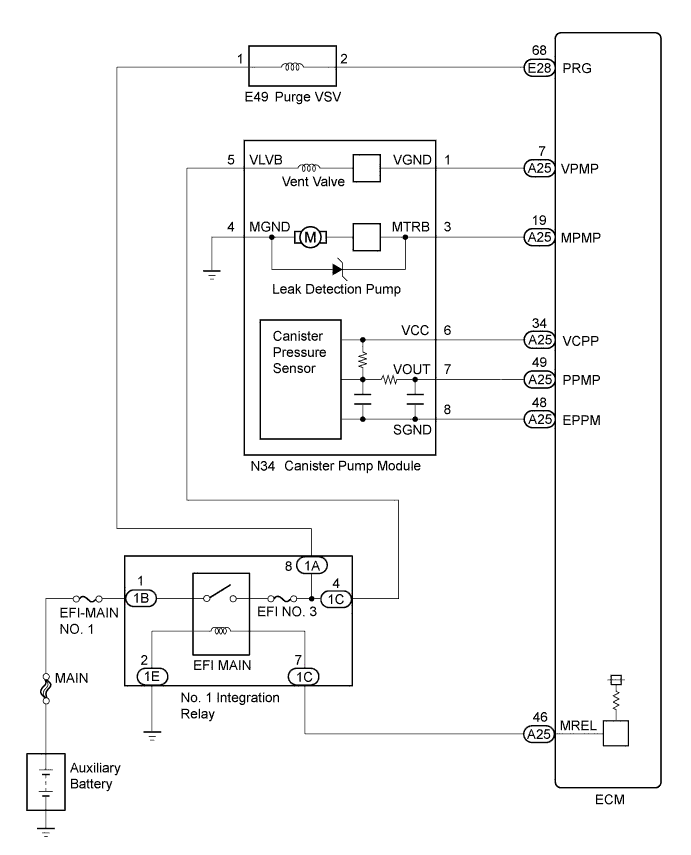
INSPECTION PROCEDURE
Note
-
When a vehicle is brought into the workshop, leave it as it is. Do not change the vehicle condition. For example, do not tighten the fuel cap.
-
The Techstream is required to conduct the following diagnostic troubleshooting procedure.
-
Inspect the fuses for circuits related to this system before performing the following inspection procedure.
PROCEDURE
-
CONFIRM DTC AND EVAP PRESSURE
-
Connect the Techstream to the DLC3.
-
Turn the power switch on (IG) (do not start the engine).
-
Turn the Techstream on.
-
Enter the following menus: Powertrain / Engine and ECT / Trouble Codes.
-
Read the DTCs.
-
Enter the following menus: Powertrain / Engine and ECT / Data List / Gas Evaporative / Vapor Pressure Pump.
-
Read the EVAP (Evaporative Emission) pressure displayed on the Techstream.
Result Display (DTC Output) Test Result Suspected Trouble Area Proceed to P0451 - Canister pressure sensor C P0452 Less than 42.11009 kPa(abs) [315.867 mmHg(abs)] -
Wire harness/connector (ECM - canister pressure sensor)
-
Canister pressure sensor
-
Short in ECM circuit
A P0453 Higher than 123.76147 kPa(abs) [928.331 mmHg(abs)] -
Wire harness/connector (ECM - canister pressure sensor)
-
Canister pressure sensor
-
Open in ECM circuit
B -
B 
CHECK HARNESS AND CONNECTOR (CANISTER PUMP MODULE - ECM) Click here
C 
GO TO EVAP SYSTEM Click here
A 
-
-
CHECK HARNESS AND CONNECTOR (CANISTER PUMP MODULE - ECM)
-
Disconnect the ECM connector.
-
Measure the resistance according to the value(s) in the table below.
Result Tester Connection Condition Specified Condition Suspected Trouble Area Proceed to A25-49 (PPMP) - Body ground Always Below 10 Ω -
Wire harness/connector (ECM - canister pressure sensor)
-
Short in canister pressure sensor circuit
A 10 kΩ or higher -
Wire harness/connector (ECM - canister pressure sensor)
-
Short in ECM circuit
B -
B
REPLACE ECM Click here
A
-
-
CHECK HARNESS AND CONNECTOR (CANISTER PUMP MODULE - ECM)
-
Disconnect the canister pump module connector.
-
Disconnect the ECM connector.
-
Measure the resistance according to the value(s) in the table below.
Result Tester Connection Condition Specified Condition Suspected Trouble Area Proceed to A25-49 (PPMP) - Body ground Always 10 kΩ or higher Short in canister pressure sensor circuit A Below 10 Ω Short in wire harness/connector (ECM - canister pressure sensor) B
A
REPLACE CANISTER PUMP MODULE Click here
B
REPAIR OR REPLACE HARNESS OR CONNECTOR (CANISTER PUMP MODULE - ECM) Click here
-
-
CHECK HARNESS AND CONNECTOR (CANISTER PUMP MODULE - ECM)
-
Disconnect the canister pump module connector.
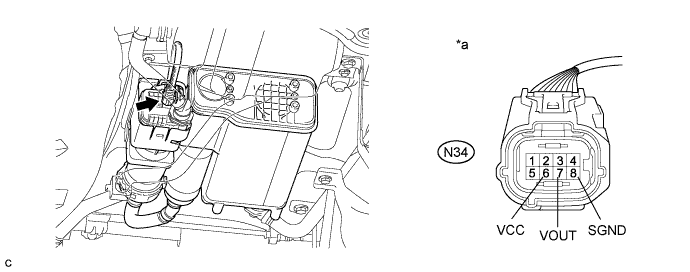
Text in Illustration *a Front view of wire harness connector
(to Canister Pump Module)
- - -
Measure the resistance according to the value(s) in the table below.
Standard Resistance Tester Connection Condition Specified Condition N34-8 (SGND) - Body ground Always 100 Ω or less -
Turn the power switch on (IG).
-
Measure the voltage according to the value(s) in the table below.
Standard Voltage Tester Connection Condition Specified Condition N34-6 (VCC) - Body ground Power switch on (IG) 4.5 to 5.5 V N34-7 (VOUT) - Body ground Power switch on (IG) 4.5 to 5.5 V Result Test Result Suspected Trouble Area Proceed to Voltage and resistance within standard ranges Open in canister pressure sensor circuit A Voltage and/or resistance outside standard ranges Open in wire harness/connector (ECM - canister pressure sensor) B
B
REPAIR OR REPLACE HARNESS OR CONNECTOR (CANISTER PUMP MODULE - ECM) Click here
A
-
-
REPLACE CANISTER PUMP MODULE
-
Replace the canister pump module Click here.
Note
-
When replacing the canister pump module, check the canister pump module interior, canister interior, No. 1 canister interior, No. 2 canister interior and related pipes for water, fuel and other liquids. If liquids are present, check for disconnections and/or cracks in the following: 1) the pipe from the canister pump module to the No. 2 canister and the pipe from the air inlet port to the No. 2 canister; 2) the canister filter; and 3) the fuel tank vent hose. If liquids are present in the canister interior or No. 1 canister interior, replace the canister, No. 1 canister and canister pump module together. If liquids are present in the No. 2 canister interior, dry the No. 2 canister.
-
Check for filter blockage in the canister and No. 1 canister. If the charcoal filter inside the canister or No. 1 canister is clogged, replace the canister, No. 1 canister and canister pump module together.
-
Check for filter blockage in the canister filter. If the canister filter has blockages, replace the canister filter.
-
Check No. 2 canister blockage. If the No. 2 canister has blockages, replace the No. 2 canister.
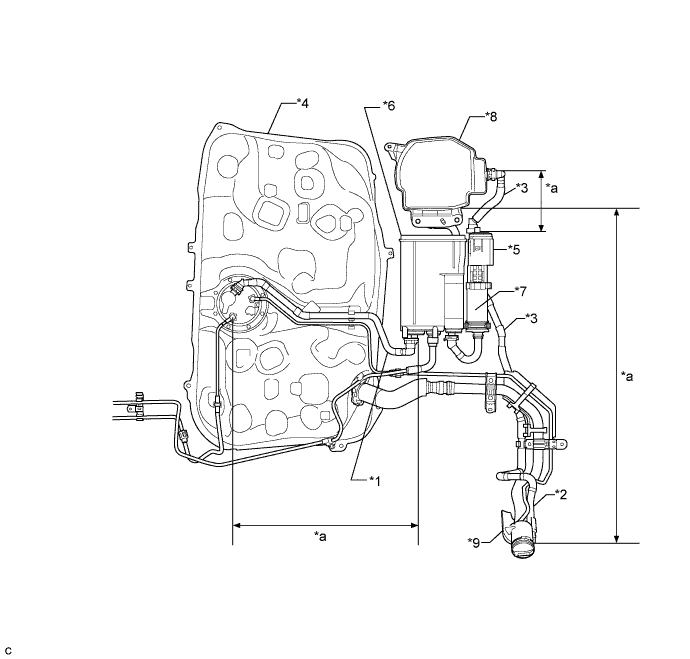
Text in Illustration *1 Fuel Tank Vent Hose *2 Air Inlet Port *3 Vent Hose *4 Fuel Tank *5 Canister Pump Module *6 Canister *7 No. 1 Canister *8 No. 2 Canister *9 Canister Filter - - *a Inspection Area
(check for disconnection and/or cracks)
- - -
NEXT
CHECK WHETHER DTC OUTPUT RECURS (DTC P0451, P0452 OR P0453) Click here
-
-
REPAIR OR REPLACE HARNESS OR CONNECTOR (CANISTER PUMP MODULE - ECM)
Tech Tips
If the exhaust pipe has been removed, go to the next step before reinstalling it.
NEXT
CHECK WHETHER DTC OUTPUT RECURS (DTC P0451, P0452 OR P0453) Click here
-
REPLACE ECM
-
Replace the ECM Click here.
NEXT
-
-
CHECK WHETHER DTC OUTPUT RECURS (DTC P0451, P0452 OR P0453)
-
Connect the Techstream to the DLC3.
-
Turn the power switch on (IG).
-
Turn the Techstream on.
-
Clear the DTCs Click here.
-
Turn the power switch off and wait for at least 30 seconds.
-
Turn the power switch on (IG).
-
Turn the Techstream on.
-
Perform the Evaporative System Check using the Techstream, referring to the Confirmation Driving Pattern.
-
Enter the following menus: Powertrain / Engine and ECT / Utility / All Readiness.
-
Input the DTC: P0451, P0452 or P0453.
-
Check the DTC judgment result.
Result Techstream Display Description NORMAL -
DTC judgment completed
-
System normal
ABNORMAL -
DTC judgment completed
-
System abnormal
INCOMPLETE -
DTC judgment not completed
-
Perform driving pattern after confirming DTC enabling conditions
N/A -
Unable to perform DTC judgment
-
Number of DTCs which do not fulfill DTC preconditions has reached ECU memory limit
-
NEXT 
END
-