VEHICLE PROXIMITY NOTIFICATION SYSTEM Engine Oil Pressure Switch Circuit
DESCRIPTION
The vehicle approaching speaker controller detects engine operation by monitoring the signal from the engine oil pressure switch assembly. Vehicle approaching speaker operation is disabled when the vehicle approaching speaker controller receives a signal from the engine oil pressure switch assembly indicating that the engine is operating.
WIRING DIAGRAM
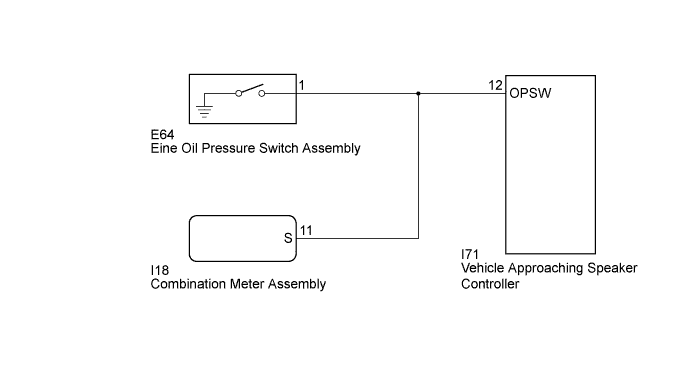
INSPECTION PROCEDURE
PROCEDURE
-
READ VALUE USING TECHSTREAM
-
Connect the Techstream to the DLC3.
-
Turn the power switch on (IG).
-
Turn the Techstream on.
-
Enter the following menus: Body Electrical / Combination Meter / Data List.
-
Read the display on the Techstream.
Combination Meter Tester Display Measurement Item/Range Normal Condition Diagnostic Note Oil Pressure Switch Oil pressure switch / OFF or ON OFF: Engine starts - ON: Engine does not start OK Normal conditions listed above are displayed.
NG 
GO TO METER / GAUGE SYSTEM Click here
OK 
-
-
CHECK HARNESS AND CONNECTOR (VEHICLE APPROACHING SPEAKER CONTROLLER - ENGINE OIL PRESSURE SWITCH ASSEMBLY)
-
Disconnect the I71 vehicle approaching speaker controller connector.
-
Disconnect the E64 engine oil pressure switch assembly connector.
-
Measure the resistance according to the value(s) in the table below.
Standard Resistance Tester Connection Condition Specified Condition I71-12 (OPSW) - E64-1 Always Below 1 Ω I71-12 (OPSW) - Body ground Always 10 kΩ or higher
NG
REPAIR OR REPLACE HARNESS OR CONNECTOR
OK 
PROCEED TO NEXT SUSPECTED AREA SHOWN IN PROBLEM SYMPTOMS TABLE Click here
-