PRE-COLLISION SYSTEM
-
FUNCTION OF MAIN COMPONENTS
Item Function Forward Recognition Camera
-
Acquires a video of the area in front of the vehicle, and performs image processing to recognize obstacles or vehicles ahead, and then transmits this information to the driving support ECU assembly.
-
Operates the camera heater (forward recognition hood with heater sub-assembly) to remove condensation from the part of the windshield in front of the forward recognition camera.
Forward Recognition Hood with Heater Sub-assembly Heats the sheet heater in accordance with the signals from the forward recognition camera. Millimeter Wave Radar Sensor Assembly Radiates millimeter waves forward, uses the reflected millimeter waves for detecting the presence of a vehicle ahead, the vehicle-to-vehicle distance, and the relative speed, and then transmits this information to the driving support ECU assembly. Yawrate Sensor Detects the yaw rate and lateral/longitudinal deceleration of the vehicle and transmits the signal to the driving support ECU assembly. Steering Sensor Detects the steering direction and angle of the steering wheel and transmits the signal to the driving support ECU assembly. Speed Sensor Detects the wheel speed and transmits signals to the skid control ECU. Ambient Temperature Sensor (Thermistor Assembly) Detects the ambient temperature and transmits signals to the air conditioning amplifier assembly. Steering Pad Switch Assembly Switches the display of multi-information display within combination meter assembly. Satellite Switch Set VSC OFF Switch Disables the pre-collision braking and pre-collision brake assist operation when the switch is turned on. The PCS warning light illuminates to show that the pre-collision braking and pre-collision brake assist operation is disabled. The pre-collision warning function can still operate. Stop Light Switch Assembly Detects the depressing of the brake pedal and transmits a signal to the skid control ECU. No. 3 Semiconductor Power Integration ECU Illuminates the stop lights in accordance with the signals from the stop light switch assembly or skid control ECU. Combination Meter Assembly PCS Warning Light
-
Flashes or illuminates to warn the driver in accordance with signals from the driving support ECU assembly.
-
Flashes when the pre-collision system is malfunctioning.
-
Illuminates when the pre-collision system is not available due to when the pre-collision system is turned OFF or pre-collision braking and pre-collision brake assist operation are disabled using the VSC OFF switch.
VSC OFF Indicator Light Illuminates when in VSC OFF mode. Master Warning Light Illuminates to warn the driver in accordance with signals from the driving support ECU assembly when the pre-collision system is malfunctioning. Multi-information Display
-
Displays a warning message to inform or warn the driver of the system condition in accordance with signals from the driving support ECU assembly.
-
Displays the pre-collision system setting screen.
Buzzer Sounds to warn the driver in accordance with signals from the driving support ECU assembly when the system is malfunctioning. Meter Mirror Sub-assembly*1 Displays a warning message to warn the driver in accordance with signals from the driving support ECU assembly. Driving Support ECU Assembly Determines whether a collision is imminent based on the information received from the millimeter wave radar sensor assembly and forward recognition camera. Sends control signals to the skid control ECU, absorber control ECU*2 and FR steering control ECU*3 when it determines that there is a possibility of a collision or a collision is imminent based on the information received from the millimeter wave radar sensor assembly and forward recognition camera. Brake Actuator Assembly Actuator Portion
-
Actuates the brakes in accordance with the signals from the skid control ECU.
-
Detects the master cylinder pressure and transmits a signal to the skid control ECU.
Skid Control ECU
-
Receives a brake assist standby request signal from the driving support ECU assembly, and switches the brake assist to standby mode. When a master cylinder pressure signal is input, it activates the brake assist.
-
Receives a pre-collision brake request signal from the driving support ECU assembly, and then applies the brakes.
-
Transmits vehicle speed signals to the driving support ECU assembly.
ECM
-
Transmits accelerator pedal position signal and shift position signal to the driving support ECU assembly.
-
Controls engine output based on the signal from the driving support ECU assembly.
Absorber Control ECU*2 Controls the damping force based on the signals received from the driving support ECU assembly. FR Steering Control ECU*3
-
Controls the turning angle of the front wheels based on the signals received from the driving support ECU assembly.
-
Calculates the turning angle of the rear wheels and sends it to the RR steering control ECU.
RR Steering Control ECU*3 Controls the turning angle of the rear wheels based on the signals received from the FR steering control ECU. Position Control ECU (Passenger Side) Performs seatback control for the front passenger seat based on signals from the driving support ECU assembly. RR Position Control ECU Assembly*4 Performs seatback control for the rear seat based on signals from the driving support ECU assembly. Air Conditioning Amplifier Assembly Transmits ambient temperature signals to the forward recognition camera. Central Gateway ECU (Network Gateway ECU) Relays and transmits each CAN communication data signal. *1: Models with headup display
*2: Models with AVS
*3: Models with Lexus Dynamic Handling (LDH) system
*4: Models with rear power seat system
-
-
OPERATING CONDITION
-
Availability of the pedestrian detection function and pre-collision braking function depend on the region in which the vehicle was sold.
Regions Function availability Region A The pedestrian detection function is available Region B The pedestrian detection function is not available -
Region A (The pedestrian detection function is available)
-
The pre-collision system is enabled and the system determines that the possibility of a frontal collision with a vehicle or pedestrian is high. Each function is operational at the following speeds:
Pre-collision Warning
-
Vehicle speed is between approximately 10 km/h and 180 km/h (7 mph and 110 mph). [For detecting a pedestrian, vehicle speed is between approximately 10 km/h and 80 km/h (7 mph and 50 mph).]
-
The relative speed between your vehicle and the vehicle or pedestrian ahead is approximately 10 km/h (7 mph) or more.
Pre-collision Brake Assist
-
Vehicle speed is between approximately 30 km/h and 180 km/h (20 mph and 110 mph). [For detecting a pedestrian, vehicle speed is between approximately 30 km/h and 80 km/h (20 mph and 50 mph).]
-
The relative speed between your vehicle and the vehicle or pedestrian ahead is approximately 30 km/h (20 mph) or more.
Pre-collision Braking
-
Vehicle speed is between approximately 10 km/h and 180 km/h (7 mph and 110 mph). [For detecting a pedestrian, vehicle speed is between approximately 10 km/h and 80 km/h (7 mph and 50 mph).]
-
The relative speed between your vehicle and the vehicle or pedestrian ahead is approximately 10 km/h (7 mph) or more.
Adaptive Variable Suspension Control
-
Vehicle speed is between approximately 30 km/h and 180 km/h (20 mph and 110 mph). [For detecting a pedestrian, vehicle speed is between approximately 30 km/h and 80 km/h (20 mph and 50 mph).]
-
The relative speed between your vehicle and the vehicle or pedestrian ahead is approximately 30 km/h (20 mph) or more.
Crash Avoidance Assist (CAA) Control [Models with Lexus Dynamic Handling (LDH) System]
-
Vehicle speed is between approximately 30 km/h and 180 km/h (20 mph and 110 mph). [For detecting a pedestrian, vehicle speed is between approximately 30 km/h and 80 km/h (20 mph and 50 mph).]
-
The relative speed between your vehicle and the vehicle or pedestrian ahead is approximately 30 km/h (20 mph) or more.
-
-
The system may not operate in the following situations:
-
If a battery terminal has been disconnected and reconnected and then the vehicle has not been driven for a certain amount of time
-
If the shift position is in R
-
If VSC is disabled (only the pre-collision warning function will be operational)
-
If the PCS warning light is illuminated or flashing
-
-
-
Region B (The pedestrian detection function is not available)
-
The pre-collision system is enabled and the system determines that the possibility of a frontal collision with a vehicle is high. Each function is operational at the following speeds:
Pre-collision Warning
-
Vehicle speed is between approximately 15 km/h and 180 km/h (10 mph and 110 mph).
-
The relative speed between your vehicle and the vehicle ahead is approximately 10 km/h (7 mph) or more.
Pre-collision Brake Assist
-
Vehicle speed is between approximately 30 km/h and 180 km/h (20 mph and 110 mph).
-
The relative speed between your vehicle and the vehicle ahead is approximately 30 km/h (20 mph) or more.
Pre-collision Braking
-
Vehicle speed is between approximately 15 km/h and 180 km/h (10 mph and 110 mph).
-
The relative speed between your vehicle and the vehicle ahead is approximately 10 km/h (7 mph) or more.
Adaptive Variable Suspension Control
-
Vehicle speed is between approximately 30 km/h and 180 km/h (20 mph and 110 mph).
-
The relative speed between your vehicle and the vehicle ahead is approximately 30 km/h (20 mph) or more.
Crash Avoidance Assist (CAA) Control [Models with Lexus Dynamic Handling (LDH) System]
-
Vehicle speed is between approximately 30 km/h and 180 km/h (20 mph and 110 mph).
-
The relative speed between your vehicle and the vehicle ahead is approximately 30 km/h (20 mph) or more.
-
-
The system may not operate in the following situations:
-
If a battery terminal has been disconnected and reconnected and then the vehicle has not been driven for a certain amount of time
-
If the shift position is in R
-
If VSC is disabled (only the pre-collision warning function will be operational)
-
If the PCS warning light is illuminated or flashing
-
-
-
Cancelation of the pre-collision braking
-
If either of the following occur while the pre-collision braking function is operating, it will be canceled:
-
The accelerator pedal is depressed strongly.
-
The steering wheel is turned sharply or abruptly.
-
-
-
-
SYSTEM CONTROL
-
The driving support ECU assembly performs pre-collision system control based on signals from ECUs, sensors and switches.
Control Function Pre-collision Warning When the system determines that the possibility of a frontal collision is high, the buzzer sounds intermittently and messages are displayed on the multi-information display in the combination meter assembly and headup display*1 in order to alert the driver. Pre-collision Brake Assist When the system determines that the possibility of a frontal collision is high, the system applies greater braking force in relation to how strongly the brake pedal is depressed. Pre-collision Braking When the system determines that the possibility of a frontal collision is high, the system warns the driver. If the system determines that the possibility of a frontal collision is extremely high, the brakes are automatically applied to help avoid the collision or help reduce the collision speed. Adaptive Variable Suspension Control*2 When the system determines that the possibility of a frontal collision is high, the damping force of the shock absorber is optimized to enhance vehicle response. Crash Avoidance Assist (CAA) Control*3 When the system determines that the possibility of a frontal collision is high, the steering gear ratio is changed by the Variable Gear Ratio Steering (VGRS) system when the driver performs steering operations, enhancing vehicle steering response. In addition, the Lexus Dynamic Handling (LDH) system controls the steering angle of the front and rear wheels, helping improve steering operation response and stability. Pre-collision Seat Back Control When it is determined that there is a very high possibility of a collision, this automatically controls power seats other than the driver seat. *1: Models with headup display
*2: Models with AVS
*3: Models with Lexus Dynamic Handling (LDH) system
-
The pre-collision system uses a millimeter wave radar sensor assembly and forward recognition camera to detect vehicles and pedestrians in front of your vehicle.
Tech Tips
-
Depending on the region in which the vehicle was sold, the pedestrian detection function may not be available.
-
The millimeter wave radar sensor assembly excels at detecting the position and speed of target objects, which allows for high-precision detection of long-distance objects and stable operation at night or in bad weather.
-
The forward recognition camera has superior object shape and size identification performance. However, performance deterioration can easily occur when visibility is poor. In that case, only objects inside the area illuminated by the headlights can be detected at night.
-
The pre-collision system inputs detection information from both the millimeter wave radar sensor assembly and forward recognition camera to ensure high recognition performance and reliability.
-
-
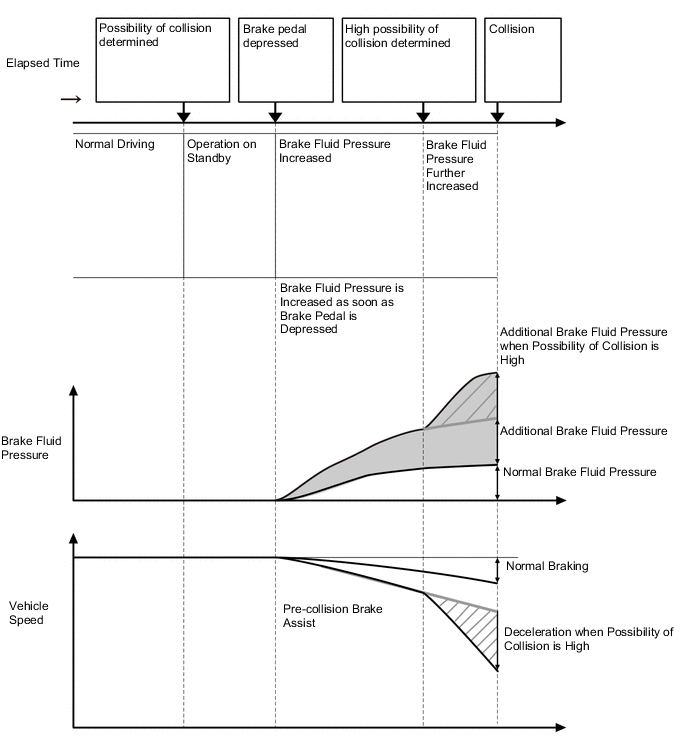
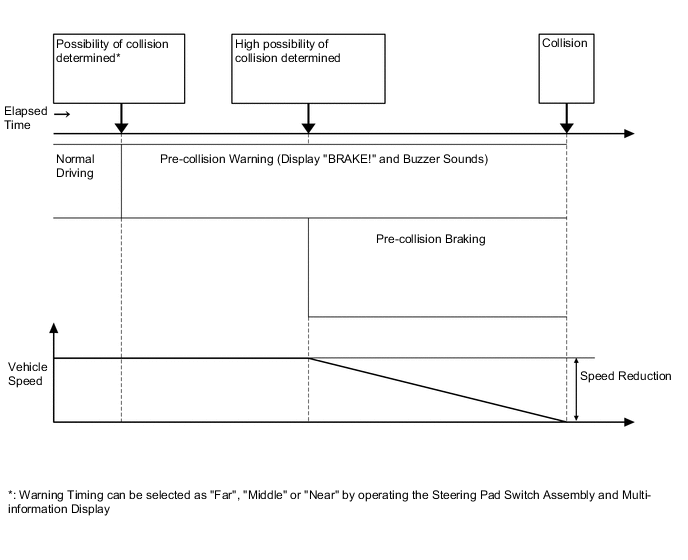
When there is a possibility of a collision, the pre-collision system displays messages on the multi-information display and headup display*, sounds an alert using the buzzer and performs pre-collision brake assist during brake pedal operations. Also, when there is a high possibility of a collision, the system performs pre-collision braking, contributing to collision avoidance support and collision damage reduction.
-
*: Models with headup display
-
-
When the pre-collision system performs brake control, the skid control ECU illuminates the stop lights to inform drivers behind the vehicle of brake operations.
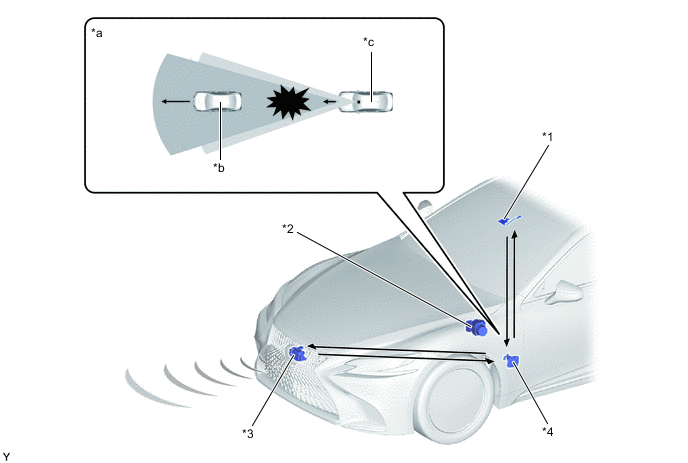
*1 Forward Recognition Camera *2 Skid Control ECU *3 Millimeter Wave Radar Sensor Assembly *4 Driving Support ECU Assembly *a Collision Imminent *b Vehicle Ahead *c Own Vehicle - - 
Forward Recognition Camera Detection Area 
Millimeter Wave Radar Sensor Assembly Detection Area -
Pre-collision Brake Assist
-
While the pre-collision system has determined that there is a high possibility of a collision, brake hydraulic pressure assistance is performed when the driver depresses the brake pedal. Also, the amount of brake hydraulic pressure assistance increases further when the system determines that there is an even higher possibility of a collision.
-
-
Pre-collision Braking
-
When the pre-collision system detects an object such as a vehicle or road structure in front of the vehicle and determines that the possibility of a collision is high, the system displays a warning message on the multi-information display and headup display*, and sounds the buzzer to warn the driver.
-
*: Models with headup display
-
-
When the pre-collision system determines that there is a high possibility of a collision, the system performs pre-collision braking control.
-
-
Conditions under which the system may operate even if there is no possibility of a collision
-
In some situations such as the following, the system may determine that is a possibility of a frontal collision and operate.
-
When passing a vehicle or pedestrian
-
When changing lanes while overtaking a vehicle ahead
-
When overtaking a vehicle ahead that is changing lanes
-
When overtaking a vehicle ahead that is making a right/left turn

-
When passing a vehicle in an oncoming lane that is stopped to make a right/left turn

-
When driving on a road where relative location to vehicle ahead in an adjacent lane may change, such as on a winding road

-
When rapidly closing on a vehicle ahead
-
If the front of the vehicle is raised or lowered, such as when the road surface is uneven or undulating
-
When approaching objects on the roadside, such as guardrails, utility pales, trees, or walls
-
When there is a vehicle, pedestrian, or object by the roadside at the entrance of a curve

-
When driving on a narrow path surrounded by a structure, such as in a tunnel or on an iron bridge
-
When there is a metal object (manhole cover, steel plate, etc.), steps, or a protrusion on the road surface or roadside
-
When a crossing pedestrian approaches very close to the vehicle

-
When passing through a place with a low structure above the road (low ceiling, traffic sign, etc.)

-
When passing under an object (billboard, etc.) at the top of an uphill road

-
When rapidly closing on an electric toll gate barrier, parking area barrier, or other barrier that opens and closes
-
When using an automatic car wash
-
When driving through or under objects that may contact the vehicles, such as thick grass, tree branches, or a banner

-
When the vehicle is hit by water, snow, dust, etc. from a vehicle ahead
-
When driving through steam or smoke
-
When there are patterns or paint on the road or a wall that may be mistaken for a vehicle or pedestrian
-
When driving near an object that reflects radio waves, such as a large truck or guardrail
-
When driving near a TV tower, broadcasting station, electric power plant, or other location where strong radio waves or electrical noise may be present
Tech Tips
Depending on the region in which the vehicle was sold, the pedestrian detection function may not be available.
-
-
-
-
FUNCTION
-
The pre-collision system is equipped with a function that can change the following settings.
-
Pre-collision system on (activates) or off (does not activate) setting
-
Warning sensitivity level (Far, Middle or Near) setting
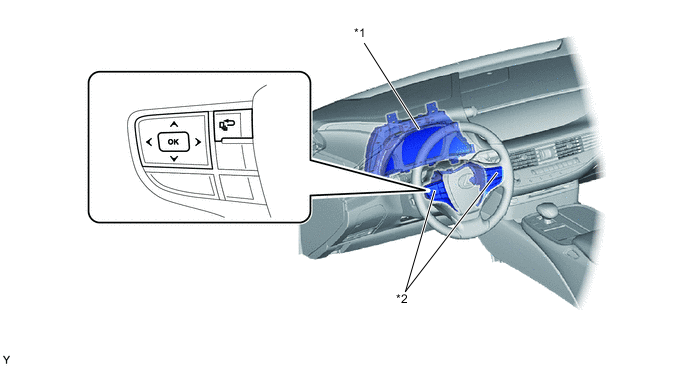
*1 Combination Meter Assembly *2 Steering Pad Switch Assembly
-
Setting Pre-collision System On (Activates) or Off (does Not Activate)
-
The on (activates) or off (does not activate) setting for the pre-collision system can be selected on the multi-information display setting screen.
-
When the pre-collision system is set to off, the PCS warning light illuminates. At that time, the multi-information display shows that the pre-collision system is off.
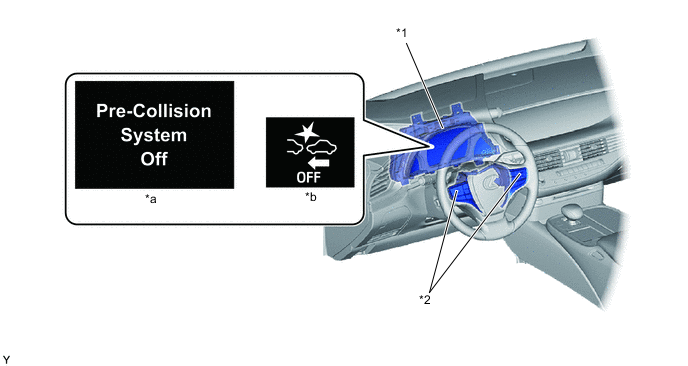
*1 Combination Meter Assembly *2 Steering Pad Switch Assembly *a Multi-information Display *b PCS Warning Light Tech Tips
The system is automatically enabled each time the engine switch is turned on (IG).
-
-
Warning Sensitivity Level Changing
-
The warning sensitivity level of the pre-collision system can be switched on the multi-information display setting screen.
Tech Tips
-
The pre-collision system is set to Middle by default.
-
When Near is selected, the pre-collision system is set to perform a warning operation when there is a short distance between the vehicle and the target object it may collide with (at a timing later than Middle).
-
When Far is selected, the pre-collision system is set to perform a warning operation when there is a long distance between the vehicle and the target object it may collide with (at a timing earlier than Middle).
-
The selected warning sensitivity level is maintained even after the engine switch is turned off.
-
-
-
-
-
DIAGNOSIS
-
Initial Check
-
The driving support ECU assembly performs an initial check on the system for approximately 3 seconds after the engine switch has been turned on (IG).
-
-
Monitor Function
-
After completing the initial check, the pre-collision system becomes ready to operate. During this time, the driving support ECU assembly periodically monitors the system for any malfunctions.
-
-
Diagnostic Trouble Code (DTC)
-
If the driving support ECU assembly detects a malfunction in the pre-collision system, it stores a Diagnostic Trouble Code (DTC) in memory.
-
-