METER / GAUGE SYSTEM
-
OUTLINE
-
An 8-inch color Thin Film Transistor (TFT) Liquid Crystal Display (LCD) combination meter, which displays a dial and needle using an LCD, is used.
-
A 1-dial combination meter, which displays a digital speedometer and an analog tachometer, is used.
-
A various vehicle information are displayed on a color TFT LCD monitor to achieve visibility and a pleasant design.
-
A Normal meter is used for models except F-SPORT and an F-SPORT meter with a special design is used for F-SPORT.
-
The Normal meter expresses a metallic graphic meter ring using the TFT LCD monitor. Depending on the displayed content, the graphic meter ring is lowered to ensure a sufficient display area, making the multi-information display area appear larger. A customization setting is provided for the analog display of the vehicle speed so that the driver can select their preferred display mode.
-
The F-SPORT meter is equipped with a movable meter ring that operates using a motor. By operating the movable meter ring, displayed contents can be switched to display 2 screens on 1 meter.
-
A multi-information display that shows various kinds of information is integrated.
-
The combination meter assembly has a built-in meter ECU and buzzer.
Figure 1. Normal Meter
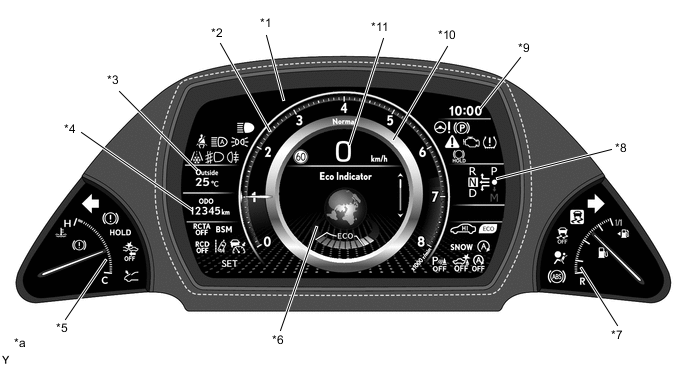
*1 8-inch Color TFT LCD Monitor *2 Tachometer *3 Outside Temperature Gauge *4 Odo/trip Meter *5 Engine Coolant Temperature Gauge *6 Multi-information Display *7 Fuel Gauge *8 Shift Position Indicator *9 Clock *10 Graphic Meter Ring *11 Speedometer - - *a The illustration shown is example only. The illustration may differ from the actual vehicle screen. - - Figure 2. F-SPORT Meter
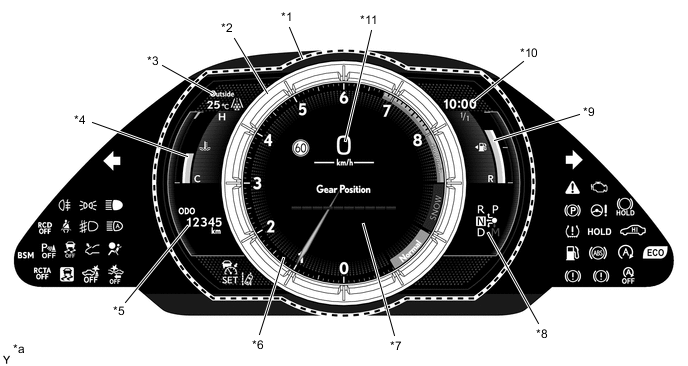
*1 8-inch Color TFT LCD Monitor *2 Movable Meter Ring *3 Outside Temperature Gauge *4 Engine Coolant Temperature Gauge *5 Odo/trip Meter *6 Tachometer *7 Multi-information Display *8 Shift Position Indicator *9 Fuel Gauge *10 Clock *11 Speedometer - - *a The illustration shown is example only. The illustration may differ from the actual vehicle screen. - -
-
-
MAIN FEATURES
-
Welcome Ceremony (Normal Meter)
-
When the driver opens the driver door and enters the vehicle, a 3D animation starts with the graphic meter ring rotating as a welcoming image.
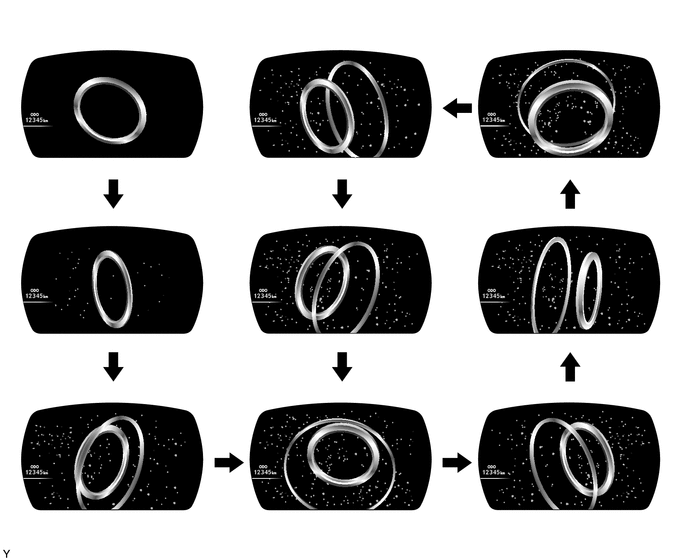
-
-
Opening Ceremony (Normal Meter)
-
When the engine starts, the speedometer, tachometer and the shift position indicator are illuminated, and an animation is displayed on the LCD monitor.
-
After the animation completes, the outside temperature gauge, clock, odo/trip meter and multi-information display are illuminated.
Tech Tips
The illustration is a representative example of the animation order. The display on the actual vehicle may differ depending on the power source mode status.
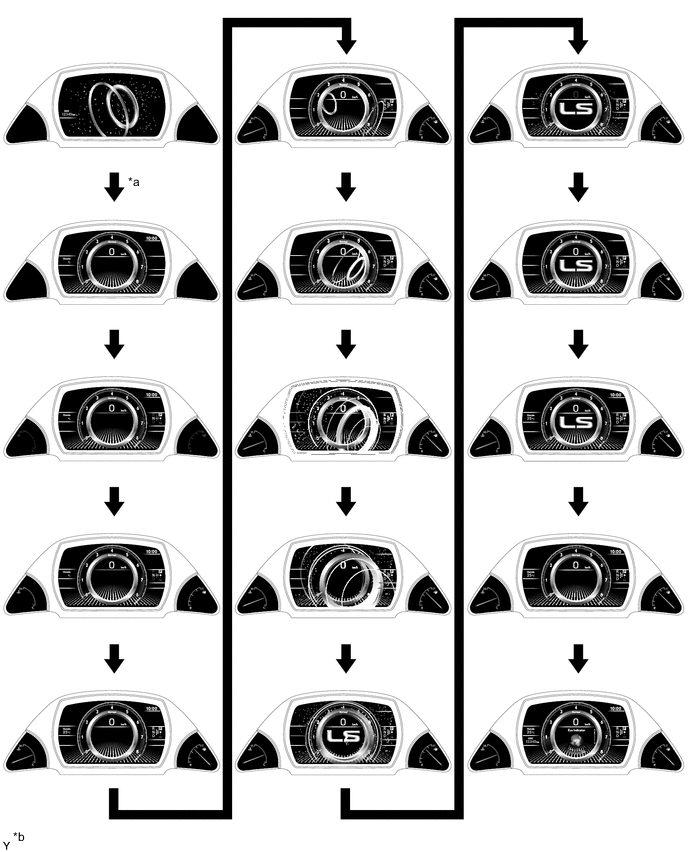
*a IG On *b The illustration shown is example only. The illustration may differ from the actual vehicle screen.
-
-
Ending Ceremony (Normal Meter)
-
When the engine switch is turned off, the multi-information display and the gauge bar graphs are turned off.
-
Furthermore, the tachometer, the speedometer, the outside temperature gauge and the clock are turned off.
-
Afterward, the shift position indicator is turned off, and once a certain period of time elapses, odo/trip meter is turned off.
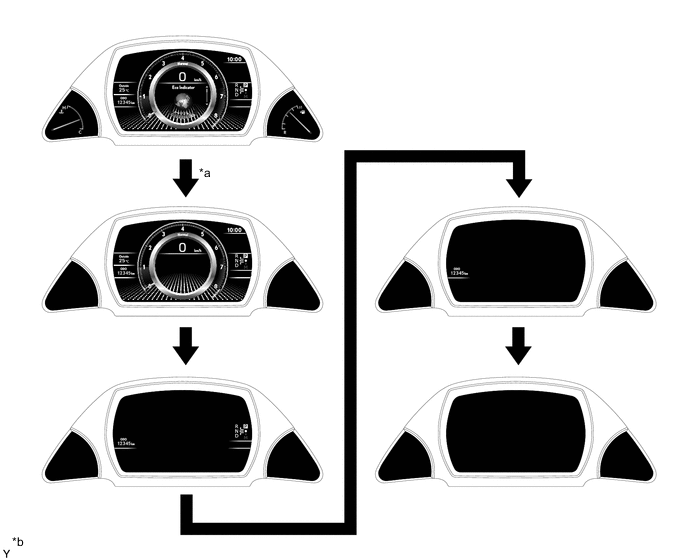
*a Off *b The illustration shown is example only. The illustration may differ from the actual vehicle screen.
-
-
Opening Ceremony (F-SPORT Meter)
-
When the engine starts, the needle of the tachometer in the movable meter ring is illuminated, and an animation is displayed on the LCD monitor.
-
After the animation completes, tachometer graduations and the speedometer are illuminated.
-
Next, an animation is displayed where gauges appear from both sides of the movable meter ring.
-
Afterward, the outside temperature gauge, clock, odo/trip meter and multi-information display are illuminated.
Tech Tips
The illustration is a representative example of the animation order. The display on the actual vehicle may differ depending on the power source mode status.
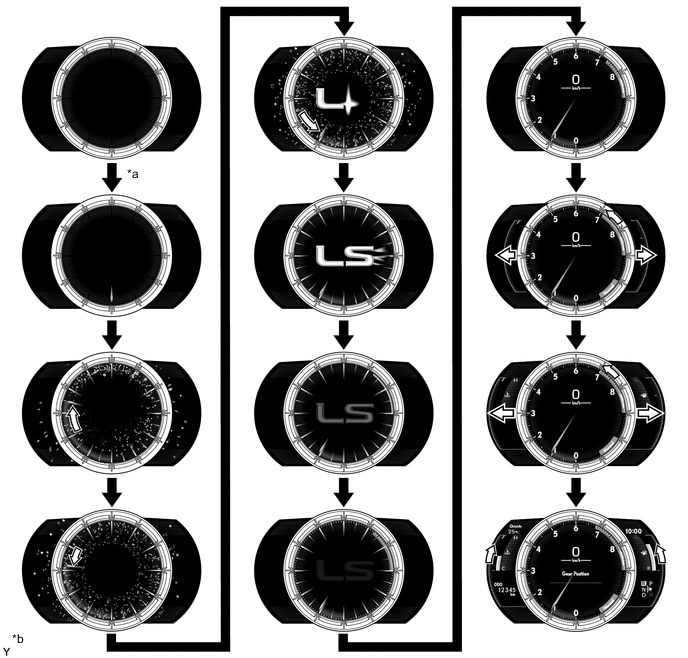
*a IG On *b The illustration shown is example only. The illustration may differ from the actual vehicle screen.
-
-
Ending Ceremony (F-SPORT Meter)
-
When the engine switch is turned off, the speedometer, the outside temperature gauge, the clock, some of the tachometer graduations and the gauge bar graphs are turned off.
-
Afterward, the multi-information display and gauge graduations are turned off.
-
Furthermore, the tachometer needle rotates counterclockwise, and then an animation is used to turn off the graduations of the tachometer.
-
When this occurs, an animation is displayed where the gauge frames appear to be stored into both sides of the movable meter ring.
-
Once the tachometer needle completes one rotation, all tachometer graduations are turned off in order.
-
Next, the tachometer needle fades out while turning off, moving inward from the end towards the center.
-
Afterward, the odo/trip meter and clock are illuminated, and once a certain period of time elapses, they are turned off.
Tech Tips
The illustration is a representative example of the animation order. The display on the actual vehicle may differ depending on the ring position memory settings.
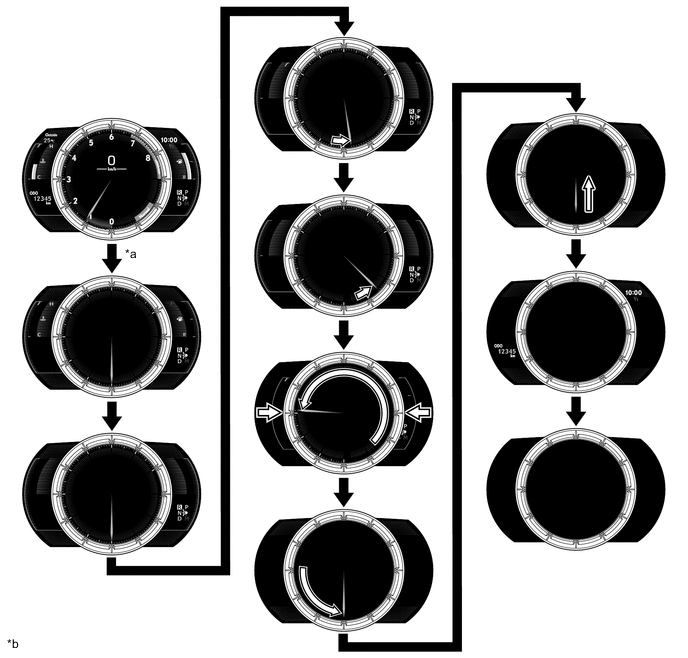
*a Off *b The illustration shown is example only. The illustration may differ from the actual vehicle screen.
-
-
Analog Speedometer Display (Normal Meter)
-
The speedometer can be switched to the analog speedometer display by selecting it through the setting tab. Also, the digital/analog simultaneous speedometer display can be selected.
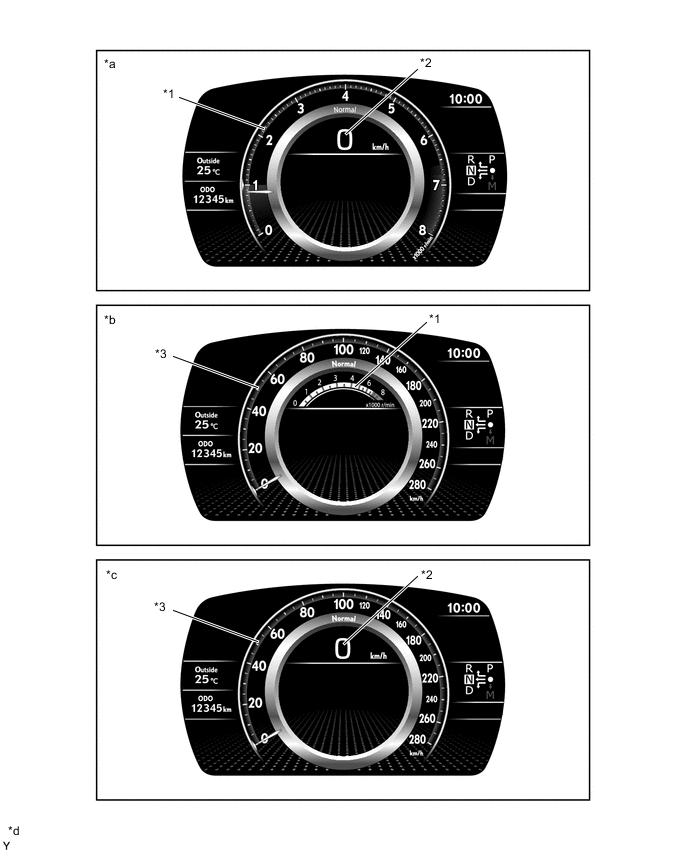
*1 Tachometer *2 Digital Speedometer *3 Analog Speedometer - - *a Digital Speedometer Display *b Analog Speedometer Display *c Digital/Analog Simultaneous Speedometer Display *d The illustration shown is example only. The illustration may differ from the actual vehicle screen.
-
-
Movable Meter Ring (F-SPORT Meter)
-
The combination meter assembly has 2 display modes: ring center display mode and ring side display mode.
-
Switching to display mode is performed using the back switch on the steering pad switch assembly. Returning to display mode is performed using the back switch again.
-
In ring center display mode, the movable meter ring is positioned at the center and the tachometer, speedometer and multi-information display are displayed inside of the movable meter ring. In addition, the outside temperature gauge, odo/trip meter, clock, shift position indicator and gauges are displayed around the movable meter ring.
-
In ring side display mode, the movable meter ring moves with the display to the right and the enlarged multi-information display is displayed at the left and the tachometer, speedometer, shift position indicator and odo/trip meter are displayed inside of the movable meter ring. In addition, the outside temperature gauge, clock and gauges are displayed at the top and bottom of the multi-information display.
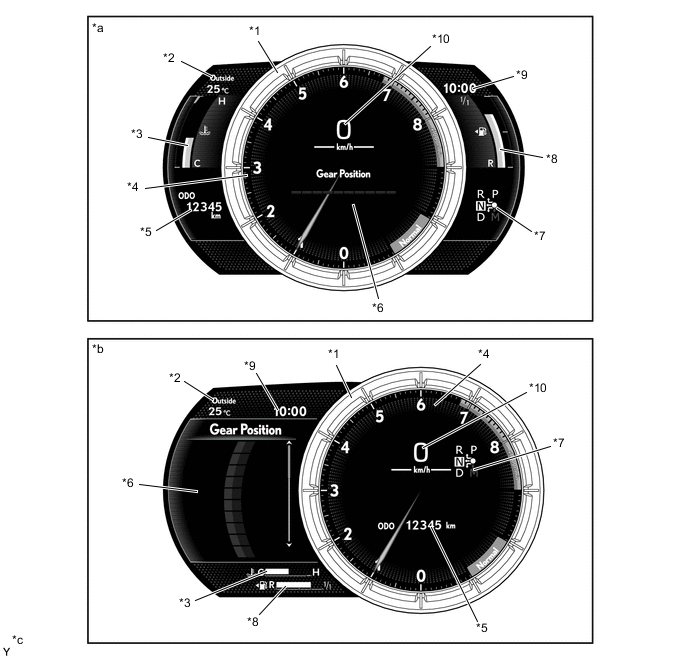
*1 Movable Meter Ring *2 Outside Temperature Gauge *3 Engine Coolant Temperature Gauge *4 Tachometer *5 Odo/trip Meter *6 Multi-information Display *7 Shift Position Indicator *8 Fuel Gauge *9 Clock *10 Speedometer *a Ring Center Display Mode *b Ring Side Display Mode *c The illustration shown is example only. The illustration may differ from the actual vehicle screen. - -
-
-
Drive Mode
-
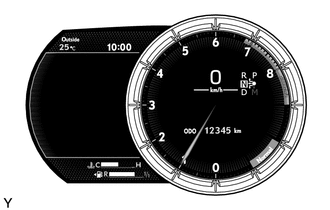
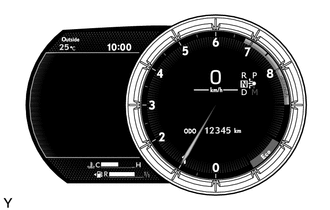
The drive mode indicator is displayed in the upper area of the graphic meter ring of the Normal meter and displayed at the bottom right area inside the movable meter ring of the F-SPORT meter.
-
Driving modes can be selected by performing drive mode select operations.
-
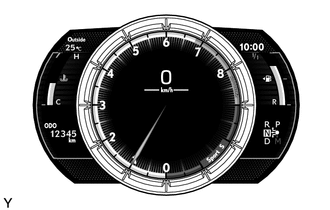
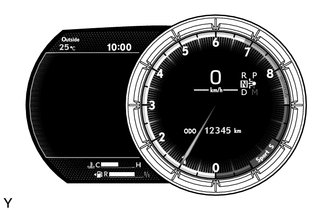
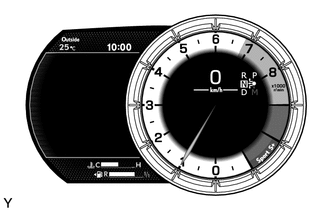
When Sport*1, Sport S*2 and Sport S+*2 mode are selected, the tachometer is displayed. Also, the design of the tachometer dial changes according to each mode and the needle turns red.
-
*1: Models without Adaptive Variable Suspension system (AVS)
-
*2: Models with Adaptive Variable Suspension system (AVS)
Normal Meter Drive Mode Display Normal/Comfort Mode 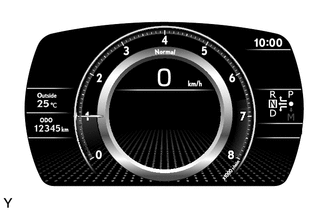
Eco Mode 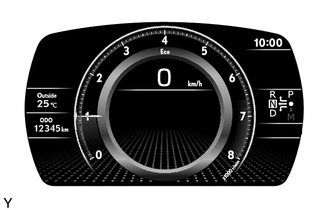
Sport Mode*1
Sport S/S+ Mode*2
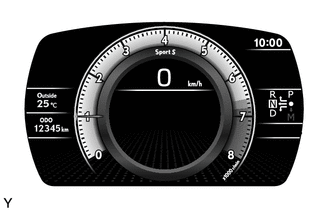
*1: Models without Adaptive Variable Suspension system (AVS)
*2: Models with Adaptive Variable Suspension system (AVS)
F-SPORT Meter Drive Mode Display Ring Center Display Mode Ring Side Display Mode Normal/Comfort Mode 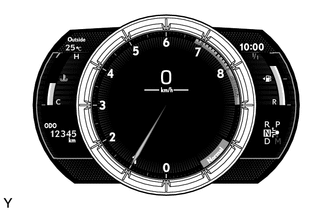
Eco Mode 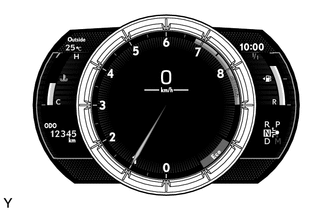
Sport Mode*1
Sport S Mode*2
Sport S+ Mode*2 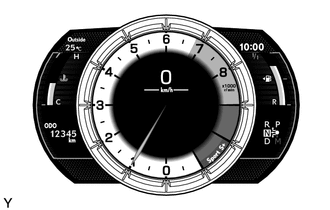
*1: Models without Adaptive Variable Suspension system (AVS)
*2: Models with Adaptive Variable Suspension system (AVS)
-
-
-
Rev Indicator (F-SPORT Meter)
-
A rev indicator, which notifies the driver when the engine speed exceeds a predetermined speed, is provided.
-
When the engine speed exceeds a set level, the rev indicator (yellow ring) is illuminated in the tachometer.
-
If the engine speed exceeds 6800 r/min, the rev indicator (red ring) is illuminated in the tachometer.
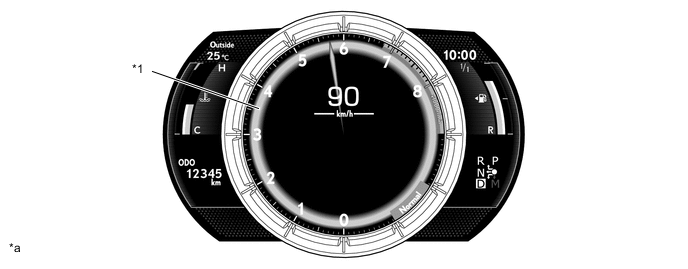
*1 Rev Indicator - - *a The illustration shown is example only. The illustration may differ from the actual vehicle screen. - -
-
-
Tachometer Peak Hold Display (F-SPORT Meter)
-
The tachometer peak hold display, which displays the afterimage of the tachometer needle at the maximum engine speed, is provided.
-
If the engine speed is changed due to shift change operation, the afterimage of the maximum engine speed is displayed for 1 second.
-
This function operates when engine speed is 5000 rpm or more.
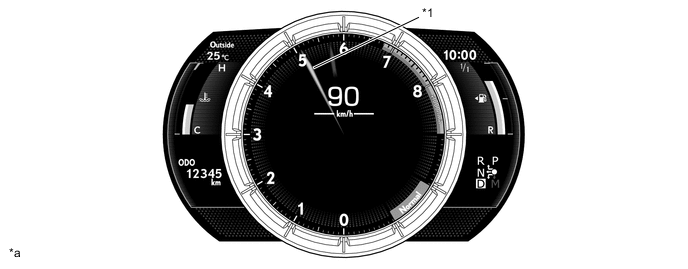
*1 Tachometer Peak Hold Display - - *a The illustration shown is example only. The illustration may differ from the actual vehicle screen. - -
-
-
ECO Driving Indicator/ECO Driving Indicator Zone Display
-
In order to support eco driving, the ECO driving indicator turns on or off to notify the driver of whether the acceleration pedal is being operated in an environmentally friendly manner, and the accelerator operation condition can be checked on the ECO driving indicator zone display.
-
The ECO driving indicator turns on when the vehicle is being driven in an environmentally friendly manner and turns off when it is not. Furthermore, if the operating conditions are not met, the ECO driving indicator turns off and stops operating.
ECO Driving Indicator Operating Conditions
-
When the shift position is D
-
When the paddle shifts are not being operated
-
When not in Sport*1 or Sport S/S+*2 mode
-
When the Snow mode is not selected*3
-
When the vehicle speed is 130 km/h (81 mph) or less
*1: Models without Adaptive Variable Suspension system (AVS)
*2: Models with Adaptive Variable Suspension system (AVS)
*3: Except models for G.C.C. countries
-
-
The ECO driving indicator zone display uses a bar graph to display the eco driving range. When the vehicle is not being driven in an environmentally friendly manner, the bar graph displays gray bars outside the eco-driving range. Furthermore, if the operating conditions are not met, the ECO driving indicator zone display is grayed out and stops operating.
ECO Driving Indicator Zone Display Operating Conditions
-
When the shift position is D
-
When the paddle shifts are not being operated
-
When not in Sport*1 or Sport S/S+*2 mode
-
When the Snow mode is not selected*3
-
When the vehicle speed is 130 km/h (81 mph) or less
*1: Models without Adaptive Variable Suspension system (AVS)
*2: Models with Adaptive Variable Suspension system (AVS)
*3: Except models for G.C.C. countries
Normal Meter Driving Condition ECO Driving Indicator ECO Driving Indicator Zone Display While Stopped Turns off 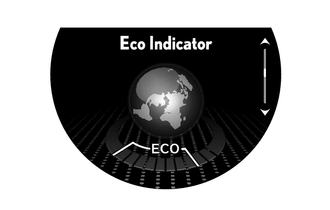
While Eco Driving Turns on 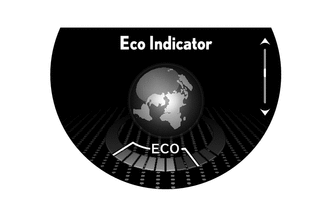
While Non-eco Driving Turns off 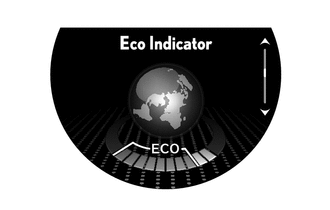
When any of the following conditions is met, operation is stopped.
-
Engine switch off.
-
Engine stopped.
-
Shift position is not in D.
-
Paddle shift is operating.
-
Sport*1 or Sport S/S+*2 mode is selected.
-
Snow mode is selected.*3
-
The vehicle is being driven at a speed of 130 km/h (81 mph) or higher.
Turns off 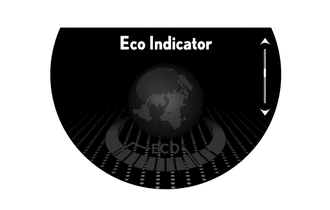
*1: Models without Adaptive Variable Suspension system (AVS)
*2: Models with Adaptive Variable Suspension system (AVS)
*3: Except models for G.C.C. countries
F-SPORT Meter (Ring Side Display Mode) Driving Condition ECO Driving Indicator ECO Driving Indicator Zone Display While Stopped Turns off 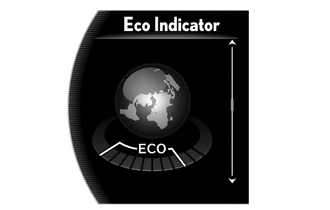
While Eco Driving Turns on 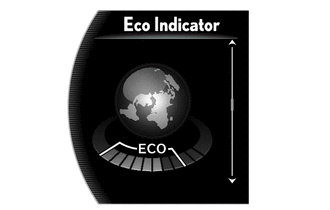
While Non-eco Driving Turns off 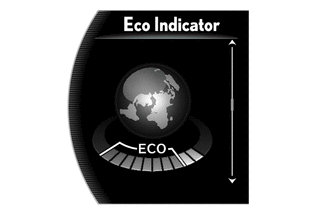
When any of the following conditions is met, operation is stopped.
-
Engine switch off.
-
Engine stopped.
-
Shift position is not in D.
-
Paddle shift is operating.
-
Sport*1 or Sport S/S+*2 mode is selected.
-
Snow mode is selected.*3
-
The vehicle is being driven at a speed of 130 km/h (81 mph) or higher.
Turns off 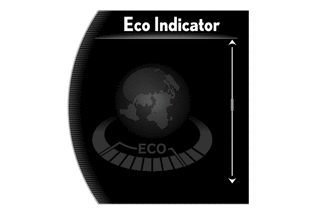
*1: Models without Adaptive Variable Suspension system (AVS)
*2: Models with Adaptive Variable Suspension system (AVS)
*3: Except models for G.C.C. countries
-
-
-
Gear Position Indicator (F-SPORT Meter)
-
A graphic is used to display all transmission gear positions and the current gear position.
-
When the shift position is D, the changed gear position is automatically displayed in white and the current gear position is emphasized.
-
When a paddle shift operation is performed while the shift position is D, the unchanged gear positions are automatically grayed out and the current gear position is emphasized.
-
When the shift position is changed to M, the current gear position is emphasized by displaying it in orange and all other gear positions are grayed out.
-
When the shift position is P, R or N or the paddle shift operation is performed while dynamic radar cruise control system is operating, all gear positions are grayed out.
Ring Center Display Mode Condition Gear Position Indicator Display Shift position is D 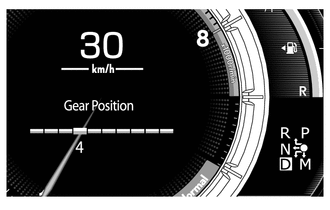
Paddle shift operation when shift position is D 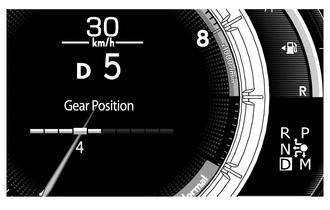
Shift position is M 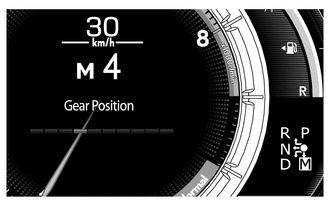
Shift position is P, R or N 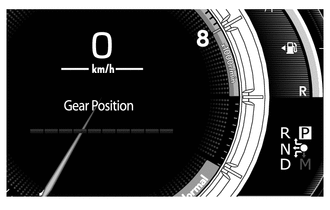
Paddle shift operation while dynamic radar cruise control system is operating* *: Models with Lexus Safety System +
Ring Side Display Mode Condition Gear Position Indicator Display Shift position is D 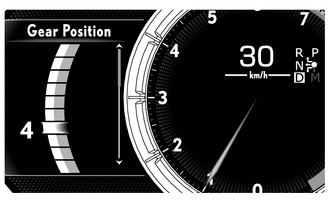
Paddle shift operation when shift position is D 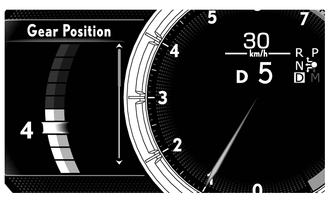
Shift position is M 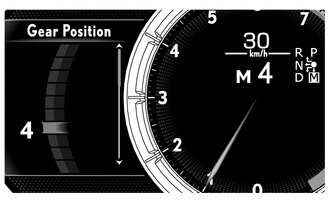
Shift position is P, R or N 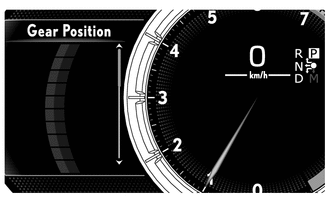
Paddle shift operation while dynamic radar cruise control system is operating* *: Models with Lexus Safety System +
-
-
G Monitor (F-SPORT Meter)
-
The operation amount of the steering wheel and accelerator pedal and the brake force are displayed using the bar graph. At the same time, the amount of front/rear and left/right gravitational acceleration applied to the vehicle is visualized using numbers and a graphic.
-
The current number of gravitational acceleration is displayed in yellow.
-
The amount and direction of the gravitational acceleration are displayed using a ball. In addition, the trajectory of the ball displays the maximum amount.
Figure 3. G Monitor
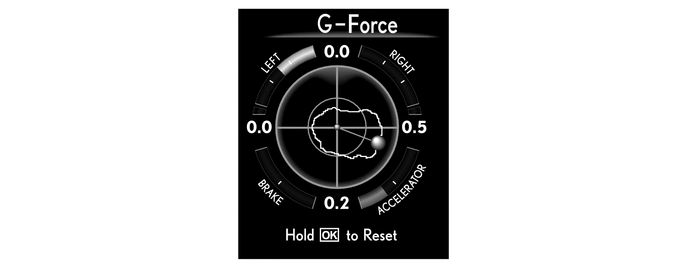
-
-
Liquid Crystal Display (LCD) Monitor
-
The following information can be displayed on the LCD monitor.
Normal Meter Item Outline Speedometer The vehicle speed is displayed. Tachometer The engine speed is displayed. Shift Position Indicator The current shift position is displayed. ODO/TRIP Meter
-
The odometer, trip meter A, trip meter B or oil maintenance is displayed.
-
The item shown can be switched by pressing the ODO/TRIP switch.
-
When the engine switch is turned on (IG), the distance of the oil maintenance will display for 6 seconds.*1
-
When the oil maintenance notification condition is met, the distance of the oil maintenance is displayed via an interrupt screen.*1
Vehicle Power Source State
-
The vehicle power source state is displayed.
-
The key certification indicator is displayed on the multi-information display.
Stop and Start System State Displays the idling stop time, setting mode indicator of the stop and start system and idling stop reject message. Outside Temperature Gauge
-
The outside temperature is displayed.
-
When the outside temperature drops below 3 °C (37 °F), an ice warning indicator illuminates to warn the driver to drive with caution due to possibly icy road conditions. After the ice warning indicator flashes 10 times, the indicator stays on. When the temperature reaches 5 °C (41 °F), the indicator goes off.
Clock The current time is displayed. Light Control Rheostat Meter panel luminance can be changed by using the rheostat switch. Indicator When the illumination conditions are met, the following indicators illuminate:
-
Parking Brake Indicator
-
Electric Power Steering System Warning Indicator
-
Tire Pressure Warning Indicator
-
Malfunction Indicator Light (MIL)
-
Masret Warning Indicator
-
Brake Hold Stanby Indicator
-
HIGH Mode Indicator*2
-
ECO Driving Indicator
-
SNOW Mode Indicator*3
-
Stop and Start Indicator
-
PKSB OFF Indicator*4
-
Lexus Parking Assist-sensor OFF Indicator
-
Road Sign Icon*5
-
Headlight High Beam Indicator
-
Taillight Indicator
-
Automatic High Beam Indicator*6
-
Adaptive High Beam Indicator*7
-
Driver and Front Passenger Seat Belt Reminder Indicator
-
Rear Fog Light Indicator
-
Multi Weather Light Indicator
-
BSM Indicator*8
-
RCTA OFF Indicator*8
-
RCD OFF Indicator*9
-
Cruise Control Indicator*10
-
Cruise Control Indicator (Constant Speed Control Mode)*11
-
Cruise Control Indicator (Vehicle-to-vehicle Distance Control Mode)*11
-
Cruise Control SET Indicator
-
LKA Indicator*12
-
LDA Indicator*13
-
Key Certification Indicator
-
Charge Warning Indicator
-
High Engine Coolant Temperature Indicator
-
Engine Oil Pressure Indicator
-
Brake Pad Wear Warning Indicator
-
Ice Warning Indicator
Drive Mode The currently selected drive mode is displayed:
-
Eco Mode
-
Comfort Mode
-
Normal Mode
-
Custom Mode
-
Sport Mode*14
-
Sport S Mode*15
-
Sport S+ Mode*15
Multi-information Display
-
The following information can be displayed on the multi-information display by switching the tabs:
-
Drive Information
-
Navigation Information
-
Audio Information
-
Driving Support System Information
-
Warning Message
-
Settings
-
When a telephone information*16, warning or advice message request is received, an interrupt screen is displayed.
*1: Except destination package for Hong Kong or Macau
*2: Models with air suspension system
*3: Except models for G.C.C. countries
*4: Models with ParKing Support Brake (PKSB) system
*5: Models with Road Sign Assist (RSA) system
*6: Models with Automatic High Beam (AHB) system
*7: Models with Adaptive High Beam (AHS) system
*8: Models with Blind Spot Monitor (BSM) system
*9: Models with panoramic view monitor system
*10: Models without dynamic radar cruise control system
*11: Models with dynamic radar cruise control system
*12: Models with Lane Keeping Assist (LKA) system
*13: Models with Lane Departure Alert (LDA) system
*14: Models without Adaptive Variable Suspension system (AVS)
*15: Models with Adaptive Variable Suspension system (AVS)
*16: This information can be displayed when a telephone is connected via Bluetooth.
F-SPORT Meter Item Outline Speedometer The vehicle speed is displayed. Tachometer The engine speed is displayed. Shift Position Indicator The current shift position is displayed. Engine Coolant Temperature Gauge The engine coolant temperature is displayed. Fuel Gauge The remaining amount of fuel is displayed. ODO/TRIP Meter
-
The odometer, trip meter A, trip meter B or oil maintenance is displayed.
-
The item shown can be switched by pressing the ODO/TRIP switch.
-
When the engine switch is turned on (IG), the distance of the oil maintenance will display for 6 seconds.*1
-
When the oil maintenance notification condition is met, the distance of the oil maintenance is displayed via an interrupt screen.*1
Vehicle Power Source State
-
The vehicle power source state is displayed.
-
The key certification indicator is displayed on the multi-information display.
Stop and Start System State Displays the idling stop time, setting mode indicator of the stop and start system and idling stop reject message. Outside Temperature Gauge
-
The outside temperature is displayed.
-
When the outside temperature drops below 3 °C (37 °F), an ice warning indicator illuminates to warn the driver to drive with caution due to possibly icy road conditions. After the ice warning indicator flashes 10 times, the indicator stays on. When the temperature reaches 5 °C (41 °F), the indicator goes off.
Clock The current time is displayed. Light Control Rheostat Meter panel luminance can be changed by using the rheostat switch. Indicator When the illumination conditions are met, the following indicators illuminate:
-
Cruise Control Indicator*2
-
Cruise Control Indicator (Constant Speed Control Mode)*3
-
Cruise Control Indicator (Vehicle-to-vehicle Distance Control Mode)*3
-
Cruise Control SET Indicator
-
LKA Indicator*4
-
LDA Indicator*5
-
Key Certification Indicator
-
Charge Warning Indicator
-
High Engine Coolant Temperature Indicator
-
Engine Oil Pressure Indicator
-
Brake Pad Wear Warning Indicator
-
Ice Warning Indicator
Drive Mode The currently selected drive mode is displayed:
-
Eco Mode
-
Comfort Mode
-
Normal Mode
-
Custom Mode
-
Sport Mode*6
-
Sport S Mode*7
-
Sport S+ Mode*7
Multi-information Display (Ring Center Display Mode)
-
The drive information is displayed.
-
When a warning or advice message request is received, an interrupt screen is displayed.
Multi-information Display (Ring Side Display Mode)
-
The following information can be displayed on the multi-information display by switching the tabs:
-
Drive Information
-
Navigation Information
-
Audio Information
-
Driving Support System Information
-
Warning Message
-
Settings
-
When a telephone information*8, warning or advice message request is received, an interrupt screen is displayed.
*1: Except destination package for Hong Kong or Macau
*2: Models without dynamic radar cruise control system
*3: Models with dynamic radar cruise control system
*4: Models with Lane Keeping Assist (LKA) system
*5: Models with Lane Departure Alert (LDA) system
*6: Models without Adaptive Variable Suspension system (AVS)
*7: Models with Adaptive Variable Suspension system (AVS)
*8: This information can be displayed when a telephone is connected via Bluetooth.
-
-
-
Multi-information Display
-
The following information can be displayed on the multi-information display .
Normal Meter Item Outline Drive Information
-
The following items can be displayed. The 4 display items can be selected in the setting screen:
-
Current Fuel Consumption (Bar Display)/Average Fuel Consumption (Mark Display)
-
Total Average Fuel Consumption Between Reset Operations
-
Average Fuel Consumption After Engine Start-up
-
Average Fuel Consumption After Refueling
-
Total Average Vehicle Speed Between Reset Operations
-
Average Vehicle Speed After Engine Start-up
-
Cruising Range After Engine Start-up
-
Total Elapsed Time Between Reset Operations
-
Elapsed Time After Engine Start-up
-
Cruising Range
-
In addition to the above functions, the following items can be displayed:
-
Stop and Start System Information
-
ECO Driving Indicator Zone Display
-
Tire Inflation Pressure Display
-
Vehicle Sway Warning*1
-
Blank
Navigation Information Navigation information is displayed. Audio Information Audio information (status information) is displayed and the audio source and songs can be switched. Driving Support System Information The operation condition of the following items is displayed:
-
Cruise Control System*2
-
Dynamic Radar Cruise Control System*1
-
Lane Keeping Assist (LKA) System*3
-
Lane Departure Alert (LDA) System*4
-
Road Sign Assist (RSA) System*5
Warning Message Warning messages about vehicle malfunctions are displayed. Settings The following settings can be changed:
-
Lane Keeping Assist (LKA) System*3
-
Lane Departure Alert (LDA) System*4
-
Pre-Collision System (PCS)*1
-
Blind Spot Monitor (BSM) System*6
-
ParKing Support Alert (PKSA) System
-
ParKing Support Brake (PKSB) System*7
-
Head-Up Display (HUD) Brightness/Position*8
-
Unit Change*9
-
Vehicle Settings
-
Meter Settings
*1: Models with Lexus Safety System +
*2: Models without dynamic radar cruise control system
*3: Models with Lane Keeping Assist (LKA) system
*4: Models with Lane Departure Alert (LDA) system
*5: Models with Road Sign Assist (RSA) system
*6: Models with Blind Spot Monitor (BSM) system
*7: Models with ParKing Support Brake (PKSB) system
*8: Models with headup display system
*9: Destination package for United Kingdom
F-SPORT Meter (Ring Center Display Mode) Item Outline Drive Information
-
The following items can be displayed. The 4 display items can be selected in the setting screen:
-
Current Fuel Consumption (Bar Display)/Average Fuel Consumption (Mark Display)
-
Total Average Fuel Consumption Between Reset Operations
-
Average Fuel Consumption After Engine Start-up
-
Average Fuel Consumption After Refueling
-
Total Average Vehicle Speed Between Reset Operations
-
Average Vehicle Speed After Engine Start-up
-
Cruising Range After Engine Start-up
-
Total Elapsed Time Between Reset Operations
-
Elapsed Time After Engine Start-up
-
Cruising Range
-
In addition to the above functions, the following items can be displayed:
-
Tire Inflation Pressure Display
-
Gear Position Indicator
-
Driving Support System Information
-
Blank
F-SPORT Meter (Ring Side Display Mode) Item Outline Drive Information
-
The following items can be displayed. The 4 display items can be selected in the setting screen:
-
Current Fuel Consumption (Bar Display)/Average Fuel Consumption (Mark Display)
-
Total Average Fuel Consumption Between Reset Operations
-
Average Fuel Consumption After Engine Start-up
-
Average Fuel Consumption After Refueling
-
Total Average Vehicle Speed Between Reset Operations
-
Average Vehicle Speed After Engine Start-up
-
Cruising Range After Engine Start-up
-
Total Elapsed Time Between Reset Operations
-
Elapsed Time After Engine Start-up
-
Cruising Range
-
In addition to the above functions, the following items can be displayed:
-
Stop and Start System Information
-
ECO Driving Indicator Zone Display
-
G Monitor
-
Gear Position Indicator
-
Vehicle Sway Warning*1
-
Tire Inflation Pressure Display
-
Blank
Navigation Information Navigation information is displayed. Audio Information Audio information (status information) is displayed and the audio source and songs can be switched. Driving Support System Information The operation condition of the following items is displayed:
-
Cruise Control System*2
-
Dynamic Radar Cruise Control System*1
-
Lane Keeping Assist (LKA) System*3
-
Lane Departure Alert (LDA) System*4
-
Road Sign Assist (RSA) System*5
Warning Message Warning messages about vehicle malfunctions are displayed. Settings The following settings can be changed:
-
Lane Keeping Assist (LKA) System*3
-
Lane Departure Alert (LDA) System*4
-
Pre-Collision System (PCS)*1
-
Blind Spot Monitor (BSM) System*6
-
ParKing Support Alert (PKSA) System
-
ParKing Support Brake (PKSB) System*7
-
Head-Up Display (HUD) Brightness/Position*8
-
Unit Change*9
-
Vehicle Settings
-
Meter Settings
*1: Models with Lexus Safety System +
*2: Models without dynamic radar cruise control system
*3: Models with Lane Keeping Assist (LKA) system
*4: Models with Lane Departure Alert (LDA) system
*5: Models with Road Sign Assist (RSA) system
*6: Models with Blind Spot Monitor (BSM) system
*7: Models with ParKing Support Brake (PKSB) system
*8: Models with headup display system
*9: Destination package for United Kingdom
-
-
-