PRE-COLLISION SYSTEM
-
OPERATION
-
The combination meter assembly uses the multi-information display, master warning light, PCS warning light and multi buzzer to provide the driver with pre-collision system warnings and indications.
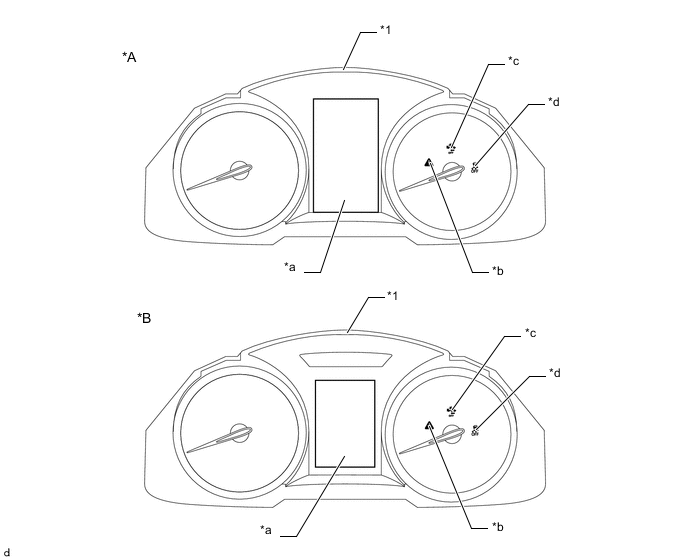
*A Models with Color Type Multi-information Display *B Models with Monochrome Type Multi-information Display *1 Combination Meter Assembly - - *a Multi-information Display *b Master Warning Light *c PCS Warning Light *d VSC OFF Indicator Light -
If the millimeter wave radar sensor assembly determines that the possibility of a collision is high, it sends a signal to the combination meter assembly. Upon receiving this signal, the combination meter assembly indicates a warning using the multi-information display. Details are indicated below.
When there is a high possibility of a collision Multi-information Display PCS Warning Light BRAKE! - -
When the system is not available, the following warning occurs to warn the driver.
When a system malfunction is detected Multi-information Display Detail Master Warning Light PCS Warning Light Multi Buzzer Color Type Monochrome Type Pre-Collision System Malfunction. Visit Your Dealer. PRE-COLLISION SYSTEM MALFUNCTION VISIT YOUR DEALER This message appears when the forward recognition camera (camera sensor) or millimeter wave radar sensor assembly detects a system malfunction. Illuminates Flashes Sounds once Pre-Collision System Unavailable. PRE-COLLISION SYSTEM UNAVAILABLE Temperature or power supply of millimeter wave radar sensor assembly is abnormal. - Illuminates - Pre-Collision System Unavailable. Clean Sensor. PRE-COLLISION SYSTEM UNAVAILABLE CLEAN SENSOR Dirty center mark of upper radiator grille or millimeter wave radar sensor assembly. - Illuminates - Front Camera Unavailable. FRONT CAMERA UNAVAILABLE Temperature or power supply of forward recognition camera (camera sensor) is abnormal. - Illuminates - Front Camera Vision Blocked. Clean and Demist Windshield. FRONT CAMERA VISION BLOCKED CLEAN AND DEMIST WINDSHIELD Dirty or fog windshield glass over the forward recognition camera (camera sensor). - Illuminates - When the pre-collision system is turned OFF Multi-information Display Detail Master Warning Light PCS Warning Light Multi Buzzer Color Type Monochrome Type Pre-Collision System Off. PRE-COLLISION SYSTEM OFF Pre-collision system operation is disabled. - Illuminates - When in VSC OFF mode Multi-information Display Detail Master Warning Light PCS Warning Light VSC OFF Indicator Light Color Type Monochrome Type VSC Turned Off. Pre-Collision Brake System Unavailable. VSC TURNED OFF PRE-COLLISION BRAKE SYSTEM UNAVAILABLE Pre-collision braking and pre-collision brake assist operation is disabled (a warning that occurs when there is a high possibility of a collision is still enabled). - Illuminates Illuminates Tech Tips
The message appears for 6 seconds on the multi-information display.
-
The pre-collision system can be turned ON/OFF at setting display of the multi-information display.
-
On the setting display screen, select PCS icon and then press on Enter/Set switch on the steering pad switch assembly.
-
Select [PCS] and then press on Enter/Set switch on the steering pad switch assembly. Each time is pressed, the system will be enabled/disabled.
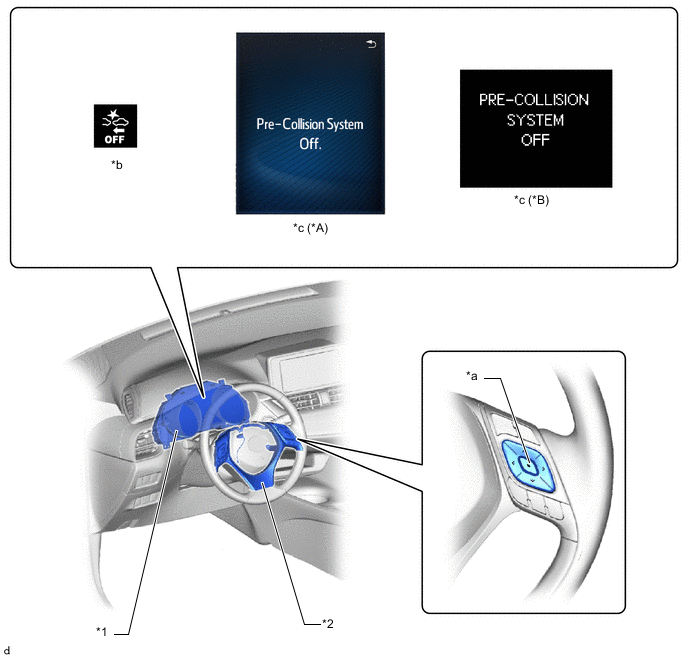
*A Models with Color Type Multi-information Display *B Models with Monochrome Type Multi-information Display *1 Combination Meter Assembly *2 Steering Pad Switch Assembly *a Enter/Set Switch *b PCS Warning Light *c Multi-information Display - - Tech Tips
-
If the system is disabled, the PCS warning light will turn on and a message will be displayed on the multi-information display.
-
The system is automatically enabled each time the ignition switch is turned to ON.
-
-
-
The pre-collision warning timing can be changed on setting display of the multi-information display.
-
On the setting display screen, select PCS icon and then press on Enter/Set switch on the steering pad switch assembly.
-
Select [Sensitivity] and then press on Enter/Set switch on the steering pad switch assembly. Each Enter/Set switch is pressed, operation timing (Far/Middle/Near) of the pre-collision system will be changed.
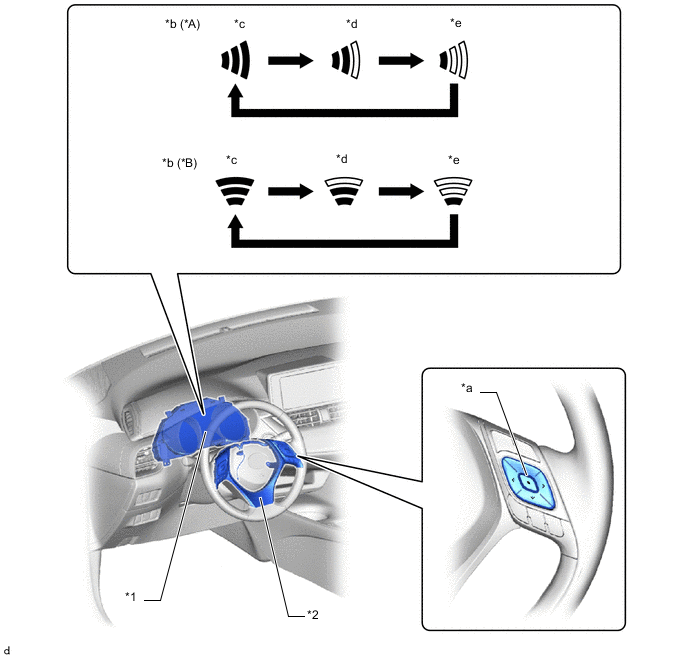
*A Models with Color Type Multi-information Display *B Models with Monochrome Type Multi-information Display *1 Combination Meter Assembly *2 Steering Pad Switch Assembly *a Enter/Set Switch *b Multi-information Display *c Far *d Middle *e Near - -
-
-