SIMPLE INTELLIGENT PARKING ASSIST SYSTEM
Info Added 2017-04-18 
-
FUNCTION OF MAIN COMPONENTS
Component Function Front Side Ultrasonic Sensor (FLS/FRS)
-
Transmits ultrasonic waves to detect empty parking spaces and sends signals to the clearance warning ECU assembly.
-
Detects the distance between the vehicle and an obstacle.
Rear Side Ultrasonic Sensor (RLS/RRS) Front Corner Ultrasonic Sensor (FL/FR) Detects the distance between the vehicle and an obstacle. Front Center Ultrasonic Sensor (FLC/FRC) Rear Corner Ultrasonic Sensor (RL/RR) Rear Center Ultrasonic Sensor (RLC/RRC) No. 1 Clearance Warning Buzzer (Front) Sounds a buzzer in accordance with the distance to the obstruction in front of the vehicle to inform the driver. No. 2 Clearance Warning Buzzer (Rear) Sounds a buzzer in accordance with the distance to the obstruction behind the vehicle to inform the driver. Clearance Warning ECU Assembly Controls the simple intelligent parking assist system based on signals from various switches and sensors. Combination Meter Assembly Multi-information Display Displays the system operation status on the multi-information display. IPA Indicator Light Illuminates during system operating. Buzzer Sounds according to system operating condition. IPA Main Switch Assembly
-
Switches between each mode.
-
Depending on the system operating conditions, turns functions off or prohibits assist.
Power Steering ECU Assembly
-
Sends power steering control status signals to the clearance warning ECU assembly.
-
Operates the steering based on signals from the clearance warning ECU assembly.
Park/Neutral Position Switch Assembly*1 Transmits the shift position signal to the ECM. Back-up Light Switch Assembly*2 ECM Sends vehicle condition signals such as the engine speed signal and shift position signal to the clearance warning ECU assembly. Brake Actuator Assembly
-
Skid Control ECU
-
Sends signals such as a wheel speed signal and brake system condition signal to the clearance warning ECU assembly.
-
Transmits the VSC OFF switch signal to the clearance warning ECU assembly.
-
Transmits the operation state signal of the brake control system (VSC, TRC or ABS) to the clearance warning ECU assembly.
Airbag Sensor Assembly Sends the G information signal to the clearance warning ECU assembly. Steering Sensor Sends the steering angle signal to the clearance warning ECU assembly. Air Conditioner Amplifier Assembly Sends outside temperature information to the clearance warning ECU assembly. Main Body ECU (Multiplex Network Body ECU)
-
Sends model destination signal (information to indicate the market the vehicle was built for) to the clearance warning ECU assembly.
-
Transmits steering wheel position information (right or left) to the clearance warning ECU assembly.
Engine Stop and Start ECU*3 Sends the stop and start system operation condition signal to the clearance warning ECU assembly. *1: Models with CVT
*2: Models with manual transaxle
*3: Models with stop and start system
-
-
OPERATING CONDITION
-
Perpendicular Parking Assist Mode
-
The system starts perpendicular parking assist mode when the vehicle speed is less than 20 km/h (12 mph) (including when the vehicle is stopped) and all of the following conditions are met:
-
Shift lever is in a position other than P* or R.
-
Perpendicular parking assist mode is selected using the IPA switch.
-
*: Models with CVT
-
-
-
Parallel Parking Assist Mode
-
The system starts parallel parking assist mode when the vehicle speed is less than 30 km/h (18 mph) (including when the vehicle is stopped) and all of the following conditions are met:
-
Shift lever is in a position other than P* or R.
-
Parallel parking assist mode is selected using the IPA switch.
-
*: Models with CVT
-
-
-
Parallel Parking Departure Assist Mode
-
The system starts parallel parking departure assist mode when all of the following conditions are met:
-
There is sufficient space to maneuver in front of and behind the vehicle.
-
The vehicle is stopped.
-
Parallel parking departure assist mode is selected using the IPA switch.
-
-
-
-
SYSTEM CONTROL
-
Perpendicular Parking Assist Mode
-
In perpendicular parking assist mode, this system assists the driver in finding the target parking space, and performs assistance starting from the time the driver starts reversing until reaching the target parking space.
-
Pressing the IPA switch twice will begin the perpendicular parking assist mode.
-
While maintaining a distance of approximately 1 meter from the parked cars, the driver slowly drives the vehicle forward. The system will begin searching for a target parking space.
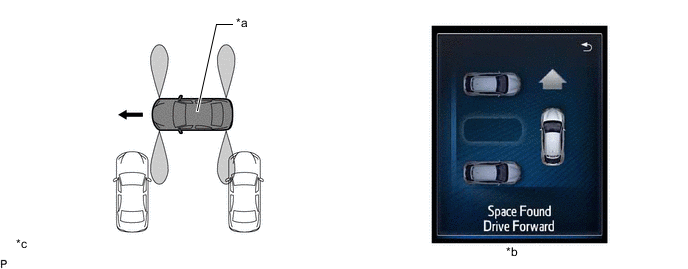
*a This Vehicle *b Multi-information Display *c The illustration shown is an example only. The illustration may differ from the actual vehicle screen. - - -
When the vehicle reaches the point at which to start reversing, the display changes to instruct the driver to stop the vehicle and select reverse.
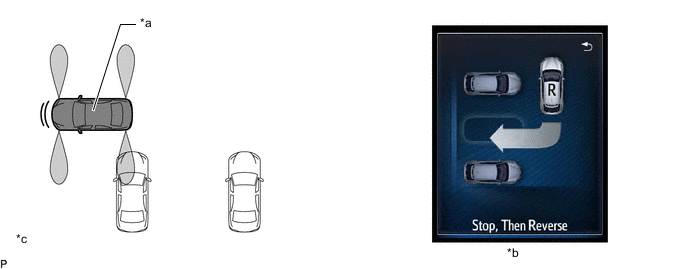
*a This Vehicle *b Multi-information Display *c The illustration shown is an example only. The illustration may differ from the actual vehicle screen. - - -
When reverse has been selected, the driver is instructed to reverse the vehicle.
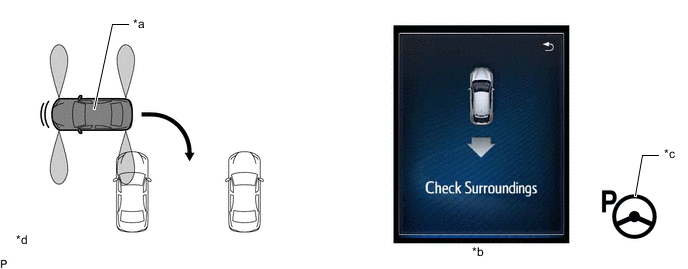
*a This Vehicle *b Multi-information Display *c Automatic Steering Mode Indicator *d The illustration shown is an example only. The illustration may differ from the actual vehicle screen. -
When it is judged that the vehicle needs to change direction while maneuvering, the driver is instructed to stop the vehicle and then drive the vehicle forward or backward.
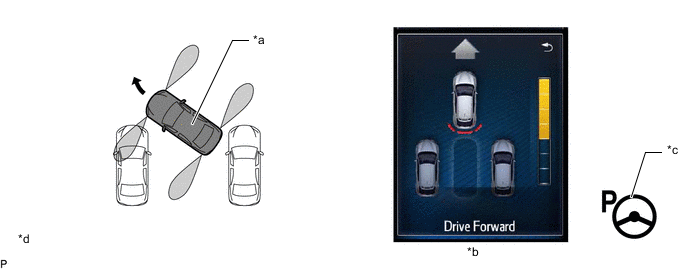
*a This Vehicle *b Multi-information Display *c Automatic Steering Mode Indicator *d The illustration shown is an example only. The illustration may differ from the actual vehicle screen. -
When the system judges that the desired parking position has been reached, guidance ends.
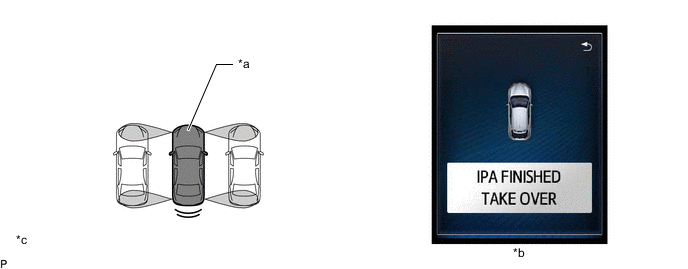
*a This Vehicle *b Multi-information Display *c The illustration shown is an example only. The illustration may differ from the actual vehicle screen. - -
-
-
Parallel Parking Assist Mode
-
During parallel parking, this system detects the target parking space and displays the point at which to start reversing the vehicle into the parking space. When the driver reverses the vehicle, the steering wheel automatically starts to operate the vehicle until it is in the target parking position.
-
Pressing the IPA switch once will begin the parallel parking assist mode.
-
While maintaining a distance of approximately 1 meter from the parked cars, the driver slowly drives the vehicle forward.
-
The vehicle should be driven parallel to the curb and the parked cars.
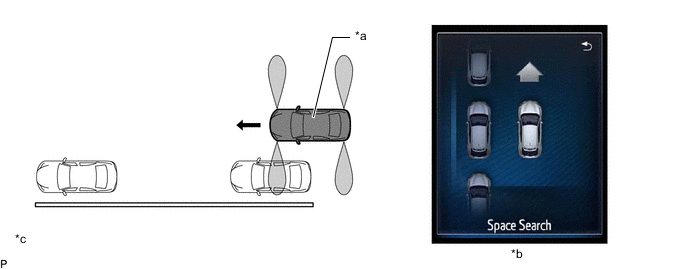
*a This Vehicle *b Multi-information Display *c The illustration shown is an example only. The illustration may differ from the actual vehicle screen. - - -
Detection of an empty parking space is performed.
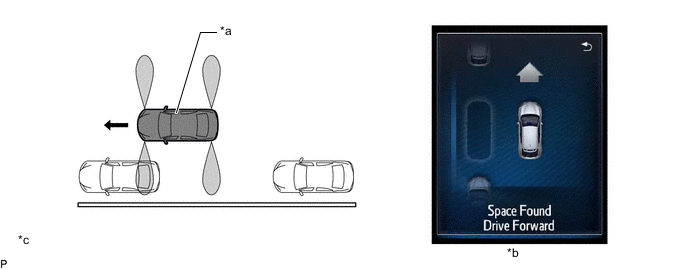
*a This Vehicle *b Multi-information Display *c The illustration shown is an example only. The illustration may differ from the actual vehicle screen. - - -
When the vehicle reaches the point at which to start reversing, the display changes to instruct the driver to stop the vehicle and select reverse. When the driver reverses the vehicle according to the guidance, the steering wheel automatically starts to operate.
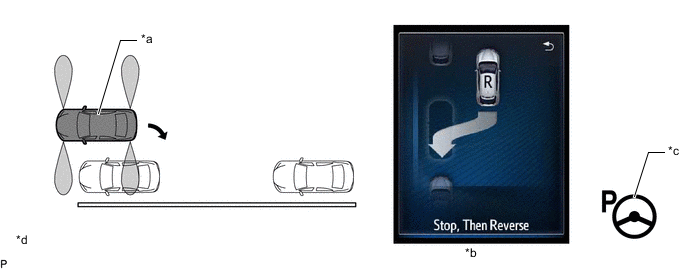
*a This Vehicle *b Multi-information Display *c Automatic Steering Mode Indicator *d The illustration shown is an example only. The illustration may differ from the actual vehicle screen. -
When it is judged that the vehicle needs to change direction while maneuvering, the driver is instructed to drive the vehicle forward or backward.
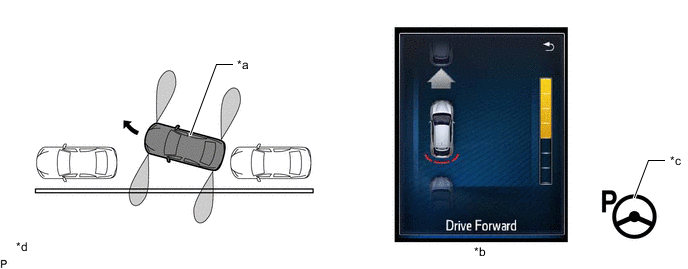
*a This Vehicle *b Multi-information Display *c Automatic Steering Mode Indicator *d The illustration shown is an example only. The illustration may differ from the actual vehicle screen. -
When the system judges that the desired parking position has been reached, guidance ends.
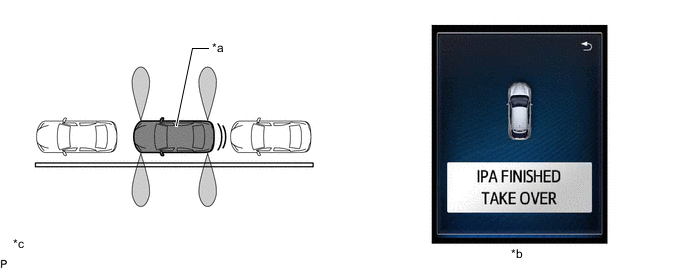
*a This Vehicle *b Multi-information Display *c The illustration shown is an example only. The illustration may differ from the actual vehicle screen. - -
-
-
Parallel Parking Departure Assist Mode
-
The system assists the driver when departing from the parallel parking space by operating the steering wheel automatically until the vehicle is out of the parking space.
-
Immediately after turning the ignition switch ON while the vehicle is stopped and there is a parked vehicle in front, pressing the IPA switch once will start the parallel parking departure assist mode.
-
Immediately after parallel parking, and the vehicle is stopped and there is a parked vehicle in front, pressing the IPA switch once will start the parallel parking departure assist mode.
-
The driver then selects the departure direction.
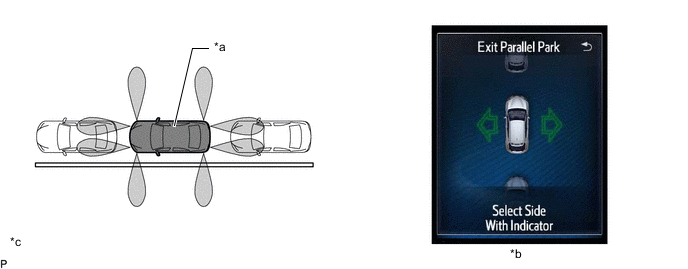
*a This Vehicle *b Multi-information Display *c The illustration shown is an example only. The illustration may differ from the actual vehicle screen. - - -
The system instructs the driver to move the vehicle forward or backward. When the driver changes the shift status according to the guidance, the steering wheel automatically starts to operate.
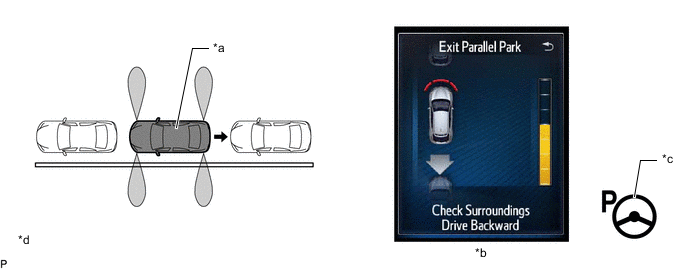
*a This Vehicle *b Multi-information Display *c Automatic Steering Mode Indicator *d The illustration shown is an example only. The illustration may differ from the actual vehicle screen. -
When it is judged that the vehicle needs to change direction while maneuvering, the system instructs the driver to stop the vehicle and the move the vehicle forward or backward.
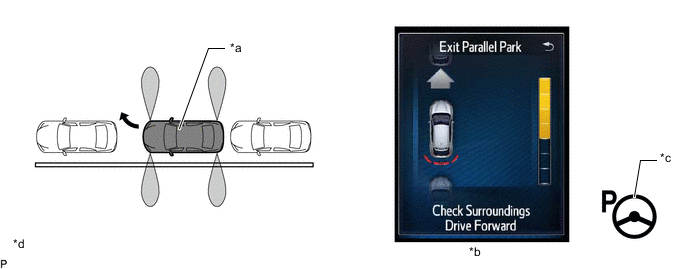
*a This Vehicle *b Multi-information Display *c Automatic Steering Mode Indicator *d The illustration shown is an example only. The illustration may differ from the actual vehicle screen. -
When the system judges that the vehicle has departed, guidance ends.
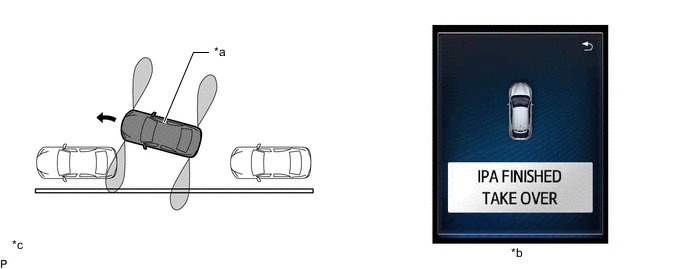
*a This Vehicle *b Multi-information Display *c The illustration shown is an example only. The illustration may differ from the actual vehicle screen. - -
-
-
Warning Message
-
The following messages are displayed on the multi-information display when the simple intelligent parking assist system cannot operate.
Warning Message Description Check surroundings Automatic steering will begin when the vehicle starts reversing. Pay close attention to the vehicle surroundings while driving the vehicle. IPA Cancelled, Take Over.
IPA Malfunction.
When a system malfunction has occurred. IPA Cancelled, Take Over. When assist control has been cancelled for one of the following reasons:
-
The IPA switch is turned off.
-
The power steering system has temporarily overheated.
-
The engine has stopped.
-
During parallel parking departure assist mode and before the start of automatic steering, the vehicle has moved.
-
During automatic steering during parallel parking assist mode or perpendicular parking assist mode, a shift position other than R is selected before the vehicle enters the parking space.
-
During parking space detection, the shift position is changed to R.
-
The shift position is changed to P. Or, when starting to parallel park with the shift position in P or R and then turning the IPA switch ON.
-
When there is a possible system malfunction.
IPA Cancelled, Take Over.
Speed Too High.
-
During parking space detection, the vehicle speed exceeds 50 km/h (31 mph).
-
During automatic steering, the vehicle speed exceeds 7 km/h (4 mph).
IPA Cancelled, Take Over.
Driver Intervened.
The steering wheel is operated during automatic steering. IPA Cancelled, Take Over.
TRC/VSC is off.
The TRC/VSC switch is turned OFF. IPA Cancelled, Take Over.
TRC/ABS/VSC Activated.
TRC/VSC/ABS is activated. IPA Cancelled, Take Over.
Timeout.
-
More than 6 minutes elapse from the time the IPA switch is turned on until the start of automatic steering.
-
More than 6 minutes elapse from the start of automatic steering until completion of the parking operation.
-
3 minutes or more elapse while "Wait For Room To Maneuver" is displayed.
IPA Malfunction. Visit Your Dealer. IPA is inoperable due to a system malfunction. IPA Unavailable.
-
Engine has not started.
-
Parallel parking departure assist is operated while there are obstacles on both the left and right sides, or an obstacle on the side on which the turn signal is operated.
-
Battery terminal or fuse was removed.
-
When there is a possible system malfunction.
-
The power steering is temporarily overheated.
-
A sensor may be dirty or covered with snow or ice.
IPA Unavailable, Speed Too High.
-
Vehicle speed is greater than 50 km/h (31 mph).
-
Reduce the vehicle speed to 30 km/h (18 mph) or less for parallel park assist mode or 20 km/h (12 mph) or less for perpendicular parking assist mode and turn the IPA switch ON.
IPA Unavailable, TRC/VSC is Off.
-
The TRC/VSC switch is OFF.
-
Turn the TRC/VSC switch ON and turn the IPA switch ON. The TRC/VSC switch must always be left ON during assist operation.
IPA Unavailable, Parking Space Too Short. In parallel parking departure assist mode, the space is too narrow. IPA Space Not Detected, Speed Too High.
-
In parallel parking assist mode, when searching for a parking space and the vehicle speed increases to more than 30 km/h (18 mph).
-
In perpendicular parking assist mode, when searching for a parking space and the vehicle speed increases to more than 20 km/h (12 mph).
IPA FINISHED TAKE OVER Parking operation complete. Wait For Room To Manoeuvre During automatic steering, a person has approached in front of or behind the vehicle, etc., and the space in front of and behind the vehicle has become narrow and there is not room for the vehicle to move forward or backward. -
-
-
-
FUNCTION
-
Parking Space Detection
-
Parking spaces are detected based on signals from the front and rear side ultrasonic sensors.

*a This Vehicle *b Parking Space *c The illustration shown is an example only. - -
-
-
Multi-information Display
-
When the system is operating, the following screen is displayed on the multi-information display in the combination meter assembly.
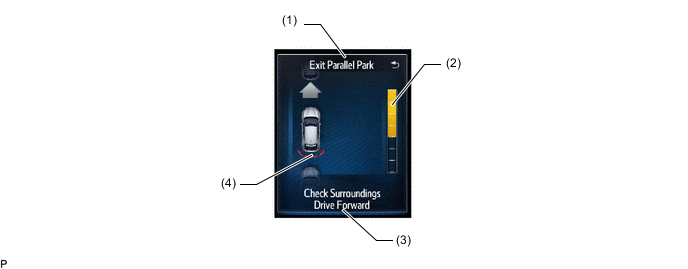
The illustration shown is an example only. The illustration may differ from the actual vehicle screen.
Item Description (1) Operation Display Area Displays the operating condition of the simple intelligent parking assist system. (2) Assistance Level Indicator Displays a gauge indicating the level until the vehicle's stopping position/the position at which assist control ends. (3) Advice Display Follow the instructions on the display and perform any indicated operations. (4) Clearance Sonar Display If an obstacle is detected when the TOYOTA parking assist-sensor system is activated, the approximate distance between the vehicle and the obstacle is displayed.
-
-
Assist Mode Selection
-
Setting for parallel parking and perpendicular parking assist mode can be changed in the following situations:
-
The vehicle has been driven some distance after the ignition switch is turned to the ON position.
-
The vehicle has been driven some distance after parallel parking.
-
While driving.
-
There are no parked vehicles in front.
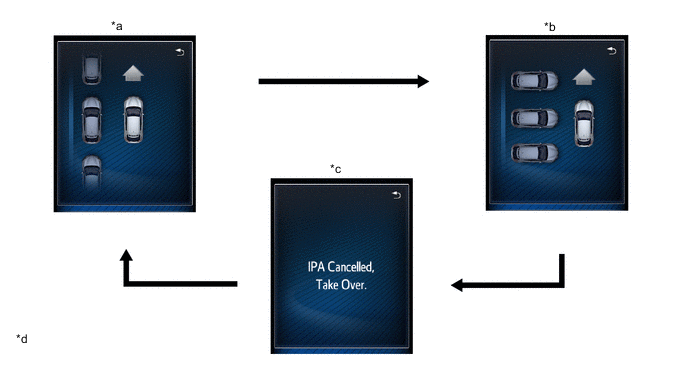
*a Parallel Parking Assist Mode *b Perpendicular Assist Mode (guidance to move forward) (Only when the operating conditions are met.) *c System Off (Assist mode is not selected.) *d The illustrations shown are examples only. The illustration may differ from the actual vehicle screens. 
IPA Switch Operation - - -
-
Settings for exit parallel parking assist mode can be changed in the following situations:
-
Immediately after the ignition switch is turned to the ON position, while stopped and there is a parked vehicle in front.
-
Immediately after parallel parking using the system, while stopped and there is a parked vehicle in front.
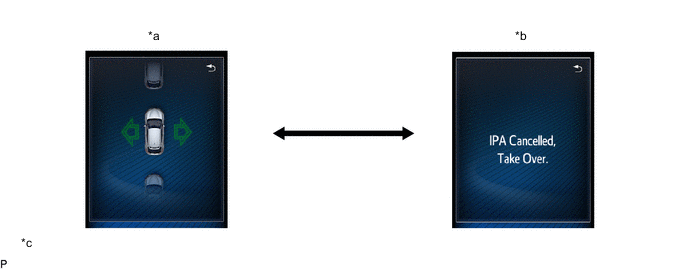
*a Parallel Parking Departure Assist Mode *b System Off (Assist mode is not selected.) *c The illustrations shown are examples only. The illustration may differ from the actual vehicle screens. - - IPA Switch Operation - - -
-
-
TOYOTA Parking Assist-sensor System Operation
-
Regardless of whether the TOYOTA parking assist-sensor system is set to off, when the simple intelligent parking assist system is operating and the operating conditions of the TOYOTA parking assist-sensor system are met, the buzzer sounds and the clearance sonar obstruction detection screen is displayed on the multi-information display in the combination meter assembly.

*a Clearance Sonar Obstruction Detection Screen *b The illustration shown is an example only. The illustration may differ from the actual vehicle screen.
-
-
-
DIAGNOSIS
-
If a system malfunction is detected, the clearance warning ECU assembly stores Diagnostic Trouble Codes (DTCs) in its memory. For details, refer to the Repair Manual.
-