NAVIGATION SYSTEM / MULTI INFORMATION SYSTEM
-
OUTLINE
-
On models for Europe, a navigation system, which consists of a navigation ECU and a radio and display receiver assembly integrated with a wide 8-inch Liquid Crystal Display (LCD) with a capacitive type touch panel, is provided.
-
On models for other than Europe, a navigation system, which is controlled by a navigation receiver assembly integrated with a wide 7-inch Liquid Crystal Display (LCD) with a capacitive type touch panel, is provided. The system uses a microSD card (disc player disc) as a map database.
-
This navigation system supports connected services, enabling the user to utilize the online search, in which the user can search for a desired Point of Interest (POI) on the Internet and set it as a destination or a memory point within the system, Google sync function (street view and panoramio), or downloadable applications. (Models for Europe)
-
The map database of the navigation system is stored on the microSD card (disc player disc) installed in the navigation receiver assembly. A microSD card (disc player disc), which has the latest map database stored, can be purchased to replace the old one and update to the latest map database. (Destination package for Taiwan)
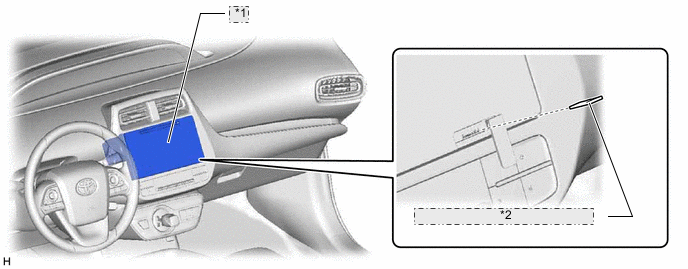
*1 Navigation Receiver Assembly *2 microSD Card (Disc Player Disc) -
A multiple display function is provided. Due to this function, a map screen and audio screen or vehicle information screen can be displayed on the navigation receiver assembly simultaneously. Displayed items are customizable, and the top screen of each function can be displayed by selecting the corresponding information screen. (Destination package for Taiwan)
-
The navigation system sends navigation information to the combination meter assembly or combination meter mirror ECU*. The user can view a compass display and turn-by-turn directions to the destination on the multi-information display or headup display.
Tech Tips
*: Models with headup display
-
A fuel consumption screen is provided in consideration of the environment.
-
-
PRECAUTION
-
microSD Card (Disc Player Disc)
-
When ejecting the microSD card, observe the following precautions to avoid damaging it.
-
The microSD card (disc player disc) stores map data or various programs which are required to operate the navigation system. With the microSD card (disc player disc) removed, the navigation system will not operate properly. Do not remove the microSD card (disc player disc) unless necessary, such as for a map update.
-
Do not insert anything other than a microSD card (disc player disc) into the microSD card slot after removing the microSD card (disc player disc).
-
Do not insert a dusty or dirty microSD card (disc player disc) into the microSD card slot, as it may cause a malfunction.
-
After the microSD card (disc player disc) is inserted, make sure that it is secure in the microSD card slot.
-
-
When handling a microSD card (disc player disc), observe the following precautions. Failure to do so may cause a malfunction.
-
Do not touch the metal contacts of the microSD card (disc player disc) with your fingers or metal objects.

-
Do not bend, drop or strike a microSD card (disc player disc), as it is a precision electronic component and may become damaged.
-
Avoid the following environments when storing a removed microSD card (disc player disc). Failure to do so may cause the microSD card (disc player disc) to malfunction and generate errors in the navigation system.
-
Areas where static electricity or electrical noise is present
-
In extremely hot or humid areas
-
Areas exposed to direct-sunlight
-
Areas where condensation may form
-
Areas where corrosive gases may be generated
-
Do not peel the label on the microSD card or attach a new label or sticker.
-
-
-
-
SPECIFICATION
Component Destination Europe Taiwan Multi-display 8-inch Wide LCD 7-inch Wide LCD Navigation Computer Harman International Fujitsu Ten Gyro Sensor Piezoelectric Ceramic Element Map Data Media Built-in Memory microSD Card (Disc Player Disc) microSD card - Fujitsu Ten Language Supported Voice Guidance English, French, Italian, Spanish, German, Dutch, Russian, Polish, Greek, Portuguese, Swedish, Norwegian, Danish, Finnish, Turkish, Ukrainian, Hungarian, Czech, Slovak and Romanian Taiwanese Voice Recognition English, French, Italian, Spanish, German, Dutch, Russian, Polish, Greek, Portuguese, Swedish, Danish, Finnish, Turkish and Czech - -
MAIN FEATURES
-
Connected Services (Models for Europe)
-
The following services are available by connecting the navigation system to Toyota's portal site via the internet using a cellular phone.
-
To use these connected services, Bluetooth registration and a portal account are required.
-
To get a portal account, access the Toyota portal site (URL:www.my.toyota.eu).
-
Available connected services are listed in the following table:
Contents Outline Online Search New establishments, such as restaurants and bars, that are not registered in the navigation system can be set as a destination. Importing Memory Points Downloading via a cellular phone Establishments that were searched for using a personal computer can be set as a destination and can be registered as memory points. Downloading from a USB memory device Vehicle Customisation The vehicle equipment operation settings can be partially changed by remote operation via the Toyota portal site. Google Sync Function Street view
-
Street view, which shows panoramic images along streets, is available. The street view of the desired location can be displayed on the multi-display.*1
-
A location searched for using street view can be set as a destination.
Panoramio
-
The Panoramio Photo sharing site, which provides photos with location information and comments, is available. Panoramio photos of the desired location can be displayed on the multi-display.
-
Due to location information contained in the photos, it is possible to set a certain point in the displayed photo as a destination.
Downloadable Applications
-
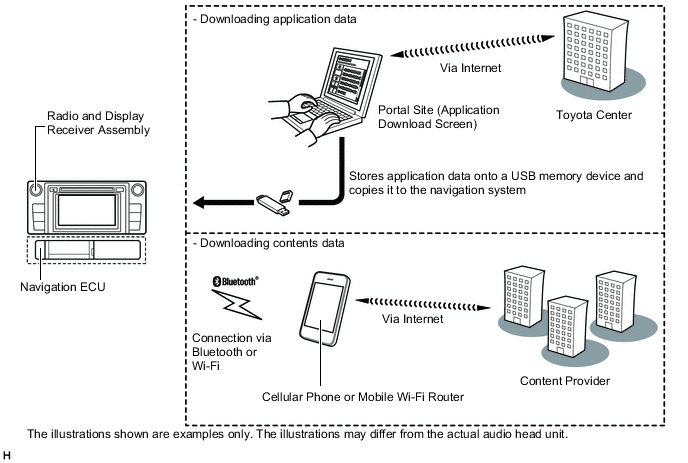
New applications can be downloaded from the Toyota portal site*2 and installed to the radio and display receiver assembly via USB memory device.
-
Using a Bluetooth connected cellular phone, information and update programs necessary for the application are accessible via the content provider of the application.
*1: Up to 6 pictures per location can be displayed.
*2: For details about Toyota portal site, refer to www.my.toyota.eu.
Figure 1. Online Search Image
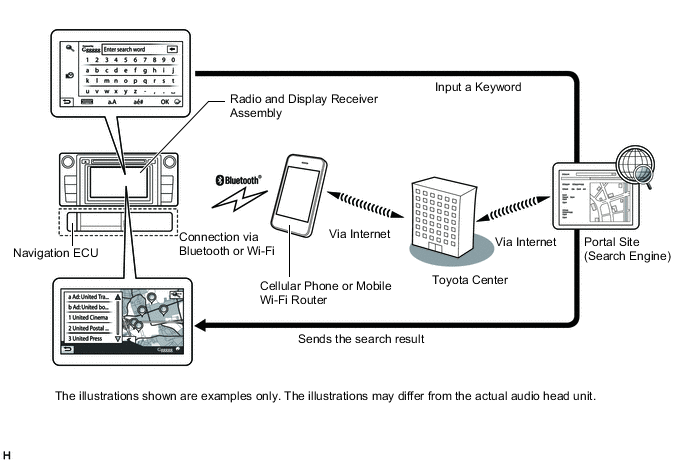
Figure 2. Importing Memory Points Image
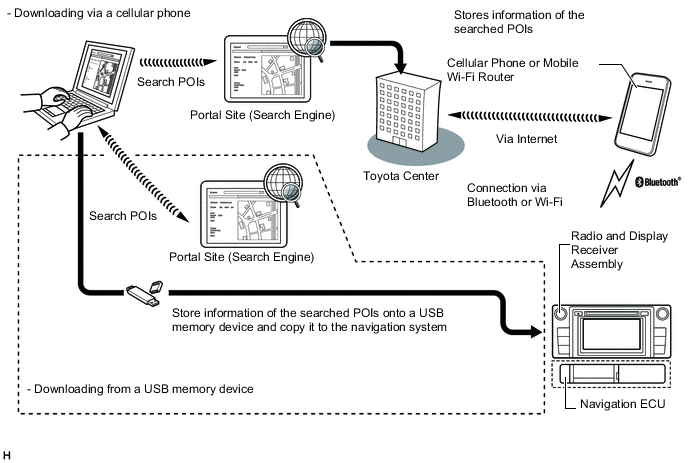
Figure 3. Vehicle Customization Image
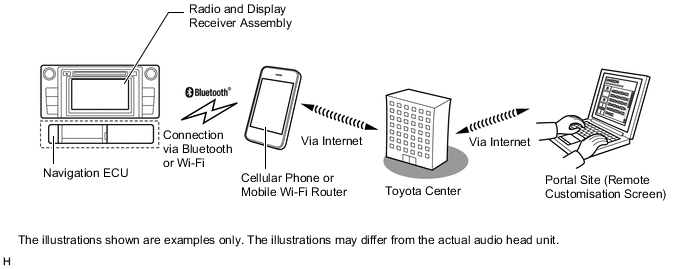
Figure 4. Downloadable Applications Image
-
-
-
Voice Recognition System (Models for Europe)
-
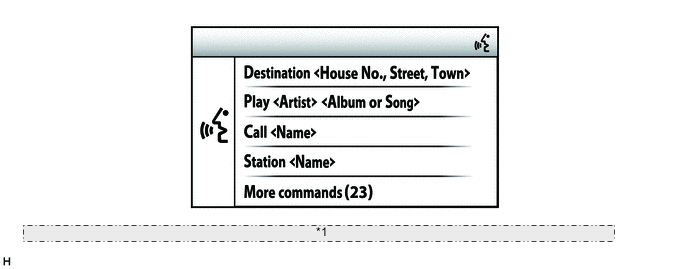
When the voice recognition system starts operating, the commands that the system is able to recognize are displayed on the multi-display.
*1 The illustrations shown are examples only. The illustrations may differ from the actual audio head unit.
-
-
The main functions of the multi-display are listed below.
Function Outline Navigation System Through the use of the Global Positioning System (GPS) and map data, the navigation system analyzes the position of the vehicle and indicates the position on the map that is displayed on the screen.
In addition, it is possible to use the system to register memory points and navigate to a destination.
Audio/Video System Audio/Video System Serves as the display and controls for the following:
-
Radio operation
-
CD/DVD player operation (Destination package for Taiwan)
-
Bluetooth-compatible portable player operation
-
iPod/iPhone operation
-
USB memory device operation
-
Portable audio player operation (AUX type)
Hands-free System When a Bluetooth-compatible cellular phone is registered to the navigation system, the driver can make and receive calls or talk hands-free on the cellular phone by operating the switches on the screen/steering pad. Speech Command System (Models for Europe) Operates the navigation, audio, and hands-free systems based on voice commands. Parking Assist Monitor System Displays a view of the area behind the vehicle that is captured by the rear television camera mounted on the back door when the shift lever is moved to R. Others Fuel Consumption Screen Fuel consumption information such as average fuel consumption per minute, current fuel consumption per minute, past fuel consumption record and and energy monitor is displayed. Language Select
(Models for Europe)
The language of the screen buttons, pop-up messages and the voice guidance can be changed. Screen Theme Color Setting
(Destination package for Taiwan)
The screen theme color can be changed. Beep Setting The beep sound can be turned off. Keyboard Layout The keyboard layout can be changed. Delete Personal Data Deletes or returns registered or changed personal settings to their default conditions.
For example:
-
General settings
-
Navigation settings
-
Audio settings
-
Telephone/Phone settings
Screen Adjustment The brightness or contrast of the screen can be adjusted to suit the brightness of the surroundings. Map Database Update
(Destination package for Taiwan)
Replace the old microSD card with a microSD card which has the latest map database stored to entirely update the map database. Diagnosis This menu contains the following items:
-
Failure Diagnosis
-
System Check
-
SD Check (Destination package for Taiwan)
-
Diagnosis Recorder
-
Function Check/Setting
-
Panel & Steering Switch
-
Touch Switch
-
Microphone Check (Destination package for Taiwan)
-
System Sensors Check (Destination package for Taiwan)
-
Vehicle Signal
-
HF Voice Quality Setting (Destination package for Taiwan)
-
EXT BOX (Models for Europe)
-
Camera Setting
-
DAB Reception Check (Models with Digital Audio Broadcast (DAB) tuner)
-
Service Information
-
Program Update (Destination package for Taiwan)
-
Version Information
-
Product Information
-
-