SIMPLE INTELLIGENT PARKING ASSIST SYSTEM
-
FUNCTION OF MAIN COMPONENTS
Component Function Front Side Ultrasonic Sensor (FLS/FRS)
-
Transmits ultrasonic waves to detect empty parking spaces and sends signals to the clearance warning ECU assembly.
-
Detects the distance between the vehicle and an obstacle.
Rear Side Ultrasonic Sensor (RLS/RRS) Front Corner Ultrasonic Sensor (FL/FR) Detects the distance between the vehicle and an obstacle. Front Center Ultrasonic Sensor (FLC/FRC) Rear Corner Ultrasonic Sensor (RL/RR) Rear Center Ultrasonic Sensor (RLC/RRC) Clearance Warning ECU Assembly Controls the simple intelligent parking assist system based on signals from various switches and sensors. Combination Meter Assembly Multi-information Display Displays the system operation status on the multi-information display. IPA Indicator Light Illuminates during system operating. Buzzer Sounds according to system operating condition. Combination Switch Assembly
-
IPA Switch
-
Switches between each mode.
-
Depending on the system operating conditions, turns functions off or prohibits assist.
Power Steering ECU Assembly
-
Sends power steering control status signals to the clearance warning ECU assembly.
-
Operates the steering based on signals from the clearance warning ECU assembly.
Shift Lock Control Unit Assembly
-
Shift Lever Position Sensor
Sends the shift position signal to the hybrid vehicle control ECU. Hybrid Vehicle Control ECU Sends the shift position signal to the clearance warning ECU Assembly. Brake Booster with Master Cylinder Assembly
-
Skid Control ECU
Sends the vehicle speed signal to the clearance warning ECU assembly. Airbag ECU Assembly Sends the G information signal to the clearance warning ECU assembly. Steering Sensor Sends the steering angle signal to the clearance warning ECU assembly. Air Conditioner Amplifier Assembly Sends outside temperature information to the clearance warning ECU assembly. Main Body ECU (Multiplex Network Body ECU) Sends model destination signal (information to indicate the market the vehicle was built for) to the clearance warning ECU assembly. -
-
OPERATING CONDITION
-
Perpendicular Parking Assist Mode
-
The system starts perpendicular parking assist mode when all of the following conditions are met:
-
An allowable parking space is detected.
-
Park (P), Neutral (N) or Reverse (R) is not selected.
-
The vehicle is stopped.
-
Perpendicular parking assist mode is selected using the IPA switch.
Tech Tips
If the vehicle speed is more than 0 km/h (0 mph), perpendicular parking assist mode cannot be selected (is not displayed). To use perpendicular parking assist mode, operate the IPA switch and select perpendicular parking assist mode with the vehicle completely stopped.
-
-
-
Parallel Parking Assist Mode
-
The system starts parallel parking assist mode when the vehicle speed is less than 30 km/h (16 mph) (including when the vehicle is stopped) and all of the following conditions are met:
-
Park (P) is not selected.
-
Parallel parking assist mode is selected using the IPA switch.
-
-
-
Parallel Parking Departure Assist Mode
-
The system starts parallel parking departure assist mode when all of the following conditions are met:
-
There is sufficient space to maneuver in front of and behind the vehicle.
-
Park (P) is selected.
-
The vehicle is stopped.
-
Parallel parking departure assist mode is selected using the IPA switch.
-
-
-
-
SYSTEM CONTROL
-
Perpendicular Parking Assist Mode
-
When the vehicle is stopped in front of the target parking space, this system assists the driver in deciding the point at which to start reversing the vehicle into the parking space.
-
When the IPA switch is pressed while the vehicle is stopped beside the center of a suitable parking space with the parking space detected, guidance information will be displayed on the multi-information display in the combination meter assembly. When the vehicle is driven forward, the steering wheel automatically starts to operate.
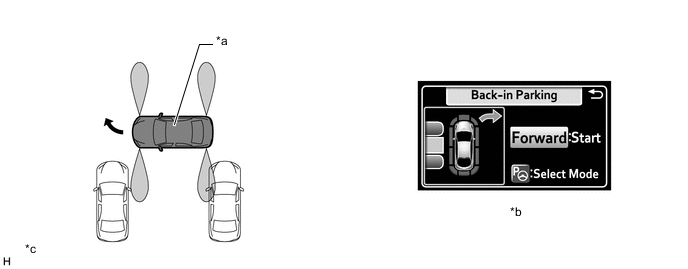
*a This Vehicle *b Multi-information Display *c The illustration shown is an example only. The illustration may differ from the actual vehicle screen. - - -
When the vehicle reaches the point at which to start reversing, the display changes to instruct the driver to stop the vehicle and select reverse (R).
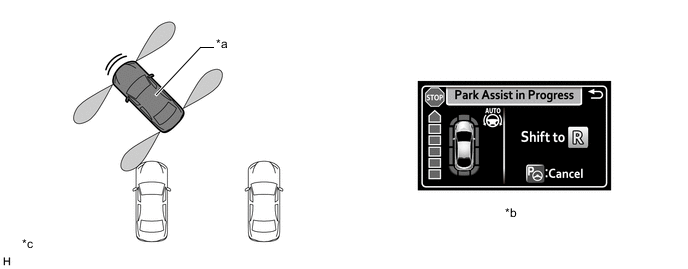
*a This Vehicle *b Multi-information Display *c The illustration shown is an example only. The illustration may differ from the actual vehicle screen. - - -
When reverse (R) has been selected, the driver is instructed to reverse the vehicle.
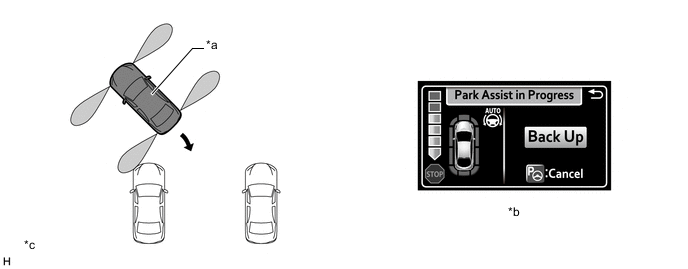
*a This Vehicle *b Multi-information Display *c The illustration shown is an example only. The illustration may differ from the actual vehicle screen. - - Tech Tips
When the vehicle is in the desired position and the P position switch is pushed, guidance ends.
-
When it is judged that the vehicle needs to change direction while maneuvering, the driver is instructed to stop the vehicle and then drive the vehicle forward or backward.
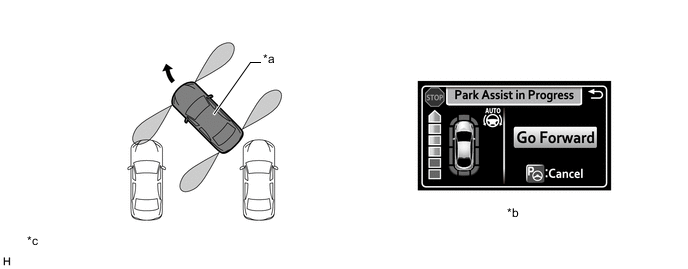
*a This Vehicle *b Multi-information Display *c The illustration shown is an example only. The illustration may differ from the actual vehicle screen. - - -
When the system judges that the desired parking position has been reached, guidance ends.
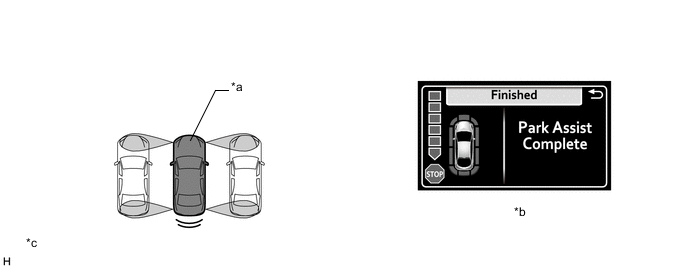
*a This Vehicle *b Multi-information Display *c The illustration shown is an example only. The illustration may differ from the actual vehicle screen. - -
-
-
Parallel Parking Assist Mode
-
During parallel parking, this system detects the target parking space and displays the point at which to start reversing the vehicle into the parking space. When the driver reverses the vehicle, the steering wheel automatically starts to operate the vehicle until it is in the target parking position.
-
When the IPA switch is pressed while the vehicle is driving at low speeds (approximately less than 30 km/h) or the vehicle is stopped, parallel parking guidance information will be displayed on the multi-information display in the combination meter assembly.
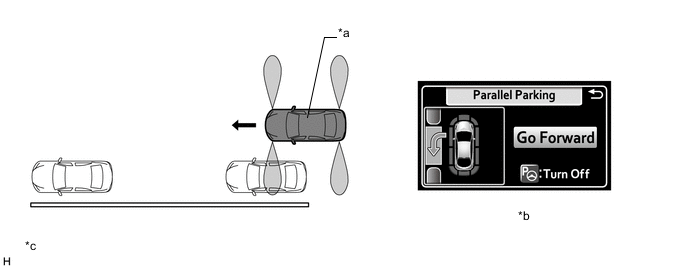
*a This Vehicle *b Multi-information Display *c The illustration shown is an example only. The illustration may differ from the actual vehicle screen. - - -
Detection of an empty parking space is performed.
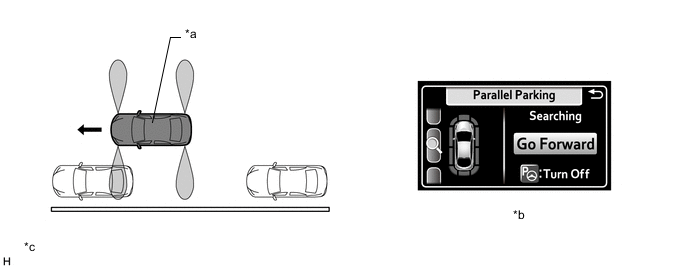
*a This Vehicle *b Multi-information Display *c The illustration shown is an example only. The illustration may differ from the actual vehicle screen. - - -
When an empty parking space has been detected and it is judged to be suitable, the display changes to instruct the driver to stop the vehicle and select reverse (R). When the driver reverses the vehicle according to the guidance, the steering wheel automatically starts to operate.
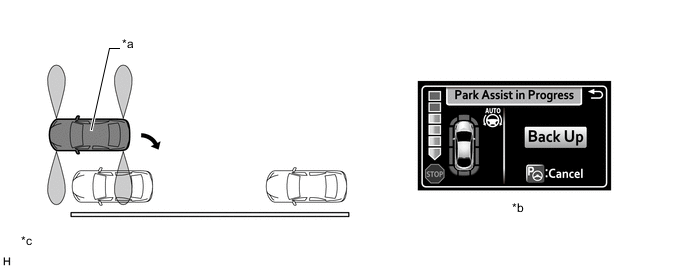
*a This Vehicle *b Multi-information Display *c The illustration shown is an example only. The illustration may differ from the actual vehicle screen. - - -
When it is judged that the vehicle needs to change direction while maneuvering, the driver is instructed to stop the vehicle and then drive the vehicle forward or backward.
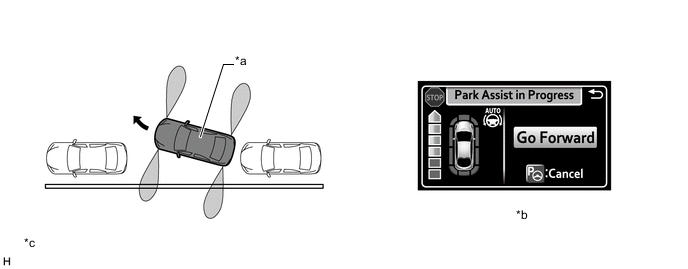
*a This Vehicle *b Multi-information Display *c The illustration shown is an example only. The illustration may differ from the actual vehicle screen. - - -
When the system judges that the desired parking position has been reached, guidance ends.
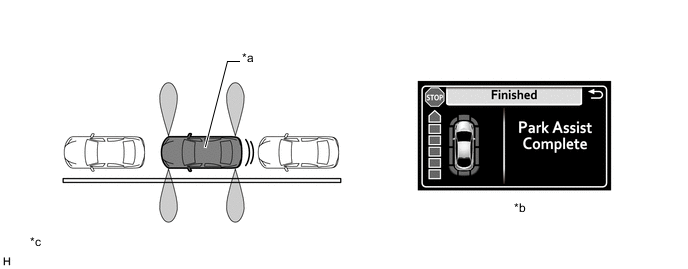
*a This Vehicle *b Multi-information Display *c The illustration shown is an example only. The illustration may differ from the actual vehicle screen. - -
-
-
Parallel Parking Departure Assist Mode
-
The system assists the driver when departing from the parallel parking space by operating the steering wheel automatically until the vehicle is out of the parking space.
-
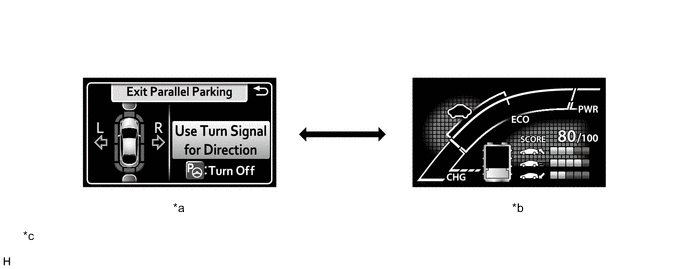
When the IPA switch is pressed with Park (P) selected, the area surrounding the vehicle is detected and parallel parking departure assist begins. The driver then needs to indicate the departure direction by using the appropriate turn signal.
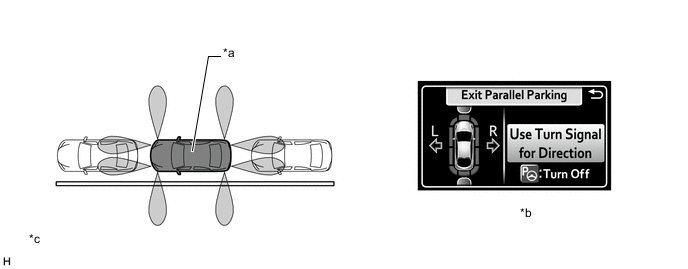
*a This Vehicle *b Multi-information Display *c The illustration shown is an example only. The illustration may differ from the actual vehicle screen. - - -
The system instructs the driver to move the vehicle forward or backward. When the driver changes the shift status according to the guidance, the steering wheel automatically starts to operate.
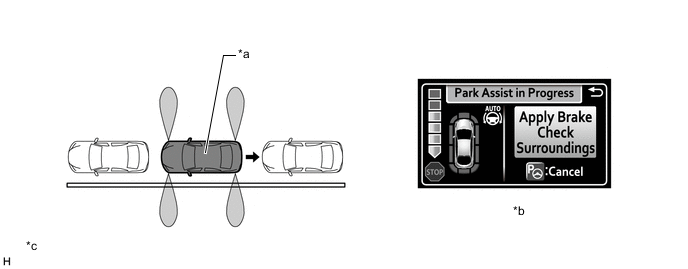
*a This Vehicle *b Multi-information Display *c The illustration shown is an example only. The illustration may differ from the actual vehicle screen. - - -
When it is judged that the vehicle needs to change direction while maneuvering, the system instructs the driver to stop the vehicle and the move the vehicle forward or backward.
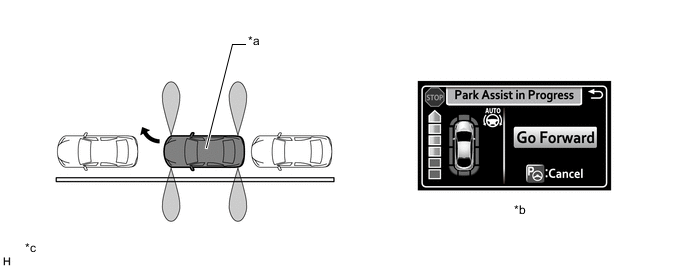
*a This Vehicle *b Multi-information Display *c The illustration shown is an example only. The illustration may differ from the actual vehicle screen. - - -
When the system judges that the vehicle has departed, guidance ends.
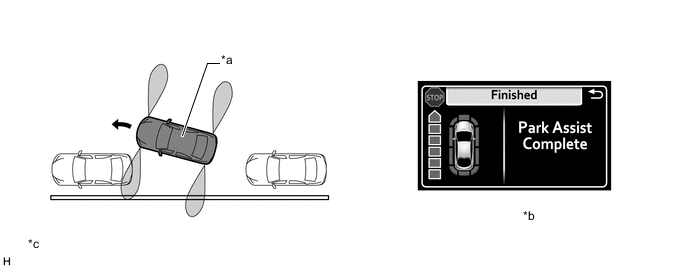
*a This Vehicle *b Multi-information Display *c The illustration shown is an example only. The illustration may differ from the actual vehicle screen. - -
-
-
Warning Message
-
The following messages are displayed on the multi-information display when the simple intelligent parking assist system cannot operate.
Warning Message Description APGS System Check
Visit Your Dealer
The system may be malfunctioning. Currently Unavailable There may be a system failure. Power steering equipment is temporarily overheating. The power switch is not ON (READY). Ice, snow, dirt, etc., has adhered to the ultrasonic sensor. The ultrasonic sensor is frozen. The auxiliary battery has been removed and reinstalled. Excessive speed The IPA switch is operated when the vehicle speed exceeds 30 km/h (16 mph). Narrow Space
Try Another Location
The IPA switch is operated at a space that is too narrow for the vehicle to park in. Obstruction
Try Another Location
The IPA switch is operated in an area where there are obstacles to the front, and the vehicle cannot move forward to the starting point for backing up. Unavailable
Try Another Location
The IPA switch is operated in an area with no parking spaces. The IPA switch is operated in an area where the road width for parking is narrow. Narrow Space The IPA switch is operated when there is not enough space to the front and rear of the vehicle when departing from a parallel parking spot. Unavailable The IPA switch is operated in an area where there are obstacles to the sides and the vehicle cannot depart from the parallel parking spot. Pressure Applied to Steering Wheel Assist control is started while the steering wheel is held. Stop the Vehicle The vehicle is moved and assist control is started while the steering wheel is held. -
The following messages are displayed on the multi-information display when the simple intelligent parking assist system is canceled.
Warning Message Description Park Assist Cancelled While assist control is operating, the driver changes the shift state to P or operates the IPA switch. Excessive speed The vehicle speed exceeds 30 km/h (16 mph) when searching for a parallel parking assist mode space. Narrow Space Assist control is started in an area with narrow parking spaces. Wrong Direction When assist control starts, the vehicle proceeds in a direction opposite to the guidance. No Exit Direction Specified The shift state is changed without having used the turn signal lever to select a departure direction when using the parallel parking departure assist mode. Cannot Reach Desired Position The maximum number of movements for multi-turn maneuvering is reached during assist control, or the target parking spot cannot be reached due to the control being used on a road with steep grade. -
The following messages are displayed on the multi-information display when the simple intelligent parking assist system is suspended.
Warning Message Description Steering Wheel Turned The driver holds the steering wheel during assist control. Excessive speed The vehicle speed exceeds 7 km/h (4.3 mph) during assist control. Pressure Applied to Steering Wheel The IPA switch is pressed to start assist control when the steering wheel is held onto with assist control temporarily stopped. Too Close to Obstacle at Front The vehicle moved too close to an obstacle in front of the vehicle. Too Close to Obstacle at Rear The vehicle moved too close to an obstacle behind the vehicle. Stop the Vehicle The IPA switch is pressed to start assist control while the vehicle is moved with assist control temporarily stopped. -
The following message is displayed on the multi-information display when the vehicle speed exceeds 4.3 km/h (3 mph) during assist control.
Warning Message Description Excessive speed
Slow Down
The vehicle speed exceeds 4.3 km/h (3 mph) during assist control.
-
-
-
FUNCTION
-
Parking Space Detection
-
Parking spaces are detected based on signals from the front and rear side ultrasonic sensors.

*a This Vehicle *b Parking Space *c The illustration shown is an example only. - -
-
-
Multi-information Display
-
When the system is operating, the following screen is displayed on the multi-information display in the combination meter assembly.
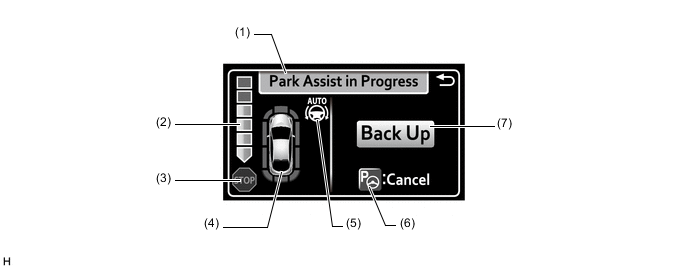
The illustration shown is an example only. The illustration may differ from the actual vehicle screen.
Item Description (1) Operation Display Area Displays the operating condition of the simple intelligent parking assist system. (2) Assistance Level Indicator Displays a gauge indicating the level until the vehicle's stopping position/the position at which assist control ends. (3) Stop Display When illuminated, depress the brake pedal and stop the vehicle at once. (4) Clearance Sonar Display If an obstacle is detected when the TOYOTA parking assist-sensor system is activated, the approximate distance between the vehicle and the obstacle is displayed. (5) Steering Wheel AUTO Operation Display Displays when the steering wheel AUTO operation is being performed. (6) IPA Switch Icon Displays when the assist mode can be changed and the assist control can be started using the IPA switch. (7) Advice Display Follow the instructions on the display and perform any indicated operations.
-
-
Assist Mode Selection
-
When Park (P), Neutral (N) or Reverse (R) is not selected, perpendicular parking assist mode* or parallel parking assist mode can be selected using the IPA switch
Tech Tips
*: Can only be selected when the operating conditions of perpendicular parking assist mode are met.
-
When Park (P) is selected, parallel parking departure assist mode can be selected using the IPA switch.
-
The multi-information display of the combination meter assembly displays each mode display.
Figure 1. When Park (P), Neutral (N) or Reverse (R) is not Selected
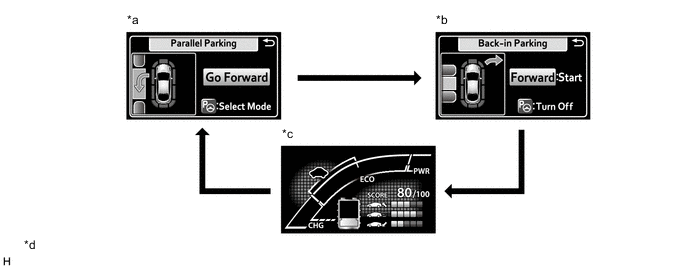
*a Parallel Parking Assist Mode *b Perpendicular Assist Mode (guidance to move forward) (Only when the operating conditions are met.) *c System Off (Assist mode is not selected.) *d The illustrations shown are examples only. The illustration may differ from the actual vehicle screens. 
IPA Switch Operation - - Figure 2. When Park (P) is Selected
*a Parallel Parking Departure Assist Mode *b System Off (Assist mode is not selected.) *c The illustrations shown are examples only. The illustration may differ from the actual vehicle screens. - - IPA Switch Operation - -
-
-
Intelligent Clearance Sonar System Operation
-
Regardless of whether the intelligent clearance sonar system is set to off, when the advanced parking guidance system is operating and the operating conditions of the intelligent clearance sonar system are met, brake control is performed and operation of the advanced parking guidance system is suspended.
-
When the advanced parking guidance system is suspended due to brake control being performed by the intelligent clearance sonar system, the buzzer sounds and the operation status of the intelligent clearance sonar system is displayed on the multi-information display in the combination meter assembly.
-
After cancellation of the intelligent clearance sonar system, if the operating conditions are met, the simple intelligent parking assist system can be operated again by pressing the IPA switch.
-
When the simple intelligent parking assist system is operating, if the intelligent clearance sonar system performs brake control 3 times or more, operation of the simple intelligent parking assist system is canceled.

The illustration shown is an example only. The illustration may differ from the actual vehicle screen.
-
-
TOYOTA Parking Assist-sensor System Operation
-
Regardless of whether the TOYOTA parking assist-sensor system is set to off, when the advanced parking guidance system is operating and the operating conditions of the TOYOTA parking assist-sensor system are met, the buzzer sounds and the clearance sonar obstruction detection screen is displayed on the multi-information display in the combination meter assembly.
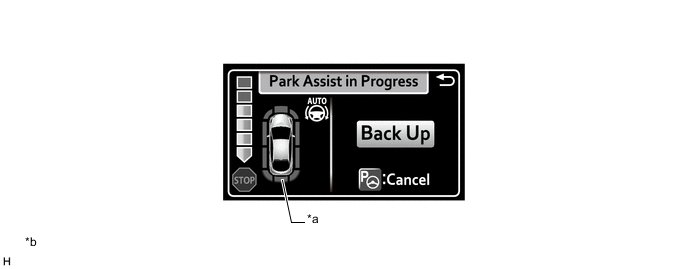
*a Clearance Sonar Obstruction Detection Screen *b The illustration shown is an example only. The illustration may differ from the actual vehicle screen.
-
-
-
DIAGNOSIS
-
If a system malfunction is detected, the clearance warning ECU assembly stores Diagnostic Trouble Codes (DTCs) in its memory. For details, refer to the Repair Manual.
-