PLUG-IN CHARGE CONTROL SYSTEM
-
OUTLINE
-
The plug-in charge control system charges the HV battery with power from an external power source using the charge cable (electric vehicle charger cable assembly), charge inlet (AC charger inlet cable), electric vehicle charger assembly, battery ECU assembly and hybrid vehicle control ECU.
-
A function in which the maximum charging current can be set via the vehicle to prevent household breakers from tripping has been added.
-
In consideration of convenience and security, locking and unlocking the charging connector when in manual mode and opening of the charging port lid are linked to the smart entry & start system.*1
-
In consideration of convenience and security, unlocking of the charging connector when in manual mode and opening and closing of the charging port lid are linked to the entry and start system. The charging connector is automatically lock when the charging connector is connected.*2
*1: Except models for Europe
*2: Models for Europe
-
An electrical leakage test is performed automatically when charging so that a manual test is not required.
-
Using the sub DC-DC converter built into the electric vehicle charger assembly, the auxiliary battery is charged with the minimum necessary power to reduce power consumption.
-
A charge cable (electric vehicle charger cable assembly) without a Charging Circuit Interrupting Device (CCID) is available for use with charging stations.
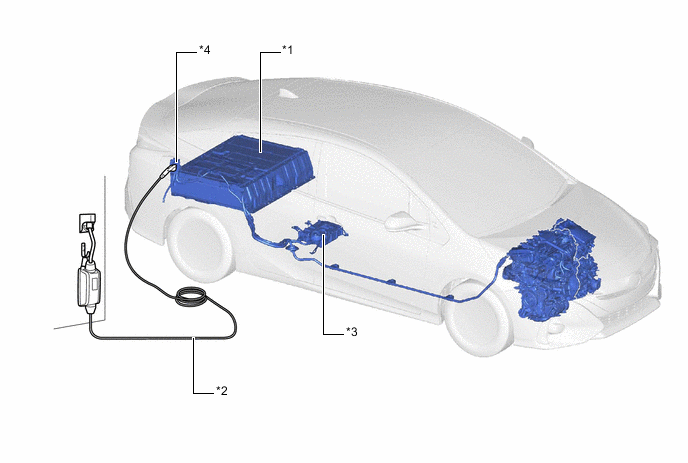
*1 HV Battery *2 Charge Cable (Electric Vehicle Charger Cable Assembly) *3 Electric Vehicle Charger Assembly *4 Charge Inlet (AC Charger Inlet cable)
-
-
SPECIFICATIONS
Electric Vehicle Charger Assembly (Models for Europe) Item Specification Rated Input Voltage 230 V Rated Input Current 10 A*1, 16A*2 Input Power Source Frequency 50 To 60 Hz Rated Output 3.3 kW Cooling System Air-cooled *1: Charging via a home outlet using the charge cable (electric vehicle charger cable assembly).
*2: Charging at a charging station.
Electric Vehicle Charger Assembly (Destination Package for South Korea) Item Specification Rated Input Voltage 220 V Rated Input Current 10 A*1, 16A*2 Input Power Source Frequency 60 Hz Rated Output 3.3 kW Cooling System Air-cooled *1: Charging via a home outlet using the charge cable (electric vehicle charger cable assembly).
*2: Charging at a charging station.
Electric Vehicle Charger Assembly (Destination Package for Taiwan) Item Specification Rated Input Voltage 110 V*1, 220 V*2 Rated Input Current 12 A*1, 16A*2 Input Power Source Frequency 60 Hz Rated Output 3.3 kW Cooling System Air-cooled *1: Charging via a home outlet using the charge cable (electric vehicle charger cable assembly).
*2: Charging at a charging station.
Charge Cable (Electric Vehicle Charger Cable Assembly) Item Specification Rated Input Voltage AC220 to 240 V Rated Input Current 10 A Cable Length 7.5 m -
MAIN FEATURES
-
The charging port lid has a charging indicator (EV charger lid indicator assembly) that indicates the operation status of the charging system.
-
The approximate SOC can be checked from outside of the vehicle when AC charging is in progress, the charging timer is in stand-by mode or charging is complete using the SOC indicator (indicator lamp assembly) located on the instrument panel.
-
If the charging connector lock cannot be released, the charging connector can be unlocked by operating the emergency release lever located in the rear luggage compartment.
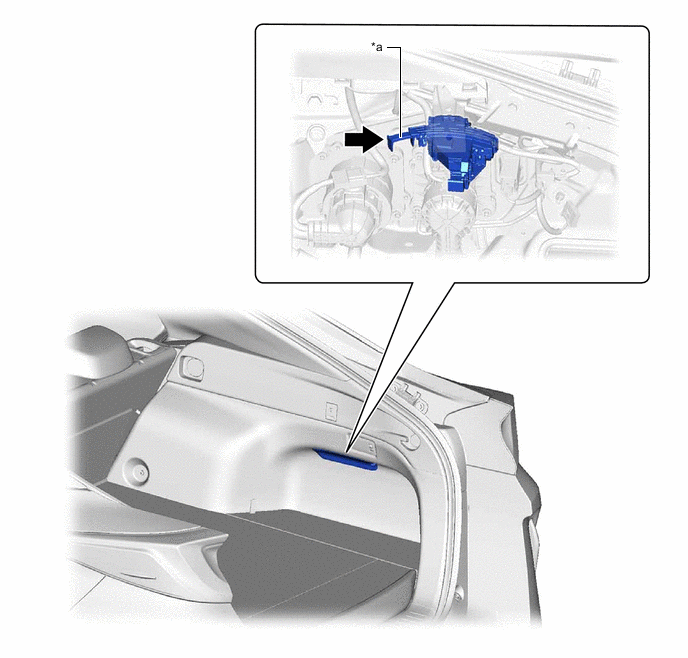
a* Emergency Release Lever - - -
Charging Timer Function
-
Repeated Setting
-
The HV battery can be charged at set times for selected days of the week. The set times can be ignored when not required.
-
Up to 15 charging events can be added to the charging timer schedule.
-
-
Air Conditioning-linked Setting
-
If a departure time is added to the charging timer schedule and air conditioning-linked setting (Climate Prep) is set to ON via the multi-information display, the air conditioning operates in accordance with the departure time.
-
-
Battery Temperature Adjusting Link
-
By adding a function which operates the battery heater system in accordance with the departure time, operation of the engine while driving on cold days has been reduced.
-
-
-
Battery Heating Function
-
As the output of the HV battery drops when the temperature of the HV battery is low, the engine may start during EV mode even if the state of charge is sufficient. Heating the HV battery automatically during plug-in charging ensures sufficient output from the HV battery even in extremely cold environments.
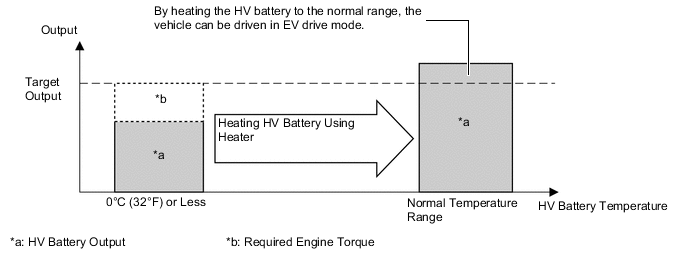
-
-
-
PRECAUTION
-
Precaution for Connecting or Disconnecting Plug to Outlet
-
Hold the plug body when connecting or disconnecting the plug.
-
To prevent electric shock, do not touch the edge of the plug when connecting or disconnecting the plug. Do not disconnect the plug by pulling the charge cable (electric vehicle charger cable assembly). If the plug is disconnected by pulling the charge cable (electric vehicle charger cable assembly), damage could occur which may result in fire or electric shock.
-
Make sure to hold the plug body when connecting or disconnecting the plug.
-
-
Do not connect or disconnect the plug with wet hands.
-
If the plug is connected or disconnected with wet hands, electric shock may result.
-
If the plug is wet, thoroughly dry the plug with a dry cloth before connecting or disconnecting the plug.
-
-
Check that there is no foreign matter on the terminals of the plug before fully inserting the plug.
-
If there is foreign matter on the plug, or the plug is not fully inserted, the connecting parts may overheat and could result in fire.
-
Fully insert the plug while holding the plug body.
-
-
Do not apply excessive force to the plug via the charge cable (electric vehicle charger cable assembly).
-
f excessive force is applied to the plug via the charge cable (electric vehicle charger cable assembly), the plug connection may be compromised which could result in overheating or fire. Furthermore, damage to the plug or charge cable (electric vehicle charger cable assembly) may occur.
-
If necessary, secure the charge cable (electric vehicle charger cable assembly) to the wall to prevent excessive force from being applied to the plug via the charge cable (electric vehicle charger cable assembly).
-
-
If the outlet is submerged in water or covered in snow, do not insert the plug. If the outlet is submerged in water or covered in snow and the plug needs to be disconnected, follow the below procedures.
-
Shut off the circuit breaker.
-
Disconnect the plug.
-
-
-
Precaution for Connecting or Disconnecting Charging Connector from Charge Inlet (AC Charger Inlet Cable)
-
Do not use the charging connector when there is foreign matter on the charging connector or charge inlet (AC charger inlet cable). If there is foreign matter on the charging connector or charge inlet (AC charger inlet cable) when the charging connector is connected to the charge inlet (AC charger inlet cable), damage to the charging connector or charge inlet (AC charger inlet cable) may occur. Check that there is no foreign matter on the charging connector or charge inlet (AC charger inlet cable).
-
Do not use the charging connector when there is water on the charge inlet (AC charger inlet cable).
-
If charging is performed when there is water on the charge inlet (AC charger inlet cable), fire or electric shock may result. If charging is performed when there is water on the charge inlet (AC charger inlet cable), immediately turn the breaker off to stop charging and call the dealer.
-
-
Do not use the charging connector when the charge inlet (AC charger inlet cable) is frozen or covered with snow.
-
Do not connect or disconnect the plug with wet hands. When connecting or disconnecting the charging connector from the charge inlet (AC charger inlet cable), confirm the following 2 items.
-
The charge inlet (AC charger inlet cable) is not frozen or covered with snow.
-
There is no water on the charge inlet (AC charger inlet cable).
-
-
-
Precaution for Locking Charging Connector
-
Do not operate the charging connector lock before connecting the charging connector.
-
Fully connect the charging connector to the charge inlet (AC charger inlet cable) before locking the charging connector.
-
Do not apply excessive force to the charging connector after locking the charging connector.
-
If the charge cable (electric vehicle charger cable assembly) is damaged or deformed, or a different type of charging connector is used, the charging connector may not connect to the charge inlet (AC charger inlet cable) or the charging connector lock may not operate correctly.
-
If the charging connector cannot be unlocked due to a discharged auxiliary battery, operate the emergency release lever to unlock the charging connector.
-
If the charging connector cannot be unlocked due to a discharged smart key battery, unlock the door using the mechanical key and press the charging connector lock switch.
-
-
Others
-
Do not drop the charging connector, charge cable, plug/outlet or CCID or subject them to strong impacts.
-
Do not disassemble or modify the charging connector, charge cable, plug/outlet or CCID. If the charging connector, charge cable, plug/outlet or CCID is disassembled or modified.
-
Do not forcibly pull, twist or kink the cable. If the cable is forcibly pulled, twisted or kinked, an open in the cable or fire may result.
-
Do not damage or sever the cable with sharp objects.
-
Keep the terminals of the power plug free from foreign matter and do not twist the terminals of the power plug.
-
Do not immerse the charging connector or power plug in water.
-
-