WIRELESS CHARGING SYSTEM
-
FUNCTION OF MAIN COMPONENTS
Component Function Mobile Wireless Charger Cradle Assembly Charging Switch Turns the wireless charging system on and off. Charging Indicator Light Displays the wireless charging system status by illuminating or blinking in different colors. Charging Area When a Qi-compatible device is placed with the wireless charging system on, charging begins. Certification ECU (Smart Key ECU Assembly) Outputs a charging stop signal to the mobile wireless charger cradle assembly. -
SYSTEM CONTROL
-
The wireless charging system operates when all of the following conditions are met:
-
The power switch is on (ACC) or on (IG).
-
The charging switch is on (charging indicator light is illuminated in green).
-
-
The wireless charging system temporarily stops when any of the following conditions are met:
-
When any of the doors is opened or closed.
-
When the luggage compartment door opening switch assembly is pressed.
-
When the luggage compartment door is closed.
-
When the power switch is on (READY).
-
When the electrical transmitter sub-assembly is outside the detection area.
-
-
After the Qi-compatible device fully charges and charging stops, if the device is left in place for 30 minutes, charging restarts.
-
After the Qi-compatible device fully charges and charging stops, if the device is moved or repositioned within the charging area, or replaced with another Qi-compatible device within 30 minutes, charging restarts.
-
If the Qi-compatible device is moved during charging, charging restarts at the new position.
-
-
FUNCTION
-
Charging Frequency Shift Function
-
If there is noise in AM radio reception during charging, turn the wireless charging system power off and check if the noise is reduced. If reduced, the charging frequency can be changed to reduce the noise by holding down the charging switch on the wireless charging system for approximately 2 seconds during charging.
-
-
Charging Indicator Light
-
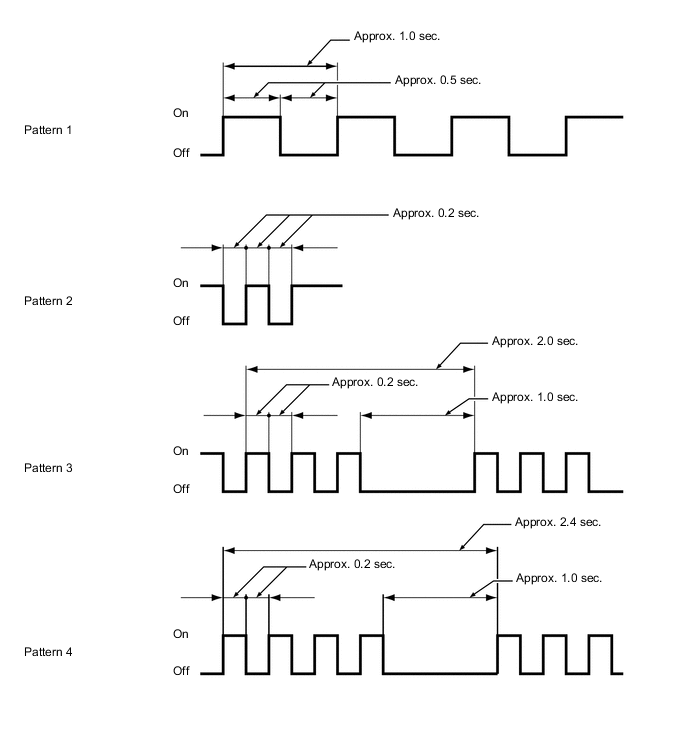
The operation status of the wireless charging system is indicated by the condition and color of the charging indicator light as follows:
Charging Indicator Light Operation Status Off The wireless charging system is not operating. Illuminates in Green The wireless charging system is on standby, finished charging*, or charging is temporarily stopped. Illuminates in Amber The wireless charging system detects a Qi-compatible device in the charging area and is charging. Blinks in Amber (Pattern 1) The wireless charging system cannot receive signals from the certification ECU (smart key ECU assembly). Blinks in Amber (Pattern 2) The charging frequency of the wireless charging system changed during charging. Blinks in Amber (Pattern 3) The wireless charging system detected a foreign object between the device and the charging area. Blinks in Amber (Pattern 4) The temperature of the mobile wireless charger cradle assembly is high. Tech Tips
*: Even when using a Qi-compatible device, the charging indicator light may fail to illuminate in green when charging is complete. If this occurs, check the charge condition on the device.
Figure 1. Charging Indicator Light Blinking Patterns
-
-